
Community listing page, reviews here may not be monitored by the author.
Advancements Reloaded


Enhance your Minecraft advancements experience with a revamped UI that utilizes more of your screen space, especially at higher GUI scales.

Community voices
Reviews
No reviews yet. Be the first to review this project!
Get it on
Available Platforms
Compatibility
Supported Environments
Runs entirely on the client. Works on vanilla servers.
About
Project Details
For authors
Embed Badge
If you're the author of this project, you can embed a live badge anywhere that supports HTML or Markdown. It updates automatically whenever ratings change.
Use HTML for any page that supports it, or Markdown for README files and Markdown-based descriptions.
Identifiers
Platform IDs
About
Description

Overview
This mod significantly enhances the advancements info UI, expanding it to use most of your screen, especially when your GUI scale is high. No longer will you be confined to viewing your advancements in a tiny part of your screen.
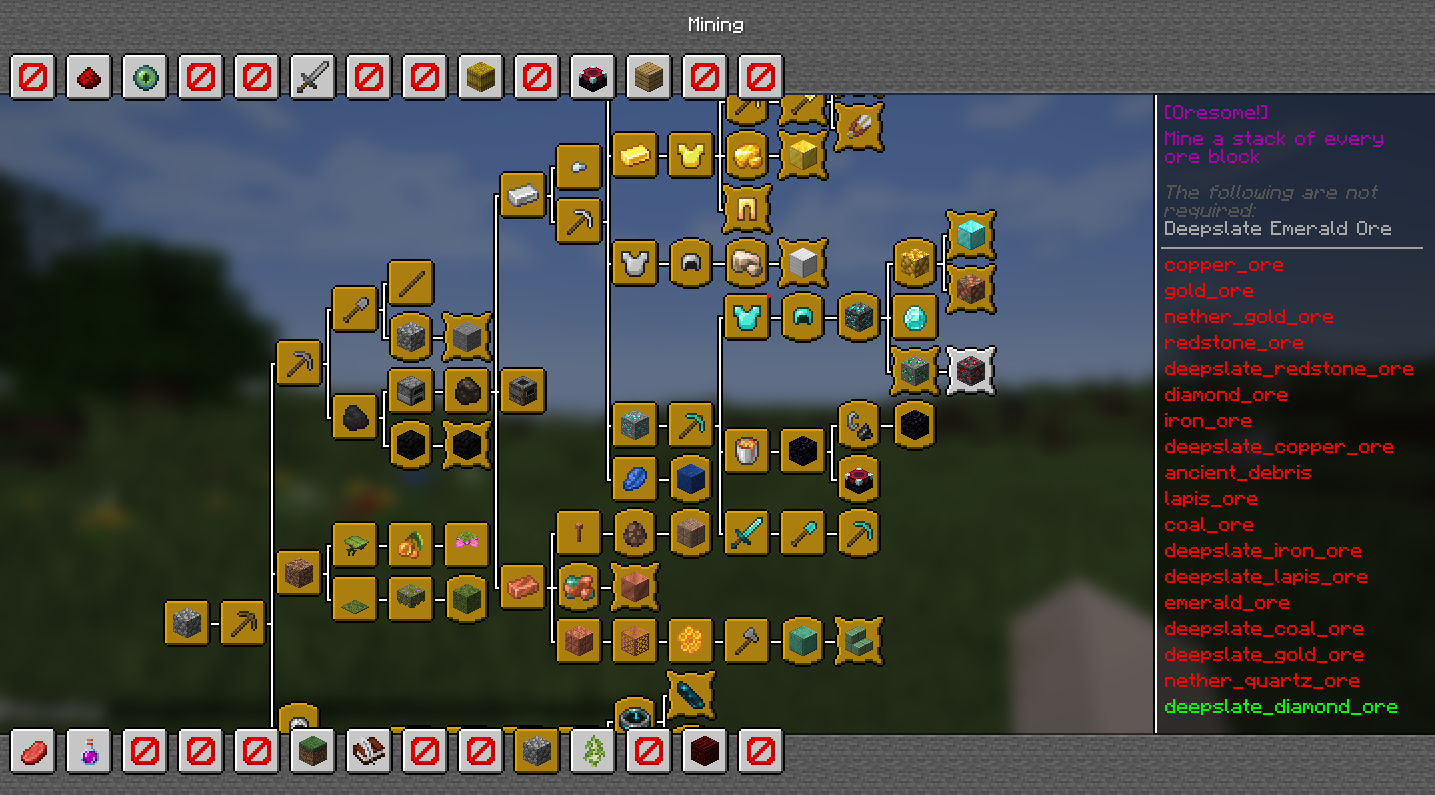
Background
I decided to revive and enhance the original AdvancementInfo mod, which was marked as end-of-life. Starting from scratch, I have reworked and improved the UI to make it more visually appealing.
Future updates will focus on further enhancing the overall advancements experience.
What's New
- A completely new design that aligns with Minecraft's artistic direction.
- Easier scrolling capabilities.
- Memory retention of the selected achievement when the window is closed using the menu key (default:
L). - Ability to close the achievement details with the escape key.
Version and Compatibility
This mod is a continuation of the original AdvancementInfo mod, picking up from version 1.21 and beyond. It aims to keep the spirit of the original mod while adding significant improvements.
Known Issues
- The mod may not work correctly with other mods that modify the advancements screen.
- The setting "background style TRANSPARENT" not working correctly on Forge (works on NeoForge).
Not Implemented Yet
Configuration options are not yet available.Implemented in 0.2.0- Implement a search engine to locate criterias and advancements
- Implementing an API to allow datapack creators to customize the UI directly from their datapacks.
- Advanced tracking of different triggers (e.g., mining 10 blocks will show 4/10 instead of just the trigger name
mine_stone). Achievement categories may display incorrectly on certain GUI scales.Implemented in 0.2.0 by configurationSupport of Forge, NeoForge and Quilt.Implemented in 0.5.0
Support and Sponsorship
If you enjoy using this mod and would like to support its development, please consider sponsoring via GitHub Sponsors or Patreon. Your support will help improve and maintain this project, allowing for more frequent updates and new features.
Special thanks
Special thanks to Gbl for her contributions so far on AdvancementInfo ❤️
Overview
This mod significantly enhances the Minecraft advancements UI with a modern, expanded interface that makes full use of your screen. Features include:
- Expanded UI - Utilizes most of your screen, especially on high GUI scales
- Deterministic Ordering - No more random tab and advancement ordering
- Powerful Search - Quickly find advancements and criteria across all tabs
- Highly Configurable - Customize colors, layout, and ordering to your preference
- Modpack Friendly - Full control over tab and advancement ordering for modpack creators
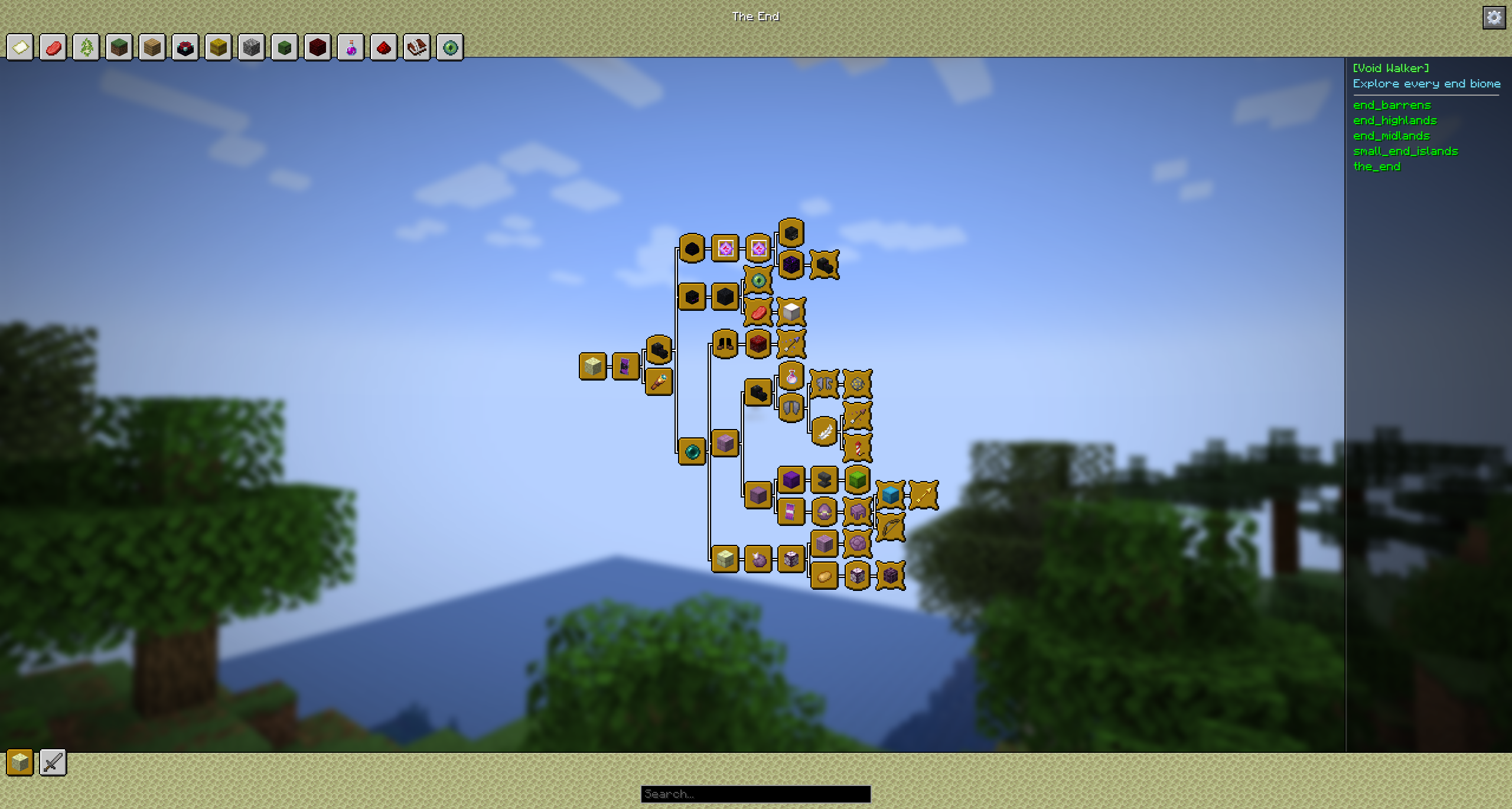
Background
I decided to revive and enhance the original AdvancementInfo mod, which was marked as end-of-life. Starting from scratch, I have reworked and improved the UI to make it more visually appealing.
Future updates will focus on further enhancing the overall advancements experience.
What's New
- A completely new design that aligns with Minecraft's artistic direction.
- Instantly search all achievements by title, description, or criteria in real time to quickly find exactly what you need.
- Easier scrolling capabilities.
- Memory retention of the selected achievement when the window is closed using the menu key (default:
L). - Ability to close the achievement details, search result with the escape key.
Version and Compatibility
This mod is a continuation of the original AdvancementInfo mod, picking up from version 1.21 and beyond. It aims to keep the spirit of the original mod while adding significant improvements.
Known Issues
- The mod may not work correctly with other mods that modify the advancements screen.
- The setting "background style TRANSPARENT" not working correctly on Forge (works on NeoForge).
Not Implemented Yet
-
Configuration options are not yet available.Implemented in 0.2.0 -
Implement a search engine to locate criterias and advancementsImplemented in 0.9.0 - Implementing an API to allow datapack creators to customize the UI directly from their datapacks.
- Advanced tracking of different triggers (e.g., mining 10 blocks will show 4/10 instead of just the trigger name
mine_stone). -
Achievement categories may display incorrectly on certain GUI scales.Implemented in 0.2.0 by configuration -
Support of Forge, NeoForge and Quilt.Implemented in 0.5.0
Support and Sponsorship
If you enjoy using this mod and would like to support its development, please consider sponsoring via GitHub Sponsors or Patreon. Your support will help improve and maintain this project, allowing for more frequent updates and new features.
Special thanks
Special thanks to Gbl for her contributions so far on AdvancementInfo ❤️
Screenshots
Gallery
-
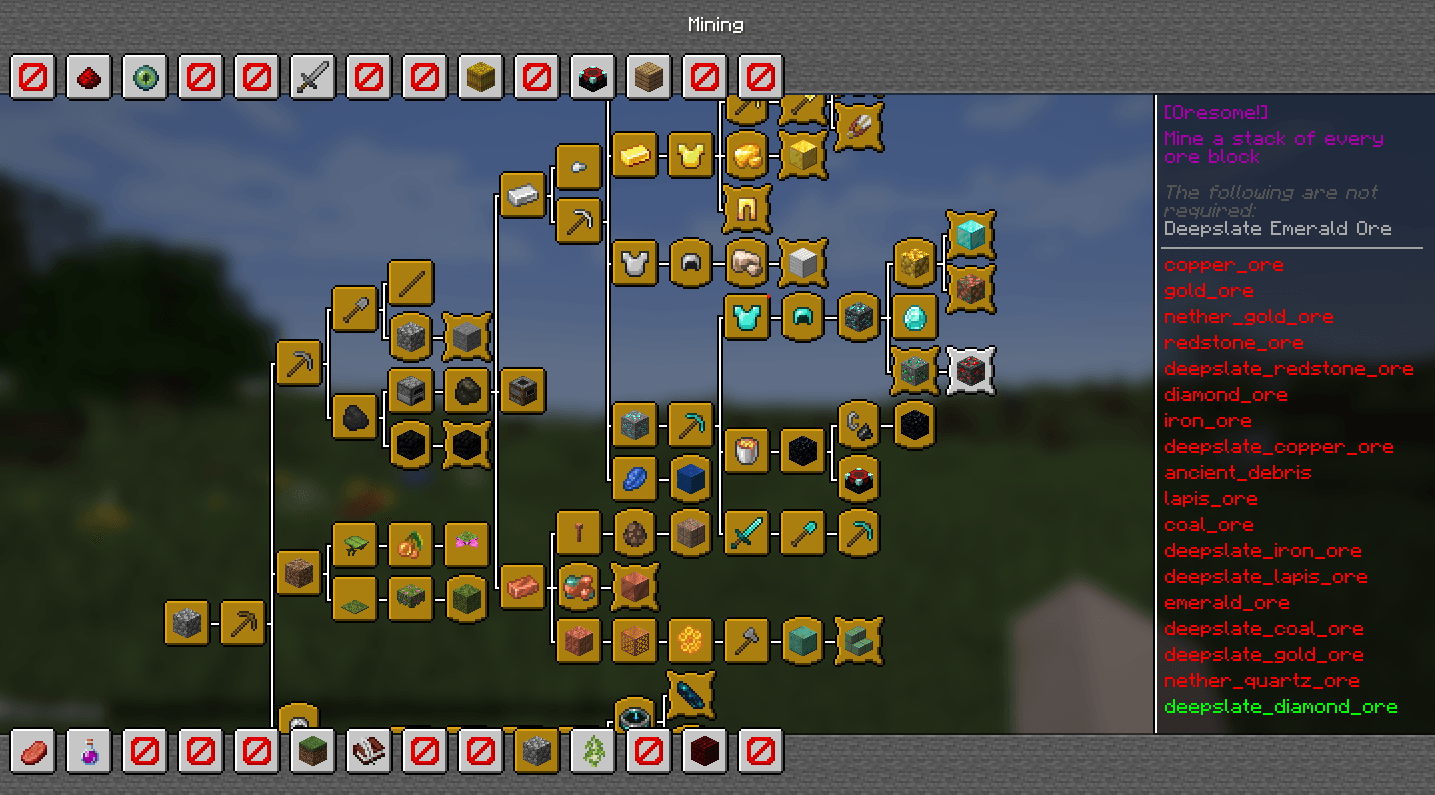 The Reloaded Advancements UI This is an example of the UI with BACAP Advancement Packs and a few placeholders to reach the new advancement category limit of 28.
 -
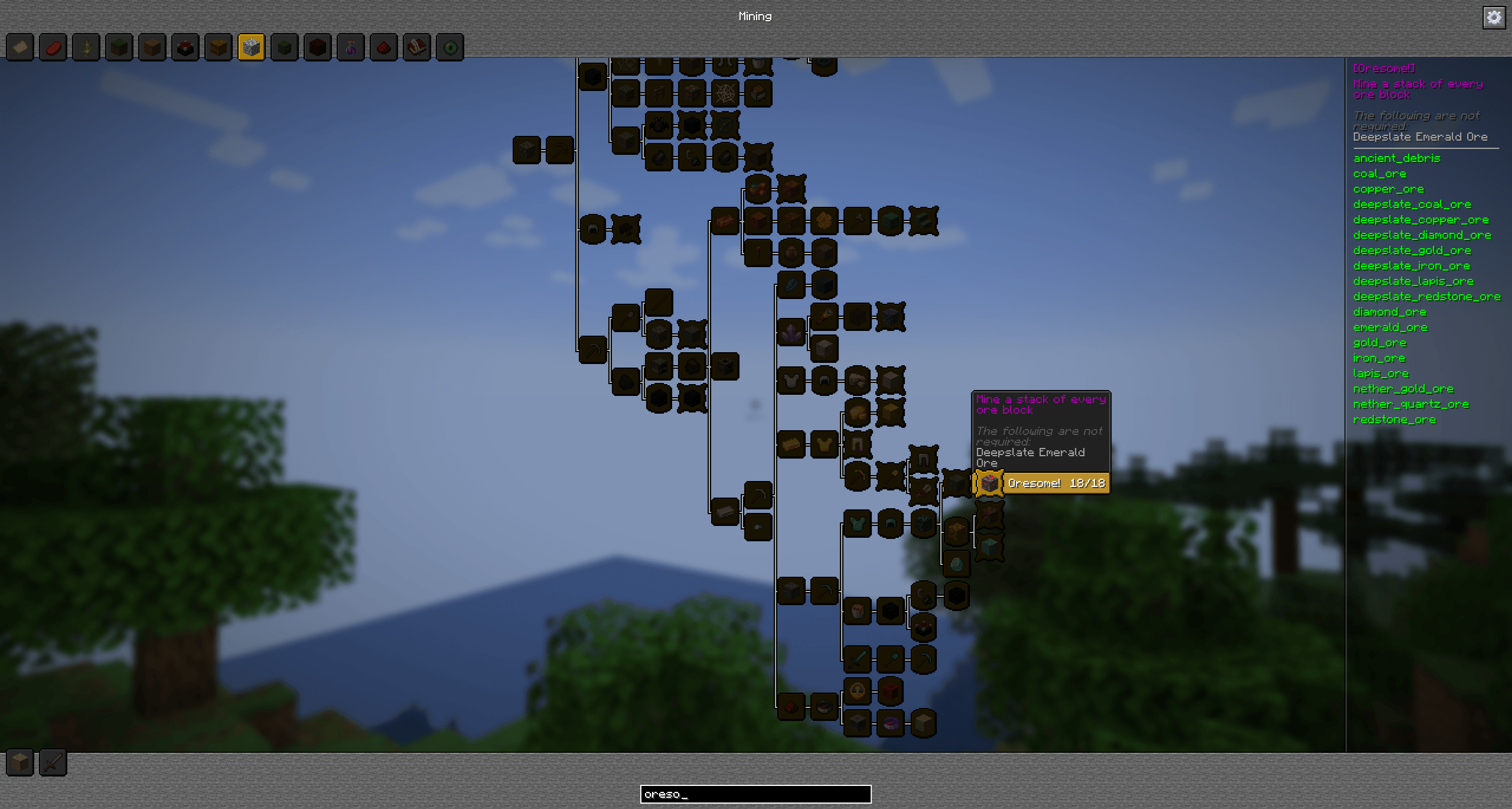 Search feature Instantly search through all achievements in real time to find exactly what you're looking for! Search by title, description, or criteria — perfect for finding all achievements that require something like a "barrel", for example.
-
The reloaded Advancement UI (v0.9) This is an example of the UI with BACAP Advancement Packs completed
-
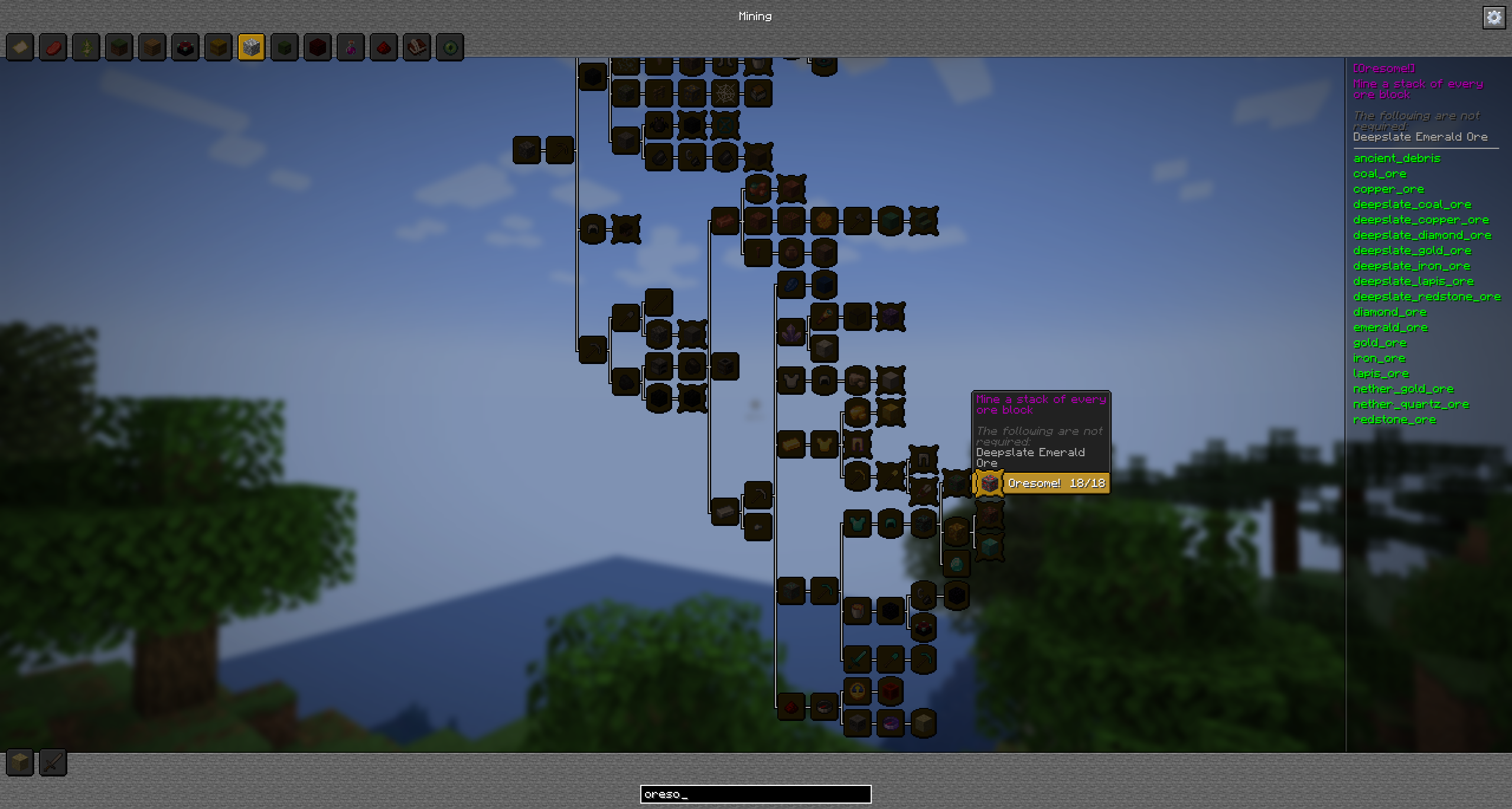 Search feature Instantly search through all achievements in real time to find exactly what you're looking for! Search by title, description, or criteria — perfect for finding all achievements that require something like a "barrel", for example.
 -
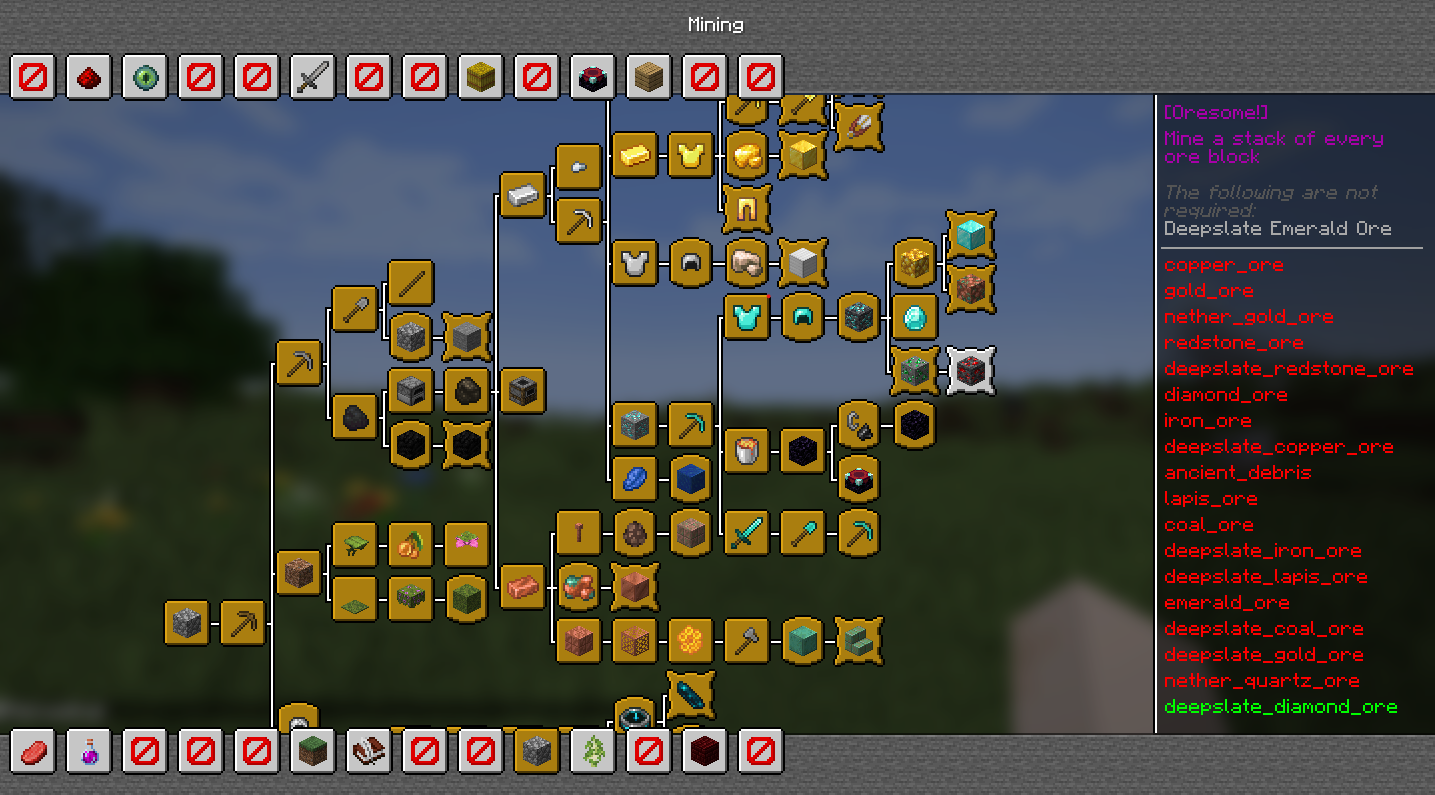 The reloaded Advancement UI (v0.1) This is an example of the UI with BACAP Advancement Packs and a few placeholders to reach the new advancement category limit of 28.
Versions
Files
Relations
Project Relations
More like this
Similar Mods
Suggestions use data such as tags, dependencies, dependents, descriptions, titles, and more to rank how much they overlap with this mod.
On ModDex
Community snapshot
By the numbers
Statistics
 (opens in a new tab)
Get it on
Available Platforms
On ModDex
Community snapshot
By the numbers