
Community listing page, reviews here may not be monitored by the author.
Attract to Chat - Mob Attraction By Chat Messages


No reviews yet
Mobs are attracted to the exact spot where you send a chat message.
Community voices
Reviews
No reviews yet. Be the first to review this project!
Get it on
Available Platforms
Compatibility
Supported Environments
Required on the server. Installing it on the client adds functionality.
About
Project Details
For authors
Embed Badge
If you're the author of this project, you can embed a live badge anywhere that supports HTML or Markdown. It updates automatically whenever ratings change.
Use HTML for any page that supports it, or Markdown for README files and Markdown-based descriptions.
Identifiers
Platform IDs
About
Description

Every message you type makes a sound.
Somewhere out there, something heard it.


Minecraft 1.19.2 & 1.20.1 · Java 17 · Server-side with optional client installation
Fabric API is required: 0.76.0+ for Minecraft 1.19.2 and 0.92.7+ for Minecraft 1.20.1.
◈ The idea
You're caving. It's been a good run — diamonds, iron, half a stack of lapis. Your friend types a joke in chat. You laugh, type back: "holy crap this cave is HUGE"
The typing stops. Somewhere in the dark, something stops too.
In Attract to Chat, chat is sound. Every message you type is a voice in the world — and the world listens. Mobs hear it, walk to where you said it and start investigating the area. That is the whole mod. And it quietly changes every conversation your server will ever have.
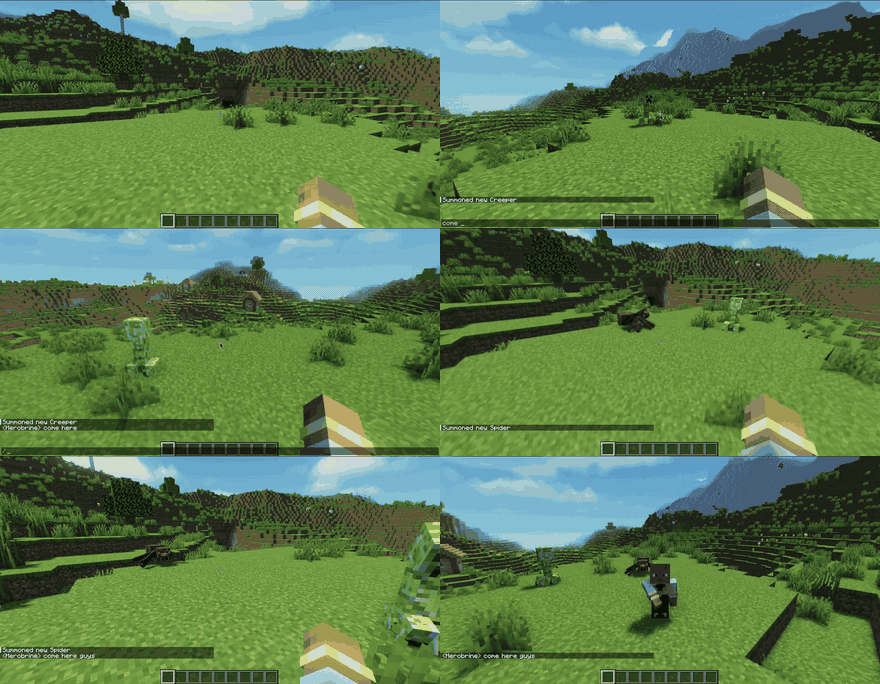
Three rules keep it feeling alive:
- Shouting is loud. CAPS and
!!!carry your voice further — and bring company faster. - Walls are quiet. A cave, a basement, a walled base: safe rooms for quiet people. (Yes — even that cave. Especially that cave.)
- Mobs stay mobs. Fighting mobs keep their real target, villagers still flee zombies, sleeping villagers can wake up. Vanilla AI is never replaced. The world just… pays attention now.
◈ A tool, not just a trap
Here's the twist: the same rule that gets you killed can work for you.
Tired of dragging villagers around with boats and minecarts? Talk to them — call them toward farms, bases and trading halls. And while you are at it:
- lure hostile mobs away from a friend in trouble;
- fake a distraction — and slip away while they investigate;
- turn chat itself into a stealth mechanic on survival and horror servers;
- run "Don't Scream" style challenges;
- attract creatures added by other mods;
- and yes: punish the player who never stops shouting.
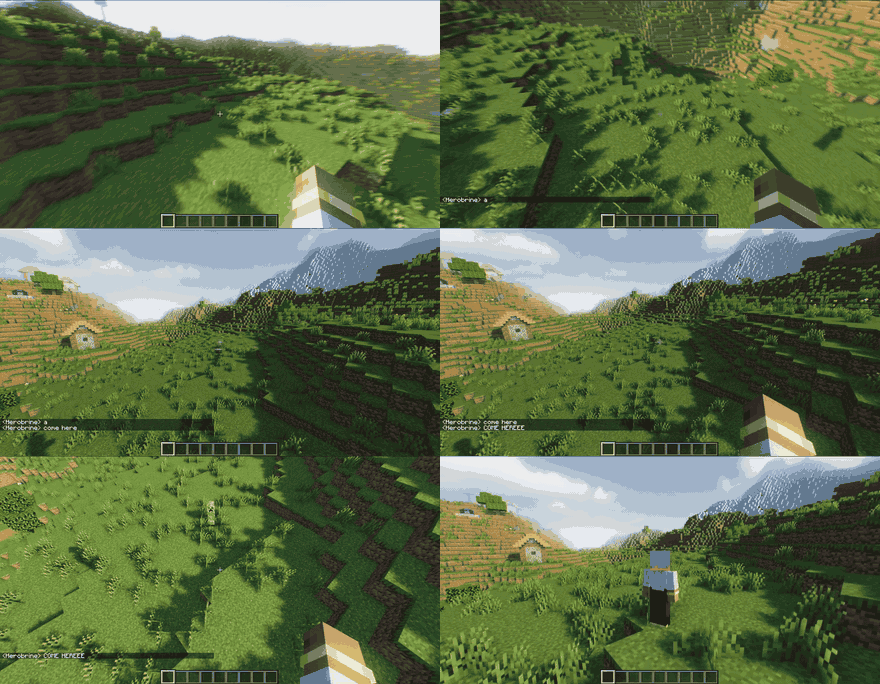
◈ Troll Mode
The admin's favorite button.
Secretly mark a player and every message they type becomes irresistible — mobs hear them from farther away and react faster. No glow. No warning. Just a player slowly realizing that the zombies always know exactly where they are.
They will never know why.
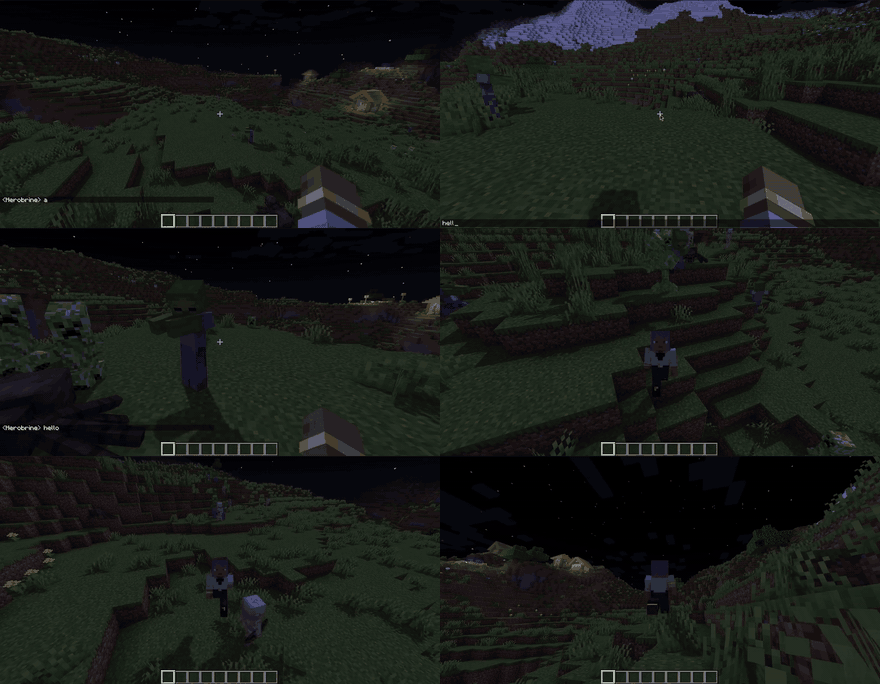
◈ Make it yours
Adjust how intense the mod feels without touching the core mechanic — everything applies live, no restart needed.
Presets — swap the whole feel with one command: Safe, Casual, Chaos or Silent — or save your own.
Vocal fatigue (off by default) — shout too much and you go hoarse: a short mute plus curious mobs coming to check on you. Milk clears it instantly, honey helps, death resets it.
Anti-spam (off by default) — rapid-fire messages stop attracting mobs. Chat is never cancelled or hidden; it just stops being loud.
Use /atc help to see everything the mod can do.
◈ For Server Admins
Every option lives in config/attracttochat-common.json and applies live — edit the file or use commands, no restart needed. The file comes commented line by line: a # note above each option explains what it does, its unit, default, valid range and a practical example.
Options at a glance
hearingRange— 30 blocks (0–500): how far mobs hear normal chatcapsRangeBonus— +5 blocks per CAPS word (0–100)mobSpeedBase/mobSpeedMax— 1.2 / 2.0 investigation speed multiplierstrollSpeedMultiplier— 2.5 for Troll Mode targetsforgetTargetAfterSeconds— 20s (1–300) until a mob gives up searchingscanCooldownTicks— 40 ticks = 2s between attraction scans per playerantiSpamMaxMessages/antiSpamWindowSeconds— 3 messages / 8s windowtraumaThreshold— 1000 shout trauma before vocal fatiguemuteDurationTicks— 600 ticks = 30s hoarse muteenableVocalFatigue/enableAntiSpam— OFF by defaultenableCapsFeature— ON by defaultenableCapsFeature— ON by defaultwalkieChatCompat— ON by default: optional Walkie-Chat integration (proximity chat, block stations) — Minecraft 1.20.1walkieChatProximityRange/walkieChatProximityCapsBonus— 15 / 10 blocks: attraction range for Walkie-Chat proximity chat (Minecraft 1.20.1)
Command reference
/atc status
/atc walkiechat on|off
/atc config list
/atc config info <option>
/atc config hearingrange <value>
/atc feature caps|fatigue|antispam
/atc entity add|remove
/atc ignore add
/atc preset set <name>
◈ Compatibility
Plays well with others — no setup, no conflicts:
- Walkie-Chat (Minecraft 1.20.1) — walkie talkies join the sound world: proximity chat attracts mobs, and hostile mobs that reach a Walkie Block station will smash it. On 1.19.2 both mods run side by side, no conflicts.
- Voice-chat mods — Attract to Chat listens to typed words, not voice. Both run on the same server.
- AI mods — the investigation goal walks beside vanilla AI; mobs in combat keep their real target.
- Modded mobs — creatures added by other mods can hear you too.
◈ Getting started
- Drop the JAR in your server's
modsfolder — Fabric servers also need Fabric API. - Restart the server.
- Say something. Watch what answers.
That's it — players join without installing anything.
| Minecraft | Loader | Attract to Chat | Additional dependency |
|---|---|---|---|
| 1.20.1 | Forge | 2.1.2 | None |
| 1.20.1 | Fabric | 2.1.2 | Fabric API 0.92.7 or newer |
| 1.19.2 | Forge | 2.1.2 | None |
| 1.19.2 | Fabric | 2.1.2 | Fabric API 0.76.0 or newer |
Do not mix Forge and Fabric files.
Optional client install — adds a personal switch for the investigation particles (/atc client particles enable|disable). Nobody sees them until they ask.
◈ FAQ
Do players need the mod installed? No. The magic runs on the server.
Does it replace Minecraft's mob AI? No — it adds an investigation goal alongside it. Mobs already in combat keep their real target; villagers still flee zombies.
Do walls really matter? Yes. Solid terrain muffles messages.
Does it work with other mods? Yes — walkie talkies, voice-chat mods, AI mods and modded creatures all run alongside it.
Do commands attract mobs? No — messages starting with !, @, # or / are never heard.
Modpacks? Yes, please — MIT License.
◈ Support the Project





Created by bielzinrx · Contributor Theus452 · Tester kots_luffyzin
Every message you type makes a sound.
Somewhere out there, something heard it.


Minecraft 1.19.2 & 1.20.1 · Java 17 · Server-side with optional client installation
Fabric API is required: 0.76.0+ for Minecraft 1.19.2 and 0.92.7+ for Minecraft 1.20.1.
◈ The idea
You're caving. It's been a good run — diamonds, iron, half a stack of lapis. Your friend types a joke in chat. You laugh, type back: "holy crap this cave is HUGE"
The typing stops. Somewhere in the dark, something stops too.
In Attract to Chat, chat is sound. Every message you type is a voice in the world — and the world listens. Mobs hear it, walk to where you said it and start investigating the area. That is the whole mod. And it quietly changes every conversation your server will ever have.

Three rules keep it feeling alive:
- Shouting is loud. CAPS and
!!!carry your voice further — and bring company faster. - Walls are quiet. A cave, a basement, a walled base: safe rooms for quiet people. (Yes — even that cave. Especially that cave.)
- Mobs stay mobs. Fighting mobs keep their real target, villagers still flee zombies, sleeping villagers can wake up. Vanilla AI is never replaced. The world just... pays attention now.
◈ A tool, not just a trap
Here's the twist: the same rule that gets you killed can work for you.
Tired of dragging villagers around with boats and minecarts? Talk to them — call them toward farms, bases and trading halls. And while you are at it:
- lure hostile mobs away from a friend in trouble;
- fake a distraction — and slip away while they investigate;
- turn chat itself into a stealth mechanic on survival and horror servers;
- run "Don't Scream" style challenges;
- attract creatures added by other mods;
- and yes: punish the player who never stops shouting.

◈ Troll Mode
The admin's favorite button.
Secretly mark a player and every message they type becomes irresistible — mobs hear them from farther away and react faster. No glow. No warning. Just a player slowly realizing that the zombies always know exactly where they are.
They will never know why.

◈ Make it yours
Adjust how intense the mod feels without touching the core mechanic — everything applies live, no restart needed.
Presets — swap the whole feel with one command: Safe, Casual, Chaos or Silent — or save your own.
Vocal fatigue (off by default) — shout too much and you go hoarse: a short mute plus curious mobs coming to check on you. Milk clears it instantly, honey helps, death resets it.
Anti-spam (off by default) — rapid-fire messages stop attracting mobs. Chat is never cancelled or hidden; it just stops being loud.
Use /atc help to see everything the mod can do.
◈ Compatibility
Plays well with others — no setup, no conflicts:
- Walkie-Chat (Minecraft 1.20.1) — walkie talkies join the sound world: proximity chat attracts mobs, and hostile mobs that reach a Walkie Block station will smash it. On 1.19.2 both mods run side by side, no conflicts.
- Voice-chat mods — Attract to Chat listens to typed words, not voice. Both run on the same server.
- AI mods — the investigation goal walks beside vanilla AI; mobs in combat keep their real target.
- Modded mobs — creatures added by other mods can hear you too.
◈ Getting started
- Drop the JAR in your server's
modsfolder — Fabric servers also need Fabric API. - Restart the server.
- Say something. Watch what answers.
That's it — players join without installing anything.
| Minecraft | Loader | Attract to Chat | Additional dependency |
|---|---|---|---|
| 1.20.1 | Forge | 2.1.2 | None |
| 1.20.1 | Fabric | 2.1.2 | Fabric API 0.92.7 or newer |
| 1.19.2 | Forge | 2.1.2 | None |
| 1.19.2 | Fabric | 2.1.2 | Fabric API 0.76.0 or newer |
Do not mix Forge and Fabric files.
Optional client install — adds a personal switch for the investigation particles (/atc client particles enable|disable). Nobody sees them until they ask.
◈ FAQ
Do players need the mod installed? No. The magic runs on the server.
Does it replace Minecraft's mob AI? No — it adds an investigation goal alongside it. Mobs already in combat keep their real target; villagers still flee zombies.
Do walls really matter? Yes. Solid terrain muffles messages.
Does it work with other mods? Yes — walkie talkies, voice-chat mods, AI mods and modded creatures all run alongside it.
Do commands attract mobs? No — messages starting with !, @, # or / are never heard.
Modpacks? Yes, please — MIT License.
◈ Support the Project



Created by bielzinrx · Contributor Theus452 · Tester kots_luffyzin
Screenshots
Gallery
-
 Attract To Chat LOGO
Versions
Files
Relations
Project Relations
More like this
Similar Mods
Suggestions use data such as tags, dependencies, dependents, descriptions, titles, and more to rank how much they overlap with this mod.
On ModDex
Community snapshot
By the numbers
Statistics
Want to reach Minecraft players?
We're looking for a server hosting partner to feature here and other parts of the site. Interested? Send us a message!
Get in touchGet it on
Available Platforms
On ModDex
Community snapshot
By the numbers