
Community listing page, reviews here may not be monitored by the author.
AutoBuildMod


No reviews yet
AutoBuild lets you automatically place blocks to build faster and easier in Minecraft. Perfect for large and repetitive builds
Community voices
Reviews
No reviews yet. Be the first to review this project!
Get it on
Available Platforms
Compatibility
Supported Environments
Must be installed on both the client and the server.
About
Project Details
For authors
Embed Badge
If you're the author of this project, you can embed a live badge anywhere that supports HTML or Markdown. It updates automatically whenever ratings change.
Use HTML for any page that supports it, or Markdown for README files and Markdown-based descriptions.
Identifiers
Platform IDs
About
Description
AutoBuild
AutoBuild is a lightweight Fabric mod that allows you to load schematics and automatically build structures block by block in your world.
Designed for large builds, repetitive constructions, and fast structure placement while keeping full control over positioning and preview, AutoBuild provides an efficient workflow without removing the survival gameplay feeling.
✨ Features
- Automatically build structures from schematic files
- Real-time ghost preview before placing blocks
- Move, rotate, and flip previews with an in-game tool
- Adjustable build speed and build mode
- Per-block or per-layer building modes
- Undo support for recent build steps
- Preview behavior control after pause or stop
- Preview mover tool for easy positioning
- Works in both **Survival** and **Creative**
- Fully multiplayer compatible
- Per-player settings and build states
- Organized schematic loading with folder support
- Ideal for fast scene creation and recording setups for content creators
🎥 AutoBuild Demo

📜 Commands
- `/autobuild load <file>` – Load a schematic
- `/autobuild list` – List available schematics
- `/autobuild start` – Start building the loaded schematic
- `/autobuild stop` – Stop the active build
- `/autobuild preview <on|off>` – Toggle preview rendering
- `/autobuild speed <value>` – Change building speed
- `/autobuild undo <steps|all>` – Undo placed blocks
- `/autobuild materials` – displays all required materials
- `/autobuild missing` – gives all missing materials (Creative only)
- `/autobuild tool` – Get the preview mover tool
- `/autobuild menu` – Open settings menu
⚙️ Settings Menu
AutoBuild includes an in-game settings GUI allowing players to configure:
- Build mode (per layer / per block)
- Building speed
- Preview visibility
- Preview behavior after pause
- Preview behavior after stop
Settings are saved per player and persist between sessions.
🎮 Tool Controls
Using the Preview Mover Tool:
- Left Click → Move preview forward
- Right Click → Move preview backward
- Shift + Click → Rotate preview
- Ctrl + Click → Flip preview
This allows fast positioning without reopening commands.
🎥 Videos
- ▶️ Showcase Video: https://www.youtube.com/shorts/lxUux-qrnvs
- ▶️ Showcase Video: https://www.youtube.com/shorts/GWuPW-sVfIw
⚙️ Requirements
- Fabric Loader
- Fabric API
🛠 Use Cases
AutoBuild is ideal for:
- Large survival builds
- Creative structure placement
- Server projects
- Repetitive construction work
- Testing schematic designs quickly
- Community and multiplayer building events
- Creating scenes, maps, and builds quickly for YouTube, TikTok, and streaming content
🚧 Planned Features
• Schematics library
• Auto resource gathering
• Server sync improvements
• Better preview tools
•...
AutoBuild focuses on simplicity, performance, and practical building automation without unnecessary complexity, keeping Minecraft building efficient while still engaging.
AutoBuild
AutoBuild is a Fabric mod for loading, previewing, transforming, and automatically building Minecraft schematics.
Load a .schem or .litematic file, position the ghost preview exactly where you want it, choose a building mode, and let AutoBuild place the structure while you remain in control.
AutoBuild also connects to its own community platform, where you can discover schematics, share creations, create a builder profile, and load community builds directly into the mod.
Preview
Features
Load and Preview Schematics
- Load
.schemand.litematicfiles - Preview structures using transparent ghost blocks
- Move previews in every direction
- Raise and lower the preview
- Rotate structures
- Flip previews across the X or Z axis
- Move the preview directly to your position
- Adjust preview transparency
- Hide selected blocks using block filters
Flexible Building Modes
Choose how AutoBuild places your structure:
- Per Block, Places a configurable number of blocks per tick
- Per Layer, Builds the structure layer by layer
- Instant, Places the complete structure immediately
You can also:
- Pause, resume, stop, or unload a build
- Keep or hide the preview after pausing or stopping
- Enable or disable block-placement sounds
- Undo recent building steps or the complete build history
- Adjust the building speed
Survival-Friendly Building
AutoBuild is designed for Survival projects as well as Creative building.
- Uses materials from your inventory
- Shows all materials required for a structure
- Reports which materials are missing
- Can collect materials from nearby chests, trapped chests, and barrels
- Includes a configurable container search radius
- Offers an optional safety check to prevent replacing existing blocks
- Allows Creative players to receive missing materials instantly
Community Schematic Library
AutoBuild connects directly to the AutoBuild community platform.
- Browse public schematics
- Link your website account to the mod
- Load community builds directly in-game
- Upload and publish your own schematics
- Add screenshots, categories, and visibility settings
- Create a public builder profile
- Track downloads and AutoBuild loads
- Discover builds shared by other creators
Find a build → Load it into AutoBuild → Position the preview → Start building
Export Your Own Schematics
Use the included Selection Tool to select two corners in your world and export the selected structure as a schematic.
Keep exported structures locally or publish them on your AutoBuild profile to share them through the community library.
In-Game Controls
AutoBuild includes configurable keybinds for:
- Moving the preview left, right, forward, and backward
- Raising and lowering the preview
- Rotating the structure
- Flipping across the X or Z axis
- Moving the preview to the player
- Undoing a build step
- Starting a build
- Opening the AutoBuild menu
Controls can be changed through Minecraft’s keybind settings.
Commands
/autobuild list— List local schematics/autobuild load <file>— Load a local schematic/autobuild start— Start or resume building/autobuild pause— Pause the current build/autobuild stop— Stop the current build/autobuild unload— Unload the current schematic/autobuild preview <on|off>— Show or hide the preview/autobuild speed <value>— Adjust the building speed/autobuild undo <steps|all>— Undo placed blocks/autobuild materials— View the required materials/autobuild missing— Receive missing materials in Creative/autobuild give previewtool— Get the Preview Mover Tool/autobuild give selectiontool— Get the Selection Tool/autobuild menu— Open the AutoBuild menu
Perfect For
- Large Survival projects
- Fast Creative building
- Multiplayer server projects
- Technical farms and redstone builds
- Repetitive construction work
- Testing schematic placement
- Videos, streams, and other content
- Community building events
- Sharing your own Minecraft creations
Multiplayer Support
AutoBuild supports separate building states and settings for multiple players.
Important: AutoBuild must be installed on both the client and the server when playing multiplayer.
Requirements
- Fabric Loader
- Fabric API
- AutoBuild installed on the client and server for multiplayer
Videos
AutoBuild combines schematic discovery, accurate previews, material management, automatic construction, exporting, and community sharing in one complete Minecraft building workflow.
Screenshots
Gallery
-
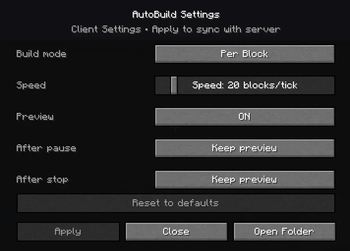 ⚙️ AutoBuild Settings Menu.png The AutoBuild Settings Menu gives you full control over how your structures are built. Easily adjust build modes, placement speed, preview behavior, and automation options to match your workflow
 -
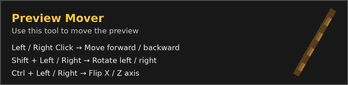 🛠 Preview Mover Tool.png The Preview Mover Tool allows you to move, rotate, and flip the schematic preview using simple mouse clicks and key combinations, without placing any blocks.
 -
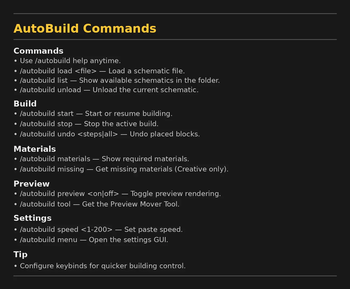 📜 Command Overview.png In game command list showing all available AutoBuild commands, including loading schematics, starting builds, adjusting speed, undoing actions, accessing tools etc...
 -
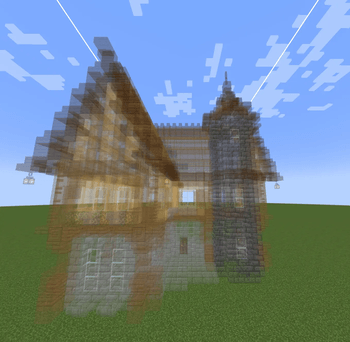 🧱 Render Preview.png Live schematic preview rendered directly in the world, showing the exact shape and position before building starts. Perfect for precise placement and large structures.
-
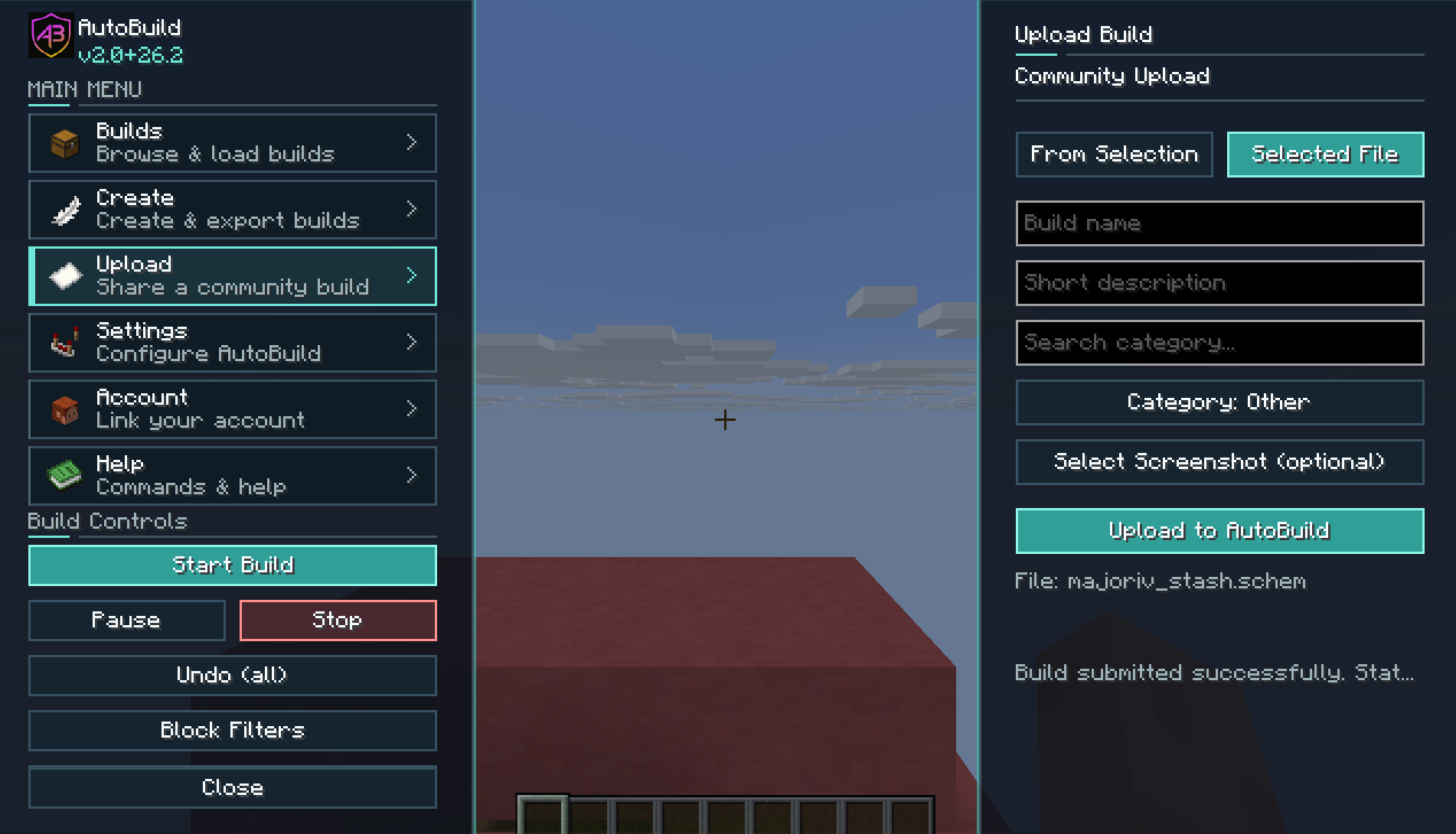 upload this is the uplaod gui. this gui gives you acces to upload a schematic or slected area to the website
 -
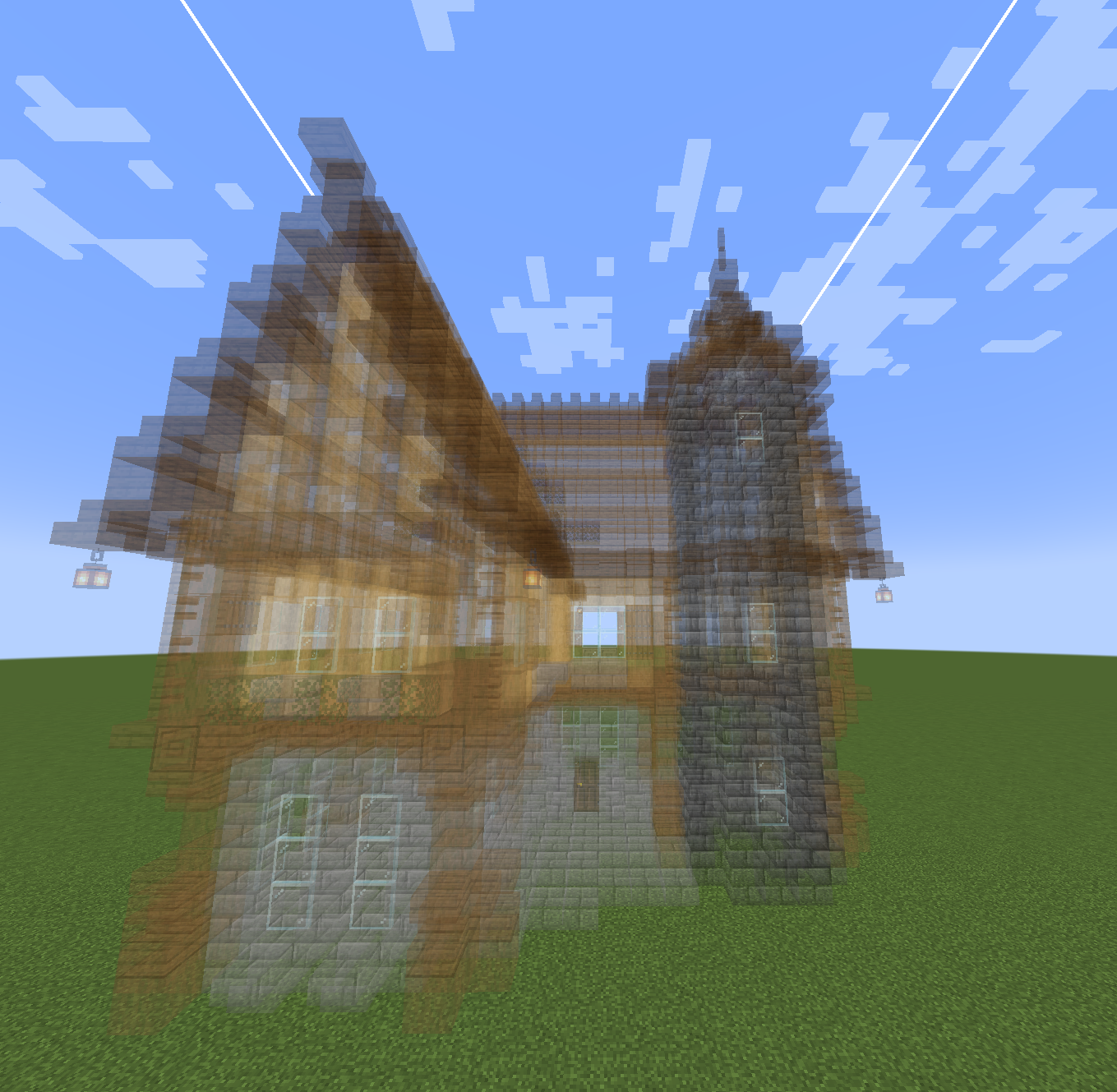 🧱 Render Preview Live schematic preview rendered directly in the world, showing the exact shape and position before building starts. Perfect for precise placement and large structures.
Versions
Files
Relations
Project Relations
More like this
Similar Mods
Suggestions use data such as tags, dependencies, dependents, descriptions, titles, and more to rank how much they overlap with this mod.
On ModDex
Community snapshot
By the numbers
Statistics
Want to reach Minecraft players?
We're looking for a server hosting partner to feature here and other parts of the site. Interested? Send us a message!
Get in touchGet it on
Available Platforms
On ModDex
Community snapshot
By the numbers