
Community listing page, reviews here may not be monitored by the author.
Better CPS Counter

No reviews yet
A lightweight mod that allows you to add highly customizable CPS counters in your screen.
Community voices
Reviews
No reviews yet. Be the first to review this project!
Get it on
Available Platforms
Compatibility
Supported Environments
Runs entirely on the client. Works on vanilla servers.
About
Project Details
For authors
Embed Badge
If you're the author of this project, you can embed a live badge anywhere that supports HTML or Markdown. It updates automatically whenever ratings change.
Use HTML for any page that supports it, or Markdown for README files and Markdown-based descriptions.
Identifiers
Platform IDs
About
Description

by notnawfas


✨ Introduction
Better CPS Counter is a lightweight, heavily customizable mod that allows you to add custom HUD elements to your screen to display your current CPS (Clicks Per Second).
Whether you need to monitor your CPS for 1.8 PvP, practice advanced bridging techniques, or simply want a clean aesthetic upgrade for your game interface, this mod has you covered.
Everything is fully hot-swappable and configurable in-game. You do not need to restart your client to apply changes or disable the mod—simply toggle the button in the configuration menu.

✨ Features
✓ Extremely Lightweight: Designed to run with zero performance impact.
✓ Modern UI: Clean, intuitive interface for stress-free customization.
✓ Built-in Presets: Quick configurations to get you started immediately.
✓ Multiple HUDs: Create and manage independent counters simultaneously.
✓ Draggable HUDs: Drag and drop the HUDs anywhere you like.
✓ Zero Dependencies: Completely self-sustained—just drop it into your mods folder and play.
✓ Heavily Customizable: Tailor fonts, colors, formats, layouts, and positions exactly how you want them.
✓ Both Mouse+Keyboard: Track both keyboard or mouse's input.
All Available Variables
You can use the placeholders below inside your mod's Display Format text field to dynamically fetch specific click inputs.
Mouse Inputs
| Variable | Description |
|---|---|
%cps_mouse.left% |
Left Click (LMB) |
%cps_mouse.right% |
Right Click (RMB) |
%cps_mouse.middle% |
Middle Click (MMB) |
Keyboard Inputs
Alphabet (A-Z)
| Variable | Key | Variable | Key |
|---|---|---|---|
%cps_keyboard.a% |
A | %cps_keyboard.n% |
N |
%cps_keyboard.b% |
B | %cps_keyboard.o% |
O |
%cps_keyboard.c% |
C | %cps_keyboard.p% |
P |
%cps_keyboard.d% |
D | %cps_keyboard.q% |
Q |
%cps_keyboard.e% |
E | %cps_keyboard.r% |
R |
%cps_keyboard.f% |
F | %cps_keyboard.s% |
S |
%cps_keyboard.g% |
G | %cps_keyboard.t% |
T |
%cps_keyboard.h% |
H | %cps_keyboard.u% |
U |
%cps_keyboard.i% |
I | %cps_keyboard.v% |
V |
%cps_keyboard.j% |
J | %cps_keyboard.w% |
W |
%cps_keyboard.k% |
K | %cps_keyboard.x% |
X |
%cps_keyboard.l% |
L | %cps_keyboard.y% |
Y |
%cps_keyboard.m% |
M | %cps_keyboard.z% |
Z |
Numbers (0-9)
| Variable | Key | Variable | Key |
|---|---|---|---|
%cps_keyboard.0% |
0 | %cps_keyboard.5% |
5 |
%cps_keyboard.1% |
1 | %cps_keyboard.6% |
6 |
%cps_keyboard.2% |
2 | %cps_keyboard.7% |
7 |
%cps_keyboard.3% |
3 | %cps_keyboard.8% |
8 |
%cps_keyboard.4% |
4 | %cps_keyboard.9% |
9 |
Function Keys (F1 - F25)
Note: Standard hardware layouts generally access keys F13–F25 when pressing SHIFT alongside the regular F1–F12 row keys.
| Variable | Key | Variable | Key |
|---|---|---|---|
%cps_keyboard.f1% |
F1 | %cps_keyboard.f14% |
F14 |
%cps_keyboard.f2% |
F2 | %cps_keyboard.f15% |
F15 |
%cps_keyboard.f3% |
F3 | %cps_keyboard.f16% |
F16 |
%cps_keyboard.f4% |
F4 | %cps_keyboard.f17% |
F17 |
%cps_keyboard.f5% |
F5 | %cps_keyboard.f18% |
F18 |
%cps_keyboard.f6% |
F6 | %cps_keyboard.f19% |
F19 |
%cps_keyboard.f7% |
F7 | %cps_keyboard.f20% |
F20 |
%cps_keyboard.f8% |
F8 | %cps_keyboard.f21% |
F21 |
%cps_keyboard.f9% |
F9 | %cps_keyboard.f22% |
F22 |
%cps_keyboard.f10% |
F10 | %cps_keyboard.f23% |
F23 |
%cps_keyboard.f11% |
F11 | %cps_keyboard.f24% |
F24 |
%cps_keyboard.f12% |
F12 | %cps_keyboard.f25% |
F25 |
%cps_keyboard.f13% |
F13 |
Numpad Layout
| Variable | Key | Variable | Key |
|---|---|---|---|
%cps_keyboard.numpad0% |
Numpad 0 | %cps_keyboard.numpad9% |
Numpad 9 |
%cps_keyboard.numpad1% |
Numpad 1 | %cps_keyboard.numpad_add% |
Numpad Plus (+) |
%cps_keyboard.numpad2% |
Numpad 2 | %cps_keyboard.numpad_subtract% |
Numpad Minus (-) |
%cps_keyboard.numpad3% |
Numpad 3 | %cps_keyboard.numpad_multiply% |
Numpad Multiply (*) |
%cps_keyboard.numpad4% |
Numpad 4 | %cps_keyboard.numpad_divide% |
Numpad Divide (/) |
%cps_keyboard.numpad5% |
Numpad 5 | %cps_keyboard.numpad_decimal% |
Numpad Decimal (.) |
%cps_keyboard.numpad6% |
Numpad 6 | %cps_keyboard.numpad_enter% |
Numpad Enter |
%cps_keyboard.numpad7% |
Numpad 7 | %cps_keyboard.numpad_equal% |
Numpad Equal (=) |
%cps_keyboard.numpad8% |
Numpad 8 |
System & Navigation Keys
| Variable | Key |
|---|---|
%cps_keyboard.up% |
Up Arrow |
%cps_keyboard.down% |
Down Arrow |
%cps_keyboard.left% |
Left Arrow |
%cps_keyboard.right% |
Right Arrow |
%cps_keyboard.insert% |
Insert |
%cps_keyboard.delete% |
Delete |
%cps_keyboard.home% |
Home |
%cps_keyboard.end% |
End |
%cps_keyboard.page_up% |
Page Up |
%cps_keyboard.page_down% |
Page Down |
%cps_keyboard.print_screen% |
Print Screen |
%cps_lock% |
Scroll Lock |
%cps_keyboard.pause% |
Pause |
Modifiers & Control Keys
| Variable | Key |
|---|---|
%cps_keyboard.shift% |
Universal Shift |
%cps_keyboard.left_shift% |
Left Shift |
%cps_keyboard.right_shift% |
Right Shift |
%cps_keyboard.ctrl% |
Universal Ctrl |
%cps_keyboard.left_ctrl% |
Left Ctrl |
%cps_keyboard.right_ctrl% |
Right Ctrl |
%cps_keyboard.alt% |
Universal Alt |
%cps_keyboard.left_alt% |
Left Alt |
%cps_keyboard.right_alt% |
Right Alt |
%cps_keyboard.super% |
Super Key (Windows / OS Command Key) |
%cps_keyboard.left_super% |
Left Super Key |
%cps_keyboard.right_super% |
Right Super Key |
%cps_keyboard.caps_lock% |
Caps Lock |
%cps_keyboard.num_lock% |
Num Lock |
%cps_keyboard.space% |
Spacebar |
%cps_keyboard.enter% |
Enter |
%cps_keyboard.escape% |
Escape |
%cps_keyboard.tab% |
Tab |
%cps_keyboard.backspace% |
Backspace |
Symbols & Miscellaneous
| Variable | Key |
|---|---|
%cps_keyboard.grave% |
Grave Accent (`) |
%cps_keyboard.tilde% |
Tilde (~) |
%cps_keyboard.minus% |
Minus (-) |
%cps_keyboard.equal% |
Equal (=) |
%cps_keyboard.left_bracket% |
Left Bracket ([) |
%cps_keyboard.right_bracket% |
Right Bracket (]) |
%cps_keyboard.backslash% |
Backslash (\) |
%cps_keyboard.semicolon% |
Semicolon (;) |
%cps_keyboard.apostrophe% |
Apostrophe (') |
%cps_keyboard.comma% |
Comma (,) |
%cps_keyboard.period% |
Period (.) |
%cps_keyboard.slash% |
Forward Slash (/) |
%cps_keyboard.world1% |
World 1 |
%cps_keyboard.world2% |
World 2 |
%cps_keyboard.menu% |
Menu Key |
✨ Author


Thank you for reading all the way down to here! That's pretty much it.
Screenshots
Gallery
-
 Logo
Logo -
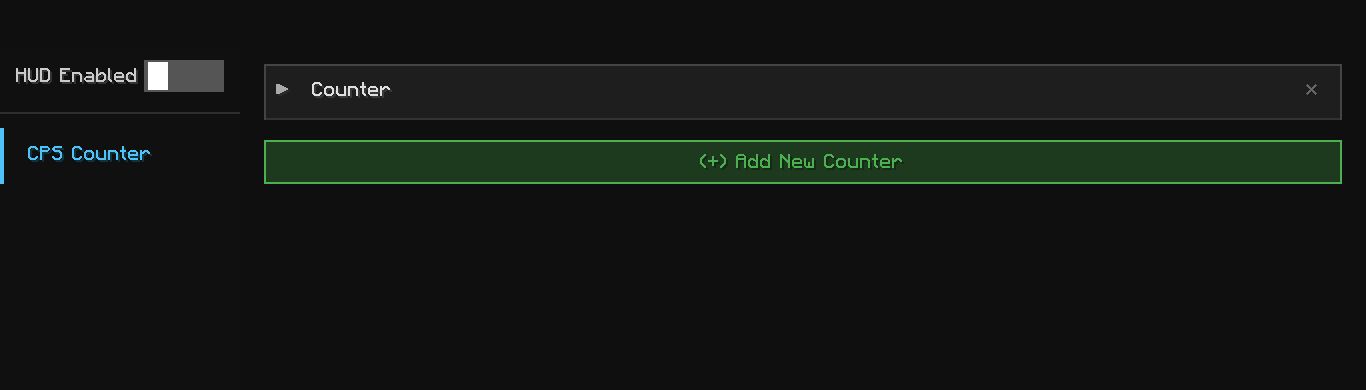 Config GUI The main configuration GUI of the mod. Can be opened by pressing F7 or through Mod Menu.
 -
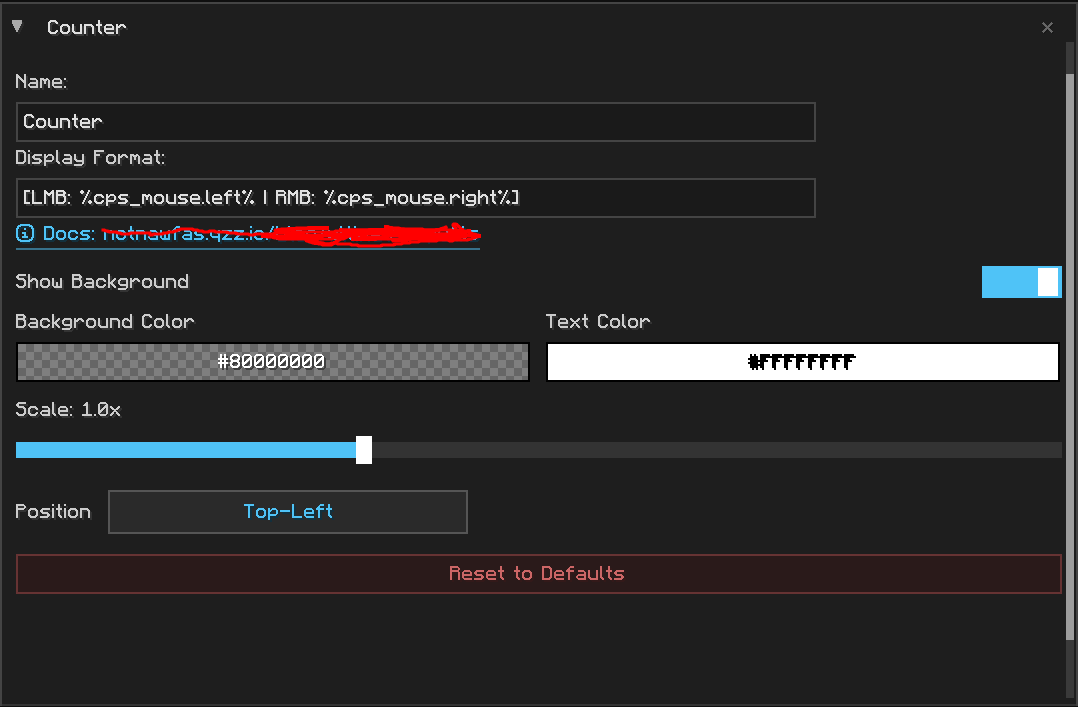 Default Counter This one will be pre-made. You can create, edit, delete these.
Versions
Files
Relations
Project Relations
More like this
Similar Mods
Suggestions use data such as tags, dependencies, dependents, descriptions, titles, and more to rank how much they overlap with this mod.
On ModDex
Community snapshot
By the numbers
Statistics

Want to reach Minecraft players?
We're looking for a server hosting partner to feature here and other parts of the site. Interested? Send us a message!
Get in touchGet it on
Available Platforms
On ModDex
Community snapshot
By the numbers