Community listing page, reviews may not be monitored by the author.
Clef

No reviews yet
Adds instruments with the ability to play ABC files.

Community voices
Reviews
No reviews yet. Be the first to review this project!
Get it on
Available Platforms
About
Project Details
For authors
Embed Badge
If you're the author of this project, you can embed a live badge anywhere that supports HTML or Markdown. It updates automatically whenever ratings change.
Use HTML for any page that supports it, or Markdown for README files and Markdown-based descriptions.
Identifiers
Platform IDs
About
Description
Basics
This mod adds the ability to have instruments which plays ABC files.
By default the mod comes with several ABC tracks, and also adds the 32 instruments available in Starbound (with permission).
Clef reads any ABC files in the /mods/clef/abc folder, and instruments in the /mods/clef/instruments folder, so you are welcome to add your own ABC tracks or Instrument Packs. As an added bonus, Clef is also able to read Starbound mod packs in a .zip format.
Getting Instruments
Once in-game, to view the instruments in creative, open up the inventory and open up the Instruments creative tab. There, you will find all the instruments that Clef was able to load.
In survival though, there are three (configurable) ways to get instruments. Chest loot from structures, Mob drops, and the Instrument Player (more on the player later)
Instruments can be either two handed or one handed. By default configs, all two handed instruments will be one handed, to allow you to hold it in your off-hand slot whilst you adventure around!
Using Instruments
With your chosen instrument in hand, press the use key and a GUI would pop up, allowing you to select a song, play solo or in a band (with options to sync to their play time or their track), and to force the mod to reload all the ABC files or Instruments, and finally a Play button. Double clicking a song in the song list will immediately begin playing it.
Whilst playing an instrument, if the instrument is two handed, both hands must be free to play them. If they are one handed, the main hand will be prioritised and that will be played. To stop playing, merely use the instrument again or attack with the instrument.
Right clicking the Band Name will cycle through the available bands currently playing.
Bear in mind not to reload your ABC files if you have a significant number of them, it will cause the game to stall momentarily.
Holding shift whilst mousing over the instrument will tell you what pack the instrument is from, and what the item name for the instrument is.
The Instrument Player
The crafting recipe for the Instrument Player is as such: Planks, a chest, a note block, and a redstone torch.

Once placed, right click the block with an instrument to place the instrument inside. The Instrument Player has enough space for 9 instruments to be played simultaneously, once redstone power is applied.
Right click it again and you will see a similar GUI to the instrument GUI, but with some added features, most notably the storage space of the Instrument Player on the bottom right. Clicking any of the instruments there will eject the instrument on the top of the block.
There are also two buttons on the bottom of the song list, to allow you to add and view the playlist. Once you are viewing the playlist you will be able to see standard playlist settings such as shuffle, repeat, etc.
Making instruments with the Instrument Player
To make a new instrument with the instrument player, you need to fill up the Instrument Player with 9 instruments, and right click it with a name tag named as the item name of the instrument you want. To get the item name of the instrument, mouse over your instrument in the inventory and hold Shift. This item name is different from the name of the instrument.
You can only make instruments that either you have loaded to your game, or the server has loaded (configurable).
Getting more tracks and instruments
The way Clef works, is that tracks and instruments exist in actual files outside of the mod. As a result, you can easily drop any ABC file that you want to listen to in-game into the abc folder, or you can add new instruments by adding Starbound mod packs (in zip format) in the instruments folder.
There are ABC libraries available online, especially since Lord of The Rings Online and Starbound are both able to play these files.
It is also possible to unpack Starbound mods in pak format and rezip it into a zip format for Clef to read. Just be sure that the file structure follows Starbound's file structure and the root of the archive are where the sfx, items folders belong.
Known issues
The ABC files may play a little off key or off tempo or play incorrectly
Playing a little off key: I've tried my best to identify this, but I'm chalking this up to the Sound System having trouble adjusting the pitch of the tunes
Playing a little off tempo: Minecraft has a limit of 20 ticks per second. Some of the ABC files I've found has notes much shorter than that. Slightly off tempo is the best I can do.
Playing incorrectly: The ABC parser that I'm using, I wrote from scratch, so there's bound to be some problems with parsing some files one way or another. If the tune plays incorrectly, drop me a message (along with the abc file) and I'll see what I can do. At the moment the mod doesn't support more than one tune per ABC and it doesn't support verses/voices in the ABC.
Pausing the game doesn't pause a specific tune
I think it's a Minecraft thing. Just unpause and repause the game until the tune pauses.
Report other issues you've found on GitHub.
Screenshots
Gallery
-
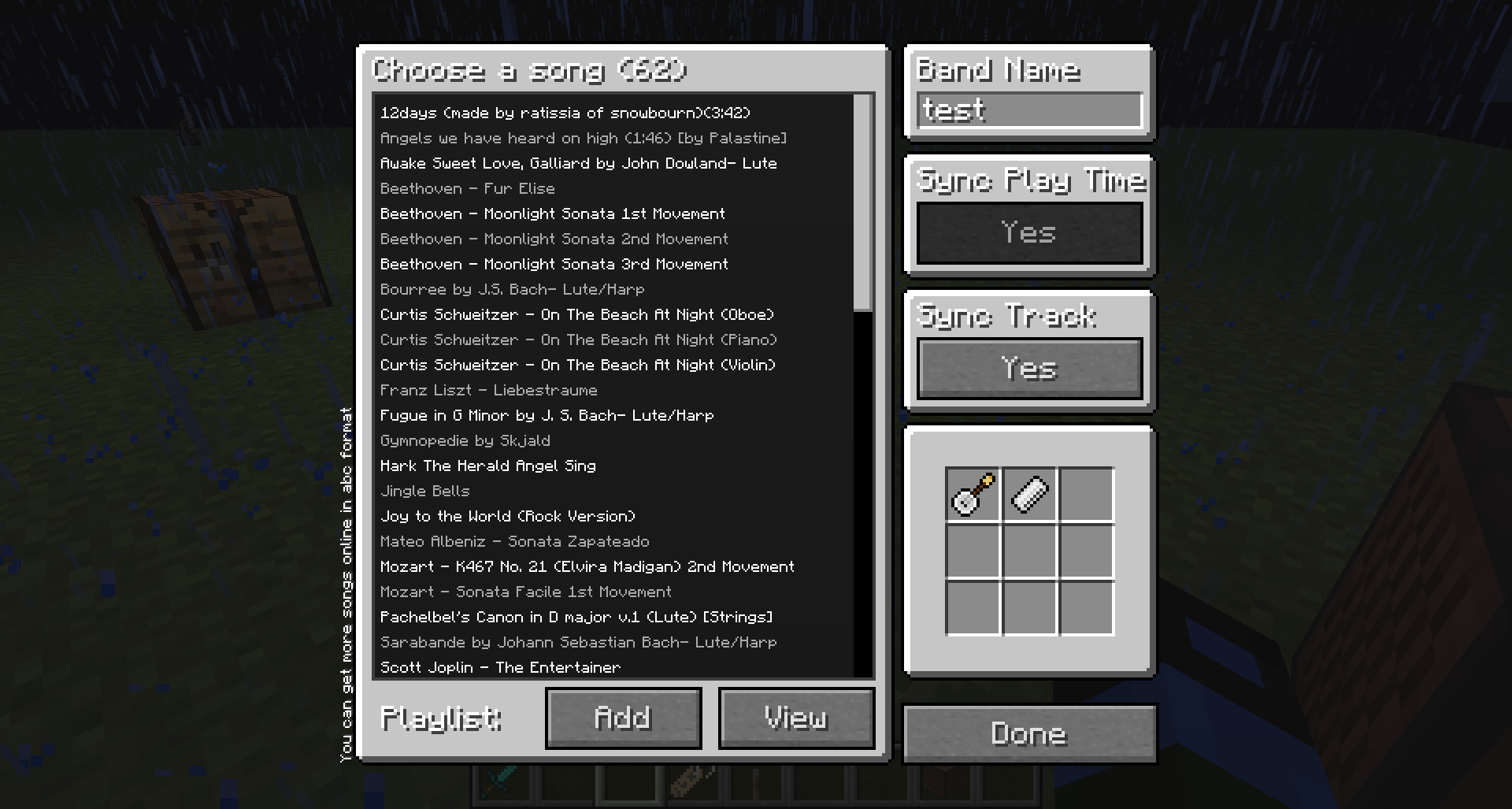 Instrument Player GUI
Versions
Files
Relations
Project Relations
More like this
Similar Mods
Suggestions use data such as tags, dependencies, dependents, descriptions, titles, and more to rank how much they overlap with this mod.
On ModDex
Community snapshot
By the numbers
Statistics

Get it on
Available Platforms
On ModDex
Community snapshot
By the numbers