Community listing page, reviews here may not be monitored by the author.
Co-Op Overhaul

No reviews yet
Provides several features to improve co-operative online play.

Community voices
Reviews
No reviews yet. Be the first to review this project!
Get it on
Available Platforms
About
Project Details
For authors
Embed Badge
If you're the author of this project, you can embed a live badge anywhere that supports HTML or Markdown. It updates automatically whenever ratings change.
Use HTML for any page that supports it, or Markdown for README files and Markdown-based descriptions.
Identifiers
Platform IDs
Resources
External Links
About
Description
Co-Op Overhaul
Source: https://github.com/FatherToast/
Discussion: https://discord.gg/GFTzTdX
Co-Op Overhaul provides several features to improve co-operative online play, such as pinging and protections for friendly fire. Everything is configurable.
Co-ordination features:
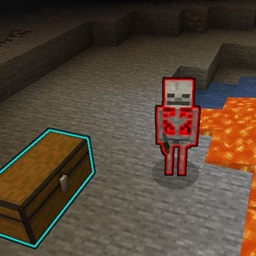
- Inspect - Default key bind: Hold V. Highlights (similar to the glow effect) the block/entity you are looking at. If you have Jade installed, its tooltip will display the block/entity you are inspecting. Using a spyglass increases your max inspect range.
- Ping - Default key bind: V + Left Mouse Button. Marks the inspected block or entity to be highlighted for a while with a nameplate above; all nearby players can see active pings.
- Find Players - Default key bind: Tab. Highlights players around you to make them easier to find.
- Party Overlay - Displays a panel in the HUD for each player in the world with you showing basic information like their name and current health.
- Revive - Not yet implemented.
Social features:
- Can link items in chat (work in progress, simply shows the tooltip when hovered).
Protection features:
- Friendly Fire Mitigation - Reduces damage that friendly players deal to each other.
Commands:
Available commands:
- None yet.
Screenshots
Gallery
Versions
Files
Relations
Project Relations
More like this
Similar Mods
Suggestions use data such as tags, dependencies, dependents, descriptions, titles, and more to rank how much they overlap with this mod.
On ModDex
Community snapshot
By the numbers
Statistics
 (opens in a new tab)
Get it on
Available Platforms
On ModDex
Community snapshot
By the numbers
Statistics
Resources