
Community listing page, reviews here may not be monitored by the author.
CobbleHunts


No reviews yet
CobbleHunts is a Minecraft Fabric Hunts mod that adds a hunting system to Cobblemon. It includes global and solo Pokémon hunting missions with customizable options, rewards, and an easy-to-use GUI.
Community voices
Reviews
No reviews yet. Be the first to review this project!
Get it on
Available Platforms
Compatibility
Supported Environments
Runs entirely on the server. Also works in singleplayer.
About
Project Details
For authors
Embed Badge
If you're the author of this project, you can embed a live badge anywhere that supports HTML or Markdown. It updates automatically whenever ratings change.
Use HTML for any page that supports it, or Markdown for README files and Markdown-based descriptions.
Identifiers
Platform IDs
About
Description
CobbleHunts
CobbleHunts A Minecraft Fabric mod that adds a hunting system to Cobblemon. It includes global and solo Pokémon hunting missions with customizable options, rewards, and an easy-to-use GUI.
Dependencies
Features
Hunt System
- Global Hunts: Participate in server-wide hunts with up to 7 concurrent active hunts, each with a shared time limit and cooldown.
- Solo Hunts: Take on personal missions across four difficulty tiers (Easy, Normal, Medium, Hard), each with unique Pokémon requirements and rewards.
- Time Limits & Cooldowns: Configurable timers for hunt duration and cooldowns ensure balanced gameplay.
- Hunt Previews: Preview upcoming solo hunt targets before activation.
Pokémon Hunt Customization
- Species Selection: Hunt specific Pokémon species tailored to each difficulty tier.
- Form & Aspect Requirements: Target Pokémon with specific forms (e.g., Alolan) or aspects (e.g., shiny).
- Gender Specification: Normal+ difficulties may require specific genders (Male, Female, or Any).
- Nature Requirements: Medium+ difficulties can demand specific natures (e.g., Adamant, Timid).
- IV Thresholds: Hard difficulty hunts may require Pokémon with high IVs in specific stats (e.g., 2+ stats above 20).
Reward System
- Weighted Loot Pools: Earn rewards from customizable loot tables with percentage-based chances.
- Item Rewards: Receive items like enchanted gear or resources upon hunt completion.
- Command Rewards: Trigger server commands (e.g., currency deposits) with configurable display items.
- Leaderboard Points: Gain points for completing hunts, tracked on a server-wide leaderboard.
User Interface
- Comprehensive GUI: Access global hunts, solo missions, and leaderboards through an intuitive graphical interface.
- Dynamic Updates: Real-time GUI refreshes show hunt progress, timers, and cooldowns.
- Turn-In System: Submit caught Pokémon via a dedicated GUI with validation checks.
- Editor GUI: Admins can tweak hunt settings, Pokémon pools, and loot tables in-game.
Administration Tools
- Command Suite: Manage hunts with commands like
/cobblehunts hunts,/cobblehunts reload, and cooldown adjustments. - Permission System: Restrict hunt access by difficulty tier with configurable permission nodes.
- Hunt Editor: Fine-tune Pokémon chances, requirements, and timers via an in-game editor.
- Revert Turn-Ins: Admins can undo hunt completions and return Pokémon to players.
Performance & Safety
- Thread-Safe Design: Uses concurrent collections for smooth server performance.
- Cooldown Management: Prevents hunt spamming with per-player and global cooldowns.
- Debug Mode: Toggle detailed logging for troubleshooting.
CobbleHunts
CobbleHunts is a Fabric mod that adds a complete Pokémon hunting system to Cobblemon. Engage your server with server-wide Global Hunts for community collaboration or challenge individual players with tiered Solo Hunts. With deep customization for Pokémon, rewards, and timers, you can create the perfect hunting experience for your community.
Dependencies
Features
- Dual Hunt System: Features both server-wide Global Hunts for community engagement and tiered Solo Hunts (Easy, Normal, Medium, Hard) for individual player progression.
- Deep Customization: Define exactly which Pokémon can appear in hunts, including specific forms, aspects (like shiny), genders, natures, and even required perfect IVs.
- Flexible Rewards: Create unique loot tables for each hunt type. Give players items, run commands (like adding economy money), or both. Use a weighted system for a single random reward or a percentage system to give multiple rewards.
- Intuitive Player GUI: Players can view all active hunts, accept missions, and turn in their catches through a clean and easy-to-use interface.
- Powerful Admin Tools: A full suite of commands lets you reload configs live, manage player cooldowns, and even revert a mistaken turn-in.
- In-Game Editors: Admins can use the
/hunts editorGUI to manage the Pokémon and reward pools without ever leaving the game.
Commands
The primary command is /hunts. All permission nodes are fully configurable in the config file.
| Command | Permission | Description |
|---|---|---|
/hunts |
cobblehunts.hunts |
Opens the main GUI to view and manage your active hunts. |
/hunts editor |
cobblehunts.editor |
Opens the powerful in-game editor to modify Pokémon and loot pools. |
/hunts reload |
cobblehunts.reload |
Reloads all configuration files from disk without a server restart. |
/hunts revertturnin <player> <pokemon> |
cobblehunts.revertturnin |
Returns a Pokémon that was turned in for a hunt back to a player's party. |
/hunts cooldowns <action> <type> ... |
cobblehunts.cooldowns |
Manages player cooldowns. Actions include reset, extend <seconds>, and decrease <seconds>. |
Configuration Highlights
CobbleHunts uses a multi-file configuration system located in config/cobblehunts/ for maximum organization. After editing, use /hunts reload to apply changes.
config.jsonc - Core Settings
This file governs the fundamental behavior of the hunting system.
| Setting | Description |
|---|---|
globalHuntsEnabled |
A master switch (true/false) to turn Global Hunts on or off for the entire server. |
soloHuntsEnabled |
The master switch for all Solo Hunts. |
globalTimeLimit & globalCooldown |
Sets the duration (in seconds) for Global Hunts and the waiting period before new ones start. |
solo[Difficulty]TimeLimit & solo[Difficulty]Cooldown |
Sets the timer and cooldown for each individual Solo Hunt tier (e.g., soloEasyTimeLimit). |
autoTurnInOnCapture |
If true, a hunt completes the instant a matching Pokémon is captured, no manual turn-in required. |
takeMonOnTurnIn |
If true, the Pokémon is taken from the player's party upon hunt completion. Set to false to let players keep their catches. |
rewardMode |
Choose between "weight" (gives one random reward from the pool) or "percentage" (each reward has a chance to be given). |
autoAcceptSoloHunts |
If true, players are automatically assigned a new hunt as soon as their cooldown for that tier ends. |
pokemon_pools.jsonc - Defining Hunt Targets
This file is where you specify which Pokémon can appear in hunts. You can create distinct pools for Global Hunts and each of the four Solo Hunt tiers.
Each Pokémon entry allows for precise targeting:
species: The ID of the Pokémon (e.g.,"pikachu").form: (Optional) Specify a form, like"alolan".aspects: (Optional) A list of required aspects, like"shiny".chance: A weighted value that determines how likely this Pokémon is to be selected from the pool.gender: (Optional) For higher difficulties, you can require"male"or"female".nature: (Optional) For higher difficulties, you can require a specific Nature (e.g.,"adamant").ivRange: (Optional) For the hardest difficulty, specify the number of perfect (31) IVs required (e.g.,"2").
loot_pools.jsonc - Crafting Rewards
Define what players receive upon successful hunt completion. Each hunt type and difficulty has its own reward list.
- Reward Types: You can create two kinds of rewards:
"command": Executes a server command. Use%player%as a placeholder for the player's name. This is perfect for economy integration."item": Directly gives the player an item, with full support for NBT data via aserializableItemStack.
- Display Item: For command rewards, you can still define an item stack to be shown in the GUI, so players know what the reward represents.
chance: A weighted value that dictates the probability of this specific reward being granted from the pool.
Screenshots
Gallery
-
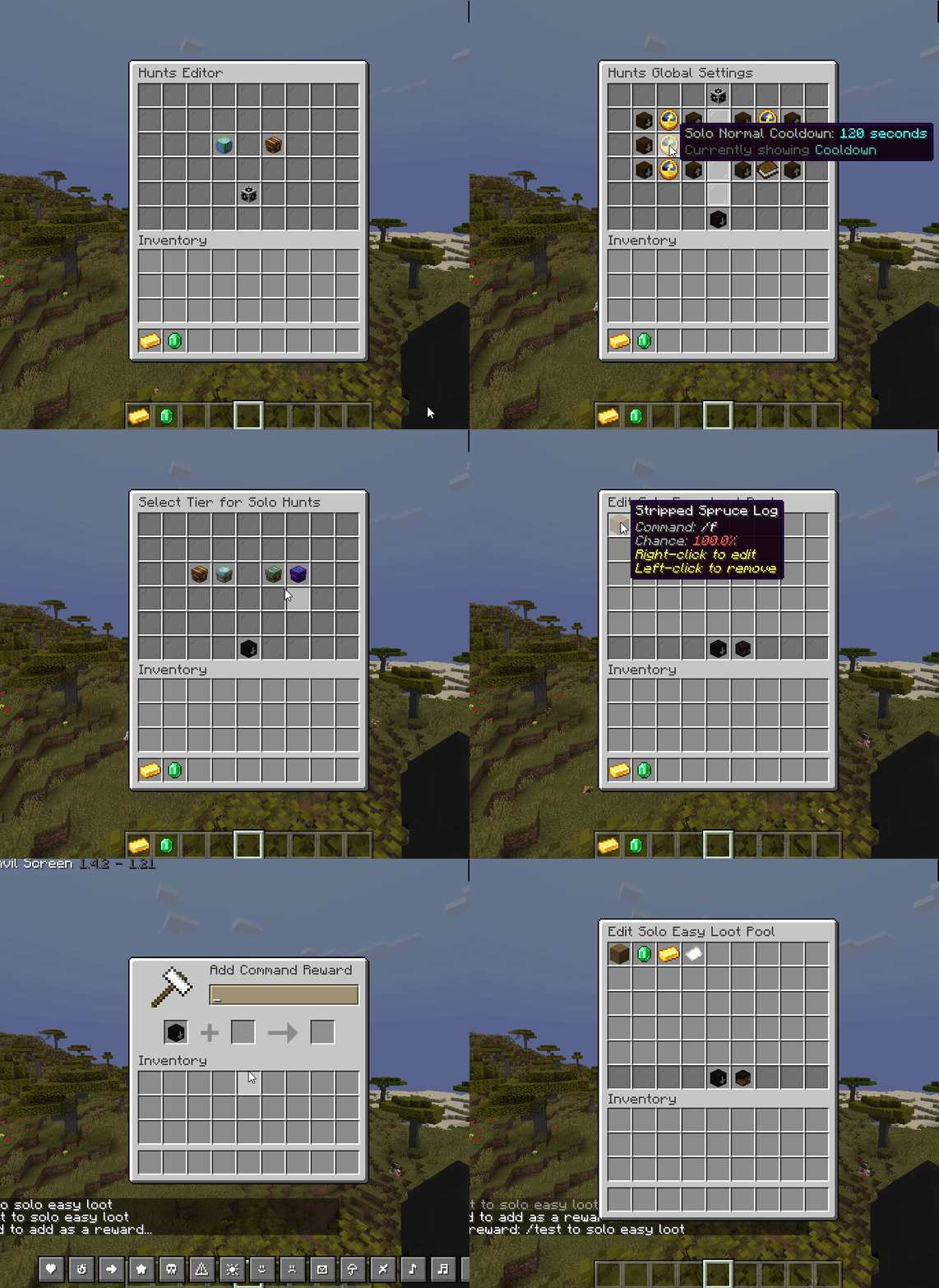 Admin gui
 -
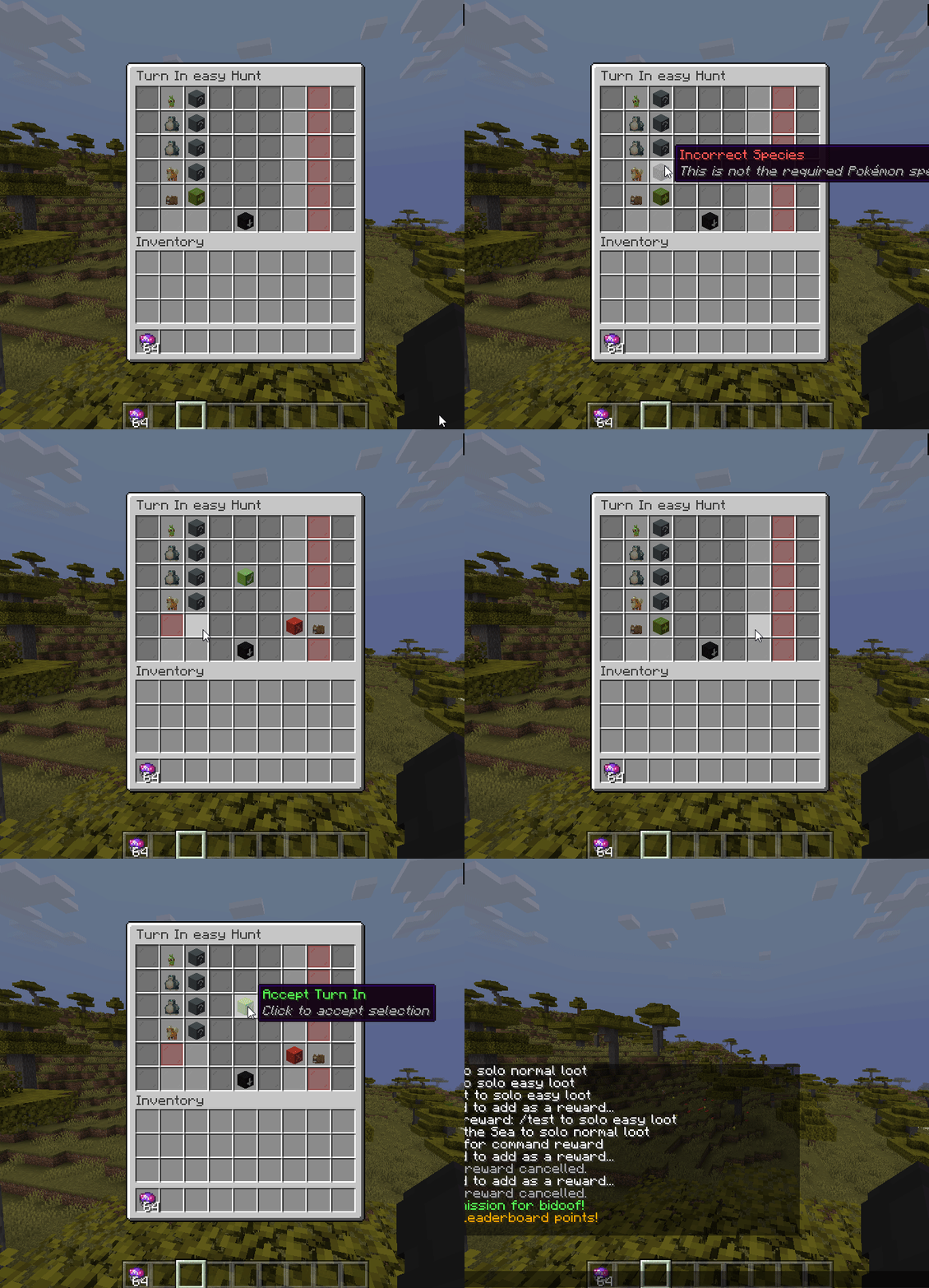 Easy turn in gui
 -
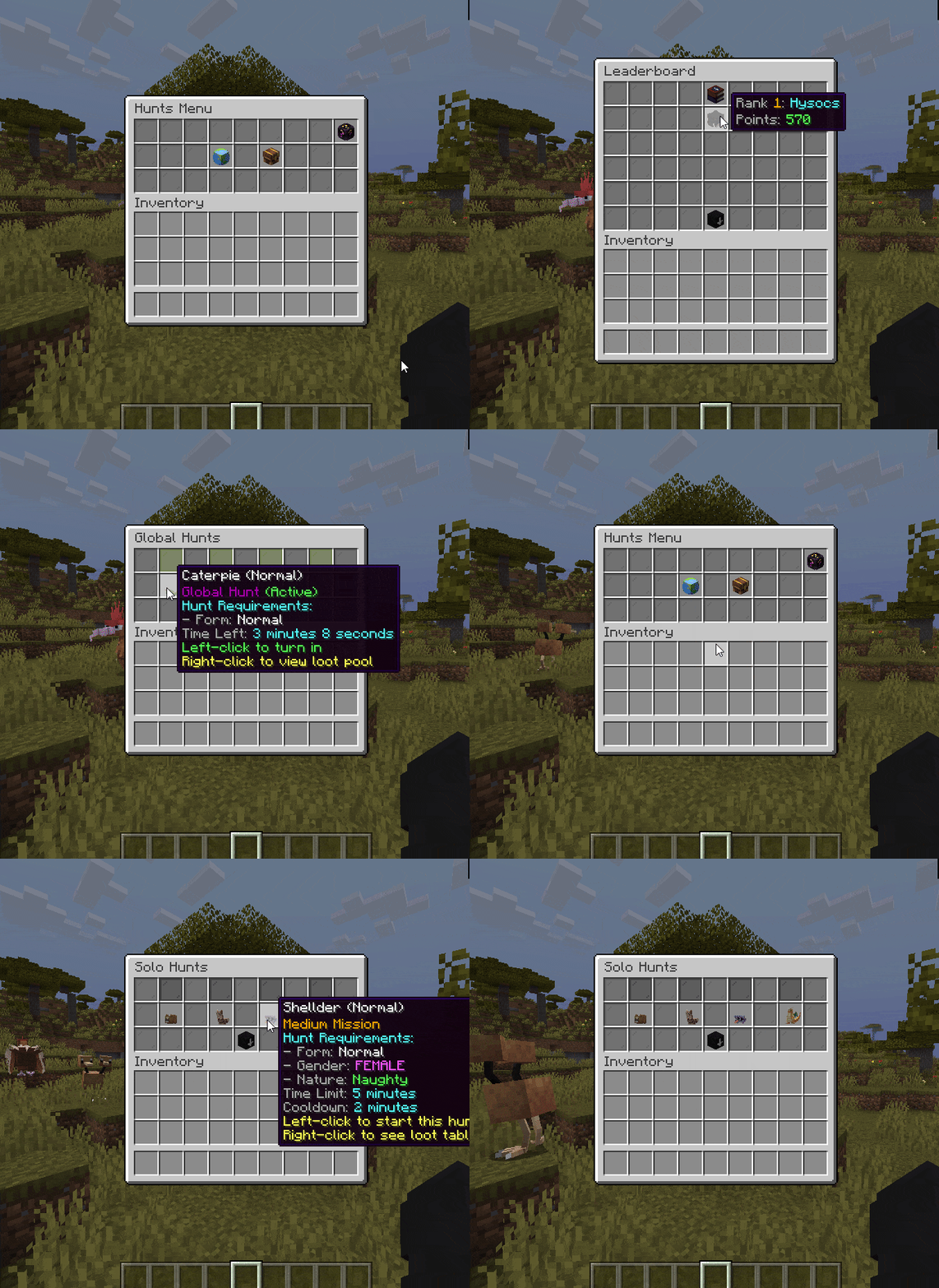 User hunts gui
Versions
Files
Relations
Project Relations
More like this
Similar Mods
Suggestions use data such as tags, dependencies, dependents, descriptions, titles, and more to rank how much they overlap with this mod.
On ModDex
Community snapshot
By the numbers
Statistics
Want to reach Minecraft players?
We're looking for a server hosting partner to feature here and other parts of the site. Interested? Send us a message!
Get in touchGet it on
Available Platforms
On ModDex
Community snapshot
By the numbers