
Community listing page, reviews may not be monitored by the author.
Cobblemon Economy


No reviews yet
Addon for Cobblemon to add : Pokedollars and PCO, Customisable Shops and Customisable Quests

Community voices
Reviews
No reviews yet. Be the first to review this project!
Get it on
Available Platforms
Compatibility
Supported Environments
Must be installed on both the client and the server.
About
Project Details
For authors
Embed Badge
If you're the author of this project, you can embed a live badge anywhere that supports HTML or Markdown. It updates automatically whenever ratings change.
Use HTML for any page that supports it, or Markdown for README files and Markdown-based descriptions.
Identifiers
Platform IDs
About
Description
Cobblemon Economy


Cobblemon Economy is an all-in-one economy + shop + quest layer for Cobblemon servers.
This page is a strict admin guide: install, required/optional mods, shops, skins, quantity controls, quests, JSON config examples, and current hard limits. If a behavior is not described here, do not assume it is supported.
1) Required and Optional Dependencies
Required
- Minecraft
1.21.1 - Fabric Loader
- Fabric API
- Cobblemon
1.7.1
Optional integrations
- Cobblemon Raid Dens (raid rewards +
raid_winobjectives) - Cobblemon Battle Tower / tower-style NPC setups (
tower_winobjectives) - CobbleDollars (economy bridge compatibility)
- Impactor (economy bridge compatibility)
- YAWP (NPC protection flag support)
- Placeholder API / TAB (balance placeholders)
- Star Academy (
academy) grading integration
Raid and Battle Tower notes
- Raid objectives (
raid_win): fully supported when Cobblemon Raid Dens is installed.- Integration uses Raid Dens runtime events (
RAID_BATTLE_START/RAID_END). raid_winquest progression and raid rewards are triggered from raid win events.
- Integration uses Raid Dens runtime events (
- Battle Tower objectives (
tower_win): no hard dependency required.- Detection is metadata/tag based (tower actor/entity IDs/tags).
- For custom NPC towers, use the Tower Tagger (
/eco item) to applytour_de_combattag for reliable detection.
2) Installation
- Drop
cobblemon-economy-<version>.jarintomods/. - Start server once.
- Edit files in
world/config/cobblemon-economy/. - Use
/eco reloadafter JSON edits (full restart is safest after major changes).
What /eco reload does:
- Reloads
config.json,shops.json,quests.json,quest_npcs.json, andquest_boards_bindings.json.
What /eco reload does not do:
- It does not replace missing dependencies.
- It is not a substitute for a restart after adding/removing mods.
3) Files and What They Do
Per world folder:
world/config/cobblemon-economy/config.json-> global economy settings.world/config/cobblemon-economy/shops.json-> all shop definitions.world/config/cobblemon-economy/quests.json-> all quest definitions.world/config/cobblemon-economy/quest_npcs.json-> quest NPC board definitions.world/config/cobblemon-economy/quest_boards_bindings.json-> block-position to quest-board ID bindings.world/config/cobblemon-economy/milestone.json-> capture milestone rewards.world/config/cobblemon-economy/skins/*.png-> custom NPC skins.world/config/cobblemon-economy/economy.db-> economy database.world/config/cobblemon-economy/quests.db-> quest state database.
3.1) Capture reward keys in config.json
To make the reward rules easier to read, the generated config now uses explicit capture-related keys:
capture_event_base_reward- Base PokeDollar reward used when a capture payout is allowed.
- Also reused as the base for fossil revive special payouts.
capture_multi_reward- Default:
0. - Reward for repeat non-special captures of an already known species.
- If you want no reward on 2nd / 3rd / 4th normal captures, leave it at
0.
- Default:
capture_shiny_multipliercapture_radiant_multipliercapture_legendary_multipliercapture_paradox_multiplier
Exact payout behavior with default values:
- First normal capture of a new species:
capture_event_base_reward. - Re-capture of an already known normal species:
capture_multi_reward. - Re-capture of an already known shiny / radiant / legendary / paradox species: still pays through the special multiplier path.
- Capture milestone rewards are separate and come from
milestone.json. - First-time special captures use the special capture reward path and do not stack an extra normal new-species payout on top.
Special multiplier rule:
- Multipliers are direct payout factors, not
base + bonus. - Example with
capture_event_base_reward = 100andcapture_shiny_multiplier = 5: shiny payout =500. - If a Pokemon matches multiple special categories, factors are added together before multiplying.
- Example: shiny
5+ legendary10=x15total special payout.
Important scope note:
capture_multi_rewardonly affects repeat normal captures.- Fossil revive rewards are handled by the fossil event path and still use
capture_event_base_reward/ special multipliers separately.
Legacy keys are still read for compatibility:
captureRewardcapture_rewardnewDiscoveryRewardpokedex_new_species_bonus_rewardnormal_capture_reward_requires_new_pokedex_entryspecial_capture_reward_ignores_pokedex_historyshinyMultiplierradiantMultiplierlegendaryMultiplierparadoxMultiplier
When the config is rewritten, Cobblemon Economy saves the explicit key names.
Recommended strict Pokedex-only setup:
{
  "capture_event_base_reward": 100,
  "capture_multi_reward": 0
}
With that setup:
- already-known species do not pay normal capture rewards
- shiny / radiant / legendary / paradox captures still pay through their multiplier path
- only genuinely new Pokedex species pay the normal base capture reward path
3.2) Manual vs automatic files
quest_boards_bindings.jsonis normally managed by/eco questboard bindand/eco questboard unbind.- You can edit it manually, but the key format is
dimension;x;y;z. - The bind command uses the block you are currently looking at.
- If a placed
cobblemon-economy:quest_boardblock has no explicit binding, it falls back to the first entry found inquest_npcs.json. - For predictable behavior on production servers, bind every board explicitly.
4) Core Commands
Player
/balor/balance/pco/pay <player> <amount>
Admin
/eco reload/eco shop list/eco shop get <id>/eco quest list/eco questnpc list/eco questnpc get <id>/eco questboard list/eco questboard open <id>/eco questboard bind <id>/eco questboard unbind/eco skin <name>/eco item/balance <player> <add|remove|set> <amount>/pco <player> <add|remove|set> <amount>
5) Shop System (Creation, Binding, Quantity, Buy/Sell)
5.1 Create a shop in JSON
Edit shops.json:
{
  "shops": {
    "general_shop": {
      "title": "General Shop",
      "currency": "POKE",
      "skin": "shopkeeper",
      "skinModel": "steve",
      "isSellShop": false,
      "items": [
        { "id": "minecraft:diamond", "name": "Diamond", "price": 1000 },
        { "id": "cobblemon:poke_ball", "name": "Poke Ball", "price": 200 }
      ]
    }
  }
}
Important fields:
currency:POKEorPCO.skin: PNG name (without.png) fromworld/config/cobblemon-economy/skins/.skinModel:steveoralex(optional, defaultsteve).isSellShop:truefor sell mode.items: list of items/command-items.- Every shop item entry must have an
id, includingtype: "command"entries. - For
type: "command", useidas a stable internal key (example:server:vote_key), not as a real given item.
Shop item behavior (exact):
type: "item":- uses
idas the item to give/sell - supports
components - supports legacy
nbt - can also use
dropTableorlootTable
- uses
type: "command":- executes
commandonce per quantity purchased - supports
%player%placeholder only - uses
displayItem.material,displayItem.displayname, anddisplayItem.enchantEffectonly for the GUI icon - does not give a real item to the player
- executes
Not supported / do not rely on this in shops:
- Extra placeholders beyond
%player%in shop commands. displayItemchanging the real purchased item fortype: "item"entries.componentsornbtcustomizing the visual icon oftype: "command"entries.- Weighted
dropTableentries. If you need weights or advanced rolls, use a MinecraftlootTableinstead.
components JSON string rule:
- Component values are still inside JSON, so inner double quotes must be escaped.
- Example string component value:
"base" - If you forget the backslashes, the JSON file becomes invalid.
- In short: JSON outside, component payload inside, so quote escaping matters.
5.2 Bind a shop to an NPC
- Spawn NPC (
shopkeeper_spawn_eggor/summon cobblemon-economy:shopkeeper). - Run
/eco shop get <shopId>. - Right-click NPC with the setter item.
5.3 Set NPC skin
- Put skin file in
world/config/cobblemon-economy/skins/(example:nurse.png). - Run
/eco skin nurse. - Right-click NPC with the Skin Setter.
You can also define defaults in JSON per shop or quest NPC:
"skin": "nurse""skinModel": "alex"
5.4 Change buy quantity in GUI
- Middle-click cycles quantity multiplier:
1x -> 2x -> 4x -> 8x -> 16x -> 32x -> 64x. - Price updates using current selected quantity.
- Left click buys at selected quantity.
5.5 Sell shops
For a sell shop:
- set
"isSellShop": true. - players can sell matching items back.
- supports optional sell limits/cooldowns per item.
Sell matching rule:
- Matching uses the same item and the same components/custom data.
- Display name alone is not enough.
- If you sell highly customized items, the player must hold the same effective item definition.
5.6 Wildcards, loot tables, and command-item limits
- Wildcards only support
namespace:*format such asminecraft:*orcobblemon:*. - Wildcards pick one random item from that namespace when the shop entry is resolved.
- Wildcards also randomize the configured price by about
-25%to+25%. lootTablerolls once per purchased quantity.dropTablegives one random item ID per purchased quantity.- If both
lootTableanddropTableare present on the same entry,lootTablewins. dropTableentries are simple item IDs only; they do not support per-drop NBT/components/weights.dropTable,lootTable, and wildcards are best used in buy shops, not deterministic sell shops.
6) Quest System (How It Works)
Quest system uses 2 files:
quests.json= mission definitions.quest_npcs.json= which NPC/board offers which quests.
Flow:
- Player opens board.
- Accepts quest.
- Progress updates from captures/battles/raids/tower/fossil events.
- Quest becomes claimable when all objectives are complete.
- Player claims rewards.
Lifecycle rules that matter:
- A quest can only be accepted if it is in the current visible rotation for that board.
- Cancelled quests stay unavailable until the next board rotation.
- Expired active quests are also pushed to the next board rotation.
- Cancelling or expiring a quest clears its saved progress.
requiresCompletedis optional and empty by default in the bundled quest set.- If you use it, it only checks quests on the same quest-board / NPC ID.
- Cross-board prerequisite chains are not supported.
- Active / claimable quests stay pinned on the board first, then remaining slots are filled from the current rotation.
7) quests.json (Exact Authoring Guide)
Top-level key must be quests.
{
  "quests": {
    "my_quest_id": {
      "name": "My Quest",
      "repeatPolicy": "DAILY",
      "repeatable": true,
      "timeLimitMinutes": 1440,
      "cooldownMinutes": 0,
      "requiresCompleted": [],
      "objectives": [],
      "rewards": {
        "pokedollars": 2000,
        "pco": 0,
        "commands": []
      }
    }
  }
}
Quest definition behavior:
name: display name shown on the board.repeatPolicy:DAILY= next board rotation / next reset windowALWAYS= can become available again immediately after claim unlesscooldownMinutesis setONCE= permanently locked after claim
repeatable:- optional compatibility flag
- if omitted, it defaults to
trueexcept forONCE - if you set
repeatable: false, the quest behaves like a one-time quest after claim
timeLimitMinutes:- active quest expiry timer
- when it expires, the quest is cancelled and pushed to the next board rotation
- expiry also clears objective progress for that quest
cooldownMinutes:- if
> 0, this explicit per-player cooldown is used after claim - if missing/
0, availability falls back torepeatPolicy
- if
requiresCompleted:- optional prerequisite quest IDs on the same board/NPC only
- the prerequisite is satisfied when the required quest is
COMPLETEDorCLAIMED
rewards:pokedollars,pco, andcommandscan be combined in the same quest reward
Recommended quest presets:
- Daily rotating repeatable quest:
repeatPolicy: "DAILY"repeatable: truecooldownMinutes: 0
- Repeatable quest with personal cooldown:
repeatPolicy: "ALWAYS"repeatable: truecooldownMinutes: <minutes>
- One-time progression quest:
repeatPolicy: "ONCE"repeatable: false
Objective types
capturefossil_revivebattle_winraid_wintower_win
Filter logic:
- Within the same field, values are OR-matched.
- Example:
"types": ["water", "ice"]means water OR ice.
- Example:
- Different fields stack as AND-matched.
- Example:
species + pokeball + shinymeans all three conditions must match.
- Example:
dimensionstakes priority overdimensionif both are present.
Capture/fossil filters
Use any combination:
species(array)types(array)labels(array)pokeball(array)dimension(single string) ordimensions(array)shiny(true/false)
Exact support by objective type:
capture:- supports
species,types,labels,pokeball,dimension,dimensions,shiny
- supports
fossil_revive:- supports
species,types,labels,dimension,dimensions,shiny pokeballis not available for fossils and should not be used
- supports
battle_win,raid_win,tower_win:- use
countonly - extra filters are ignored
- use
Quest reward commands:
rewards.commandsexecutes as server permission level 4.%player%is the only supported placeholder.- Blank command strings are ignored.
- Command output is suppressed; use side effects/rewards, not chat-return values.
Example: shiny Gyarados quest
{
  "quests": {
    "catch_shiny_gyarados": {
      "name": "Red Leviator",
      "repeatPolicy": "DAILY",
      "repeatable": true,
      "objectives": [
        {
          "type": "capture",
          "count": 1,
          "species": ["cobblemon:gyarados"],
          "shiny": true
        }
      ],
      "rewards": {
        "pokedollars": 15000,
        "pco": 120,
        "commands": []
      }
    }
  }
}
Yes: this setup shows a shiny Gyarados preview on the quest board.
Example: raid and tower objectives
{
  "quests": {
    "raid_runner": {
      "name": "Raid Runner",
      "repeatPolicy": "DAILY",
      "repeatable": true,
      "objectives": [
        { "type": "raid_win", "count": 3 }
      ],
      "rewards": { "pokedollars": 6000, "pco": 60, "commands": [] }
    },
    "tower_runner": {
      "name": "Tower Runner",
      "repeatPolicy": "DAILY",
      "repeatable": true,
      "objectives": [
        { "type": "tower_win", "count": 2 }
      ],
      "rewards": { "pokedollars": 5000, "pco": 80, "commands": [] }
    }
  }
}
8) quest_npcs.json (Board/NPC Definitions)
{
  "quest_npcs": {
    "safari_guide": {
      "displayName": "Safari Guide",
      "skin": "shopkeeper",
      "skinModel": "alex",
      "maxActive": 2,
      "visibleQuests": 6,
      "sharedRotation": true,
      "rotationMode": "MIDNIGHT",
      "rotationHours": 24,
      "questPool": [
        "catch_shiny_gyarados",
        "raid_runner",
        "tower_runner"
      ]
    }
  }
}
Field behavior:
maxActive: max simultaneously active quests for that NPC board.visibleQuests: keep this at6.- values below
6are raised to6 - the current board UI only has 6 card slots, so values above
6are not useful
- values below
sharedRotation:true= same selection for all players.false= per-player selection.
rotationMode:MIDNIGHT= rotates at next local server midnight.HOURS= rotates everyrotationHoursblock.
rotationHours:- only matters when
rotationModeisHOURS - minimum effective value is
1
- only matters when
questPool: quest IDs fromquests.json.- duplicate IDs are de-duplicated automatically
- pool order is not preserved on the board; the active rotation is shuffled from this pool
dialogues:- accepted in config and kept in the file
- the current custom quest board screen does not use these dialogue arrays as its main text source
- treat them as optional flavor/config data, not as the authoritative board UI copy
Board behavior notes:
- The board UI has 6 card slots total.
- If players already have active or claimable quests on that board, those cards consume slots first.
- That means a large
questPooldoes not show more than 6 cards at once.
Bind an NPC to a quest profile:
/eco questnpc list/eco questnpc get <id>- Right-click a shopkeeper NPC with the setter.
9) Main Currency Modes
Set in config.json:
{
  "main_currency": "cobeco"
}
Values:
cobeco(default)cobbledollarsimpactor
Behavior:
cobeco: CobEco DB is authoritative, with optional mirror/bridge support.cobbledollars: balance ops route to CobbleDollars.impactor: balance ops route to Impactor primary account.
10) Common JSON Mistakes (Avoid These)
- Wrong key names:
- use
types(nottypefor filters) - use
pokeball(notball) speciesmust be an array
- use
- Invalid IDs:
- use full IDs like
cobblemon:gyarados,minecraft:the_nether
- use full IDs like
objectivesmust be an array ([]) even for one objective.countmust be>= 1.repeatPolicymust beDAILY,ALWAYS, orONCE.repeatPolicy: "HOURLY"is not a supported config value. Use board rotation (rotationMode: "HOURS") orcooldownMinutesinstead.- Do not use
visibleQuests > 6expecting extra board pages; the current board screen is fixed to 6 visible cards. - Do not use
requiresCompletedto chain quests between different board IDs. - Do not expect
pokeballfilters to work onfossil_reviveobjectives. - Do not expect
battle_win,raid_win, ortower_winto filter by species/type/label; they are count-only objectives. - Do not expect shop/quest command strings to support placeholders other than
%player%. - If you changed JSON and behavior does not update, run
/eco reloador restart.
11) Integrations Summary
- Cobblemon: core capture/battle/fossil events.
- Cobblemon Raid Dens: raid win rewards +
raid_winquest progression. - Battle Tower-like systems:
tower_windetection via battle metadata/tags (use Tower Tagger for custom setups). - CobbleDollars / Impactor: compatibility bridge.
- Placeholder API / TAB: balance placeholders.
- YAWP: shopkeeper protection flag checks.
12) Support
Discord support: https://discord.gg/zxZXcaTHwe
Cobblemon Economy



Cobblemon Economy is the all-in-one economy core for Cobblemon servers. It gives you modern NPC shops, dual currencies, a full Quest NPC progression layer, and a compatibility bridge so you can keep mod compatibility while still using CobEco as your main economy.
Why Cobblemon Economy
- One economy core for your server instead of fragmented balances.
- Bridge support for CobbleDollars and Impactor, so many existing economy-dependent mods keep working.
- Main-currency switch with per-world config (
cobeco,cobbledollars,impactor). - PvE progression rewards (capture, battle, raid dens, battle tower) plus rotating quest boards.
- Production-friendly: JSON config, hot reload tools, SQLite persistence.
Discord (Support)
Join here: https://discord.gg/zxZXcaTHwe
What You Get
- PokeDollars + PCO currencies
- Buy and sell NPC shops with pagination
- Quest NPCs with configurable mission boards
- Command-based shop items (sell commands, not only items)
- Capture/discovery/battle rewards + multipliers
- Raid Dens reward compatibility
- Battle Tower PCO rewards + completion bonus
- Cross-economy bridge + API sync support
- Switchable main backend:
cobeco,cobbledollars,impactor(per world)
Quest NPC System (0.0.16)
- One NPC entity, two roles:
SHOPorQUEST(no duplicate entity type). - Per-world quest files with full data-driven behavior:
quests.json: objectives, rewards, repeatability, cooldowns, prerequisites.quest_npcs.json: NPC pool, max active quests, visible board size, rotation strategy.
- Quest objective coverage includes:
- Capture filters (
species,type,ball,dimension/dimensions, shiny, labels). - Progression events (
battle_win,raid_win,tower_win,fossil_revive).
- Capture filters (
- Reward model supports:
- Currency rewards (
pokedollars,pco) and optional command rewards per quest. - Prerequisite chains, repeat policies, time limits, and cooldown lockouts.
- Currency rewards (
- Custom quest board UX:
- Up to 4 missions visible by default (configurable per NPC).
- Detailed objective text (species/type/ball/location/shiny/labels).
- Time remaining, cooldown remaining, and clear action states.
- Rotation system:
- Shared board for all players or per-player board (configurable via
sharedRotation). - Rotation mode is exactly
MIDNIGHTorHOURS(rotationMode). MIDNIGHT: rotates on next local server midnight.HOURS: rotates everyrotationHoursblock (minimum 1).- Cancelled/expired quests can be blocked until next rotation.
- Shared board for all players or per-player board (configurable via
How To Set A Quest NPC (Summon + Bind)
- Spawn a shopkeeper NPC:
- Use the spawn egg
cobblemon-economy:shopkeeper_spawn_egg, or - Run
/summon cobblemon-economy:shopkeeper.
- Check available quest NPC profiles with
/eco questnpc list. - Get a Quest NPC setter item with
/eco questnpc get <id>. - Right-click the spawned shopkeeper with that setter to switch it to
QUESTrole and bindquestNpcId. - Optional: switch the same NPC back to a normal shop with
/eco shop get <shopId>then right-click.
- Use the spawn egg
Minimal quest_npcs.json Example
{
  "quest_npcs": {
    "safari_guide": {
      "displayName": "Safari Guide",
      "skin": "shopkeeper",
      "maxActive": 2,
      "visibleQuests": 4,
      "sharedRotation": true,
      "rotationMode": "MIDNIGHT",
      "rotationHours": 24,
      "questPool": ["safari_water_10", "safari_bug_12"]
    }
  }
}
Configuration Warning
- Configuration support is limited.
- No hand-holding for custom config troubleshooting: test changes incrementally on a staging world/server.
- If a custom setup fails, validate JSON syntax, quest IDs, npc IDs, and objective keys first.
Installation
- Put
cobblemon-economy-0.0.16.jarinmods/. - Start the server once.
- Edit
world/config/cobblemon-economy/config.json. - Restart server (or
/eco reloadfor config-only edits).
File Layout (Per World)
world/config/cobblemon-economy/config.jsonworld/config/cobblemon-economy/shops.jsonworld/config/cobblemon-economy/quests.jsonworld/config/cobblemon-economy/quest_npcs.jsonworld/config/cobblemon-economy/milestone.jsonworld/config/cobblemon-economy/economy.dbworld/config/cobblemon-economy/quests.dbworld/config/cobblemon-economy/skins/*.png
main_currency is also per-world because it lives in this world config folder.
How Each Config Works
config.json- Global economy behavior (currencies, rewards, multipliers, profiling).
- Does not need to contain shops anymore.
shops.json- All shop definitions (
title,currency,items, limits, linked shops, etc.). - Backward compatibility: if this file is missing, the mod loads legacy
config.json.shopsand auto-createsshops.json.
- All shop definitions (
quests.json- Quest definitions and objectives.
- Supports capture filters (species, type, ball,
dimensionordimensions, shiny, labels). - Supports event objectives:
battle_win,raid_win,tower_win,fossil_revive. - Per-quest control:
repeatable,repeatPolicy,cooldownMinutes,timeLimitMinutes,requiresCompleted. - Supports rewards (
pokedollars,pco, optional command list).
quest_npcs.json- Quest NPC definitions (display name, skin, dialogue lines, quest pool, max active quests).
- Board/rotation control:
visibleQuests,sharedRotation,rotationMode(MIDNIGHT/HOURS),rotationHours. - One NPC can offer a list of multiple quests via
questPool.
milestone.json- Unique-capture milestone rewards.
Quick Start (5 Minutes)
- Start server once to generate defaults.
- Open
config.jsonand set:
{
  "main_currency": "cobeco"
}
- Add one test item to any shop.
- Join server and run
/bal. - Buy/sell to confirm economy flow.
Commands
Player
/balor/balance/pco/pay <player> <amount>
Admin
/eco reload/eco shop list/eco shop get <id>/eco quest list/eco questnpc list/eco questnpc get <id>/eco skin <name>/eco item/balance <player> <add|remove|set> <amount>/pco <player> <add|remove|set> <amount>
Main Currency Modes
Configure in config.json:
{
  "main_currency": "cobeco"
}
Valid values:
cobeco(default)cobbledollarsimpactor
Behavior:
cobeco: CobEco DB is authoritative; balances are mirrored to CobbleDollars and Impactor when present, and bridge hooks keep external transactions synced back into CobEco.cobbledollars: CobEco balance operations route to CobbleDollars.impactor: CobEco balance operations route to Impactor primary currency.
In practice: you can choose CobEco as your main economy and still keep broad compatibility with mods that expect CobbleDollars/Impactor-style flows.
Rewards
Main reward keys:
battleVictoryRewardraidDenVictoryRewardcaptureRewardnewDiscoveryRewardbattleVictoryPcoRewardbattleTowerCompletionPcoBonus
Multipliers:
shinyMultiplierradiantMultiplierlegendaryMultiplierparadoxMultiplier
Milestones
File: world/config/cobblemon-economy/milestone.json
Example:
{ "10": 300, "50": 700, "100": 1500, "200": 3000 }
Shop Item Types
Standard item
{ "id": "minecraft:diamond", "name": "Diamond", "price": 1000 }
Component item
{
  "id": "academy:booster_pack",
  "name": "Booster Pack",
  "price": 200,
  "components": {
    "academy:booster_pack": "\"base\""
  }
}
Command item
{
  "type": "command",
  "command": "crate key give vote 1 %player%",
  "price": 100,
  "displayItem": {
    "material": "supplementaries:key",
    "displayname": "Vote Crate Key",
    "enchantEffect": true
  }
}
Integrations
- CobbleDollars (bridge + conversion, transaction sync support)
- Impactor (bridge + conversion, transaction sync support)
- Cobblemon Raid Dens (raid win rewards)
- Cobblemon Battle Tower (PCO rewards on tower wins + completion bonus)
- Star Academy (optional)
- Placeholder API (optional)
- YAWP (optional)
Placeholder API
Recommended namespace: cobeco
cobeco:balancecobeco:balance_symbolcobeco:pcocobeco:pco_symbol
Troubleshooting
- Command missing after update: restart server fully (not only
/eco reload). - Economy bridge not active: verify target mod is loaded and version-compatible.
- Wrong backend behavior: check
main_currencyin world config. - Existing world does not show new default quest pools: your
quests.json/quest_npcs.jsonalready exists; merge manually or regenerate after backup.
Need Help?
Discord support: https://discord.gg/zxZXcaTHwe
Acknowledgements
Thanks to Rikunji for their contributions to the project.
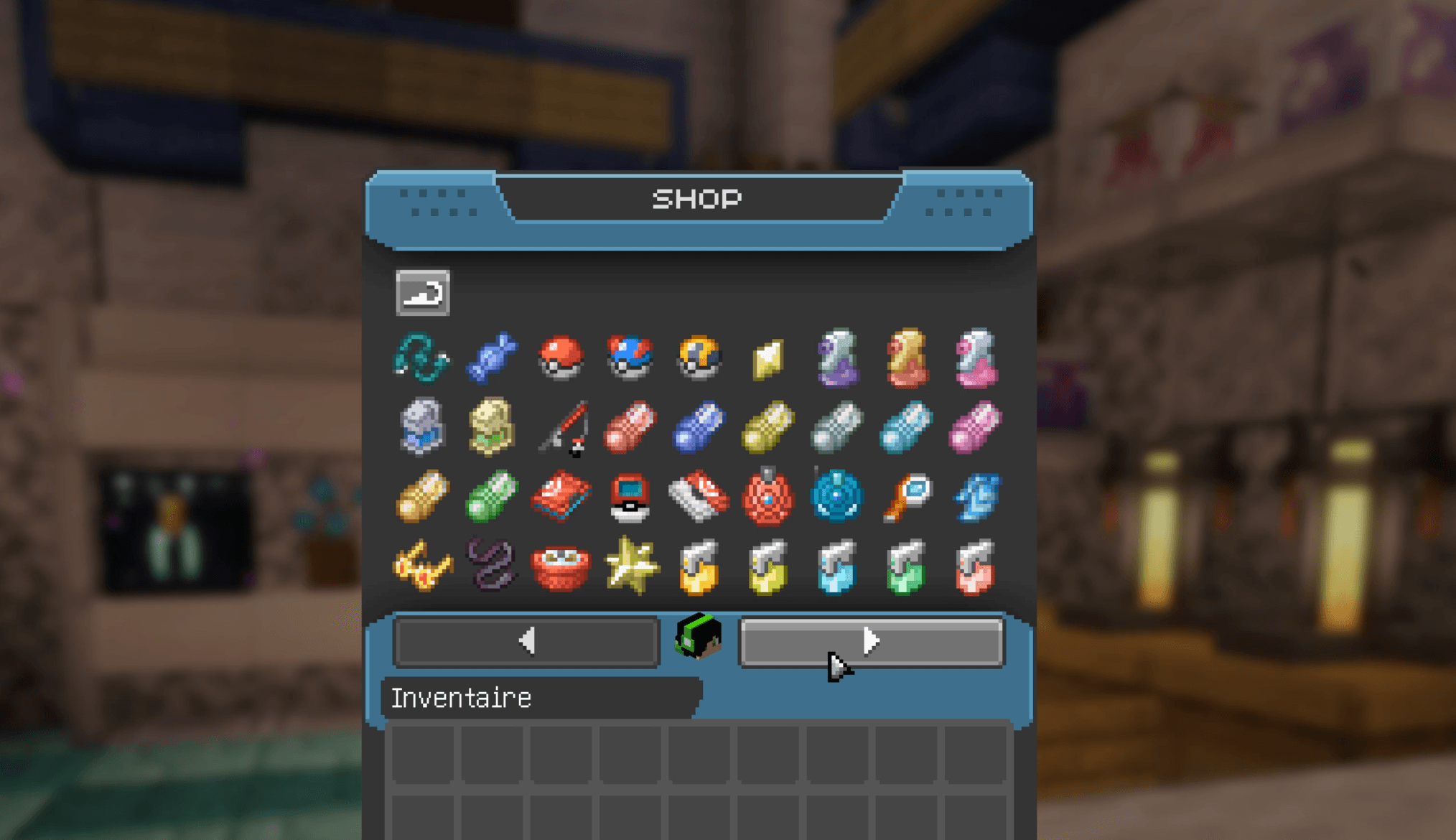
Screenshots
Gallery
-
 Capture dâeÌcran 2026-01-26 aÌ 13.10.37.png Capture dâeÌcran 2026-01-26 aÌ 13.10.37.png
 -
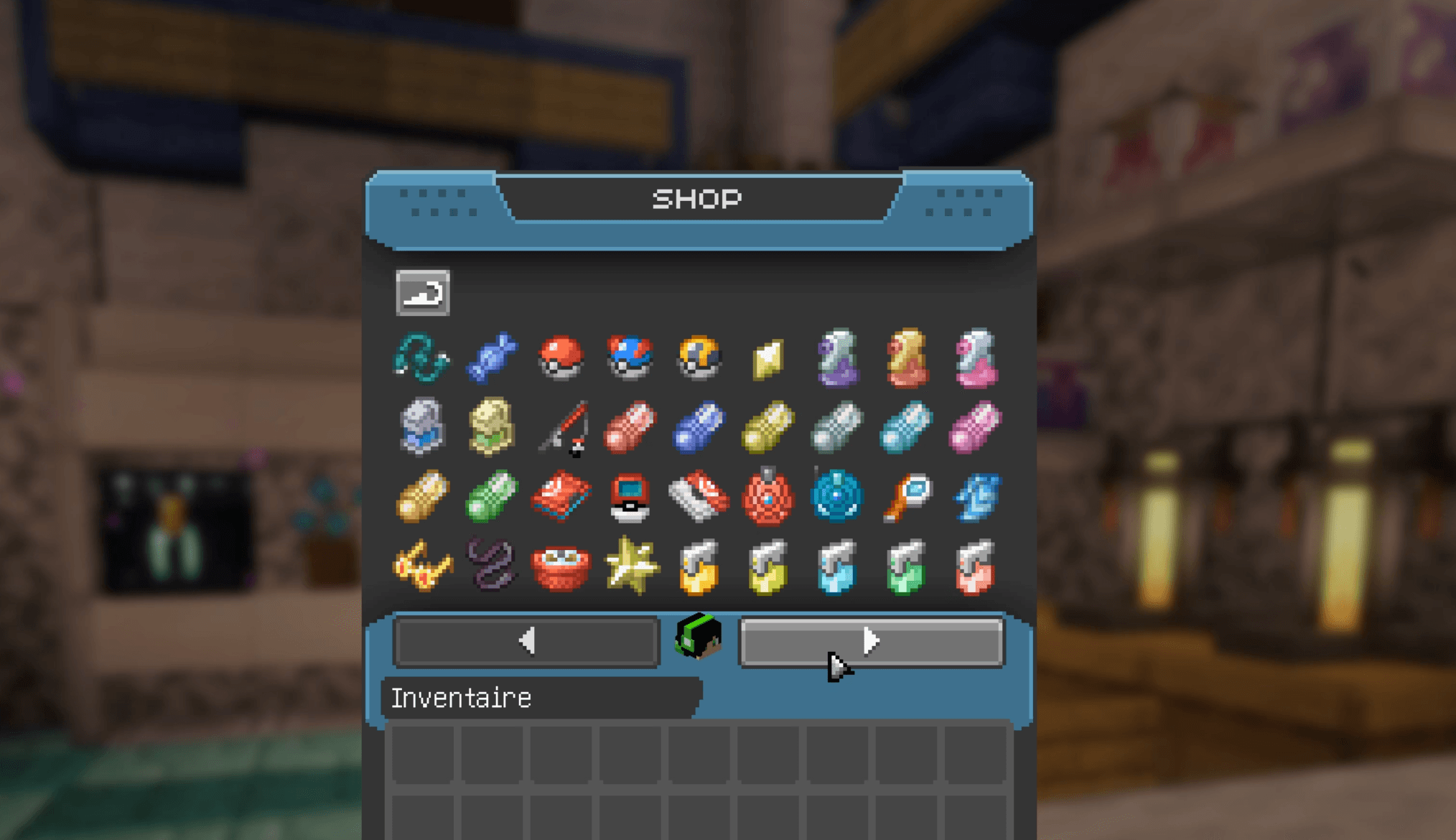 Capture dâeÌcran 2026-01-26 aÌ 13.10.55.png Capture dâeÌcran 2026-01-26 aÌ 13.10.55.png
 -
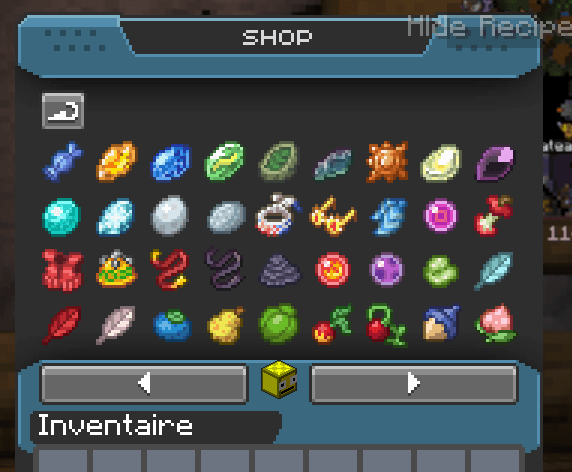 Shop.png Shop.png
 -
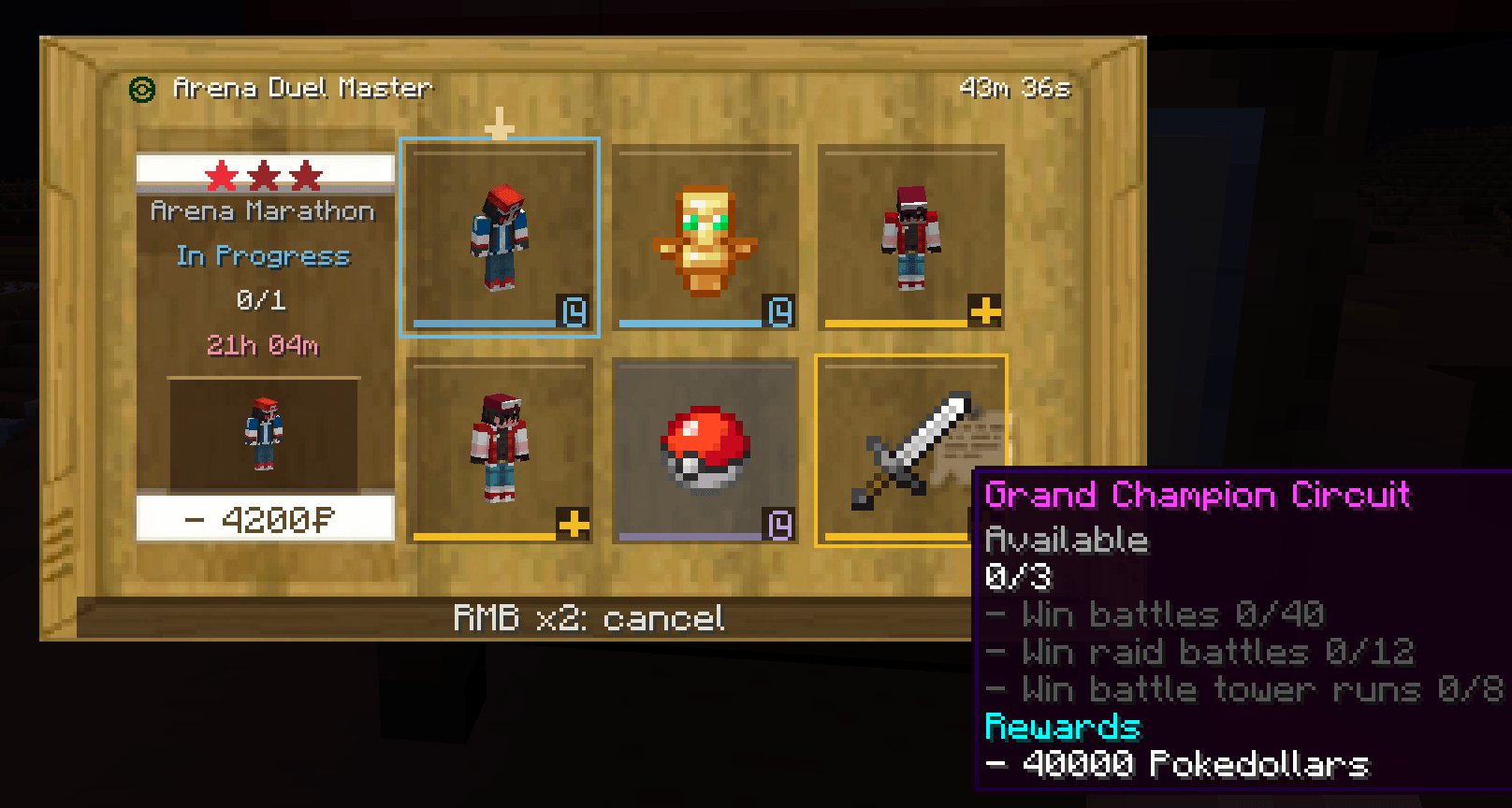 image-attachment_88e878f5-e026-4385-8646-8021411bd0da.png


Versions
Files
Relations
Project Relations
More like this
Similar Mods
Suggestions use data such as tags, dependencies, dependents, descriptions, titles, and more to rank how much they overlap with this mod.
On ModDex
Community snapshot
By the numbers
Statistics

Get it on
Available Platforms
On ModDex
Community snapshot
By the numbers