
Community listing page, reviews here may not be monitored by the author.
Command Presets

No reviews yet
This Mod is perfect for people who need help with Commands. It adds a GUI that allows people to Use presets that run commands.
Community voices
Reviews
No reviews yet. Be the first to review this project!
Get it on
Available Platforms
Compatibility
Supported Environments
Runs entirely on the client. Works on vanilla servers.
About
Project Details
For authors
Embed Badge
If you're the author of this project, you can embed a live badge anywhere that supports HTML or Markdown. It updates automatically whenever ratings change.
Use HTML for any page that supports it, or Markdown for README files and Markdown-based descriptions.
Identifiers
Platform IDs
Resources
External Links
About
Description
CommandHelper gives you an in-game menu to run common commands instantly instead of typing them out in chat every time. Just press Y to pull up a scrollable menu of shortcuts. You can change this keybind in your normal Minecraft controls settings.
Features: 32 Built-in Commands: Split into a clean, scrolling layout. Includes quick buttons for time, weather, gamemodes, item spawning, and potion effects.
100% Client-Side: You only need to install this on your own game. It works fine on servers without needing the mod installed on the server side.
Mob Purge Selector: Click "Customize Command" to open a sub-menu listing vanilla mobs. Select one to automatically run a /kill @e[type=...] command for that specific mob.
Custom Presets: Click "Create Preset" to type in your own custom command and give it a name. It saves directly to your computer so it stays there even after you close the game.
The current Preset Commands are:
- Time and Weather
- Set Day -> time set day
- Set Night -> time set night
- Clear Weather -> weather clear
- Set Thunder -> weather thunder
- Game Modes
- Creative Mode -> gamemode creative
- Survival Mode -> gamemode survival
- Adventure Mode -> gamemode adventure
- Spectator Mode -> gamemode spectator
- Player Health and Effects
- Heal and Feed -> effect give @s instant_health 1 255 and effect give @s saturation 1 255
- Kill Self -> kill
- Clear Bad Effects -> effect clear @s
- Give Fire Immunity -> effect give @s fire_resistance 9999 1
- Give Night Vision -> effect give @s night_vision 9999 1
- Give Invisibility -> effect give @s invisibility 9999 1
- Super Speed -> effect give @s speed 9999 5
- Super Jump Boost -> effect give @s jump_boost 9999 5
- Game Rules
- Keep Inventory ON -> gamerule keepInventory true
- Keep Inventory OFF -> gamerule keepInventory false
- Disable Mob Grief -> gamerule mobGriefing falseEnable
- Mob Grief -> gamerule mobGriefing trueStop
- Stop Weather Loop -> gamerule doWeatherCycle falseStart
- Items and Experience Drops
- Give 1 Diamond -> give @s diamond 1
- Give 64 Diamonds -> give @s diamond 64
- Give Netherite -> give @s netherite_ingot 1
- Give God Apple -> give @s enchanted_golden_apple 1
- Give 10 XP Levels -> xp add @s 10 levels
- Give 100 XP Levels -> xp add @s 100 levels
- Mechanics and Utilities
- Freeze Game Tick -> tick freeze
- Unfreeze Game Tick -> tick unfreezeSummon Lightning -> summon lightning_bolt
- Locate Village -> locate structure village
- Clear Inventory -> clear
Screenshots
Gallery
-
 BAnner Banner
 -
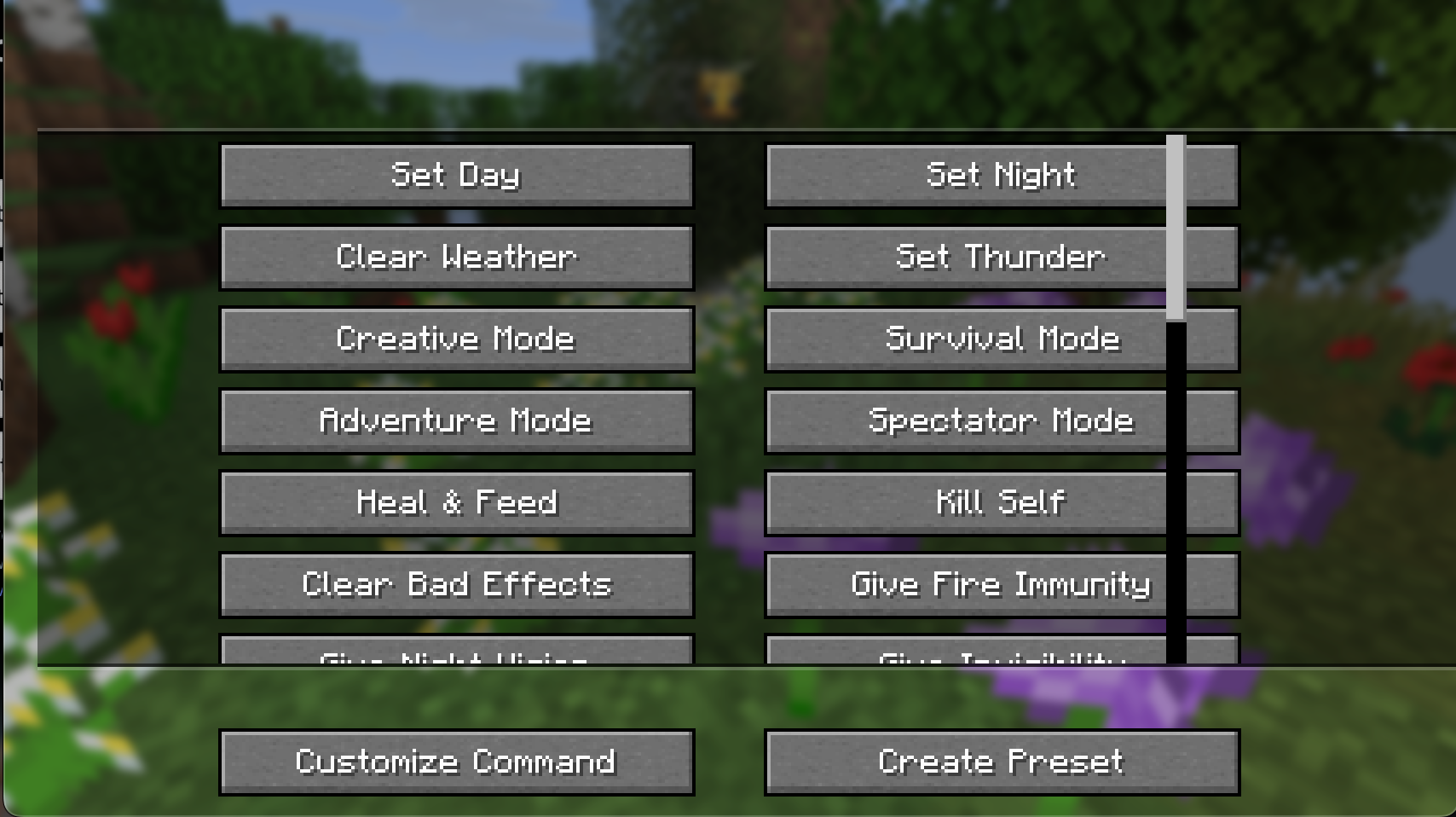 The GUI opened after pressing Y The GUI opened after pressing Y
Versions
Files
Relations
Project Relations
More like this
Similar Mods
Suggestions use data such as tags, dependencies, dependents, descriptions, titles, and more to rank how much they overlap with this mod.
On ModDex
Community snapshot
By the numbers
Statistics

Want to reach Minecraft players?
We're looking for a server hosting partner to feature here and other parts of the site. Interested? Send us a message!
Get in touchGet it on
Available Platforms
On ModDex
Community snapshot
By the numbers
Statistics
Resources