Community listing page, reviews here may not be monitored by the author.
Not Enough Keys - Voice Commands

No reviews yet
Adds presets and voice commands to solve the keybinding problem in big modpacks
Community voices
Reviews
No reviews yet. Be the first to review this project!
Get it on
Available Platforms
About
Project Details
For authors
Embed Badge
If you're the author of this project, you can embed a live badge anywhere that supports HTML or Markdown. It updates automatically whenever ratings change.
Use HTML for any page that supports it, or Markdown for README files and Markdown-based descriptions.
Identifiers
Platform IDs
About
Description
Not Enough Keys aims to solve the problem of just too many keybinds in modern modpacks.
The mod currently provides two main features: Presets and Voice Commands
Presets
The mod allows you to differentiate between 10 presets. Each preset has its own set of keys that are bound to keybinds.
Editing and switching between presets can be done in Minecrafts Controls-UI. First you have to expand the presets-bar by clicking on the green plus-sign. In the appearing bar you can switch between the 10 presets. When you are changing keybinds in one preset this will have no effect on the other presets.

Voice Commands
This feature allows you to add special Voice Commands. Voice Commands can be triggered by holding down the specified Push-to-talk key and speaking the commands specific rule.
Adding/editing and removing Voice Commands can be done via a GUI. This gui can be opened in two ways:
By typing "#voice" into the chat ("/voice" in 1.12)
Or the voice-command "[open] voice".
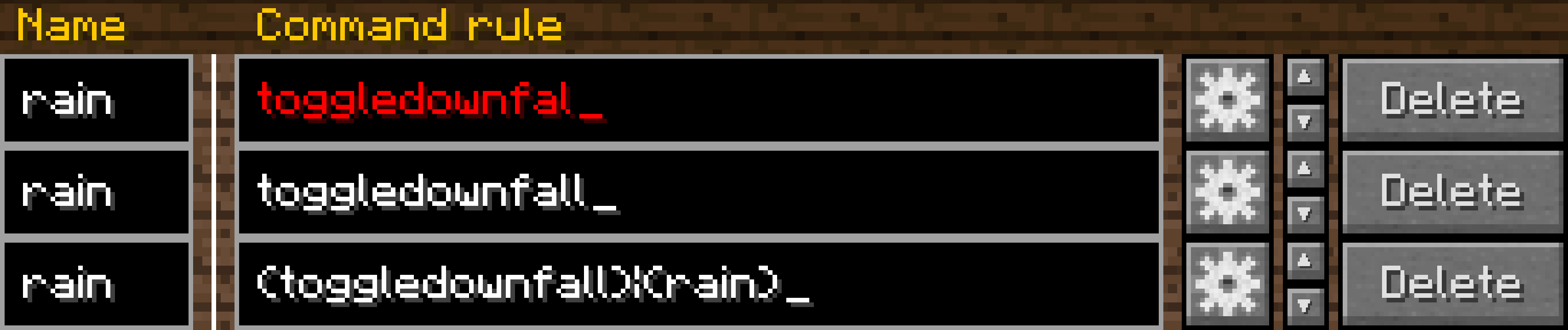
In the gui you see the list of your Voice Commands. In the first text-field of each command stands the unique name of the command (these will be used for a search function later on). In the second text field stands the rule of the command. The function of the buttons should be clear.
Command rule
The rule is the word or phrase on which this command should be triggered.
The syntay for the rules is almost the same as the Java Speech Grammar Format (JSGF) with the difference being that you don't need to write assignment ("public <abc> =") and don't have the ability to use comments.
Here are some examples of valid rules:
"rain" -> Triggers on the word rain
"let it rain" -> Triggers on the phrase
"rain|snow" -> Triggers on the word rain or snow
"(let it rain)|(let it snow)" -> Triggers on "let it rain" or "let it snow"
"[let it] rain" -> Triggers on "rain" or "let it rain"
"let it <rule1>" -> Triggers on "let it" followed by what is specified in the rule with the name "rule1"
If you use a word that is not in the dictionary (for example "wodr") or a broken syntax the text in the text field will be marked in red. The dictionary contains around 135000 words from the english language and currently around 80 minecraft specific words.
Voice Command actions
After you set a name and rule for a command you probably also want to specify the action of it. To do this you have to click on the button with the gear. In the popup that opened you can now first select the type of the action with the drop down menu at the top. After you choose the action type you can edit the settings for that type.
Heres an example for the toggledownfall command:
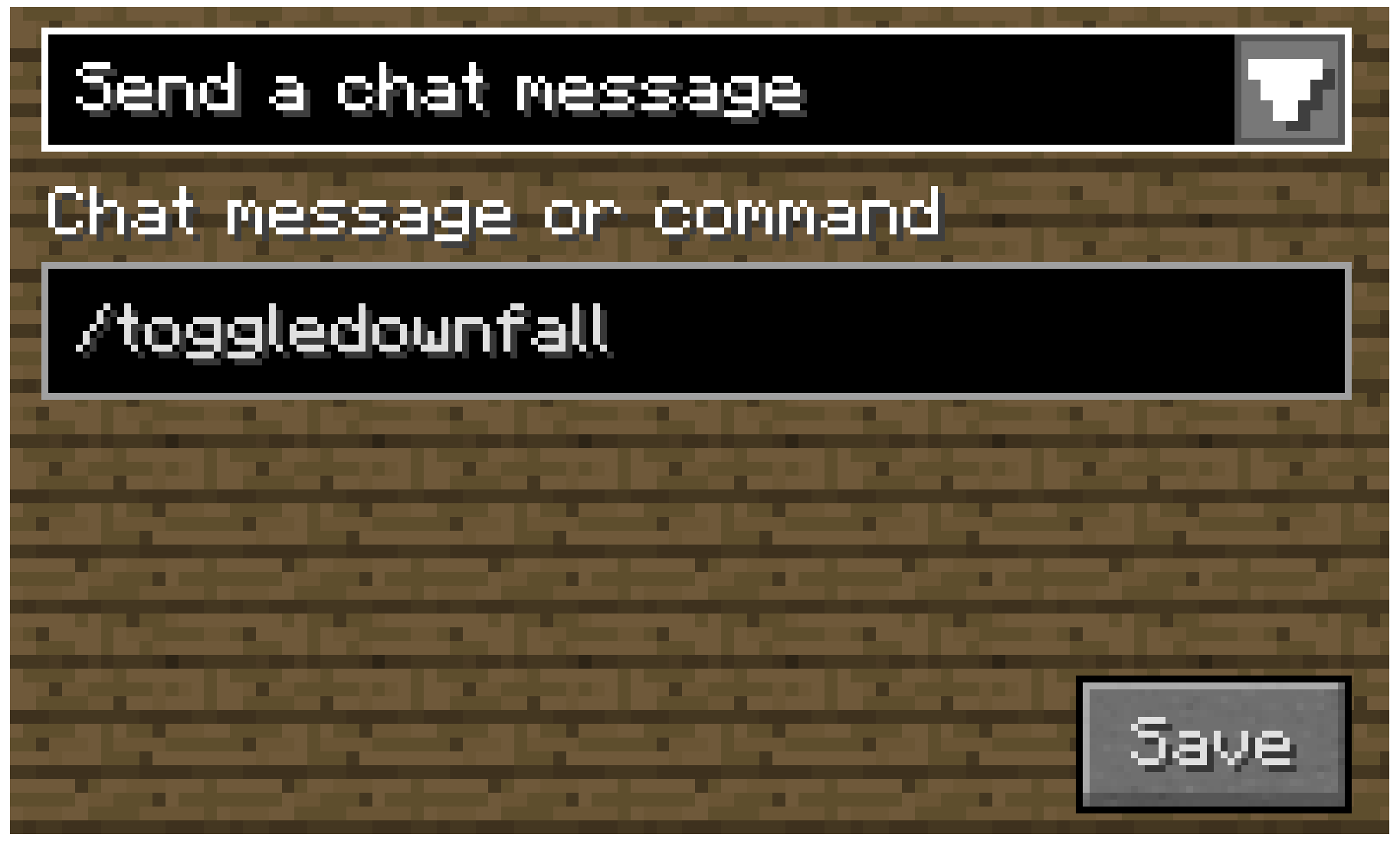
The following action types are currently implemented:
- Send a chat message / command
- Change the active controls-preset
- Press a keybinding once
- Toggle a keybinding
- Open a GUI (Inventory, Menu, Controls, Voice Commands)
- Change the selected CAD slot (Psi 1.12 and 1.16)
- Change the foci of your gauntlet (Only for Thaumcraft 1.12)
Using Voice Commands
If you now want to use a voice command you can do it like this:
- Hold down the Push-to-talk key (Left alt/option by default)
- Speak something that matches the rule of the command into your microphone
- Done
But please keep in mind that you need a somewhat decent microphone and pronounciation to get accurate results.
API
The mod also proivdes an API for other mods to add their own action types. The API not yet finished and will change in the future. Therefore a documentation of it is not yet available.
Bugs/Features
Bugs and Features request can be postet on the mods GitHub Repository issue tracker.
Please keep in mind that I can do almost nothing about inaccurate voice recognition. If you know how to improve it feel free to create a pull request.
Credits
This mod uses the open source Sphinx 4 library for the speech recognition. The source code and licence can be found on the GitHub Repository.
Screenshots
Gallery
-
Voice Command rule example
-
Voice Command action example
-
Preset example
Versions
Files
Relations
Project Relations
More like this
Similar Mods
Suggestions use data such as tags, dependencies, dependents, descriptions, titles, and more to rank how much they overlap with this mod.
On ModDex
Community snapshot
By the numbers
Statistics
Want to reach Minecraft players?
We're looking for a server hosting partner to feature here and other parts of the site. Interested? Send us a message!
Get in touchGet it on
Available Platforms
On ModDex
Community snapshot
By the numbers