Community listing page, reviews here may not be monitored by the author.
Command Tokens


No reviews yet
Create custom token items that execute commands when a player uses them

Community voices
Reviews
No reviews yet. Be the first to review this project!
Get it on
Available Platforms
Compatibility
Supported Environments
Must be installed on both the client and the server.
About
Project Details
For authors
Embed Badge
If you're the author of this project, you can embed a live badge anywhere that supports HTML or Markdown. It updates automatically whenever ratings change.
Use HTML for any page that supports it, or Markdown for README files and Markdown-based descriptions.
Identifiers
Platform IDs
Resources
External Links
About
Description
NOTE: If you are looking for a server-side alternative to this mod (that clients dont also have to install to connect to your server) - CommandTokens has been included in my server essentials mod:
Henny Essentials
Overview
CommandTokens gives the user the ability to create custom items that execute commands when a player uses them.
This mod is aimed toward server owners, modpack creators and map makers but has a wide range of uses in many scenarios.
Commands
You can use the command /commandtokens give <playername> <tokenalias> to give a token to a player.
Alternatively, you can use the Minecraft give command to give a player a token as follows:
/give <playername> commandtokens:token[custom_data={"commandtoken":"tokenAlias"}]
How to create a Token
To create a token, place this mod in your mods folder and load up a world in creative mode. If you navigate to the CommandTokens creative tab you will see 3 tokens that are created by default.
Now save and quit your world and navigate to the config directory, you will see a file called: CommandTokens.json
This is the file where you can create your custom tokens. Below is a breakdown of a "token" object:
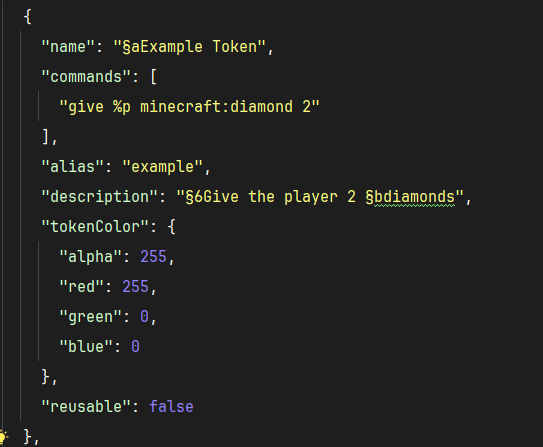
NOTE: as of V1.0.4 you can add a permission: "some.permission.node" option to tokens and it will use LuckPerms to check if player has permission to use the token. If LuckPerms is not installed, or the permission string is blank, the token will not check permissions.
Create as many of those objects as you want and place them within the "tokens": [] array in the config and the next time you load your world you will have access to these tokens.
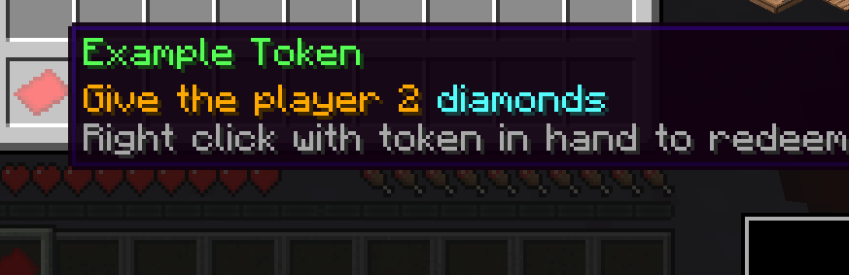
For example, the config token defined above will create this token in game:
NOTE: If you are looking for a server-side alternative to this mod (that clients dont also have to install to connect to your server) - CommandTokens has been included in my server-side essentials mod:
Henny Essentials
Overview
CommandTokens gives the user the ability to create custom items that execute commands when a player uses them.
This mod is aimed toward server owners, modpack creators and map makers but has a wide range of uses in many scenarios.
Commands
You can use the command /commandtokens give to give a token to a player.
Alternatively, you can use the Minecraft give command to give a player a token as follows:
/give commandtokens:token[custom_data={"commandtoken":"tokenAlias"}]
How to create a Token
To create a token, place this mod in your mods folder and load up a world in creative mode. If you navigate to the CommandTokens creative tab you will see 3 tokens that are created by default.
Now save and quit your world and navigate to the config directory, you will see a file called: CommandTokens.json
This is the file where you can create your custom tokens. Below is a breakdown of a "token" object:
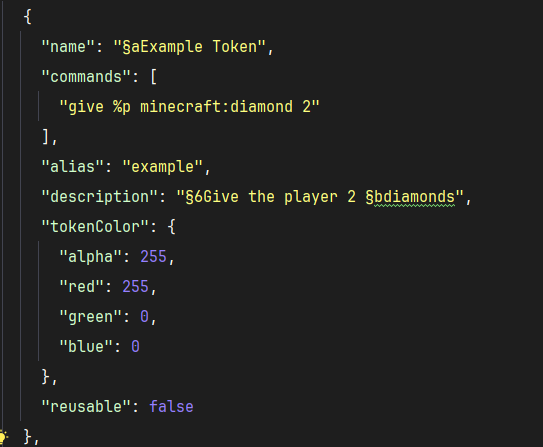
NOTE: as of V1.0.4 you can add a permission: "some.permission.node" option to tokens and it will use LuckPerms to check if player has permission to use the token. If LuckPerms is not installed, or the permission string is blank, the token will not check permissions.
Create as many of those objects as you want and place them within the "tokens": [] array in the config and the next time you load your world you will have access to these tokens.
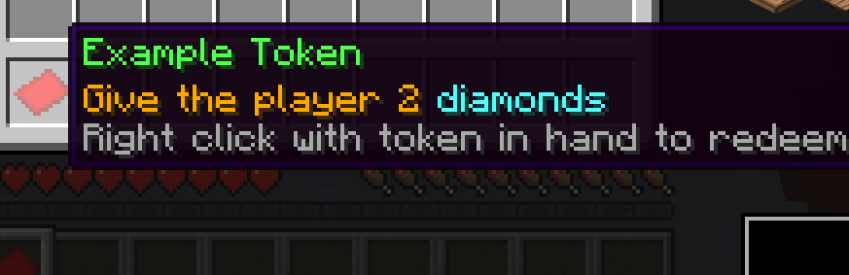
For example, the config token defined above will create this token in game:
Screenshots
Gallery
Versions
Files
Relations
Project Relations
More like this
Similar Mods
Suggestions use data such as tags, dependencies, dependents, descriptions, titles, and more to rank how much they overlap with this mod.
On ModDex
Community snapshot
By the numbers
Statistics
 (opens in a new tab)
Get it on
Available Platforms
On ModDex
Community snapshot
By the numbers
Statistics
Resources