Community listing page, reviews here may not be monitored by the author.
Craft Down Under Client Companion

No reviews yet
A client-side mod that adds multi-channel chat with tabbed channels, filtering, and context menus for CDU servers.
Community voices
Reviews
No reviews yet. Be the first to review this project!
Get it on
Available Platforms
About
Project Details
For authors
Embed Badge
If you're the author of this project, you can embed a live badge anywhere that supports HTML or Markdown. It updates automatically whenever ratings change.
Use HTML for any page that supports it, or Markdown for README files and Markdown-based descriptions.
Identifiers
Platform IDs
About
Description
Quasar Client Companion
An optional client-side mod that provides multi-channel chat and quality-of-life features for players on CDU (Play CDU) servers. It works alongside the Quasar server plugin to add a richer chat experience directly in-game.
Features
Multi-Channel Chat
- Tabbed channels — Switch between party, global, and other channels with a single click
- Channel filtering — View messages from all channels or focus on one
- Collapsible tabs — Collapse channel names to save space
- Unread indicators — Red markers show channels with new messages
Context Menus
- Right-click usernames — Quick actions such as PM, Ignore/Unignore, and admin tools
- Right-click channel tabs — Close channels or collapse/expand tabs
Chat Experience
- Custom chat UI — Cleaner layout with a scrollbar and message history
- Persistent settings — Collapsed tab state is saved between sessions
- Cross-loader support — Works on both Fabric and Forge
Server List Integration
- CDU servers in your server list — CDU servers automatically appear at the top of the Multiplayer screen with gold-styled branding
- Live from the API — Server entries are fetched from the CDU API, so new servers show up without a mod update
- Protected entries — CDU server entries can't be edited or deleted from the list
In-Game Settings
- Quasar Settings screen — Accessible via the gold "Q" button in Minecraft's Options menu
- Toggle QChat — Turn the custom chat on or off without editing config files
- Toggle network tab list players — Show or hide players from other servers on the network in your tab list
Mod Compatibility
- Chat Heads support — Player heads render next to messages in QChat channel views when the Chat Heads mod is installed
Other
- Welcome toast — A configurable welcome notification shows on the title screen after launch
- Persistent config — All settings saved to
config/quasar_client/config.jsonand persist across sessions
Requirements
- Architectury API
- CDU server running the Quasar plugin (the mod only activates when channels are available)
Installation
- Install Architectury API for your loader (Fabric or Forge)
- Place Quasar Client Companion in your
modsfolder - Join a CDU server with Quasar enabled — the custom chat will appear when you have channels
Supported Loaders
| Loader | Supported |
|---|---|
| Fabric | ✅ |
| Forge | ✅ |
Screenshots
Gallery
-
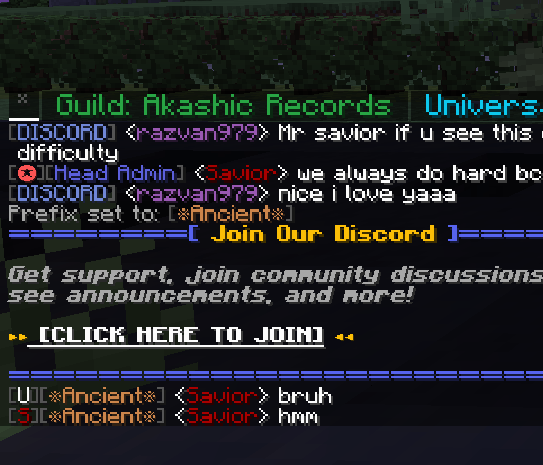 image.png image.png
Versions
Files
Relations
Project Relations
More like this
Similar Mods
Suggestions use data such as tags, dependencies, dependents, descriptions, titles, and more to rank how much they overlap with this mod.
On ModDex
Community snapshot
By the numbers
Statistics
Want to reach Minecraft players?
We're looking for a server hosting partner to feature here and other parts of the site. Interested? Send us a message!
Get in touchGet it on
Available Platforms
On ModDex
Community snapshot
By the numbers