
Community listing page, reviews here may not be monitored by the author.
Crash Guard: Client Recovery


No reviews yet
Recover from supported client-side crashes and safely return to the main menu instead of immediately closing Minecraft.
Community voices
Reviews
No reviews yet. Be the first to review this project!
Get it on
Available Platforms
Compatibility
Supported Environments
Must be installed on both the client and the server.
About
Project Details
For authors
Embed Badge
If you're the author of this project, you can embed a live badge anywhere that supports HTML or Markdown. It updates automatically whenever ratings change.
Use HTML for any page that supports it, or Markdown for README files and Markdown-based descriptions.
Identifiers
Platform IDs
About
Description
🛡️ Crash Guard: Client Recovery
Crash Guard: Client Recovery is a Minecraft 1.20.1 Forge client-side recovery mod that helps recover from certain crashes instead of immediately closing the game.
When a supported client crash occurs, Crash Guard attempts to catch the exception, generate a crash report, safely disconnect from the current world or server if necessary, and return you to the main menu with a detailed recovery screen.
The goal is not to prevent every crash, but to make supported client-side crashes easier to diagnose and recover from.
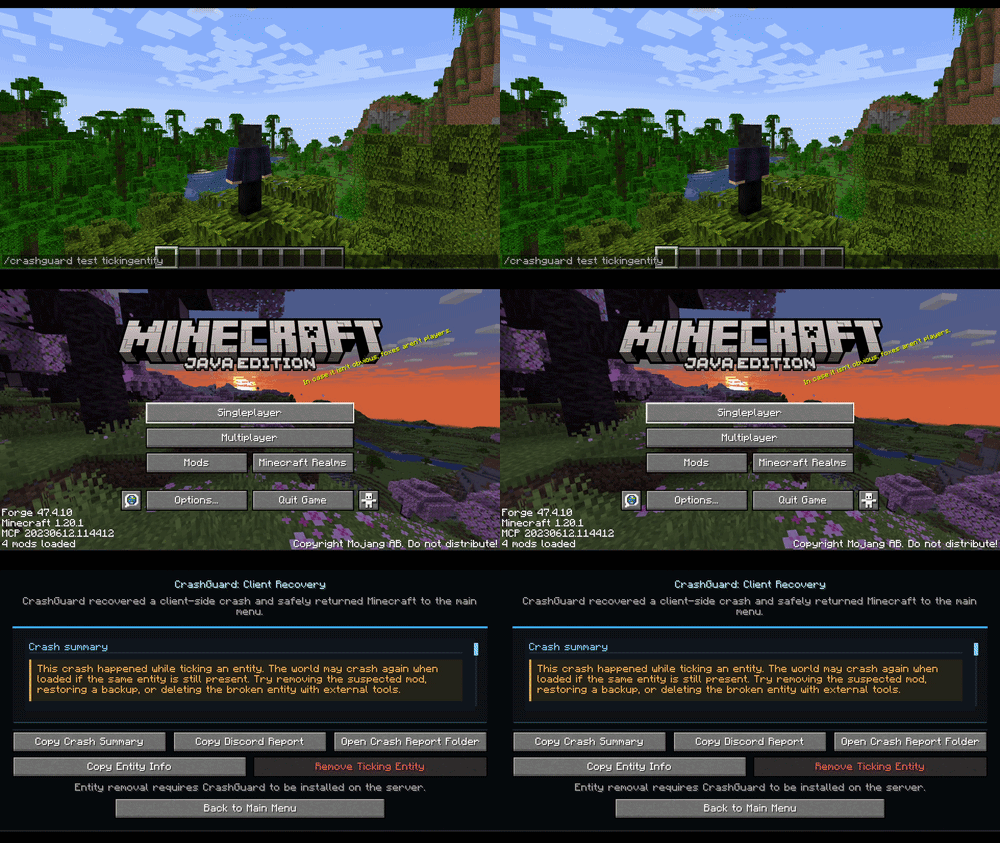
✨ Features
🛡️ Client Crash Recovery
Crash Guard can recover from several types of client-side crashes, including:
-
GUI crashes
-
Screen rendering crashes
-
Tooltip crashes
-
General rendering crashes
-
Entity rendering crashes
-
Client tick crashes
-
Ticking entity crashes
📄 Automatic Crash Reports
Whenever a crash is recovered, Crash Guard automatically:
-
Creates a dedicated crash report
-
Records exception information
-
Stores recovery details
-
Saves useful debugging information
🔍 Suspected Mod Detection
Crash Guard analyzes the stacktrace and attempts to identify the mod most likely responsible for the crash.
This can significantly reduce troubleshooting time when using large modpacks.
📋 Recovery Screen
After a successful recovery, Crash Guard displays a dedicated recovery screen showing:
-
Crash type
-
Exception class
-
Exception message
-
Suspected mod
-
Crash report location
-
Minecraft version
-
Loader information
-
Additional warnings when applicable
Available actions:
-
Copy Crash Summary
-
Copy Discord Report
-
Open Crash Report Folder
-
Return to Main Menu
⚠️ Ticking Entity Warnings
Ticking entity crashes may occur again if the problematic entity still exists in the world.
Crash Guard provides additional warnings for these situations and includes safeguards to prevent accidental entity removal.
Nothing is removed automatically.
🔒 Recovery Safety System
To prevent endless recovery loops, Crash Guard monitors how often recoveries occur during a session.
If too many recoveries happen within a short period, the mod automatically enters safe mode and stops attempting further recoveries.
⚙️ Commands
View Available Commands
/crashguard help
Check Current Status
/crashguard status
Displays:
-
Recovery status
-
Debug mode status
-
Recovery count
-
Safe mode status
🧪 Testing Recovery
Test commands are only available when debug mode is enabled.
File:
config/crashguard-client.toml
Enable:
debugMode = true
Available test commands:
-
/crashguard test gui -
/crashguard test tooltip -
/crashguard test render -
/crashguard test entityrender -
/crashguard test clienttick -
/crashguard test tickingentity -
/crashguard test suspectedmod -
/crashguard test repeat
For normal gameplay and release builds:
debugMode = false
❌ What Crash Guard Does NOT Recover
Crash Guard is not a universal crash fixer.
It does not recover from:
-
Startup crashes
-
Mod loading crashes
-
Registry crashes
-
Datapack crashes
-
JVM crashes
-
Native crashes
-
OpenGL driver crashes
-
Out of memory crashes
-
Other crashes outside supported recovery points
🔧 How It Works
Crash Guard uses Mixins to intercept specific Minecraft client methods such as rendering, GUI handling, tooltip rendering, entity rendering, and client ticking.
When a supported runtime exception occurs, Crash Guard intercepts the crash before Minecraft's normal fatal crash handler, generates a crash report, safely exits the current session, and opens the recovery screen.
🛡️ Summary
Recover from supported Minecraft client crashes, save crash reports, identify suspected mods, and safely return to the main menu instead of immediately closing the game.

This mod have been created with IntelliJ
Disclaimer about product: NOT AN OFFICIAL MINECRAFT PRODUCT. NOT APPROVED BY OR ASSOCIATED WITH MOJANG OR MICROSOFT
🛡️ Crash Guard: Client Recovery
Crash Guard: Client Recovery is a Minecraft 1.20.1 Forge client-side recovery mod that helps recover from certain crashes instead of immediately closing the game.
When a supported client crash occurs, Crash Guard attempts to catch the exception, generate a crash report, safely disconnect from the current world or server if necessary, and return you to the main menu with a detailed recovery screen.
The goal is not to prevent every crash, but to make supported client-side crashes easier to diagnose and recover from.
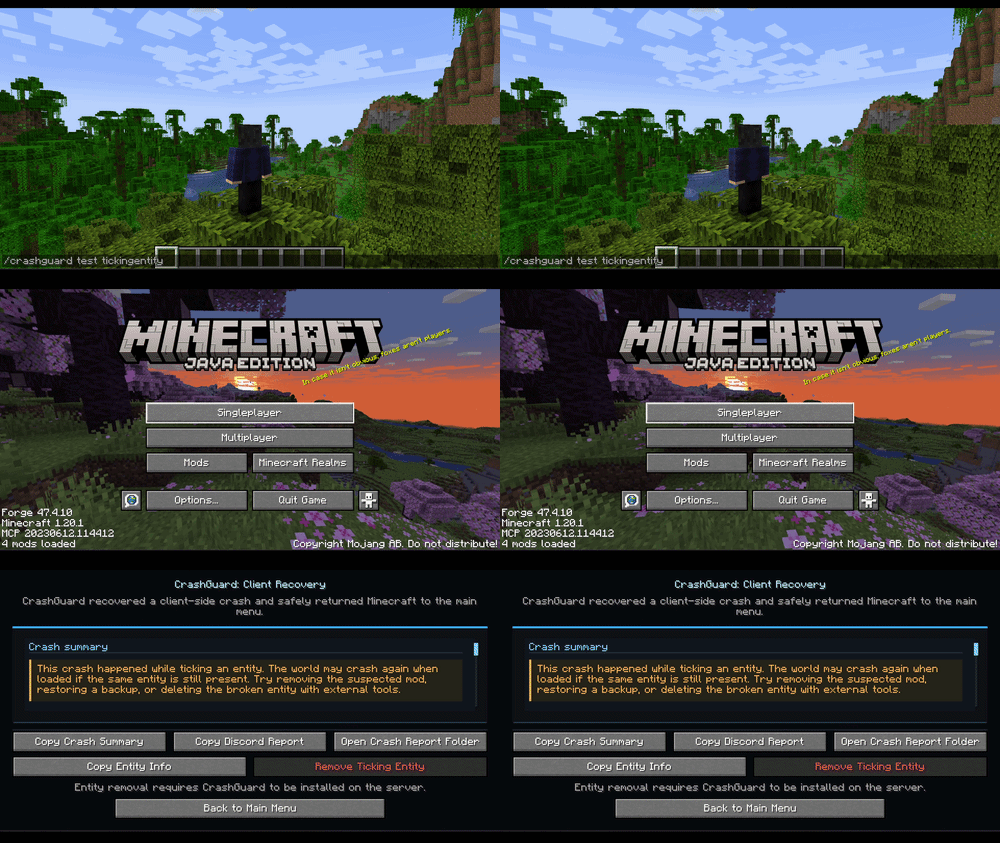
✨ Features
🛡️ Client Crash Recovery
Crash Guard can recover from several types of client-side crashes, including:
- GUI crashes
- Screen rendering crashes
- Tooltip crashes
- General rendering crashes
- Entity rendering crashes
- Client tick crashes
- Ticking entity crashes
📄 Automatic Crash Reports
Whenever a crash is recovered, Crash Guard automatically:
- Creates a dedicated crash report
- Records exception information
- Stores recovery details
- Saves useful debugging information
🔍 Suspected Mod Detection
Crash Guard analyzes the stacktrace and attempts to identify the mod most likely responsible for the crash.
This can significantly reduce troubleshooting time when using large modpacks.
📋 Recovery Screen
After a successful recovery, Crash Guard displays a dedicated recovery screen showing:
- Crash type
- Exception class
- Exception message
- Suspected mod
- Crash report location
- Minecraft version
- Loader information
- Additional warnings when applicable
Available actions:
- Copy Crash Summary
- Copy Discord Report
- Open Crash Report Folder
- Return to Main Menu
⚠️ Ticking Entity Warnings
Ticking entity crashes may occur again if the problematic entity still exists in the world.
Crash Guard provides additional warnings for these situations and includes safeguards to prevent accidental entity removal.
Nothing is removed automatically.
🔒 Recovery Safety System
To prevent endless recovery loops, Crash Guard monitors how often recoveries occur during a session.
If too many recoveries happen within a short period, the mod automatically enters safe mode and stops attempting further recoveries.
⚙️ Commands
View Available Commands
/crashguard help
Check Current Status
/crashguard status
Displays:
- Recovery status
- Debug mode status
- Recovery count
- Safe mode status
🧪 Testing Recovery
Test commands are only available when debug mode is enabled.
File:
config/crashguard-client.toml
Enable:
debugMode = true
Available test commands:
/crashguard test gui/crashguard test tooltip/crashguard test render/crashguard test entityrender/crashguard test clienttick/crashguard test tickingentity/crashguard test suspectedmod/crashguard test repeat
For normal gameplay and release builds:
debugMode = false
❌ What Crash Guard Does NOT Recover
Crash Guard is not a universal crash fixer.
It does not recover from:
- Startup crashes
- Mod loading crashes
- Registry crashes
- Datapack crashes
- JVM crashes
- Native crashes
- OpenGL driver crashes
- Out of memory crashes
- Other crashes outside supported recovery points
🔧 How It Works
Crash Guard uses Mixins to intercept specific Minecraft client methods such as rendering, GUI handling, tooltip rendering, entity rendering, and client ticking.
When a supported runtime exception occurs, Crash Guard intercepts the crash before Minecraft's normal fatal crash handler, generates a crash report, safely exits the current session, and opens the recovery screen.
🎯 Perfect For
- Players using large modpacks
- Modpack developers
- Mod developers
- Testers
- Server communities
- Anyone who wants better crash diagnostics and recovery tools
🛡️ Summary
Recover from supported Minecraft client crashes, save crash reports, identify suspected mods, and safely return to the main menu instead of immediately closing the game.

This mod have been created with IntelliJ
Disclaimer about product: NOT AN OFFICIAL MINECRAFT PRODUCT. NOT APPROVED BY OR ASSOCIATED WITH MOJANG OR MICROSOFT
Screenshots
Gallery
-
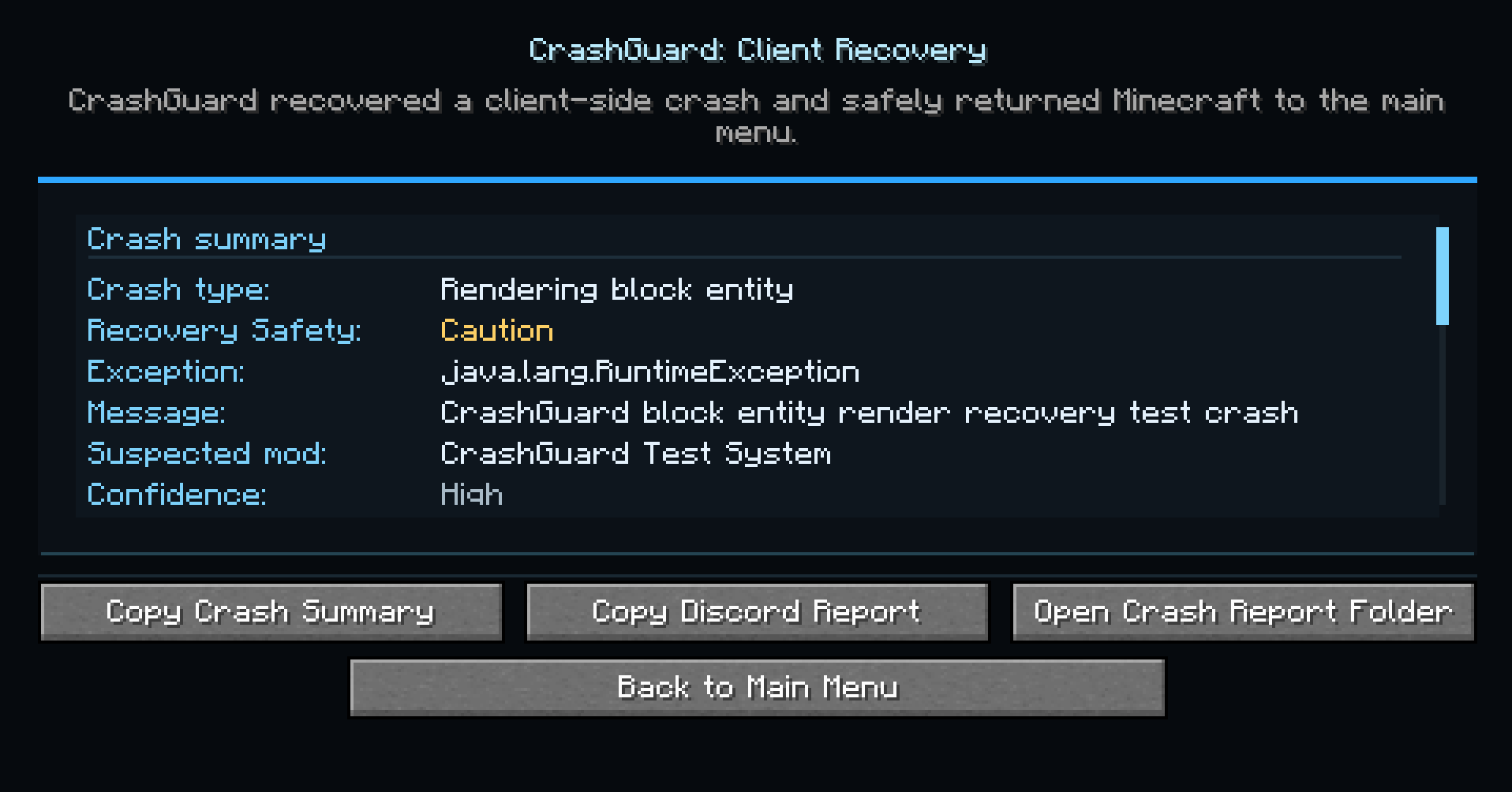 Message pop up when game crashed.png Message pop up when game crashed.png
 -
ezgif.com-video-to-gif-converter (1).gif ezgif.com-video-to-gif-converter (1).gif
-
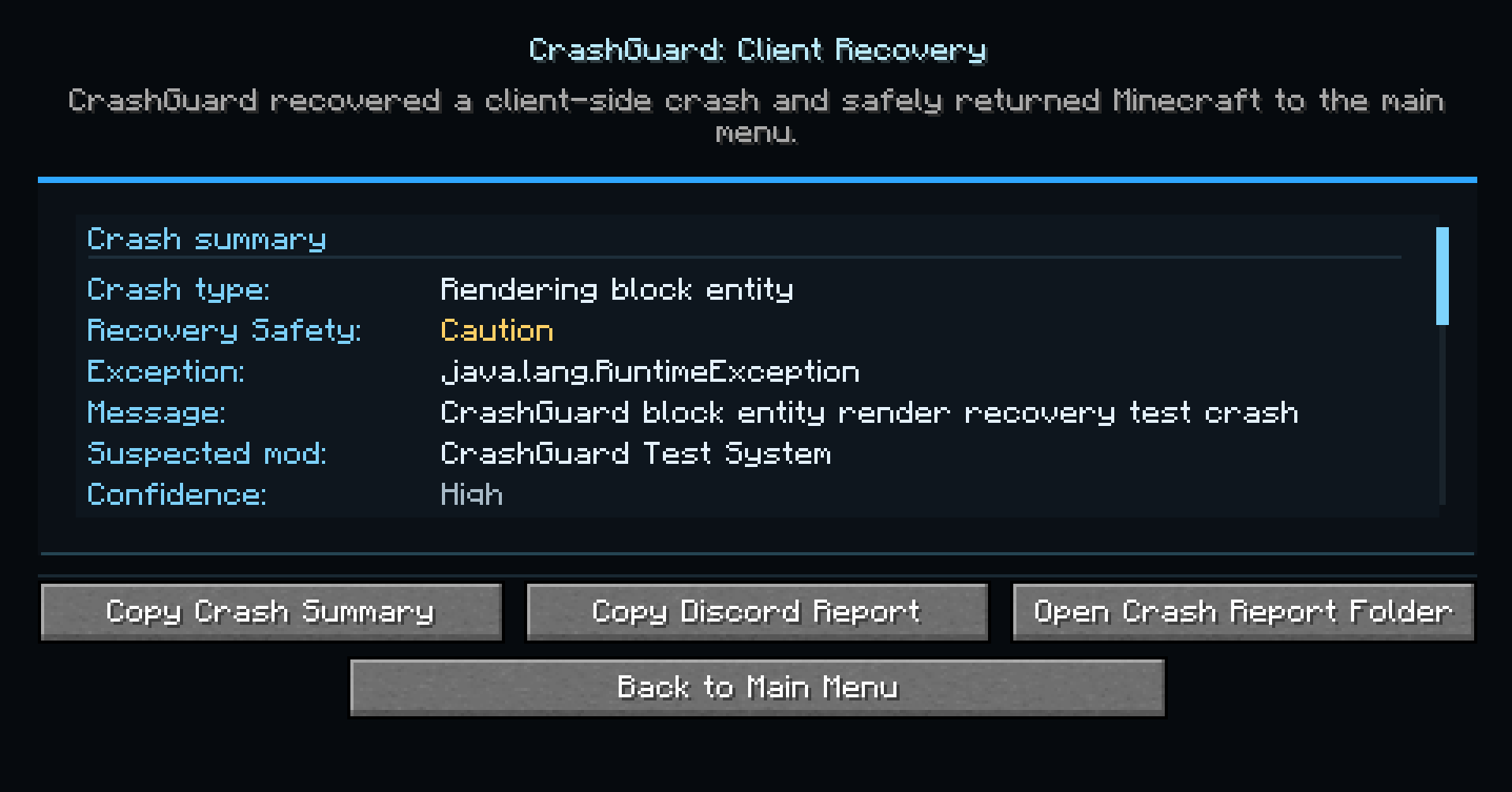 Message pop up when game crashed
 -
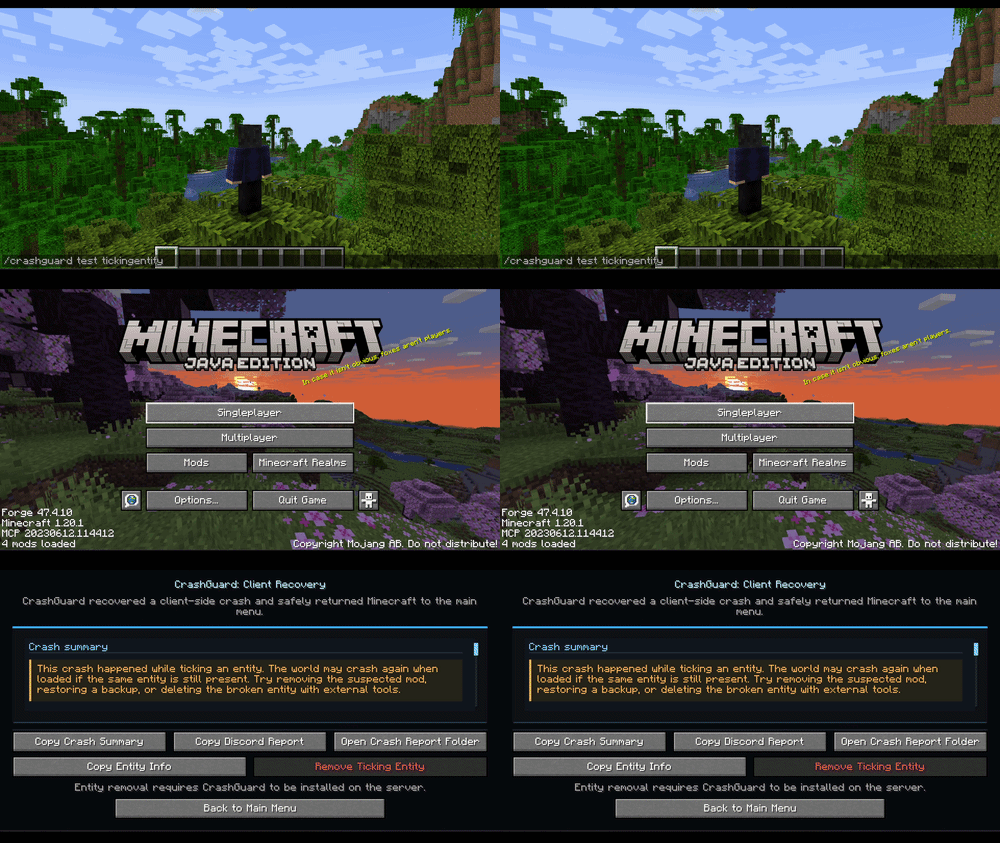 Game crashed gif
Versions
Files
Relations
Project Relations
More like this
Similar Mods
Suggestions use data such as tags, dependencies, dependents, descriptions, titles, and more to rank how much they overlap with this mod.
On ModDex
Community snapshot
By the numbers
Statistics
Want to reach Minecraft players?
We're looking for a server hosting partner to feature here and other parts of the site. Interested? Send us a message!
Get in touchGet it on
Available Platforms
On ModDex
Community snapshot
By the numbers