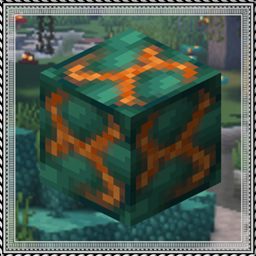
Community listing page, reviews here may not be monitored by the author.
Create: Molten Vents


No reviews yet
A renewable source of create's orestones
Community voices
Reviews
No reviews yet. Be the first to review this project!
Get it on
Available Platforms
Compatibility
Supported Environments
Must be installed on both the client and the server.
About
Project Details
For authors
Embed Badge
If you're the author of this project, you can embed a live badge anywhere that supports HTML or Markdown. It updates automatically whenever ratings change.
Use HTML for any page that supports it, or Markdown for README files and Markdown-based descriptions.
Identifiers
Platform IDs
About
Description
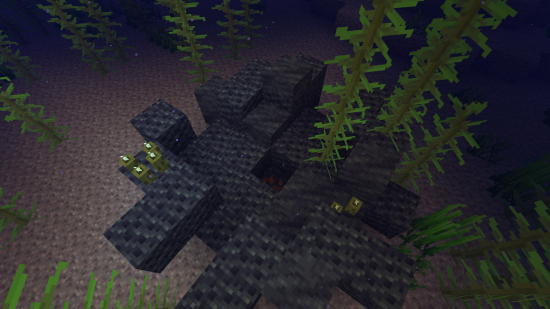
Molten Vents is a mod which adds a renewable source of the orestones found in the Create mod, and by extension the many resources that can be processed from them.
How to use:
- Locate a vent; Vents are found anywhere on the surface, but are more easily found underwater. (Configurable)
- Dig out the blocks inside of the vent until you find a block that looks like the orestones the vent is made of except with magma on it, that is the dormant orestone.
- Explode the dormant orestone by any means.
- Notice that the dormant molten vent is now an active molten vent by seeing the magma in it become brighter.
- Dump lava (preferrably via an automated method) on the active molten vent and watch as the lava turns into the corresponding orestone.
- Process the orestones into resources, or use them for building.
Default Vents:
- Veridium Vent
- Asurine Vent
- Crimsite Vent
- Ochrum Vent
- Scorchia Vent
- Scoria Vent
How to add a custom molten block
Just add the name of the block to this list (a .json file that generates in the config folder)
{"values":["asurine","veridium","crimsite","ochrum","scorchia","scoria","exampleblock"]}And then depending on your modloader:
NeoForge:
Forge:
{
  "replace": false,
  "values": [
    "examplemodthataddsblock:exampleblock",
    "molten_vents:dormant_molten_exampleblock",
    "molten_vents:active_molten_exampleblock"
  ]
}{
"replace": false,
"values": [
"minecraft:lava"
]
}Then make a resourcepack that adds the name translations, blockstates, models, and textures for "molten_vents.active_molten_exampleblock" and "molten_vents.dormant_molten_exampleblock" (optional)
How to make a custom molten vent feature
Just recreate your own copy of the placed and configured feature jsons available in the base mod in the respective directories within your own datapack: data/yourdatapackname/worldgen/configured_feature/examplevent.json data/yourdatapackname/worldgen/placed_feature/examplevent.json Then add your placed feature to the forge biome modifiers: data/yourdatapackname/forge/biome_modifier/add_vents.json
Examples are here:
Discord: https://discord.gg/HHqKa8vTAN
This mod may be used in any modpack.

Molten Vents is a mod which adds a renewable source of the orestones found in the Create mod, and by extension the many resources that can be processed from them.
How to use:
- Locate a vent; Vents are found anywhere on the surface, but are more easily found underwater. (Configurable)
- Dig out the blocks inside of the vent until you find a block that looks like the orestones the vent is made of except with magma on it, that is the dormant orestone.
- Explode the dormant orestone by any means.
- Notice that the dormant molten vent is now an active molten vent by seeing the magma in it become brighter.
- Dump lava (preferrably via an automated method) on the active molten vent and watch as the lava turns into the corresponding orestone.
- Process the orestones into resources, or use them for building.
Default Vents:
- Veridium Vent
- Asurine Vent
- Crimsite Vent
- Ochrum Vent
- Scorchia Vent
- Scoria Vent
How to add a custom molten block
Just add the name of the block to this list (a .json file that generates in the config folder)
{"values":["asurine","veridium","crimsite","ochrum","scorchia","scoria","exampleblock"]}
And then depending on your modloader:
Neoforge
- Copy paste any other file in the config/molten_vents/conductive & config/molten_vents/convertible folders.
- Rename the files to the name of the custom block.
- Change values inside the files (Conductive is a list of blocks the molten vent can convert blocks through, it must contain the active molten vent at minimum. Convertible is a list of blocks the molten vent can convert into the new block. (ex. lava -> asurine))
Forge
Make a datapack that adds these two jsons: data/molten_vents/molten_vents/blocks/conductive/exampleblock.json (You can add whatever blocks you want here but definitely include these three) ```json { "replace": false, "values": [ "examplemodthataddsblock:exampleblock", "molten_vents:dormant_molten_exampleblock", "molten_vents:active_molten_exampleblock" ] } ``` data/molten_vents/molten_vents/blocks/convertible/exampleblock.json (The lava can be changed to any other block and other blocks can be additionally added) ```json { "replace": false, "values": [ "minecraft:lava" ] } ``` Example datapack can be found in the #datapacks channel in the discord ([https://discord.gg/HHqKa8vTAN]((https://discord.gg/HHqKa8vTAN)))Then make a resourcepack that adds the name translations, blockstates, models, and textures for "molten_vents.active_molten_exampleblock" and "molten_vents.dormant_molten_exampleblock" (optional)
How to make a custom molten vent feature
Just recreate your own copy of the placed and configured feature jsons available in the base mod in the respective directories within your own datapack: data/yourdatapackname/worldgen/configured_feature/examplevent.json data/yourdatapackname/worldgen/placed_feature/examplevent.json Then add your placed feature to the forge biome modifiers: data/yourdatapackname/forge/biome_modifier/add_vents.json
Examples are here:
Discord: https://discord.gg/HHqKa8vTAN
This mod may be used in any modpack.

Screenshots
Gallery
-
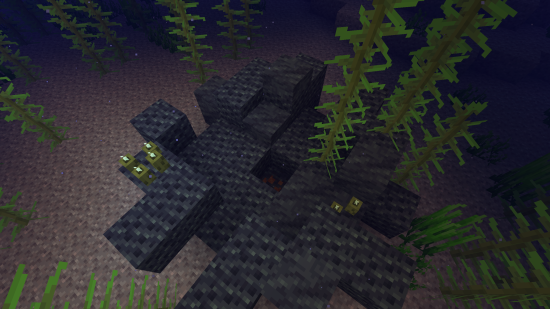 Dormant Vent Dormant Vent
-
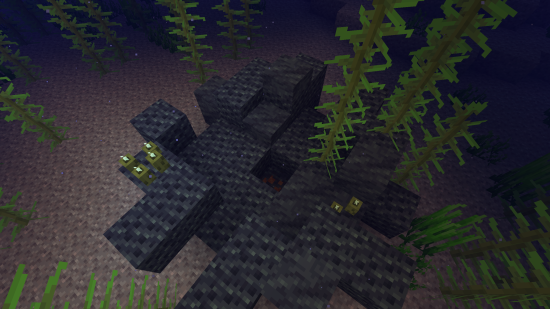 Dormant Vent Dormant Vent
Versions
Files
Relations
Project Relations
More like this
Similar Mods
Suggestions use data such as tags, dependencies, dependents, descriptions, titles, and more to rank how much they overlap with this mod.
On ModDex
Community snapshot
By the numbers
Statistics
Want to reach Minecraft players?
We're looking for a server hosting partner to feature here and other parts of the site. Interested? Send us a message!
Get in touchGet it on
Available Platforms
On ModDex
Community snapshot
By the numbers