Community listing page, reviews may not be monitored by the author.
Custom boss bar

No reviews yet
Custom boss bars for any mob: your own colors, titles, segmented styles and frame skins. Assign them per mob, mob type, hostiles or all mobs from a menu (K or /barras). Forge 1.20.1, server and client.

Community voices
Reviews
No reviews yet. Be the first to review this project!
Get it on
Available Platforms
About
Project Details
For authors
Embed Badge
If you're the author of this project, you can embed a live badge anywhere that supports HTML or Markdown. It updates automatically whenever ratings change.
Use HTML for any page that supports it, or Markdown for README files and Markdown-based descriptions.
Identifiers
Platform IDs
Resources
External Links
About
Description
Custom Boss Bars: Your Own Colors and Frames
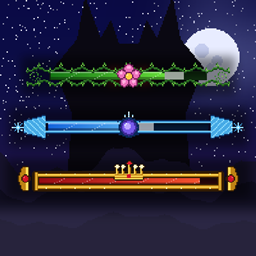
Custom Boss Bars gives any mob its own health bar. Pick the colors, the title, the style and a decorative frame, then assign the bar to one mob, a mob type, all hostile mobs or every mob, from a menu. Three frame skins are included, and you can make your own with PNG files.
Forge 1.20.1 · Required on the server and on every client (same .jar) · No other mods needed
Language note: the menus, buttons, messages and language files are in Spanish, including the English file. The button names below show the Spanish label in parentheses so you can find them in the game.
How it works
Open the menu with K (you can change the key in the Controls settings) or with the command /barras. The menu has two tabs.
Profiles create and edit bar styles, with a live preview. Each profile has:
- a title, where
%nombre%is replaced by the mob's name - five colors in hexadecimal: main, gradient end, background, border and title
- a style: solid, or segmented with 6, 10, 12 or 20 segments
- width, vision range, showing health, and "only in combat"
Assignments choose who gets which profile. The most specific rule wins:
| Rule | Applies to |
|---|---|
| Specific mob | One mob you are looking at when you open the menu |
| Mob type | A searchable list, such as zombie, creeper or villager |
| All hostile mobs | Every hostile mob |
| All mobs | Every mob |
Skins: frames with your own art
A skin is a folder in config/barrasjefe/skins/NAME/ with a frame.png (the decoration drawn over the bar), a fill.png (the bar itself), an optional back.png (the background) and a skin.json file. The Skin folder button (Carpeta de skins) opens it.
On first start, three examples are copied: enredadera (vines), espada_hielo (ice blade) and dorado (gold). To make your own, copy one folder, change the PNG files, press Reload skins (Recargar skins), choose the skin in a profile and save.
The skin.json file sets the pixel scale, the position and size of the bar inside the frame, the gap between the title and the frame, and whether the title has an outline.
Skins exist only on each player's computer. On a server, a player without the skin sees the normal colored bar.
Vanilla bars
The Vanilla bars button (Barras vanilla) shows or hides Minecraft's own boss bars, such as the Ender Dragon, the Wither and raids. They are hidden by default. The client setting ocultarBarrasVanilla controls the same thing.
Limits
- At most 4 bars are shown at once. Mobs that are attacking you come first, then the closest ones.
- Up to 64 profiles and 256 assignment rules.
- Changing profiles and rules needs operator rights (permission level 2), or being the owner of a single-player world.
- Your profiles and rules are saved with the world.
Multiplayer
Install the mod on the server (or on the LAN host) and on every client, with the same Forge version. The server decides which bars each player sees. Only the skin artwork lives on each client.
Configuration
The client setting ocultarBarrasVanilla (default: on) hides the vanilla bars. Skins are stored in config/barrasjefe/skins/.
Notes
- Skins need the client. A player without a skin still sees the colored bar, just without the frame.
- Operators only: players without operator rights get a message if they try to change profiles or rules.
- Found a bug? Report it with your Forge version and your mod list.
Screenshots
Gallery
Versions
Files
Relations
Project Relations
More like this
Similar Mods
Suggestions use data such as tags, dependencies, dependents, descriptions, titles, and more to rank how much they overlap with this mod.
On ModDex
Community snapshot
By the numbers
Statistics

Get it on
Available Platforms
On ModDex
Community snapshot
By the numbers
Statistics
Resources