Community listing page, reviews may not be monitored by the author.


Community voices
Reviews
No reviews yet. Be the first to review this project!
Get it on
Available Platforms
About
Project Details
For authors
Embed Badge
If you're the author of this project, you can embed a live badge anywhere that supports HTML or Markdown. It updates automatically whenever ratings change.
Use HTML for any page that supports it, or Markdown for README files and Markdown-based descriptions.
Identifiers
Platform IDs
Resources
External Links
About
Description
** NOT MAINTAINED ANYMORE **
There is a little probability that this mod gets revived on 1.19.2 but NO guarantee
DEFAULT ANIMATIONS PACK
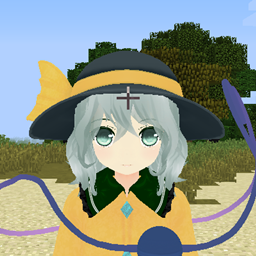
KAIMyEntity-Reborn is a maintained version of the original KAIMyEntity mod by kjkjkaistudio that lets you change default entity models (including player model) by a custom mmd model.
BE SURE TO DOWNLOAD NORMAL VERSION + KAIMyEntity_Saba.dll AND ADD THEM SIDE BY SIDE IN THE MODS FOLDER OTHERWISE IT WILL NOT WORK
** KAIMyEntity_Saba.dll will in a future be updated to proprose a threading system that is meant to improve animations loading times & gain fps **
SO STAY TUNED FOR THE NEXT UPDATE: V3.0 - The Revival
It has support for changing player model with external MMD Model (.pmx .pmd) and also support a lot of animations (.vmd):
walk
sprint
sleep
jump
idle
swingLeft
swingRight
sneak
swim
onLadder
ride
ridden
How to install?
You need minecraft 1.16.5.
Only support Windows x64.
You need to copy ".jar" file and "KAIMyEntitySaba.dll" file into your "mods" folder.
If KAIMyEntity cannot find "KAIMyEntitySaba.dll", Minecraft will crash.
If you are sure "KAIMyEntitySaba.dll" is existing, try to install "Microsoft Visual C++ 2015 Redistributable x64".
The server doesn't need "KAIMyEntitySaba.dll", but needs the ".jar" file.
How to put model and animation?
KAIMyEntity does not have its own model and animation.
In your Minecraft data folder (that has "mods" and "resourcepacks" folder), create "KAIMyEntity" folder.
This version of KAIMyEntity have been getting new features for Player model ONLY.
- New folder structure to support more flexibility & in-game model switch:
KAIMyEntity -> EntityPlayer (In this folder add any folders you want containing an mmd character but without any animations)
KAIMyEntity -> EntityPlayer_Username (same as above but used for multiplayer. Replace "Username" with your real minecraft username you use)
KAIMyEntity -> Animations (In this folder you'll have multiple folders. Firstly, you need a mandatory folder named "default" which will contains default animations belonging to all your mmd characters and can serve as a fallback. Then you'll have any folders you want (not required) that have to be named the same as the ones you've added before in your EntityPlayer & EntityPlayer_Username folders that will contains animations you want to be specific for mmd models that will override the mandatory "default" folder)
I.E: if you have a folder "Hakure Reimu" inside EntityPlayer folder and want to override the "default" mandatory animations folder inside Animations then you'll also have a folder "Hakure Reimu" inside Animations folder containing animations specific for that model.
- Now support better consistent flying and swimming animations:
You now have two different animations: flying_loop.vmd which serve when flying and in movement (and not when going up or down only anymore) AND flying_idle.vmd which serve when flying and being idle.
Also the swim animation is now played only when you swim (not just when you go into the water anymore)
- Now support for new animations:
jump.vmd which plays when jumping
swingSwordRight.vmd which plays when attacking (swinging) with a sword in main hand
- Now support for multiple skins of a mmd character
Now you have to name your model to be loaded as model0 (.pmx or .pmd) and all other skins/versions of your character are named model1,model2...
The max amount is 5 skins per model so last name is model4 (.pmx or .pmd).
By default: numpad 2 is for switching to the next model available and numpad 3 is for switching to the next skin available.
VIDEO TUTORIAL (Sorry for the low sound but that's my 10€ microphone of 2010 hehe)
Your feedback is much appreciated
Credit to: kjkjkaistudio for the original mod
Screenshots
Gallery
Versions
Files
Relations
Project Relations
More like this
Similar Mods
Suggestions use data such as tags, dependencies, dependents, descriptions, titles, and more to rank how much they overlap with this mod.
On ModDex
Community snapshot
By the numbers
Statistics

Get it on
Available Platforms
On ModDex
Community snapshot
By the numbers
Statistics
Resources