Community listing page, reviews here may not be monitored by the author.
Custom Interaction Sounds

No reviews yet
Minecraft Forge singleplayer/multiplayer mod to add custom sounds to player interactions with blocks, items and entities.

Community voices
Reviews
No reviews yet. Be the first to review this project!
Get it on
Available Platforms
About
Project Details
For authors
Embed Badge
If you're the author of this project, you can embed a live badge anywhere that supports HTML or Markdown. It updates automatically whenever ratings change.
Use HTML for any page that supports it, or Markdown for README files and Markdown-based descriptions.
Identifiers
Platform IDs
Resources
External Links
About
Description

Custom Interaction Sounds allows you to play your own custom sounds when you interact in Minecraft using the left and right click of your mouse. These sounds are played to everyone when both server and clients have the mod installed.
Usage
Holding the 'R' key while clicking brings up the menu to assign either an existing sound or a new sound from your file system to the current interaction.
The 'L' key displays a list of your interactions and their assigned sounds.
- Sounds are loaded and saved to '~Minecraft~Install~Folder~/sounds/Custom Interaction Sounds/' which is also where the interaction->sound mappings file is located(CustomInteractionSounds.json).
- Adding a sound in the game will save it within a folder named by your Minecraft account name.
- Any sound directly within '/sounds/' or a sub directory will be loaded.
- The format of sounds can be mp3, wav or ogg.
- Any sound used by someone on the server is available for everyone else to use.
Client Config
The config file for the client has the option to mute the default sounds normally played when you left or right click a block and also has the option to mute the custom sounds of other players in multiplayer.
Server Config
The config file for the server allows you to specify the length of sounds that can be played on the server. There is also the option to force all players to play the same sounds for the same interactions. This is done by merging the 'sounds' folder from a client into the 'sounds' folder of the server. The server will then be able to load the copied over mappings file and all the required sounds.
Open Source
https://github.com/zoonie/CustomInteractionSounds
Minecraft Forum Link
Screenshots
Gallery
-
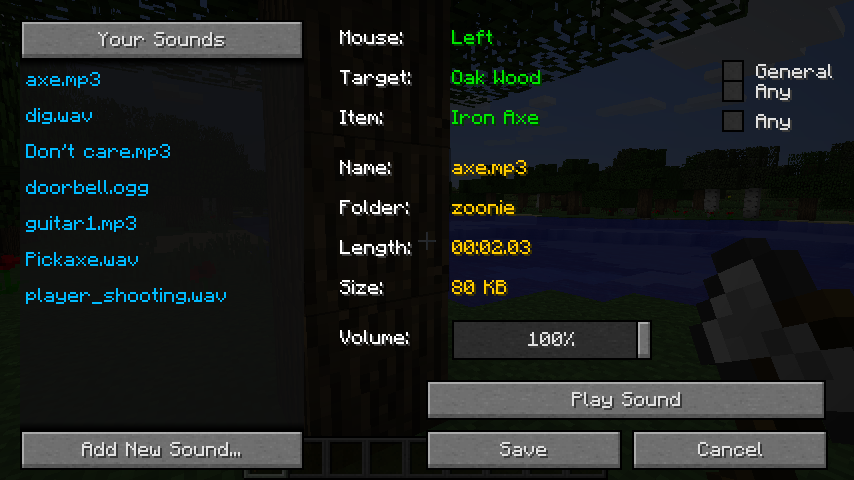 Mapping GUI
 -
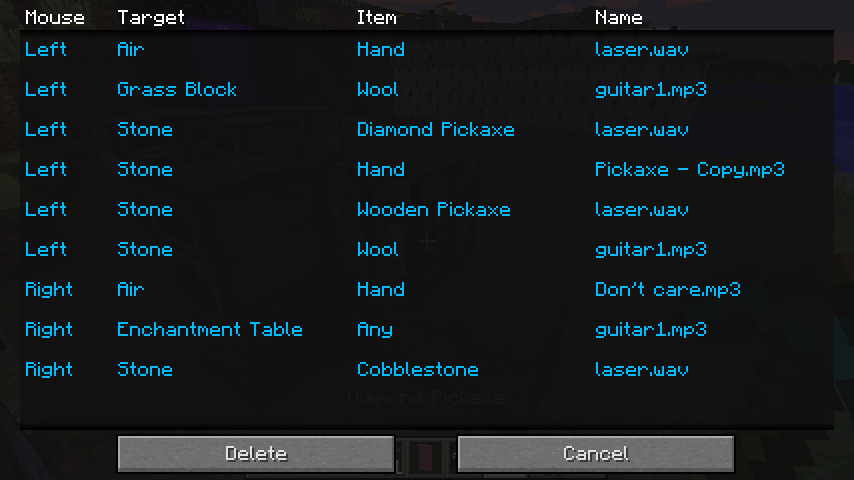 Mappings List GUI
Versions
Files
Relations
Project Relations
More like this
Similar Mods
Suggestions use data such as tags, dependencies, dependents, descriptions, titles, and more to rank how much they overlap with this mod.
On ModDex
Community snapshot
By the numbers
Statistics
 (opens in a new tab)
Get it on
Available Platforms
On ModDex
Community snapshot
By the numbers
Statistics
Resources