Community listing page, reviews here may not be monitored by the author.
GeoGradient - Climate Generator


No reviews yet
Real-world geography for Minecraft. The further you travel north or south, the colder or hotter the world becomes, with poles, equators, and seven climate bands that actually make sense.
Community voices
Reviews
No reviews yet. Be the first to review this project!
Get it on
Available Platforms
Compatibility
Supported Environments
Runs entirely on the server. Also works in singleplayer.
Must be installed on both the client and the server.
Varies by version.
About
Project Details
For authors
Embed Badge
If you're the author of this project, you can embed a live badge anywhere that supports HTML or Markdown. It updates automatically whenever ratings change.
Use HTML for any page that supports it, or Markdown for README files and Markdown-based descriptions.
Identifiers
Platform IDs
About
Description
Biomes stop being a patchwork. GeoGradient lays climate across the world in latitude bands, so you ride from equatorial jungle through temperate forest into tundra and finally polar ice, the way a real globe is arranged.
Minecraft 1.21.1 on Fabric or NeoForge, and 1.20.1 on Fabric or Forge. Needs Architectury API.
⭐ What It Does
- Climate follows latitude - hot at the equator, cold at the poles, with the full cycle repeating every two globe-widths so the world stays infinite.
- You set how big the globe is - anywhere from 1,000 to 1,000,000 blocks from a pole to the nearest equator.
- The bands are not straight lines - noise warps every border, so a coastline of climate wanders instead of ruling a stripe across the map.
- Transitions are blended, not butted together - each boundary gets a cosine-blended zone sized as a fraction of the narrower neighbor.
- Start where you want on the globe - an optional spawn latitude drops a new world at the equator, at a pole, or anywhere between.
- Terrain shape is untouched - it hooks vanilla's biome source and, when present, TerraBlender. Mountains and caves stay exactly as your other mods made them.
📋 Requirements
- Minecraft 1.21.1 on Fabric or NeoForge, and 1.20.1 on Fabric or Forge.
- Architectury API 13.0.8 or later on every loader.
- Fabric API 0.110.0 or later, Fabric Loader 0.16.9 or later, and Cloth Config API 15.0.140 or later, on Fabric.
- NeoForge 21.1 or later, on NeoForge.
📥 Installation
- Install your loader and Architectury API, plus Fabric API and Cloth Config if you are on Fabric.
- Install with the CurseForge app, or download the jar for your version and loader into your
modsfolder. - Create a world and travel north or south. The climate changes as you go.
⚙️ Configuration
Settings are read when the Overworld loads. On Fabric the file is config/geogradient.json; on NeoForge it is config/geogradient-common.toml.
| Setting | Default | What it does |
|---|---|---|
globe_size |
10,000 | Blocks from a pole to the nearest equator, 1,000 to 1,000,000. The full cycle repeats every two of these. |
border_amplitude |
200 | Maximum Z-axis warp applied to biome borders by noise, in blocks, 0 to 10,000. |
border_frequency |
0.002 | Frequency of that border noise, 0.0001 to 0.1. Lower is broader waves, higher is tighter ripples. |
spawn_latitude |
0.0 | Where a new world spawns, -1.0 at the equator to 1.0 at the north pole. 0.0 leaves spawn alone. |
blend_fraction |
0.15 | Width of the blended transition at each band boundary, 0.0 to 0.5, as a fraction of the narrower band. |
NeoForge enforces those ranges. On Fabric a value outside its range is clamped when the world loads.
🖥️ Compatibility
- Existing worlds. Chunks generated before you added the mod keep their biomes; only new columns follow the climate bands. Expect a visible seam at the edge of explored terrain.
- Client or server. It changes world generation, so it goes on the server and on every client.
- Spawn is set once. The override runs on first world load and leaves a marker in the world folder, so changing
spawn_latitudelater does not move an existing world's spawn. - TerraBlender is used when it is installed, and skipped cleanly when it is not.
- Terrain shape, caves and structures are untouched, so mods that change those work alongside it.
🐛 Support
- Leave a comment on this page.
- Include your Minecraft version, your loader and its version, the mod version, and your other mods.
📄 License
License terms are in the Alkeari License Agreement.
Biomes stop being a patchwork. GeoGradient lays climate across the world in latitude bands, so you ride from equatorial jungle through temperate forest into tundra and finally polar ice, the way a real globe is arranged.
Minecraft 1.21.1 on Fabric or NeoForge, and 1.20.1 on Fabric or Forge. Needs Architectury API.
⭐ What It Does
- Climate follows latitude - hot at the equator, cold at the poles, with the full cycle repeating every two globe-widths so the world stays infinite.
- You set how big the globe is - anywhere from 1,000 to 1,000,000 blocks from a pole to the nearest equator.
- The bands are not straight lines - noise warps every border, so a coastline of climate wanders instead of ruling a stripe across the map.
- Transitions are blended, not butted together - each boundary gets a cosine-blended zone sized as a fraction of the narrower neighbor.
- Start where you want on the globe - an optional spawn latitude drops a new world at the equator, at a pole, or anywhere between.
- Terrain shape is untouched - it hooks vanilla's biome source and, when present, TerraBlender. Mountains and caves stay exactly as your other mods made them.
📋 Requirements
- Minecraft 1.21.1 on Fabric or NeoForge, and 1.20.1 on Fabric or Forge.
- Architectury API 13.0.8 or later on every loader.
- Fabric API 0.110.0 or later, Fabric Loader 0.16.9 or later, and Cloth Config API 15.0.140 or later, on Fabric.
- NeoForge 21.1 or later, on NeoForge.
📥 Installation
- Install your loader and Architectury API, plus Fabric API and Cloth Config if you are on Fabric.
- Install with the Modrinth App, or download the jar for your version and loader into your
modsfolder. - Create a world and travel north or south. The climate changes as you go.
⚙️ Configuration
Settings are read when the Overworld loads. On Fabric the file is config/geogradient.json; on NeoForge it is config/geogradient-common.toml.
| Setting | Default | What it does |
|---|---|---|
globe_size |
10,000 | Blocks from a pole to the nearest equator, 1,000 to 1,000,000. The full cycle repeats every two of these. |
border_amplitude |
200 | Maximum Z-axis warp applied to biome borders by noise, in blocks, 0 to 10,000. |
border_frequency |
0.002 | Frequency of that border noise, 0.0001 to 0.1. Lower is broader waves, higher is tighter ripples. |
spawn_latitude |
0.0 | Where a new world spawns, -1.0 at the equator to 1.0 at the north pole. 0.0 leaves spawn alone. |
blend_fraction |
0.15 | Width of the blended transition at each band boundary, 0.0 to 0.5, as a fraction of the narrower band. |
NeoForge enforces those ranges. On Fabric a value outside its range is clamped when the world loads.
🖥️ Compatibility
- Existing worlds. Chunks generated before you added the mod keep their biomes; only new columns follow the climate bands. Expect a visible seam at the edge of explored terrain.
- Client or server. It changes world generation, so it goes on the server and on every client.
- Spawn is set once. The override runs on first world load and leaves a marker in the world folder, so changing
spawn_latitudelater does not move an existing world's spawn. - TerraBlender is used when it is installed, and skipped cleanly when it is not.
- Terrain shape, caves and structures are untouched, so mods that change those work alongside it.
🐛 Support
- Report bugs and ask questions on this mod's Nexus Mods page, where every report is tracked.
- Include your Minecraft version, your loader and its version, the mod version, and your other mods.
📄 License
License terms are in the Alkeari License Agreement.
Screenshots
Gallery
-
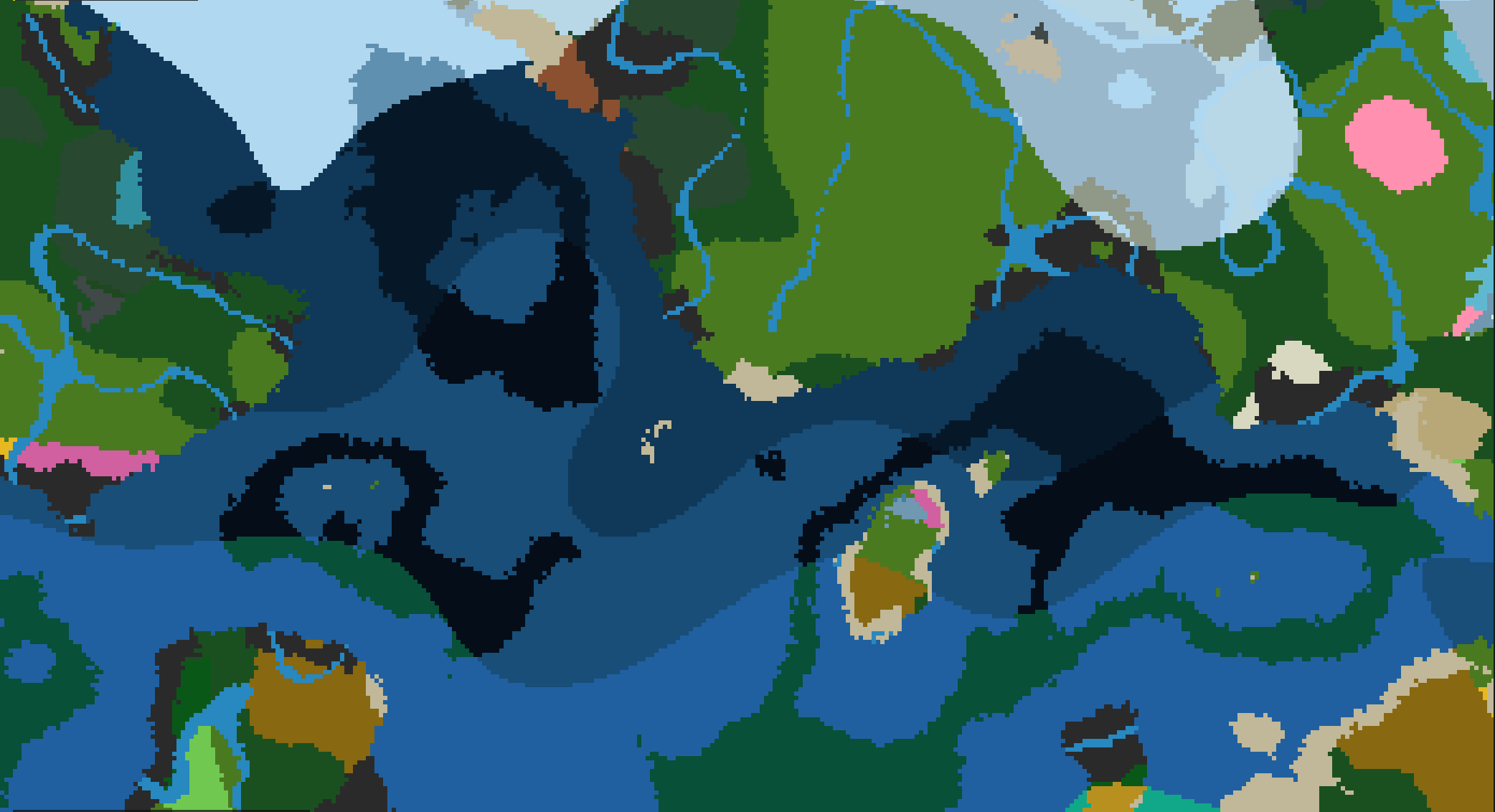 Climate Bands Biome placement climate bands viewed through the Genesis Menu.
Versions
Files
Relations
Project Relations
More like this
Similar Mods
Suggestions use data such as tags, dependencies, dependents, descriptions, titles, and more to rank how much they overlap with this mod.
On ModDex
Community snapshot
By the numbers
Statistics
Want to reach Minecraft players?
We're looking for a server hosting partner to feature here and other parts of the site. Interested? Send us a message!
Get in touchGet it on
Available Platforms
On ModDex
Community snapshot
By the numbers