Community listing page, reviews here may not be monitored by the author.
KubeJS: Create Tooltips

No reviews yet
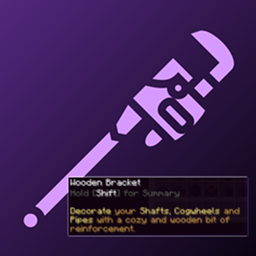
A KubeJS addon for Create that lets you register Create's rich, palette-styled tooltips on any item using a single startup script.

Community voices
Reviews
No reviews yet. Be the first to review this project!
Get it on
Available Platforms
About
Project Details
For authors
Embed Badge
If you're the author of this project, you can embed a live badge anywhere that supports HTML or Markdown. It updates automatically whenever ratings change.
Use HTML for any page that supports it, or Markdown for README files and Markdown-based descriptions.
Identifiers
Platform IDs
About
Description
KubeJS: Create Tooltips
A KubeJS addon for Create that lets you register Create's rich, palette-styled tooltips on any item using a single startup script.
No Java code, no separate lang files - just KubeJS.
Disclaimer:
This Mod and description was made with the help of AI.
Getting Started
Drop the mod JAR into your mods/ folder alongside Create and KubeJS.
Create a startup script at kubejs/startup_scripts/tooltips.js:
CreateTooltipEvents.register(event => {
  event.add('minecraft:stick', 'STANDARD_CREATE', {
    tooltip: '',
    summary: 'A simple _wooden_ stick. Very sticky.'
  })
})
Launch the game and hover over a stick while holding Shift to see the tooltip.
API
event.add(itemId, palette, text)
Registers a Create tooltip for the given item. The lang key base is derived from the item's translation key automatically.
event.addWithKey(itemId, palette, langKeyBase, text)
Same as add(), but lets you specify a custom lang key base instead of using the item's default.
Palettes
The palette parameter controls the tooltip color scheme. Valid values:
STANDARD_CREATE, BLUE, GREEN, YELLOW, RED, PURPLE, GRAY, ALL_GRAY, GRAY_AND_BLUE, GRAY_AND_WHITE, GRAY_AND_GOLD, GRAY_AND_RED
Palette names are case-insensitive.
Text Object
The text parameter is an object with the following fields. All fields are optional, but summary is required for the tooltip to display.
| Field | Shown | Description |
|---|---|---|
tooltip |
- | Detection key (required for Create to recognize the item, value not displayed) |
summary |
Hold Shift | Main description text |
condition1...conditionN |
Hold Shift | Condition labels (rendered in gray) |
behaviour1...behaviourN |
Hold Shift | Paired with conditions (supports highlight formatting) |
control1...controlN |
Hold Ctrl | Control labels (rendered in gray) |
action1...actionN |
Hold Ctrl | Paired with controls (supports highlight formatting) |
Conditions/behaviours and controls/actions are numbered sequentially starting from 1. No gaps allowed.
Highlight Formatting
Use underscores to toggle highlight color in behaviour and action text:
behaviour1: '_Burns_ for 100 ticks'
This renders "Burns" in the palette's highlight color and "for 100 ticks" in the primary color.
Full Example
CreateTooltipEvents.register(event => {
  event.add('minecraft:stick', 'STANDARD_CREATE', {
    tooltip: '',
    summary: 'A simple wooden stick with _many_ uses.',
    condition1: 'When used as fuel',
    behaviour1: '_Burns_ for 100 ticks',
    condition2: 'When crafted with flint',
    behaviour2: 'Creates _arrows_',
    control1: 'Right Click',
    action1: '_Poke_ things with it'
  })
})
VS Code Intellisense
Run /kubejs generate_typings in-game to generate TypeScript definitions. This gives you autocomplete and hover docs for CreateTooltipEvents and its methods in VS Code.
Screenshots
Gallery
Versions
Files
Relations
Project Relations
More like this
Similar Mods
Suggestions use data such as tags, dependencies, dependents, descriptions, titles, and more to rank how much they overlap with this mod.
On ModDex
Community snapshot
By the numbers
Statistics
 (opens in a new tab)
Get it on
Available Platforms
On ModDex
Community snapshot
By the numbers