Community listing page, reviews here may not be monitored by the author.
Maker's mark


No reviews yet
Allows players to place their mark on items they craft
Community voices
Reviews
No reviews yet. Be the first to review this project!
Get it on
Available Platforms
Compatibility
Supported Environments
Must be installed on both the client and the server.
About
Project Details
For authors
Embed Badge
If you're the author of this project, you can embed a live badge anywhere that supports HTML or Markdown. It updates automatically whenever ratings change.
Use HTML for any page that supports it, or Markdown for README files and Markdown-based descriptions.
Identifiers
Platform IDs
Resources
External Links
About
Description
Allows players to mark the items they craft by embellishing the tooltip of the item.
## Walkthrough
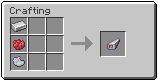
1. Craft a stamp from an iron ingot and two dyes
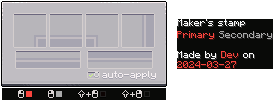
2. Right-click with the stamp in your hand to open the stamp UI
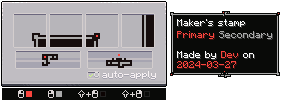
3. Draw tooltip borders and decorations in the stamp UI
4. Choose if the stamp should automatically apply to all crafted items (only works for items with durability)
5a. Craft an item in the regular workbench and it should recieve the tooltip you drew in step 3 (if the stamp is set to auto apply and is in the player inventory)
5b. Put the stamp in your main and another item in the other hand, rightclick to apply the stamp to the offhand item
Allows players to mark the items they craft by embellishing the tooltip of the item.
Walkthrough
-
Craft a stamp from an iron ingot and two dyes
-
Right-click with the stamp in your hand to open the stamp UI
-
Draw tooltip borders and decorations in the stamp UI
-
Choose if the stamp should automatically apply to all crafted items (only works for items with durability)
-
Then apply the stamp by:
- Craft an item in the regular workbench and it should recieve the tooltip you drew in step 3 (if the stamp is set to auto apply and is in the player inventory)
- Put the stamp in your main hand and another item in the offhand, rightclick to apply the stamp to the offhand item
Screenshots
Gallery
-
 stamped equipment
 -
 designed stamp
 -
 stamp ui
 -
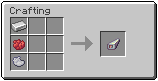 crafting
-
Crafting A maker's mark can be crafted using an iron ingot and two dyes, the dyes affect the color of the stamp.
-
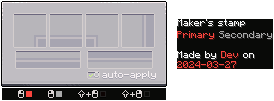
Stamp interface Using a stamp (without an item in the offhand) the UI for designing the stamp opens up. Click to paint in the boxes to design the stamp.
-
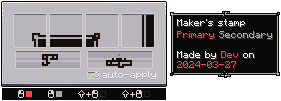
Designed stamp Once done a designed stamp might look like this.
-
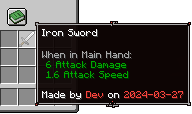
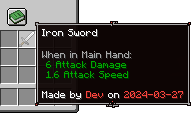
Stamped equipment Using a stamp with a piece of equipment in the other hand will stamp the equipment, changing its tooltip.
Versions
Files
Relations
Project Relations
More like this
Similar Mods
Suggestions use data such as tags, dependencies, dependents, descriptions, titles, and more to rank how much they overlap with this mod.
- Tetra Holo GUI Compat
- Scroll of Harvests
- HyperStorm's Progressive Difficulty
- Maker's Random Features(MRF)
- Freetime Maker's Aphmau
- Dune : Maker's Crysknife & More
- SSL's npc maker
- Nek's Command Maker (Client Edition)
- Nek's Command Maker (Server Side Edition)
- Riley's idea maker
- Bataran's portable portal maker
- Iron's Spellbooks Tweaks
On ModDex
Community snapshot
By the numbers
Statistics
Want to reach Minecraft players?
We're looking for a server hosting partner to feature here and other parts of the site. Interested? Send us a message!
Get in touchGet it on
Available Platforms
On ModDex
Community snapshot
By the numbers
Statistics
Resources