Community listing page, reviews here may not be monitored by the author.
Map Art Maker


No reviews yet
Paste an image link or drop a picture onto the block to craft locked vanilla map art.
Community voices
Reviews
No reviews yet. Be the first to review this project!
Get it on
Available Platforms
Compatibility
Supported Environments
Must be installed on both the client and the server.
About
Project Details
For authors
Embed Badge
If you're the author of this project, you can embed a live badge anywhere that supports HTML or Markdown. It updates automatically whenever ratings change.
Use HTML for any page that supports it, or Markdown for README files and Markdown-based descriptions.
Identifiers
Platform IDs
Resources
External Links
About
Description
Paste an image link, or drop a picture file onto the block, and get vanilla map art you can craft and place like any other map.
Vanilla maps only ever show terrain. This adds a craftable block that turns any picture into a locked filled map, ready to frame on a wall — either alone or as part of a larger grid for a mural. No admin permissions, no launcher plugin: it's a block and a recipe, built for survival.
Features
- Paste an image URL, or drag a local image file onto the block's screen — both work
- Build 1x1 up to 3x3 grids (up to 9 maps) for larger murals
- Toggle dithering on or off before creating
- Consumes empty maps from your inventory, one per output tile
- The block accepts empty maps from the top or sides and lets a hopper pull finished maps from below, so bulk runs don't need to be babysat
- Finished maps are locked, the same mechanism vanilla uses when you lock a map with glass at a cartography table, so walking around the world with one in hand never overwrites it back into real terrain
- Multiplayer-safe: finished maps are stored server-side, so every player who picks one up sees the same picture
How to use
- Craft a Map Art Maker block (3 sticks, 5 planks, 1 empty map — cartography-table shaped).
- Place empty maps in the input, then either paste an image URL or drop an image file onto the screen.
- Pick a grid size (1x1 to 3x3) and hit Create. Take the finished maps out, or let a hopper do it.
For server admins
When a URL is used, the server is the one that fetches it, so loopback, LAN, and cloud metadata addresses are refused out of the box — a player can't point the machine at your internal network. A config option opens that up if you deliberately host images somewhere private the server should reach.
Not in this version
- No clipboard image paste — only a typed/pasted URL or a dropped file work
- Dithering is a fixed algorithm you switch on or off, not a choice of algorithms
- No automatic item frame placement — you place the finished maps yourself
- No editing or deleting map art after it's created
- No Create contraption integration
No other mods are required.

Bugs and questions: comment on the CurseForge page, or DM @kuronami333 on X.
All Rights Reserved. Free to put in any modpack, on any platform, monetised or not - no permission needed, no credit required. Source is published so you can read exactly what it does: https://github.com/KURONAMI333/map-art-maker
Paste an image link, or drop a picture file onto the block, and get vanilla map art you can craft and place like any other map.
Vanilla maps only ever show terrain. This adds a craftable block that turns any picture into a locked filled map, ready to frame on a wall — either alone or as part of a larger grid for a mural. No admin permissions, no launcher plugin: it's a block and a recipe, built for survival.
Features
- Paste an image URL, or drag a local image file onto the block's screen — both work
- Build 1x1 up to 3x3 grids (up to 9 maps) for larger murals
- Toggle dithering on or off before creating
- Consumes empty maps from your inventory, one per output tile
- The block accepts empty maps from the top or sides and lets a hopper pull finished maps from below, so bulk runs don't need to be babysat
- Finished maps are locked, the same mechanism vanilla uses when you lock a map with glass at a cartography table, so walking around the world with one in hand never overwrites it back into real terrain
- Multiplayer-safe: finished maps are stored server-side, so every player who picks one up sees the same picture
How to use
- Craft a Map Art Maker block (3 sticks, 5 planks, 1 empty map — cartography-table shaped).
- Place empty maps in the input, then either paste an image URL or drop an image file onto the screen.
- Pick a grid size (1x1 to 3x3) and hit Create. Take the finished maps out, or let a hopper do it.
For server admins
When a URL is used, the server is the one that fetches it, so loopback, LAN, and cloud metadata addresses are refused out of the box — a player can't point the machine at your internal network. A config option opens that up if you deliberately host images somewhere private the server should reach.
Not in this version
- No clipboard image paste — only a typed/pasted URL or a dropped file work
- Dithering is a fixed algorithm you switch on or off, not a choice of algorithms
- No automatic item frame placement — you place the finished maps yourself
- No editing or deleting map art after it's created
- No Create contraption integration
No other mods are required.
Bugs and questions: comment on the CurseForge page, or DM @kuronami333 on X.
All Rights Reserved. Free to put in any modpack, on any platform, monetised or not - no permission needed, no credit required. Source is published so you can read exactly what it does: https://github.com/KURONAMI333/map-art-maker
Screenshots
Gallery
-
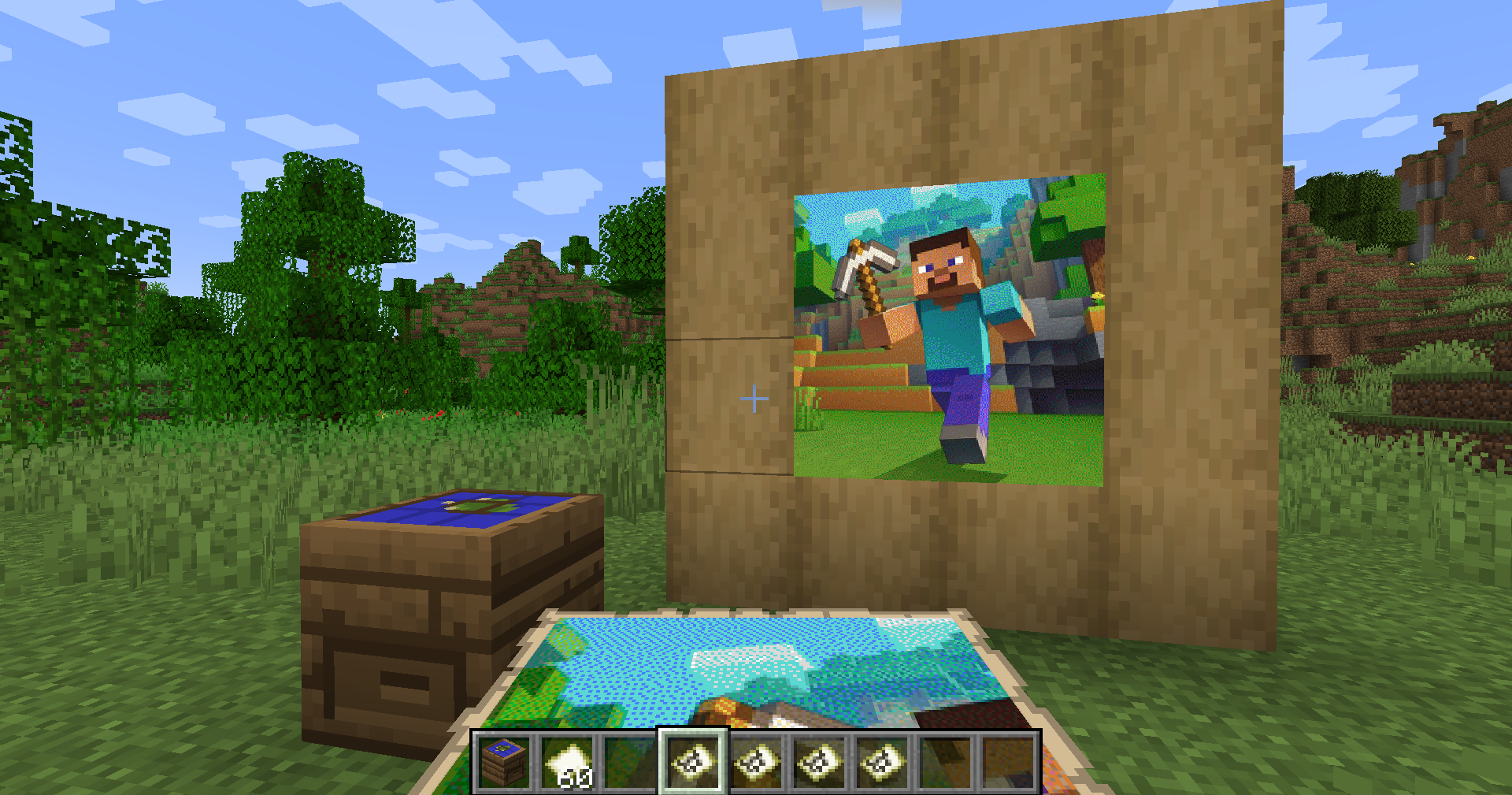 Any picture becomes map art A 2x2 grid of finished maps in item frames, made from an image link. The Map Art Maker block is in the foreground.
 -
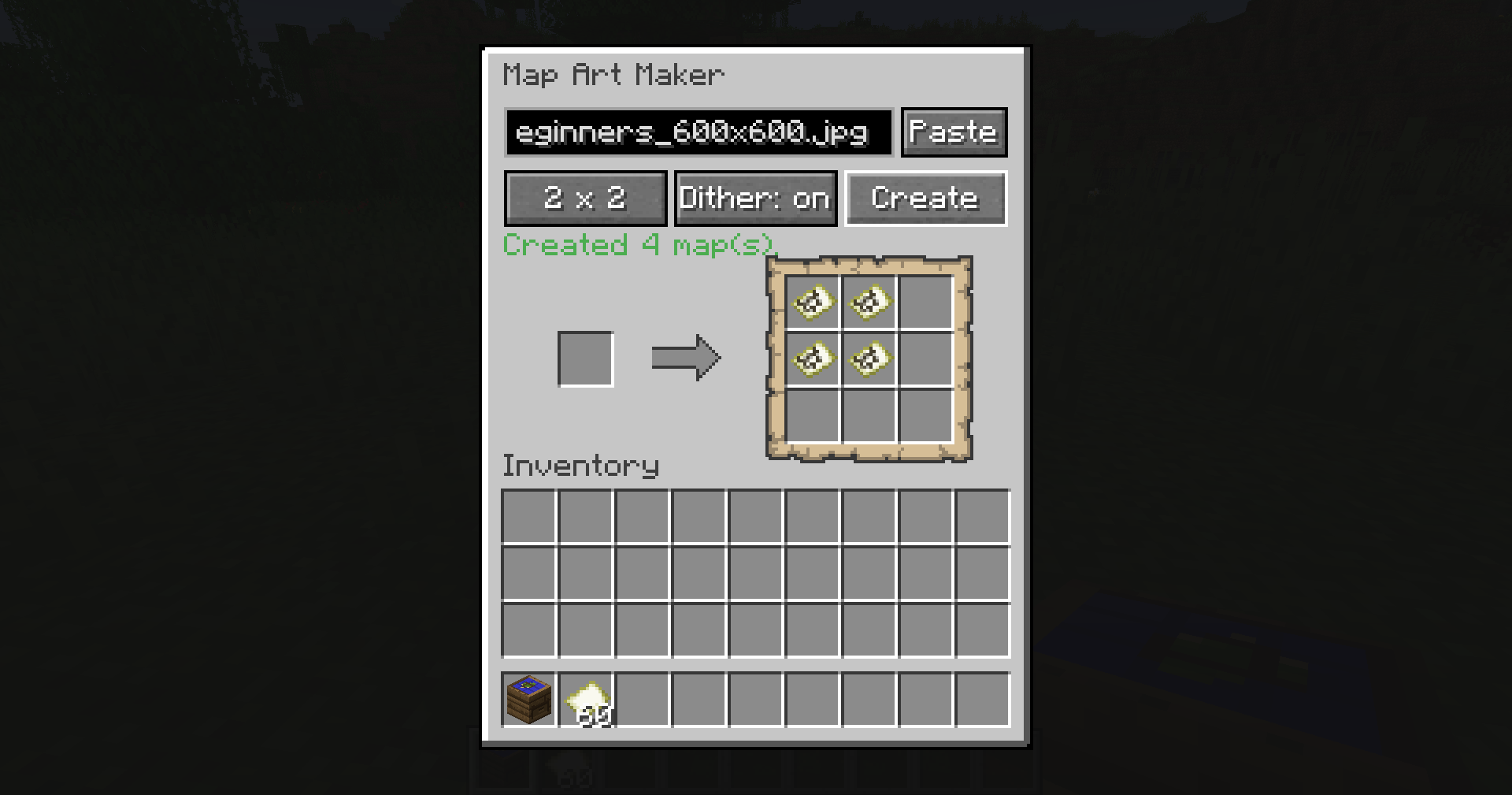 Paste a link, pick a size, hit Create The block's screen: paste an image URL or drop an image file, choose 1x1 to 3x3, and the finished maps land in the output slots.
Versions
Files
Relations
Project Relations
More like this
Similar Mods
Suggestions use data such as tags, dependencies, dependents, descriptions, titles, and more to rank how much they overlap with this mod.
On ModDex
Community snapshot
By the numbers
Statistics
Want to reach Minecraft players?
We're looking for a server hosting partner to feature here and other parts of the site. Interested? Send us a message!
Get in touchGet it on
Available Platforms
On ModDex
Community snapshot
By the numbers
Statistics
Resources