
Community listing page, reviews here may not be monitored by the author.
OtterLib


No reviews yet
A cool new simple library mod that everyone can use!
Community voices
Reviews
No reviews yet. Be the first to review this project!
Get it on
Available Platforms
Compatibility
Supported Environments
Must be installed on both the client and the server.
About
Project Details
For authors
Embed Badge
If you're the author of this project, you can embed a live badge anywhere that supports HTML or Markdown. It updates automatically whenever ratings change.
Use HTML for any page that supports it, or Markdown for README files and Markdown-based descriptions.
Identifiers
Platform IDs
About
Description
A simple library mod for minecraft, made mostly to develop my mods easier, but can be used by anyone! Currently supported loaders: Fabric, Spigot, & Paper
Use in your projects! 👍️
Want to use OtterLib in your project? You can add it as a dependency in your build.gradle file:
repositories {
    maven {
        name "oth3rMavenSnapshots"
        url "https://maven.oth3r.one/snapshots"
    }
}
Implementing on each loader, where ${project.otterlib_version} is the current version of OtterLib for the loader (e.g. 0.2.0.0+1.21.6, 0.2.0.0+1.20-1.21.6)
// fabric
modImplementation "one.oth3r:otterlib:${project.otterlib_version}-fabric"
// spigot
implementation "one.oth3r:otterlib:${project.otterlib_version}-spigot"
// paper
implementation "one.oth3r:otterlib:${project.otterlib_version}-paper"
Visit the maven repository to see more indepth information about the library, including the latest versions.
Features
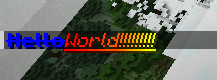
💬 Simple Chat Builder
sample usage:
player.sendMessage(new CTxT("Hello").color(Color.BLUE).bold(true).strikethrough(true)
    .append(new CTxT("World!!!!!!!!!").rainbow(new Rainbow(true)).underline(true).italic(true)).b());
in game example:
📜 Custom Language Reader
OtterLib provides a custom language reader that allows you to easily have server-side localization on all supported loaders. There is also support for a secondary location for locales for easy player overrides.
🗃️ Robust file saving and loading
Adds an interface that enables easy config file creation with support for saving, loading, and updating versions easily.
updating an old entry from the json to the new version:
@Override
public void update(JsonElement jsonElement) {
    JsonObject file = jsonElement.getAsJsonObject();
    if (file.get("version").getAsDouble() == 1.0) {
        this.version = 1.1;
        this.test = file.get("test-bool").getAsBoolean();
    }
}
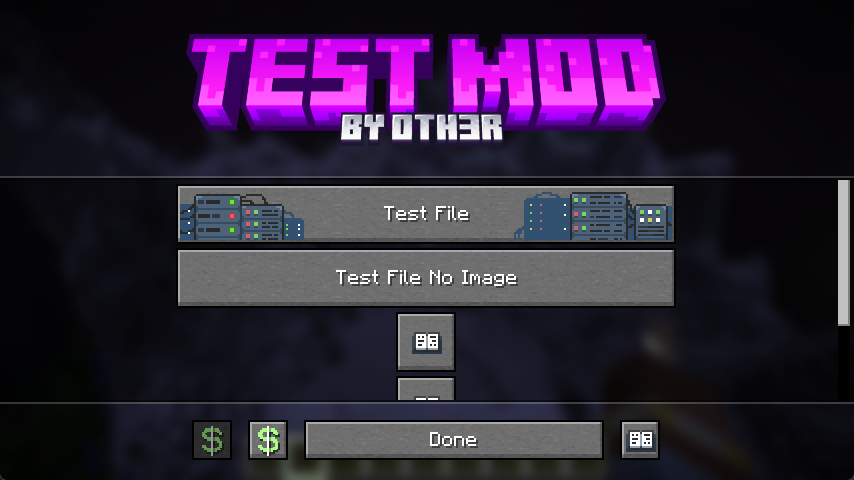
⚙️ Custom config screen
OtterLib offers a custom config screen that can be cuztomized to offer a way to edit multiple config files, link to social media, or even open different screens.
creating the screen:
client.setScreen(new ConfigScreen(client.currentScreen, Text.of("test"),
    new CustomImage(Identifier.of(FabricTest.MOD_ID, "textures/gui/banner.png"),240, 60),
    // the list of buttons to be displayed in the middle
    List.of(
            SimpleButton.Templates.fileEditor(new CTxT("Test File"), FabricTest.testFile, new CustomImage(Identifier.of(FabricTest.MOD_ID, "button/server_button"),246,26)).build(),
            SimpleButton.Templates.fileEditor(new CTxT("Test File No Image"), FabricTest.testFile).build(),
            SimpleButton.Templates.wiki(new CTxT("Help")).openLink("https://oth3r.one").size(30,30).build(),
            SimpleButton.Templates.wiki(new CTxT("Help")).openLink("https://oth3r.one").size(30,30).build(),
            SimpleButton.Templates.warning(new CTxT("Help")).openLink("https://oth3r.one").size(150,15).hideText(false).build()
    ),
    // the bottom buttons can be customized!
    List.of(
            new SimpleButton.Builder(new CTxT("Donate"))
                    .miniIcon(new CustomImage(Identifier.of(Assets.ID, "icon/donate"),15,15)).build(),
            SimpleButton.Templates.donate(new CTxT("Donate")).openLink(URI.create("https://ko-fi.com/oth3r")).build(),
            SimpleButton.Templates.done(new CTxT("Done")).build(),
            SimpleButton.Templates.wiki(new CTxT("Wiki")).openLink("https://oth3r.one").build()
    )));
main config screen in game:
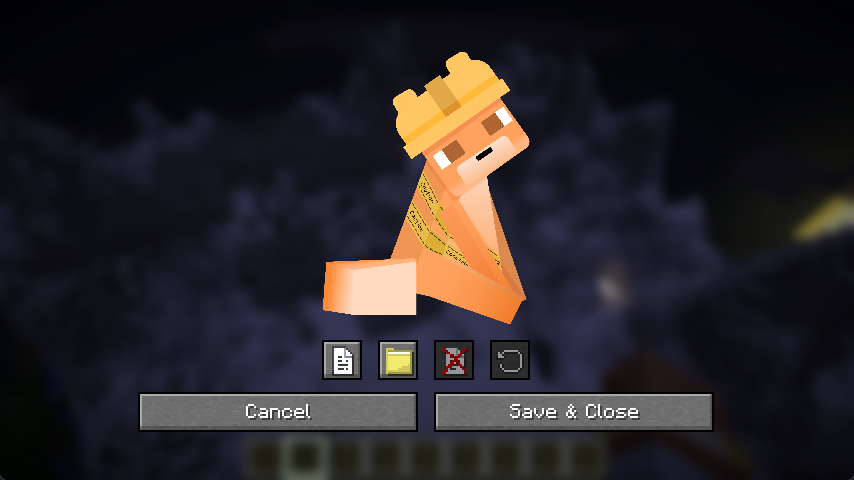
file editor in game: (individual entry editor is planned, this is just a simple placeholder)
A simple library mod for minecraft, made mostly to develop my mods easier, but can be used by anyone! Currently supported loaders: Fabric, Spigot, & Paper
Use in your projects! 👍️
Want to use OtterLib in your project? You can add it as a dependency in your build.gradle file:
repositories {
    maven {
        name "oth3rMavenSnapshots"
        url "https://maven.oth3r.one/snapshots"
    }
}
Implementing on each loader, where ${project.otterlib_version} is the current version of OtterLib for the loader (e.g. 0.2.0.0+1.21.6, 0.2.0.0+1.20-1.21.6)
// fabric
modImplementation "one.oth3r:otterlib:${project.otterlib_version}-fabric"
// spigot
implementation "one.oth3r:otterlib:${project.otterlib_version}-spigot"
// paper
implementation "one.oth3r:otterlib:${project.otterlib_version}-paper"
Visit the maven repository to see more indepth information about the library, including the latest versions.
Features
💬 Simple Chat Builder
sample usage:
player.sendMessage(new CTxT("Hello").color(Color.BLUE).bold(true).strikethrough(true)
    .append(new CTxT("World!!!!!!!!!").rainbow(new Rainbow(true)).underline(true).italic(true)).b());
in game example:

📜 Custom Language Reader
OtterLib provides a custom language reader that allows you to easily have server-side localization on all supported loaders. There is also support for a secondary location for locales for easy player overrides.
🗃️ Robust file saving and loading
Adds an interface that enables easy config file creation with support for saving, loading, and updating versions easily.
updating an old entry from the json to the new version:
@Override
public void update(JsonElement jsonElement) {
    JsonObject file = jsonElement.getAsJsonObject();
    if (file.get("version").getAsDouble() == 1.0) {
        this.version = 1.1;
        this.test = file.get("test-bool").getAsBoolean();
    }
}
⚙️ Custom config screen
OtterLib offers a custom config screen that can be cuztomized to offer a way to edit multiple config files, link to social media, or even open different screens.
creating the screen:
client.setScreen(new ConfigScreen(client.currentScreen, Text.of("test"),
    new CustomImage(Identifier.of(FabricTest.MOD_ID, "textures/gui/banner.png"),240, 60),
    // the list of buttons to be displayed in the middle
    List.of(
            SimpleButton.Templates.fileEditor(new CTxT("Test File"), FabricTest.testFile, new CustomImage(Identifier.of(FabricTest.MOD_ID, "button/server_button"),246,26)).build(),
            SimpleButton.Templates.fileEditor(new CTxT("Test File No Image"), FabricTest.testFile).build(),
            SimpleButton.Templates.wiki(new CTxT("Help")).openLink("https://oth3r.one").size(30,30).build(),
            SimpleButton.Templates.wiki(new CTxT("Help")).openLink("https://oth3r.one").size(30,30).build(),
            SimpleButton.Templates.warning(new CTxT("Help")).openLink("https://oth3r.one").size(150,15).hideText(false).build()
    ),
    // the bottom buttons can be customized!
    List.of(
            new SimpleButton.Builder(new CTxT("Donate"))
                    .miniIcon(new CustomImage(Identifier.of(Assets.ID, "icon/donate"),15,15)).build(),
            SimpleButton.Templates.donate(new CTxT("Donate")).openLink(URI.create("https://ko-fi.com/oth3r")).build(),
            SimpleButton.Templates.done(new CTxT("Done")).build(),
            SimpleButton.Templates.wiki(new CTxT("Wiki")).openLink("https://oth3r.one").build()
    )));
main config screen in game:

file editor in game: (individual entry editor is planned, this is just a simple placeholder)

Screenshots
Gallery
-
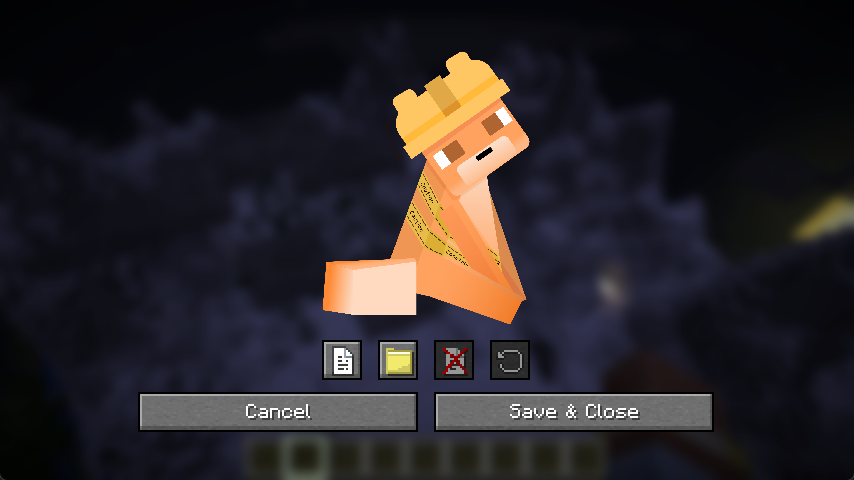 file config demo
 -
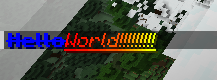 CTxT demo
 -
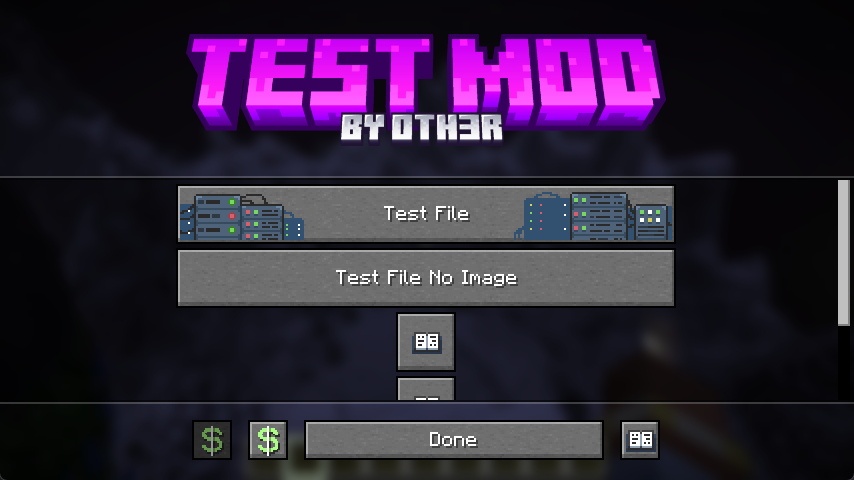 config screen demo
Versions
Files
Relations
Project Relations
More like this
Similar Mods
Suggestions use data such as tags, dependencies, dependents, descriptions, titles, and more to rank how much they overlap with this mod.
On ModDex
Community snapshot
By the numbers
Statistics
Want to reach Minecraft players?
We're looking for a server hosting partner to feature here and other parts of the site. Interested? Send us a message!
Get in touchGet it on
Available Platforms
On ModDex
Community snapshot
By the numbers