
Community listing page, reviews here may not be monitored by the author.
PureVanilla

No reviews yet
The official mod for the PureVanilla server. Easily connect to the server using the best possible ping.

Community voices
Reviews
No reviews yet. Be the first to review this project!
Get it on
Available Platforms
Compatibility
Supported Environments
Runs entirely on the client. Works on vanilla servers.
About
Project Details
For authors
Embed Badge
If you're the author of this project, you can embed a live badge anywhere that supports HTML or Markdown. It updates automatically whenever ratings change.
Use HTML for any page that supports it, or Markdown for README files and Markdown-based descriptions.
Identifiers
Platform IDs
Resources
External Links
About
Description
PureVanilla Server List
PureVanilla Server List is a small client-side Fabric mod that makes joining PureVanilla easier from Minecraft's multiplayer screen.
Instead of manually adding server addresses, the mod adds a PureVanilla panel directly inside the multiplayer server list. From there, you can see the server message, check regional pings, and join through the fastest available route.
What It Does

- Adds a PureVanilla featured server panel to the multiplayer server list.
- Shows the current PureVanilla MOTD and online player count.
- Pings available regions and highlights the best one for you.
- Lets you join with one
PLAYbutton, using the lowest-ping region when available. - Shows region names, flags, and ping times without exposing raw server addresses.
- Includes quick links for the PureVanilla Store and Vote pages.
- Shows a Status Page button if the main server status cannot be reached.
What It Does Not Do
- It does not change gameplay.
- It does not give any in-game advantage.
- It does not join servers automatically.
- It does not replace Minecraft's normal multiplayer screen.
Requirements
- Minecraft
26.1.2 - Fabric Loader
0.19.2or newer - Java
25or newer
This is a client-side mod. You only need to install it on your own Minecraft client.
How To Use It
- Install Fabric Loader for the supported Minecraft version.
- Put the mod jar in your Minecraft
modsfolder. - Start Minecraft with the Fabric profile.
- Open
Multiplayer. - Use the PureVanilla panel at the top of the server list.
Joining PureVanilla
- Click
PLAYto join using the best detected route. - Click a region button if you want to choose a specific region manually.
- If PureVanilla cannot be reached, click
Status Pageto check for outages or maintenance.
Links
- Website: https://purevanilla.co/
- Store: https://purevanilla.co/shop
- Vote: https://purevanilla.co/vote
- Status: https://status.purevanilla.co/
Screenshots
Gallery
-
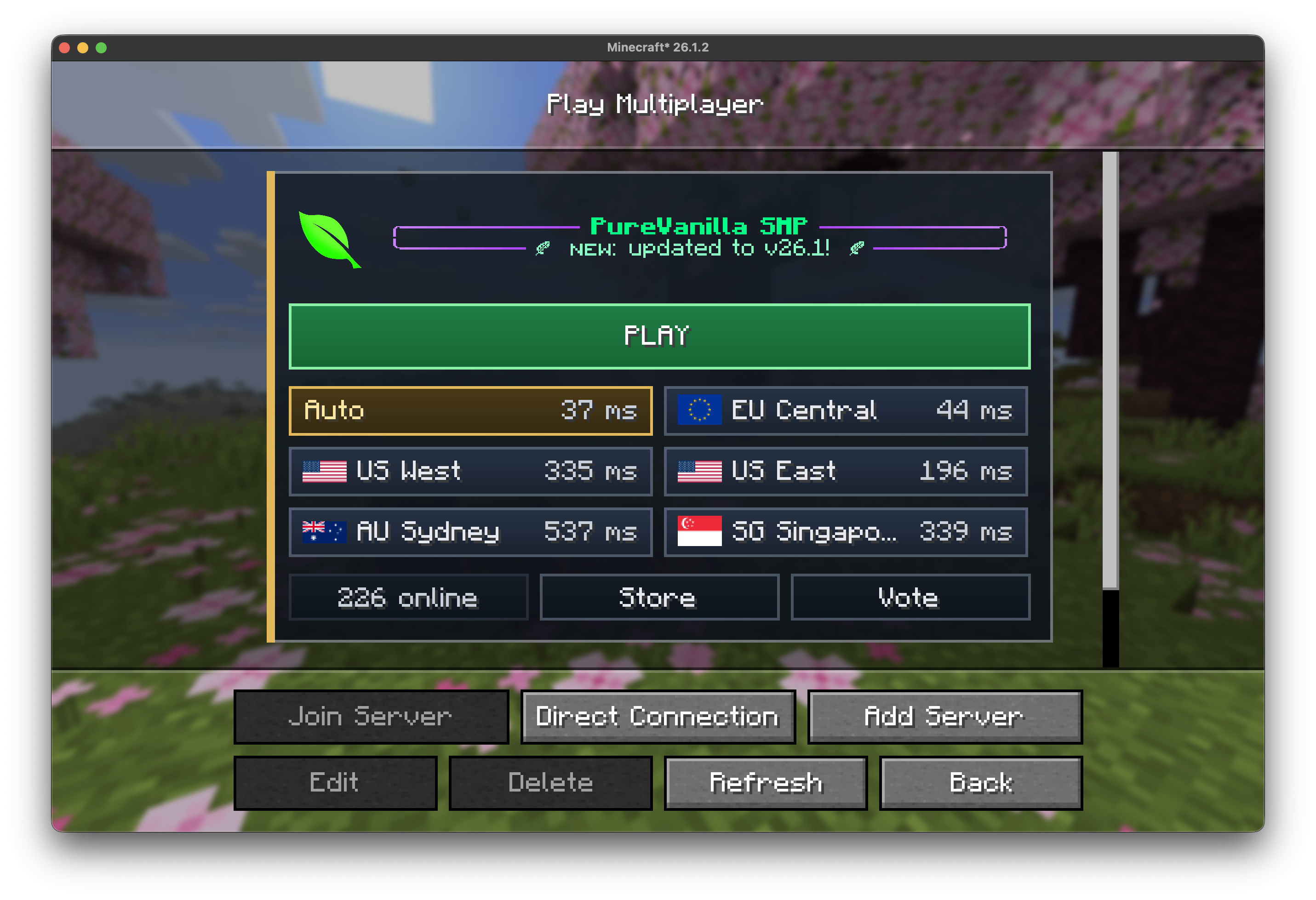 multiplayer menu
Versions
Files
Relations
Project Relations
More like this
Similar Mods
Suggestions use data such as tags, dependencies, dependents, descriptions, titles, and more to rank how much they overlap with this mod.
On ModDex
Community snapshot
By the numbers
Statistics

 (opens in a new tab)
Get it on
Available Platforms
On ModDex
Community snapshot
By the numbers
Statistics
Resources