Community listing page, reviews here may not be monitored by the author.
PvP Assist

No reviews yet
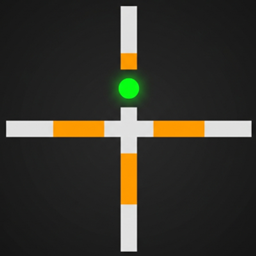
Client-side crit-timing and target crosshair overlay for PvP — no gameplay changes, safe on servers without it.
Community voices
Reviews
No reviews yet. Be the first to review this project!
Get it on
Available Platforms
About
Project Details
For authors
Embed Badge
If you're the author of this project, you can embed a live badge anywhere that supports HTML or Markdown. It updates automatically whenever ratings change.
Use HTML for any page that supports it, or Markdown for README files and Markdown-based descriptions.
Identifiers
Platform IDs
Resources
External Links
About
Description
# PvP Assist
A lightweight, **client-side only** overlay that makes information the game
already computes for you easier to read at a glance during PvP. It does not
change any game mechanics, does not read anything the client wouldn't
already have, and adds no server-side component.
## Features
- **Crit-ready indicator** — a small dot appears above your crosshair when
vanilla's own critical-hit conditions are currently met (falling, airborne,
not on a ladder, not in water, not blinded, not riding, not sprinting).
- Translucent green: conditions are met, but your attack cooldown hasn't
fully recharged yet.
- Solid bright green: conditions are met **and** your attack is fully
charged — your next hit will land as a c
- **Target indicator** — your crosshair is recolored orange whenever a
player is within attack range under your c
target the game already selects internally for left-click.
## Why it's safe to use
Everything shown is derived from values already present and visible on the
client (fall distance, ground/water/climb st
attack cooldown, and the vanilla crosshair-picked entity). PvP Assist does
not:
- read any hidden server data,
- automate aiming or clicking,
- give reach, speed, or damage advantages.
It's a readability aid, comparable to a HUD element — not an automation or
X-ray style mod. That said, some servers rese
even when they're not detectable — check your server's mod policy before
using it in ranked/competitive PvP.
## Compatibility
- Minecraft **1.16.5**, Forge **36.2.39+**
- Client-side only: the mod marks itself as not required on the server, so
you can join servers that don't have it in
without worrying about clients who don't have it either.
## Configuration
Two toggles, available from **Esc → Mods → PvP Assist → Config** in-game,
or by editing `config/pvpassist-client.toml`
- `crit_indicator.enabled` (default `true`)
- `target_indicator.enabled` (default `true`)
## Installation
1. Install Minecraft Forge `36.2.39` or newer for Minecraft 1.16.5.
2. Drop `pvpassist-0.1.0.jar` into your `mod
3. Launch the game.
Screenshots
Gallery
Versions
Files
Relations
Project Relations
More like this
Similar Mods
Suggestions use data such as tags, dependencies, dependents, descriptions, titles, and more to rank how much they overlap with this mod.
On ModDex
Community snapshot
By the numbers
Statistics
Want to reach Minecraft players?
We're looking for a server hosting partner to feature here and other parts of the site. Interested? Send us a message!
Get in touchGet it on
Available Platforms
On ModDex
Community snapshot
By the numbers
Statistics
Resources