
Community listing page, reviews here may not be monitored by the author.
Pvp Helper (faresmod)

No reviews yet
This mod makes landing critical hits in Minecraft much easier. I hope you like it.
Community voices
Reviews
No reviews yet. Be the first to review this project!
Get it on
Available Platforms
Compatibility
Supported Environments
Runs entirely on the client. Works on vanilla servers.
About
Project Details
For authors
Embed Badge
If you're the author of this project, you can embed a live badge anywhere that supports HTML or Markdown. It updates automatically whenever ratings change.
Use HTML for any page that supports it, or Markdown for README files and Markdown-based descriptions.
Identifiers
Platform IDs
Resources
External Links
About
Description
How to use:
The progress section first checks if the item in your hand has reached critical hit count. If it has, it will show yellow; if not, it will show a gray bar indicating the countdown. If the progress section is yellow and you are about to hit a monster or player, the bar will turn green. The success section shows the last monster you hit: gray if you hit it before critical hit count, yellow if you hit it with critical hit count and without jumping, and green if you hit it with critical hit count and while jumping. Additional features: Pressing the 'k' key (you can change which letter it is in settings-->controls->key assignments) can open and close the GUI. Also, when your mouse cursor is visible (like in chat, esc), you can drag and drop the GUI to change its position. I hope you like it <3 --im doing a new mod i will announce the mod on my discord server after that i will release on modrinth-- 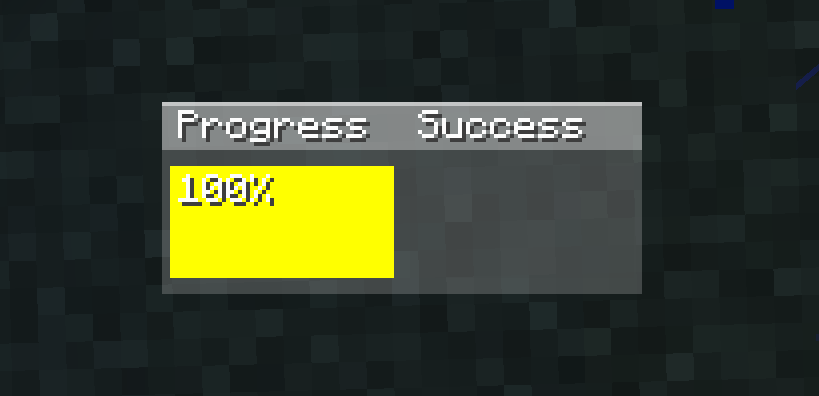
Screenshots
Gallery
-
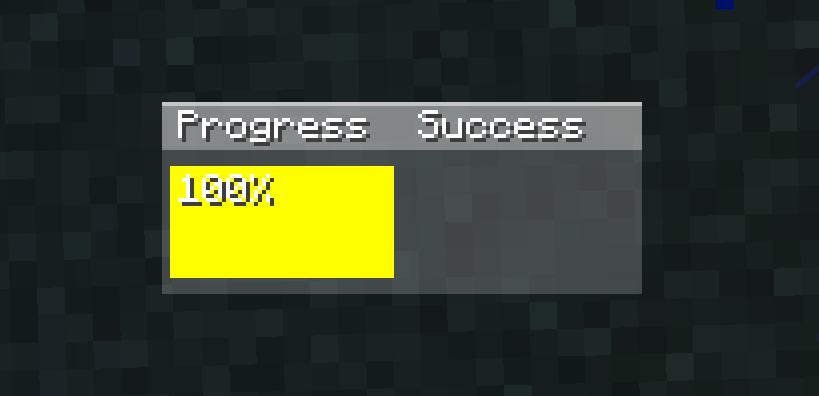 Real gui
 -
 _ _
_ _
Versions
Files
Relations
Project Relations
More like this
Similar Mods
Suggestions use data such as tags, dependencies, dependents, descriptions, titles, and more to rank how much they overlap with this mod.
On ModDex
Community snapshot
By the numbers
Statistics

Want to reach Minecraft players?
We're looking for a server hosting partner to feature here and other parts of the site. Interested? Send us a message!
Get in touchGet it on
Available Platforms
On ModDex
Community snapshot
By the numbers
Statistics
Resources