Community listing page, reviews here may not be monitored by the author.
Q Shop

No reviews yet
A flexible server shop for Forge 1.20.1, NeoForge 1.21.1 and NeoForge 26.1.2, with buy, sell, barter and command trades, custom currencies, limits, in-game editing and a Builder-first KubeJS API.
Community voices
Reviews
No reviews yet. Be the first to review this project!
Get it on
Available Platforms
About
Project Details
For authors
Embed Badge
If you're the author of this project, you can embed a live badge anywhere that supports HTML or Markdown. It updates automatically whenever ratings change.
Use HTML for any page that supports it, or Markdown for README files and Markdown-based descriptions.
Identifiers
Platform IDs
Resources
External Links
About
Description
Q Shop
QShop
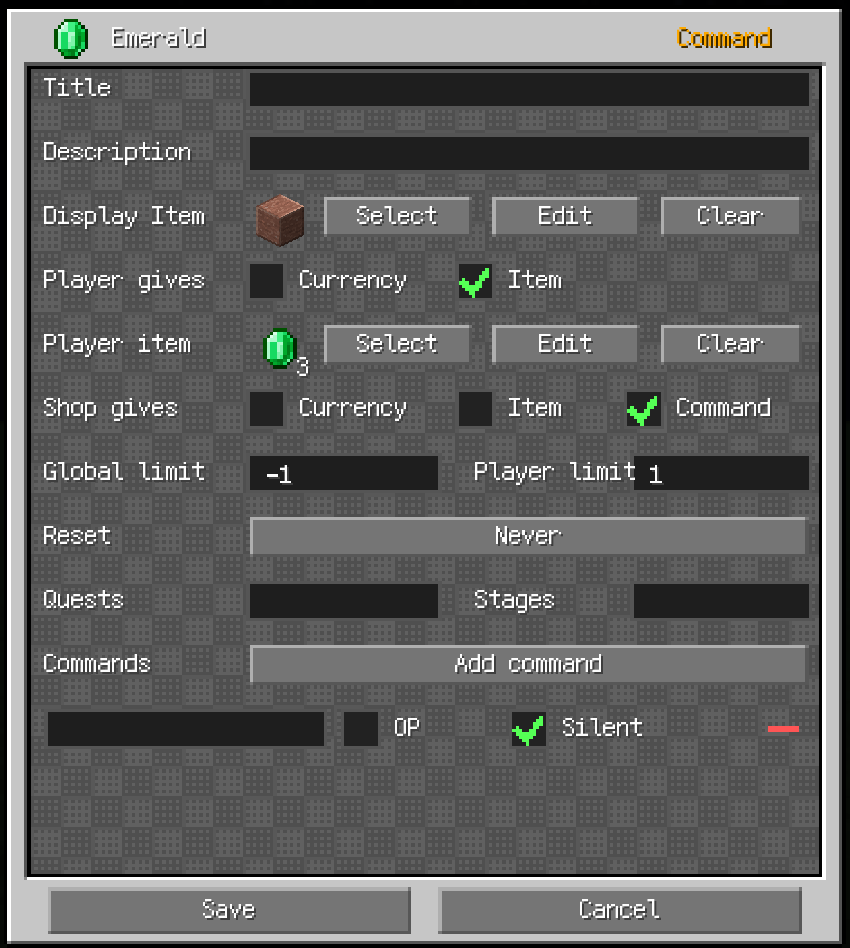
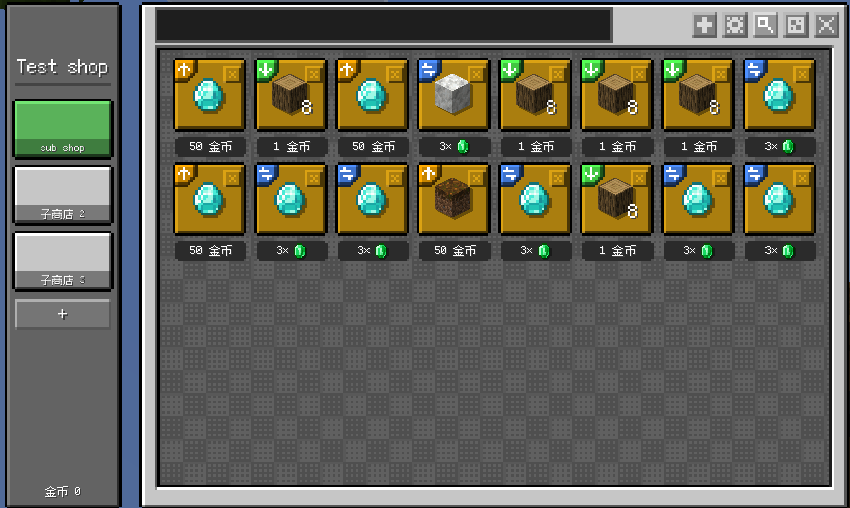
QShop is a configurable shop mod for Minecraft Forge 1.20.1, NeoForge 1.21.1 and NeoForge 26.1.2. Create multiple shops and sub-shops, edit them in game, use custom non-item currencies, and let players buy, sell, barter or trigger server commands.
All supported builds provide the same core shop features. The trade screen includes quick quantity-step buttons for x1, x10, x100 and x1000 purchases, while the optional F8 layout debugger can adjust the shop, trade settings and item browser screens. Layout offsets are stored in config/qshop_layout.json, and resource packs can override them through assets/qshop/style.json.
QShop has no mandatory gameplay integration dependencies. KubeJS and FTB Quests are optional and only needed for their respective features. GameStages and AStages are available on the loader/version branches that support them; NeoForge 26.1.2 uses KubeJS PlayerStages because AStages does not currently provide a 26.1.2 build.
QShop has no mandatory gameplay integration dependencies. KubeJS and FTB Quests are optional and only needed for their respective features. Stage requirements use KubeJS stages when KubeJS is installed.
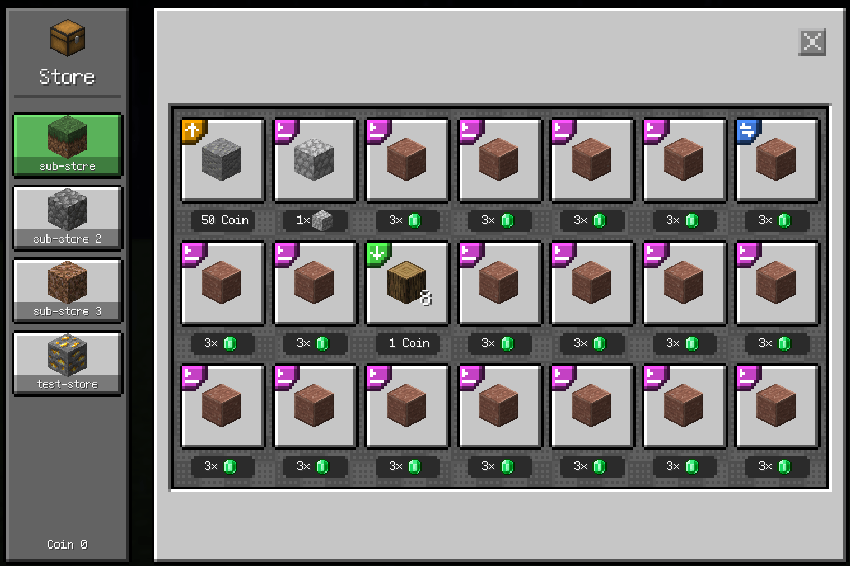
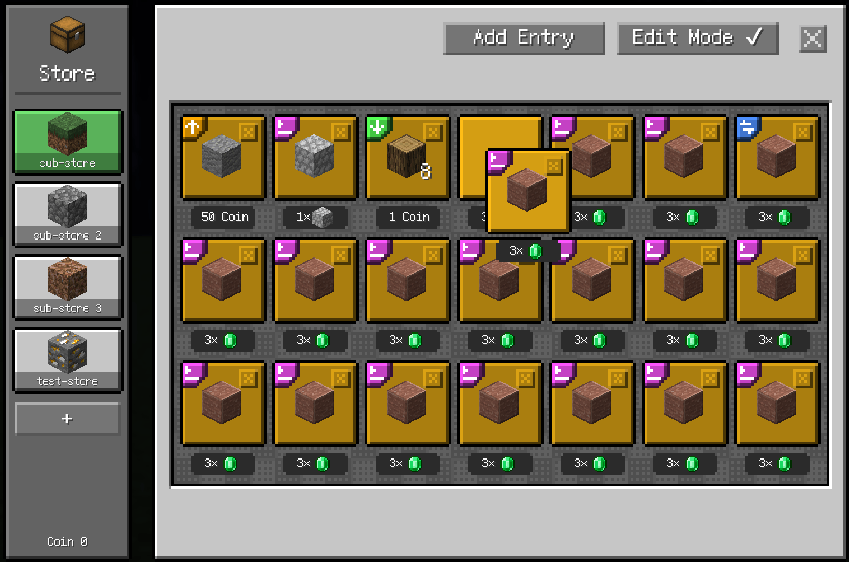
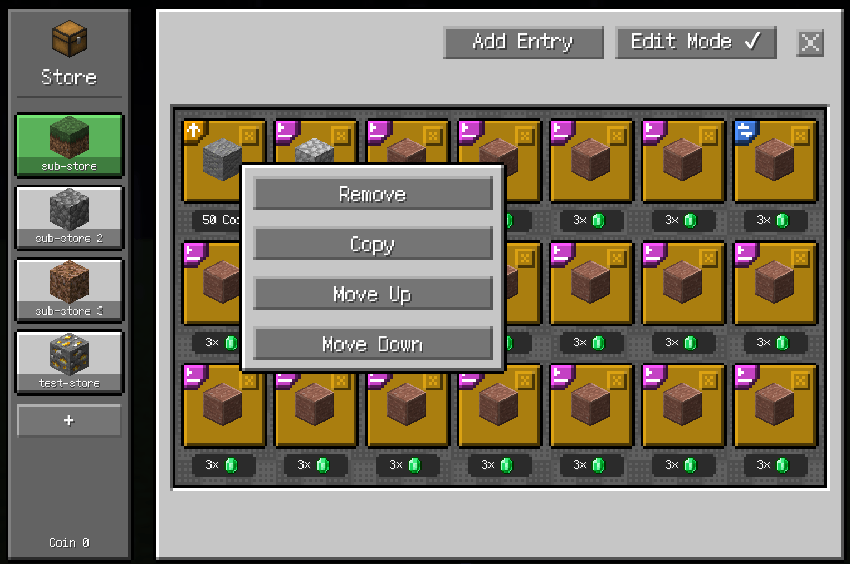
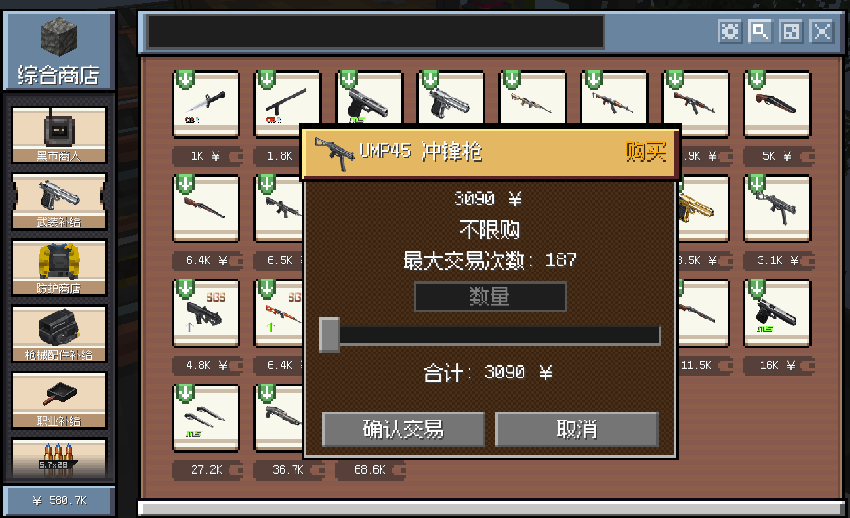 For a matching visual style, we recommend the Q Shop Create style Resourcepack, a Create-inspired resource pack with files for the supported QShop versions.
Features
Trade GUI
- Buy, sell, item-for-item barter and command entries in one interface.
- Barter entries can optionally charge an additional currency fee.
- Command entries execute configured server commands after a successful purchase.
- Custom display names, descriptions, display items and item NBT are supported.
- Quantity controls use a slider and input box with live limit, inventory and balance checks.
- When the available quantity is large, x1, x10, x100 and x1000 buttons change the slider step and range for faster bulk purchases.
- Smooth scrolling for entry grids and sub-shop tabs.
- GUI scaling keeps item tooltips and button tooltips independent of the local QShop scale.
Shops and sub-shops
- Multiple shops identified by a stable ID or UUID.
- Every shop has one or more sub-shops with an icon, description and independent entries.
- Sub-shop icons support item data and NBT; descriptions are shown as hover tooltips.
- Creative-mode editing supports adding, removing, copying, reordering and editing entries.
- Shop and sub-shop changes are saved and synchronized to open clients.
Custom currencies
- Create any number of non-item currencies such as coins, points or tokens.
- Balances are stored per player and synchronized to the client.
- Manage currencies with commands or KubeJS.
Purchase limits
- Global server-wide and per-player limits for each entry.
- Limits are counted in trade units/purchase counts, not item quantities. One completed trade unit consumes one limit even when it contains multiple items.
- Reset periods:
NEVER,DAILY,WEEKLYandMONTHLY.
Requirements
- Gate complete sub-shops or individual entries behind FTB Quests tasks.
- Stage requirements use the available stage provider for the selected loader/version: GameStages, KubeJS PlayerStages or AStages where supported.
- If a configured requirement has no matching provider installed, it is treated as unmet and the content stays hidden from normal players.
Commands
/qshop open <shop> [player]
/qshop list
/qshop balance
/qshop reload
/qshop overwrite
/qshop currency list
/qshop currency create <id> <name> [color]
/qshop currency give|take|set <player> <currency> <amount> [true|false]
/qshop shop create <id> [displayName] [currency]
/qshop edit <shop> add <type> [price] [currency]
/qshop edit <shop> remove <index>
/qshop edit <shop> setitem <index>
/qshop edit <shop> set <index> <field> <value>
/qshop item
Shop editing requires permission level 2 and Creative mode. The final sub-shop cannot be removed.
Configuration
<world>/serverconfig/qshop/currencies.json
<world>/serverconfig/qshop/shops/<shop-id>.json
Items accept an ID, an item object with count and nbt, a KubeJS ItemStack, or the Base64 format written by QShop.
The server-wide template is stored under config/qshop/:
config/qshop/
├── currencies.json
└── shops/
    ├── starter.json
    └── my_shop.json
QShop creates missing template files from its bundled defaults. A new world, or a world whose serverconfig/qshop/ has no QShop configuration, imports the template automatically without overwriting existing world files. Use /qshop overwrite with permission level 2 to force-replace matching world files from the template; extra world files are preserved.
The common config config/qshop-common.toml is split into [server] and [client] sections. It can optionally reduce currencies on death. Set server.death.loseCurrencyOnDeath=true, then use entries such as server.death.currencyRetention=["coins=0.2"] to keep 20% of coins after death.
Server-side trade settings are also in config/qshop-common.toml. To allow a player to complete a purchase when the result exceeds the current inventory capacity, enable:
[server.inventory]
allowOverflowPurchases = true
Resource packs can customize QShop component positions and the tab-list fade-mask color with assets/qshop/style.json. The resource-pack style is applied before local layout-debug offsets, so pack authors can provide a complete default layout while players can still tune it locally.
KubeJS integration
Install KubeJS on the server to enable the global QShop binding. The public 1.1.0 KubeJS API is Builder-first. JSON CRUD methods and direct JsonIO writes are not part of the public global API.
Create or update data
QShop.createShop('vip', 'VIP Shop', 'coins')

QShop.tab('vip')
  .name('Daily Offers')
  .icon({
    item: 'minecraft:paper',
    count: 1,
    nbt: '{display:{Name:"Daily Card"}}'
  })
  .description('Refreshes every day')
  .uuid('daily-offers')
  .stage('vip_unlocked')
  .add()

QShop.entry('vip', 'daily-offers')
  .buy({ item: 'minecraft:oak_log', count: 8 })
  .price(2, 'coins')
  .playerLimit(20, 'DAILY')
  .uuid('oak-bundle')
  .add()
Calling add() with an existing entry UUID replaces that entry in place. Calling add() with an existing tab UUID updates tab metadata while preserving its entries.
Read objects
const shop = QShop.getShop('vip')
const tab = QShop.getTab('vip', 'daily-offers')
const entry = QShop.getEntry('vip', 'daily-offers', 'oak-bundle')

console.log(shop.id, tab.uuid, entry.uuid)
console.log(entry.type.name(), entry.count, entry.getCount())getShop, getTab and getEntry return complete Java objects. Read fields directly from the returned object: entry.type, entry.item, entry.give, entry.receive, entry.price, entry.currencyId, entry.commands, entry.requiredQuests and entry.requiredStages.
entry.count and entry.getCount() are equivalent. count is the item quantity represented by one entry unit, not the number of clicks. entry.type is an enum; compare it with entry.type.name(), for example entry.type.name() === 'BUY'.
Reference rules
| Reference | Accepted values |
|---|---|
shopRef |
Shop ID or shop UUID |
tabRef |
Zero-based index, tab UUID or null for the first tab |
entryRef |
Zero-based index or entry UUID |
Use UUIDs for long-lived scripts because indexes change when content is reordered or refreshed.
QShop.getEntryCount('vip')       // entries in tab 0
QShop.getEntryCount('vip', 1)    // entries in tab 1
QShop.removeEntry('vip', 'daily-offers', 'oak-bundle')
QShop.removeTab('vip', 'daily-offers')
Currencies and refresh
QShop.createCurrency('tokens', 'Tokens', '#55ff55')
QShop.giveCurrency(player, 'tokens', 100)
QShop.takeCurrency(player, 'tokens', 10)
QShop.setCurrency(player, 'tokens', 50)

QShop.refreshTab('vip', 'daily-offers', 10, [
  { item: 'minecraft:iron_ingot', price: 2, weight: 50 },
  { item: 'minecraft:gold_ingot', price: 5, weight: 10 }
])
The second argument is a zero-based tab index or the tab UUID (daily-offers in this example), not the tab display name. Every generated entry receives a new UUID and starts with empty limit counters. The limit-clearing methods accept tab/entry indexes or UUIDs (not names); the shop reference can be a shop ID or shop UUID. They clear the global counter and personal counters for both online and offline players; offline counters are edited directly in world/playerdata/<uuid>.dat.
Trade events
QShopEvents.beforeTrade(event => {
  const entry = event.getEntry()
  if (entry && entry.type.name() === 'COMMAND') {
    event.cancel()
    event.player.tell('This entry is temporarily unavailable.')
  }
})

QShopEvents.afterTrade(event => {
  const shop = event.getShop()
  const tab = event.getTab()
  const entry = event.getEntry()

  console.log(`${shop.id}/${tab.uuid}/${entry.uuid}`)
  console.log(`${entry.type.name()} x${event.tradedUnits}`)
  if (event.isPartial()) {
    event.player.tell(`Completed ${event.tradedUnits} unit(s).`)
  }
})

QShopEvents.currencyChanged(event => {
  console.log(`${event.getCurrency()}: ${event.getOldValue()} -> ${event.getNewValue()}`)
})
Read shop, tab and entry fields through getShop(), getTab() and getEntry(). Event-only data includes units for beforeTrade, and tradedUnits, totalItems, paidPrice and partial for afterTrade. currencyChanged provides getPlayer(), getCurrency(), getOldValue(), getNewValue(), getDelta(), getSource() and getSourcePos(). It fires for all effective currency changes, including trades, FTB money rewards/tasks, commands, KubeJS currency methods, configured death retention, and Java addon services. Append false to a command to suppress it.
Forge addon mods can use the official com.qshop.api.QShopAddonApi facade. Its currency() service centralizes wallet mutations, and its buy/sell methods accept Forge IItemHandler inventories for server-side container integrations. Java addons can listen for com.qshop.api.CurrencyChangedEvent on the Forge event bus.
Documentation
License
QShop and its assets are All Rights Reserved (ARR). See LICENSE for the full terms.
Screenshots
Gallery
Versions
Files
Relations
Project Relations
More like this
Similar Mods
Suggestions use data such as tags, dependencies, dependents, descriptions, titles, and more to rank how much they overlap with this mod.
On ModDex
Community snapshot
By the numbers
Statistics
Want to reach Minecraft players?
We're looking for a server hosting partner to feature here and other parts of the site. Interested? Send us a message!
Get in touchGet it on
Available Platforms
On ModDex
Community snapshot
By the numbers
Statistics
Resources