Community listing page, reviews may not be monitored by the author.
Remnants | Advanced Minimap & Waypoints


No reviews yet
Explore. Navigate. Never get lost again. A clean, lightweight minimap and fullscreen map for Minecraft.

Community voices
Reviews
No reviews yet. Be the first to review this project!
Get it on
Available Platforms
Compatibility
Supported Environments
Runs entirely on the client. Works on vanilla servers.
Must be installed on both the client and the server.
Varies by version.
About
Project Details
For authors
Embed Badge
If you're the author of this project, you can embed a live badge anywhere that supports HTML or Markdown. It updates automatically whenever ratings change.
Use HTML for any page that supports it, or Markdown for README files and Markdown-based descriptions.
Identifiers
Platform IDs
About
Description
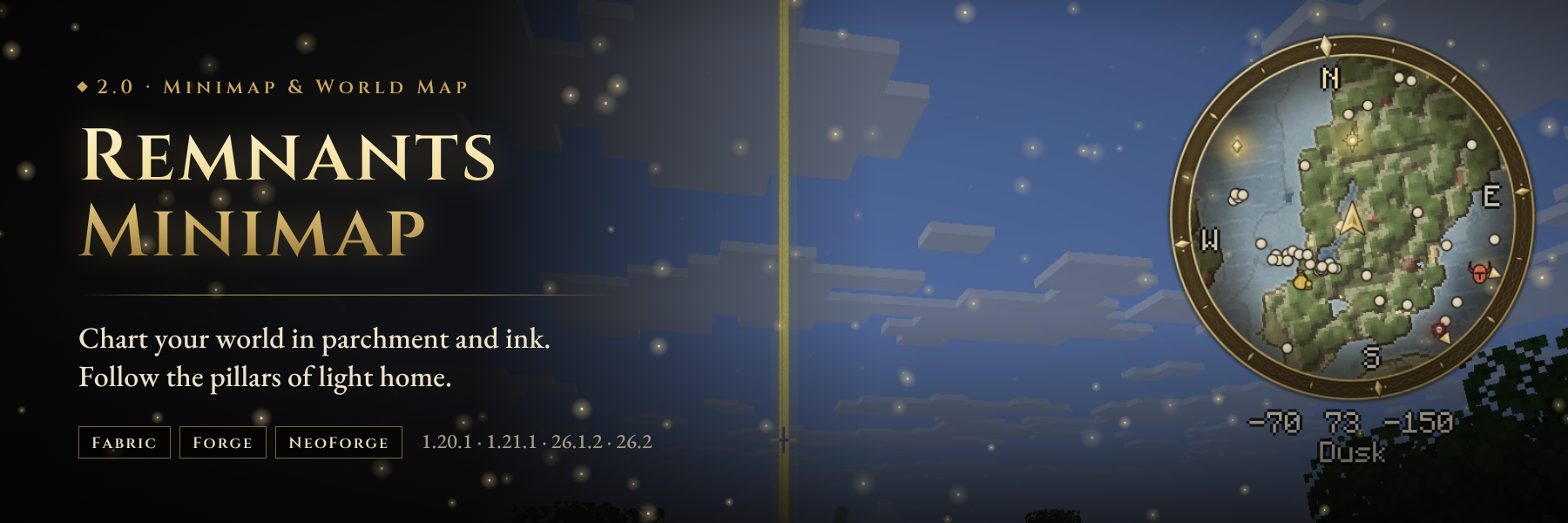
A soulslike minimap for Minecraft
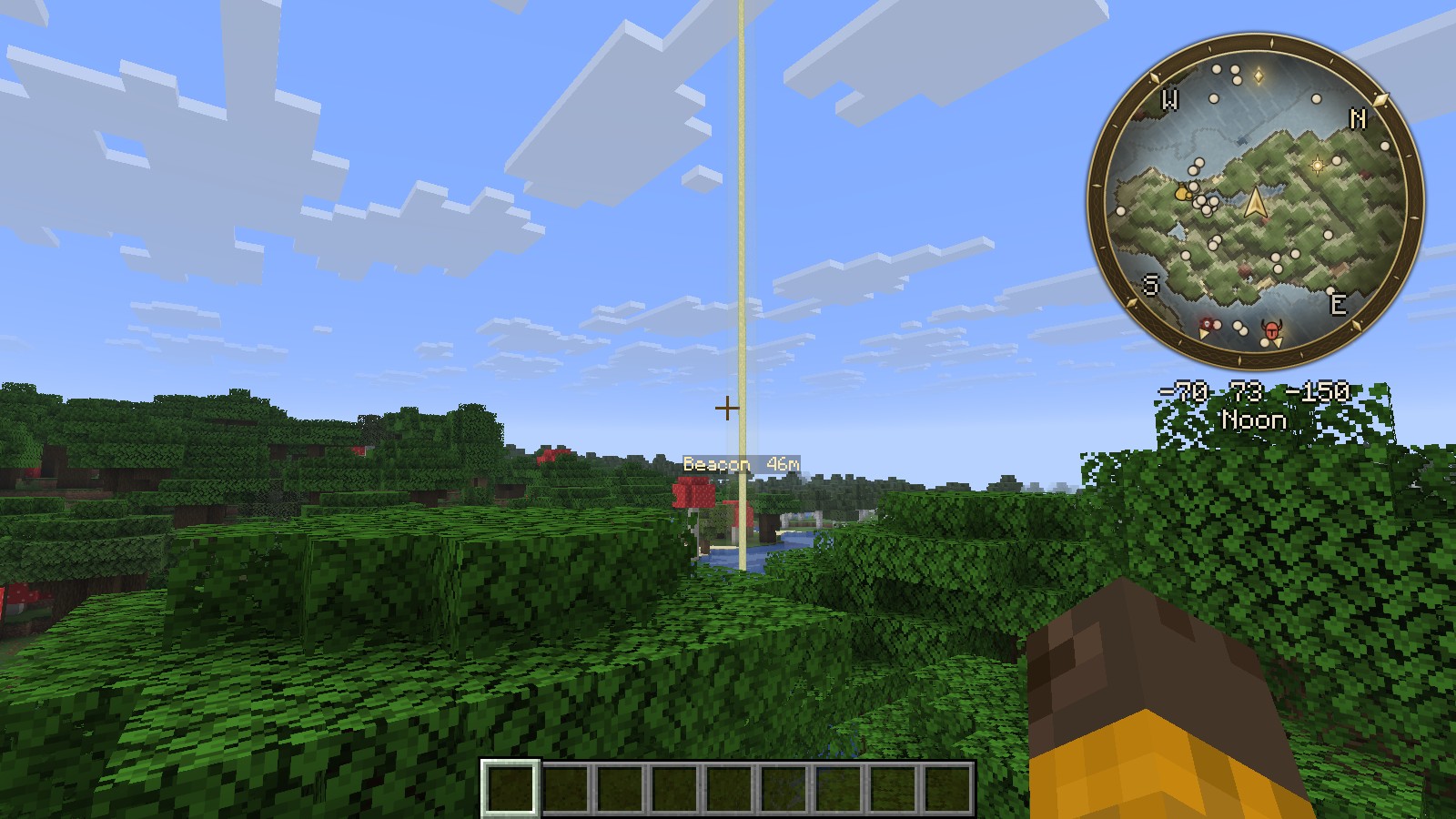
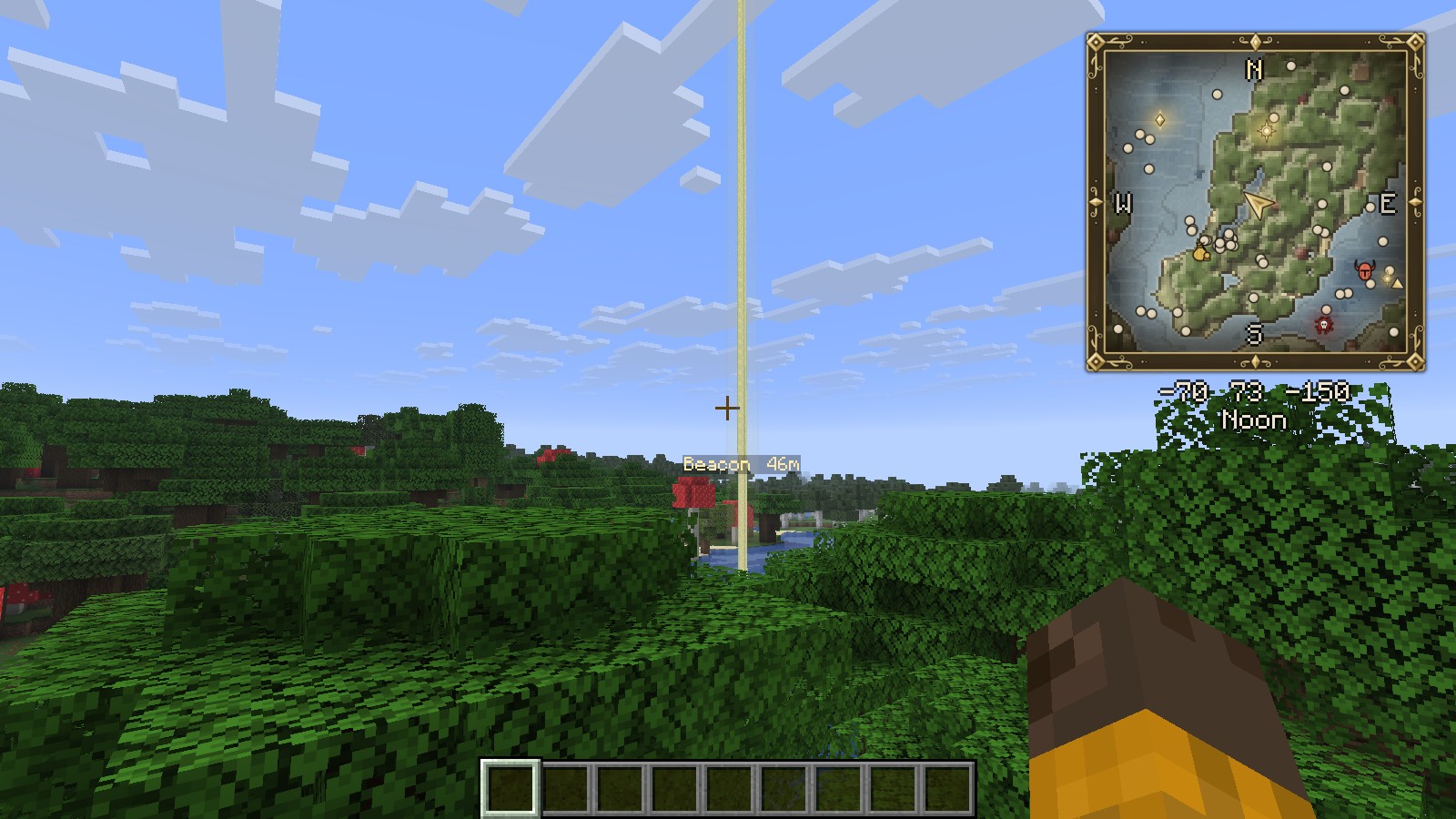
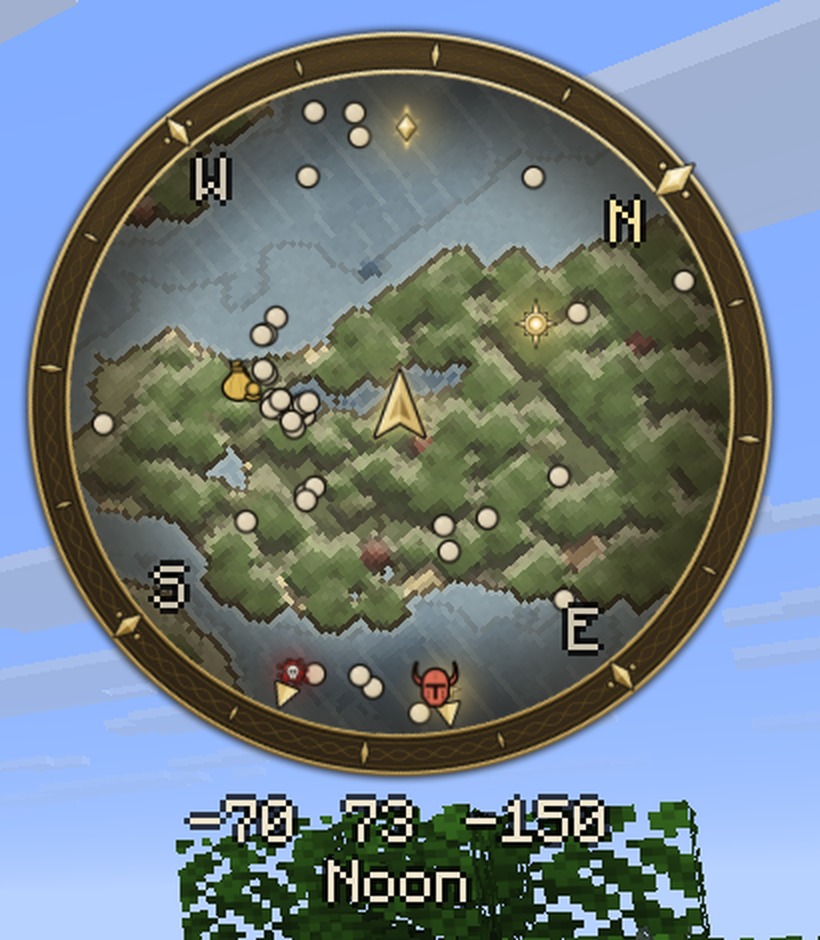
Remnants Minimap redraws your world as a hand-inked chart: parchment lands, engraved seas and ink contour lines, framed by a gilded ring. Mark your Sites of Grace, drop a beacon, and follow pillars of light back across the land.
Client-side only. It works in singleplayer and on any server, and the server needs nothing installed.
2.0 is available for Fabric, Forge and NeoForge on 1.20.1, 1.21.1, 26.1.2 and 26.2.


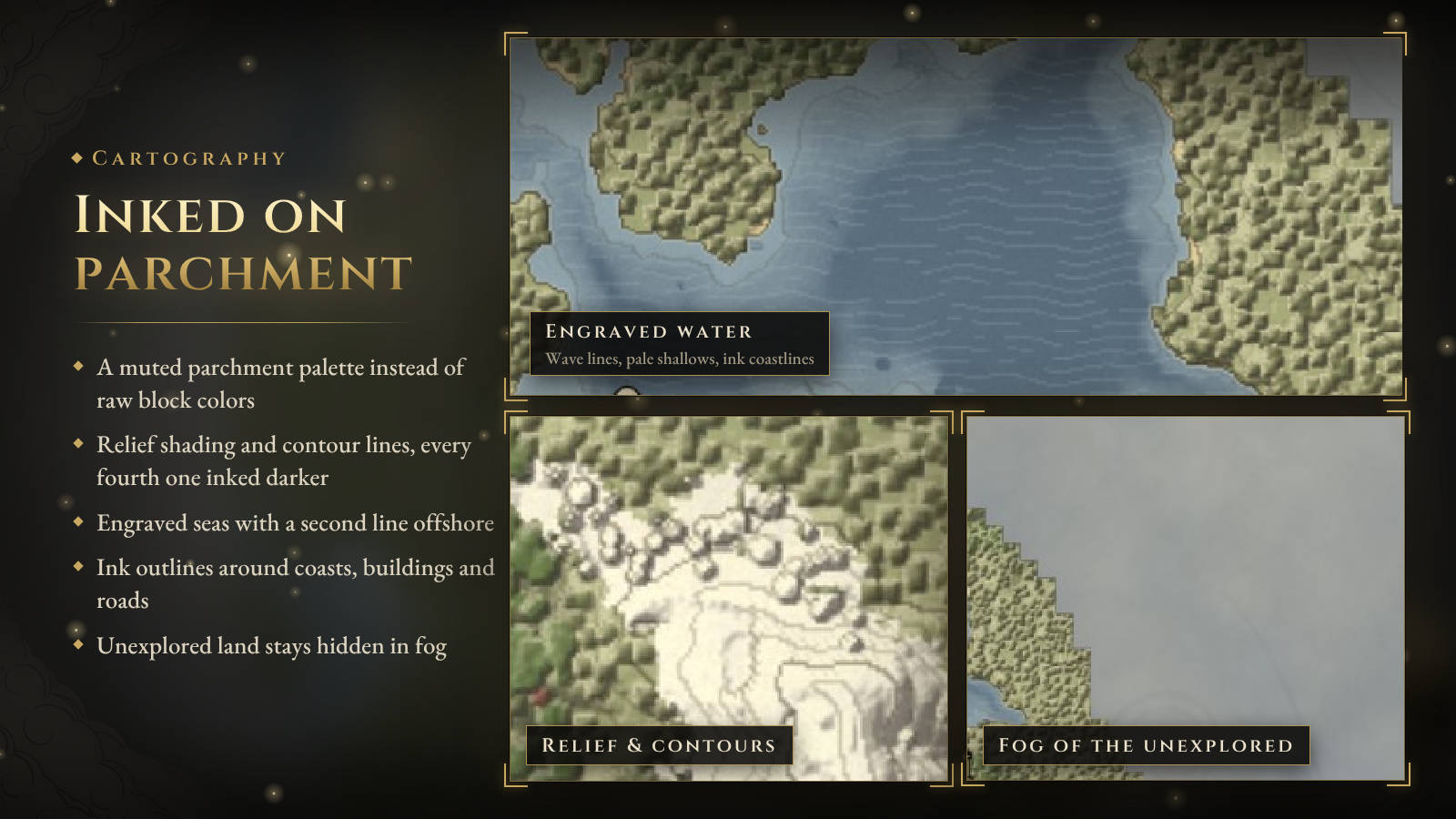
Most minimaps copy the block colors. Remnants Minimap draws the land the way a cartographer would.
- Parchment palette. Soft khaki plains, olive forests, pale sand and grey stone instead of saturated block colors.
- Relief and contours. Hills are shaded so they show their shape, and ink contour lines follow the height of the land. Every fourth line is inked darker.
- Engraved water. Slate-blue seas with fine wave lines, pale shallows and a second line offshore.
- Ink outlines. Coastlines, building footprints and roads are traced in ink.
- Fog of the unexplored. Land you have not seen stays hidden in fog. Everything you explore is saved per world and per dimension.
- In the Nether, and other dimensions with a ceiling, the map is drawn at your height instead of from the roof.
- Prefer Minecraft's own colors? Switch to the Vivid Parchment or Classic palette. Contours, relief, water engraving, paper grain and ink outlines each have their own setting.

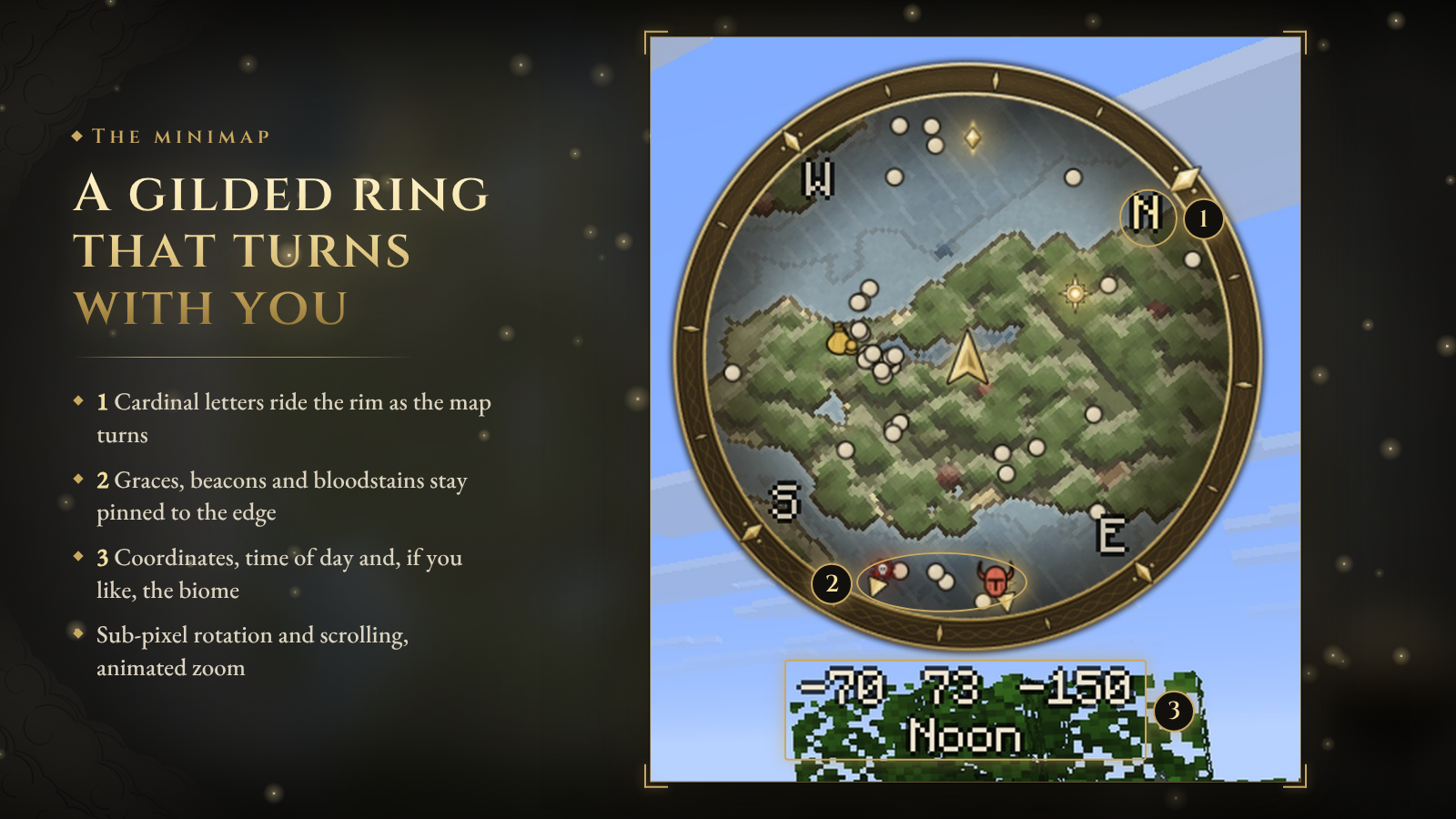
- Smooth. The map rotates and scrolls with sub-pixel precision instead of jumping block by block, and zooming is animated.
- Rotate with your view or keep north up, with N, E, S and W around the rim.
- A gold arrow for you and silver arrows for other players. An optional radar shows hostile and passive mobs.
- Your coordinates, the time of day (Dawn, Early Day, Noon, Dusk…) and, optionally, the biome below the map.
- Graces, beacons, bloodstains and markers with a pillar stay pinned to the rim when they are out of view, so you always know which way to go.
- Press N to hide the minimap and = / - to zoom.
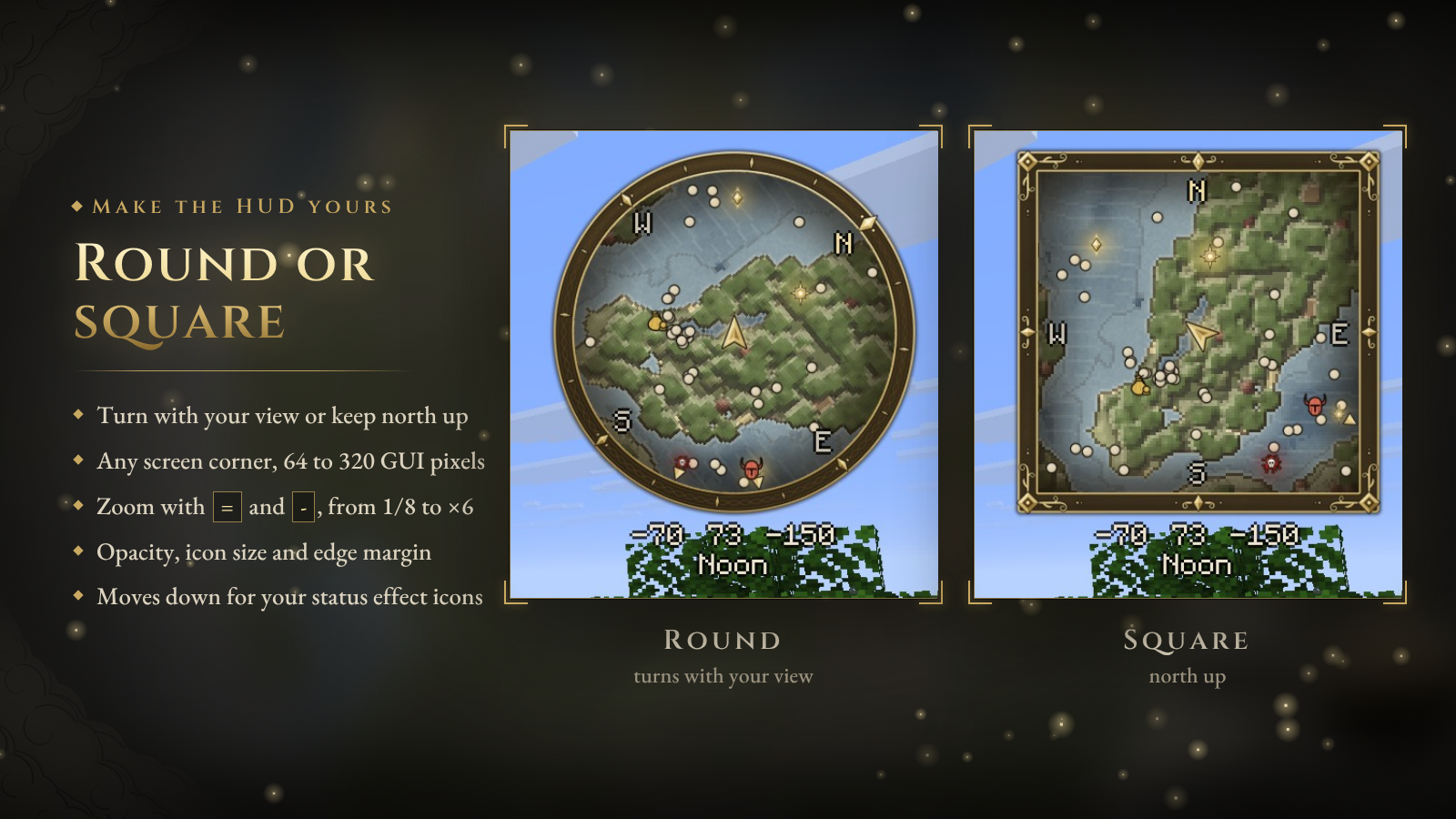
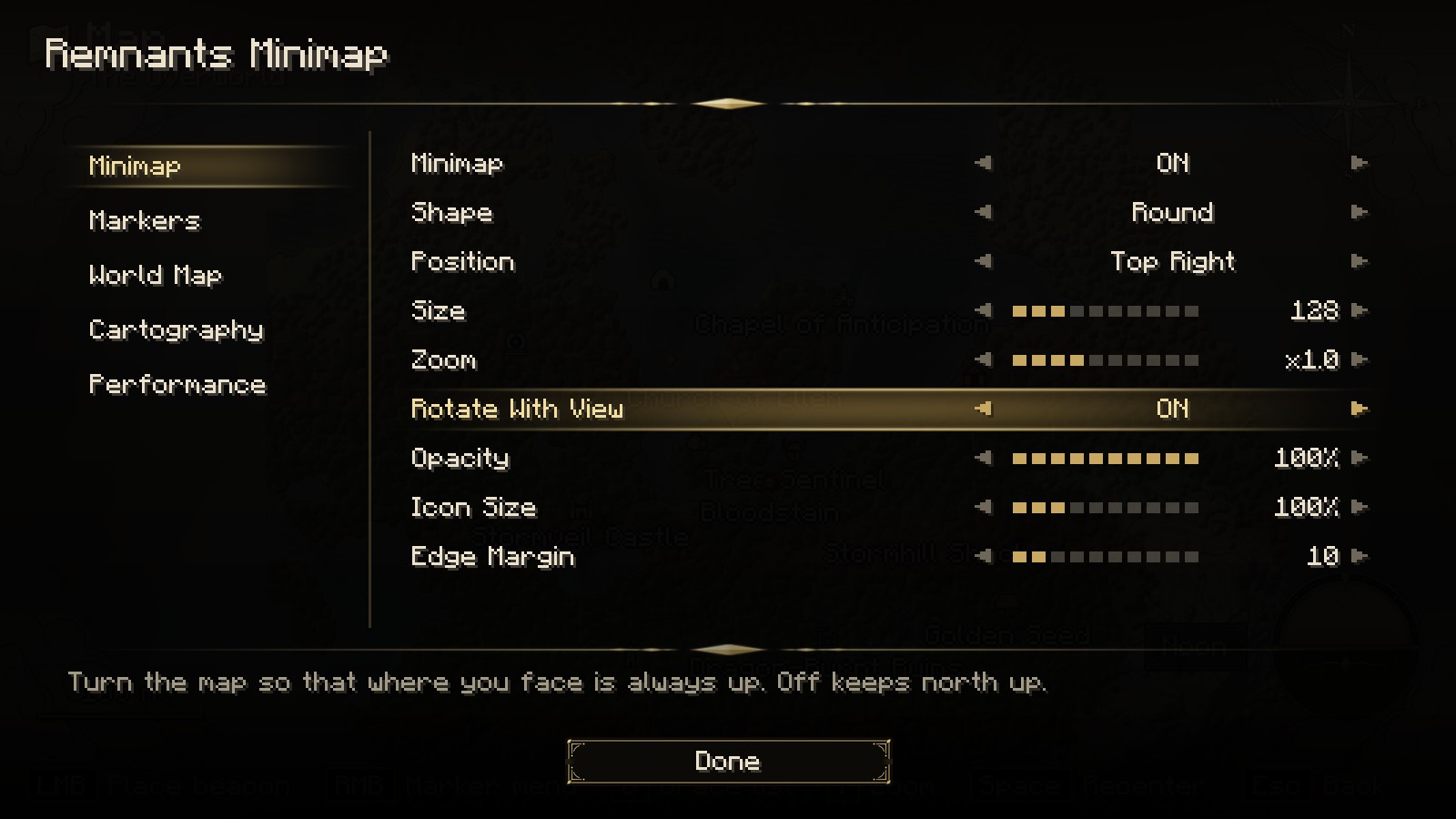
Pick a round map in a gold ring or a square chart frame, any screen corner, and a size from 64 to 320 GUI pixels. Opacity, icon size and edge margin are adjustable too. At the top right, the minimap moves down to make room for your status effect icons.

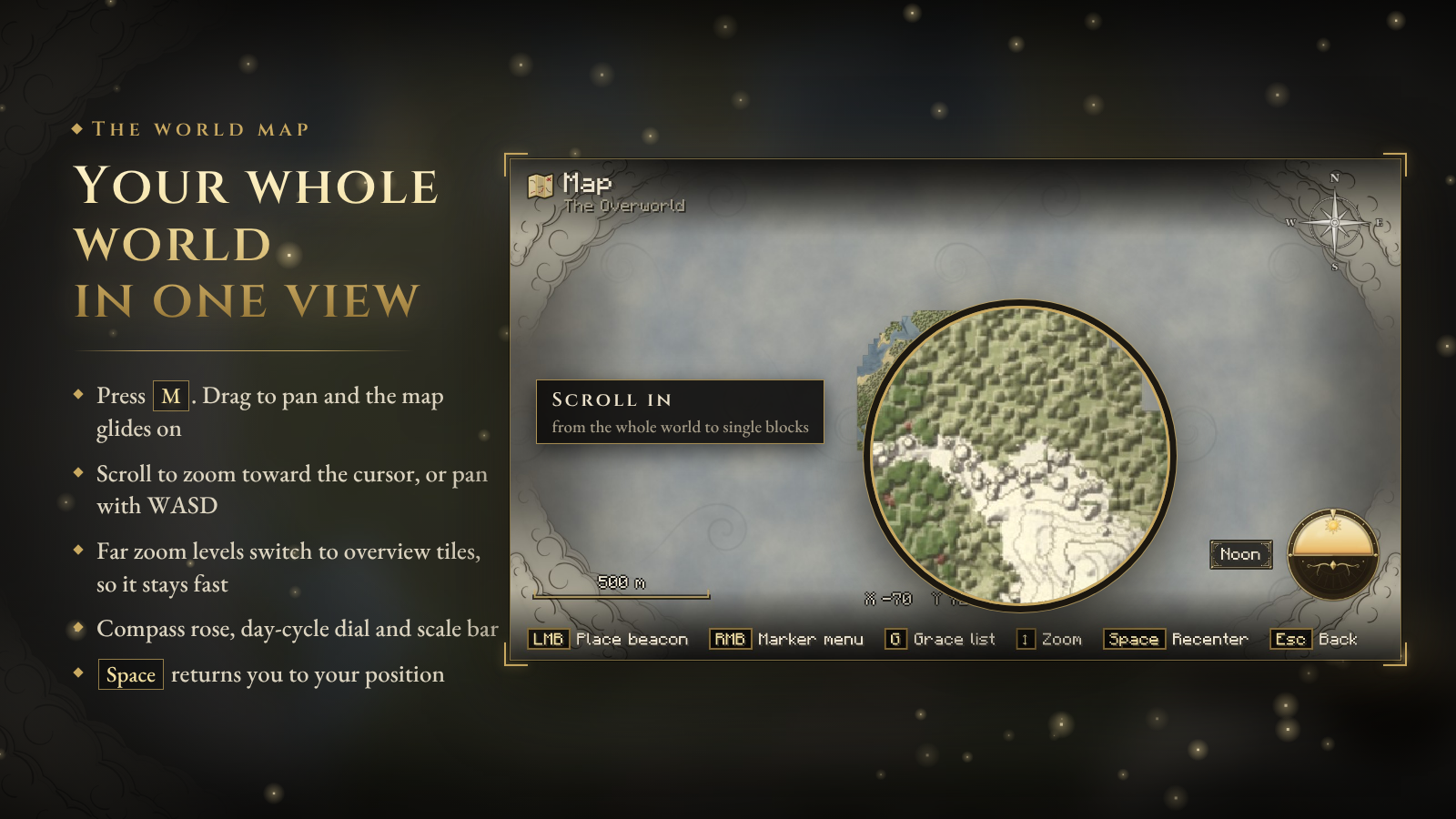
Press M to open the full map.
- Drag to pan. The map keeps gliding when you let go. WASD and the arrow keys pan too.
- Scroll to zoom toward the cursor, from single blocks out to your whole explored world. Far zoom levels switch to overview tiles, so the map stays fast.
- Left click places your beacon, which rises as a pillar of light in the world; click it again to remove it. Click any other marker and the map glides to it; double click it to edit.
- Right click opens the marker menu: add a marker, place or remove the beacon, edit, raise or lower a pillar, show or hide a marker on the minimap, remove it, or return to your position.
- Hover a marker to see its name, group, position and distance.
- A compass rose, a day-and-night dial, a scale bar, cursor coordinates and control hints, framed by swirling clouds in the corners. The compass, dial, hints and clouds can each be turned off, and a faint region grid can be turned on.
- Space returns to your position, H hides the hints and O opens the settings.

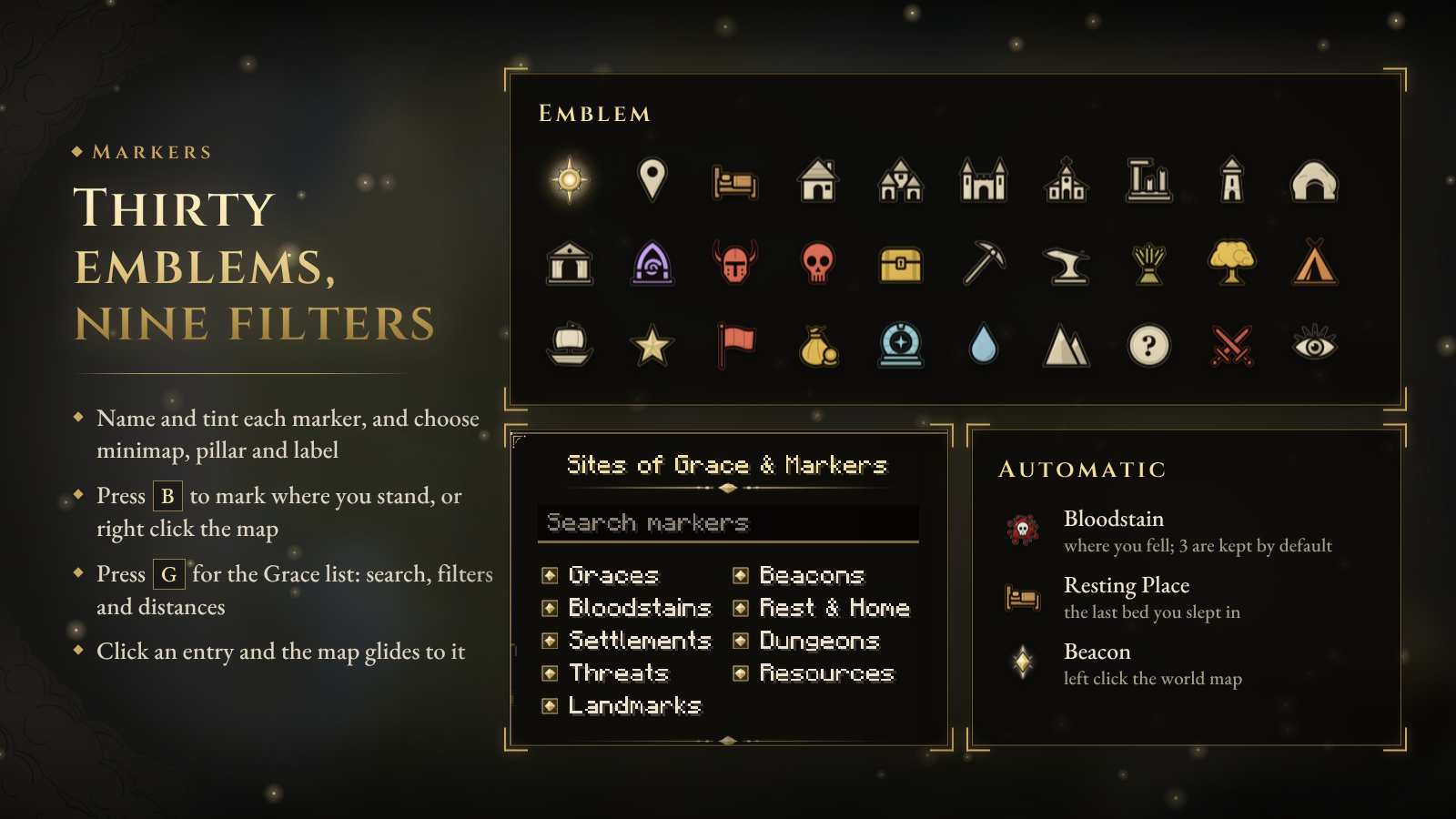
- 30 emblems: Site of Grace, Castle, Church, Ruins, Tower, Village, Cave, Catacombs, Portal, Waygate, Boss, Danger, Battle, Treasure, Mine, Forge, Farm, Merchant, Spring, Great Tree, Summit, Camp, Ship, Banner, Star, Lookout and more.
- Make each one yours: a name, one of ten hues, an exact position, and whether it shows on the minimap, carries a label and raises a pillar of light.
- Press B to place a marker where you stand.
- Press G on the world map for the Grace list: every marker in the dimension with its distance, Sites of Grace first, a search box and nine category filters (Graces, Beacons, Bloodstains, Rest & Home, Settlements, Dungeons, Threats, Resources, Landmarks). Click an entry and the map glides to it.
- A Bloodstain is left where you die (the last 3 are kept by default, up to 20), and a Resting Place marks the last bed you slept in. Both are automatic.
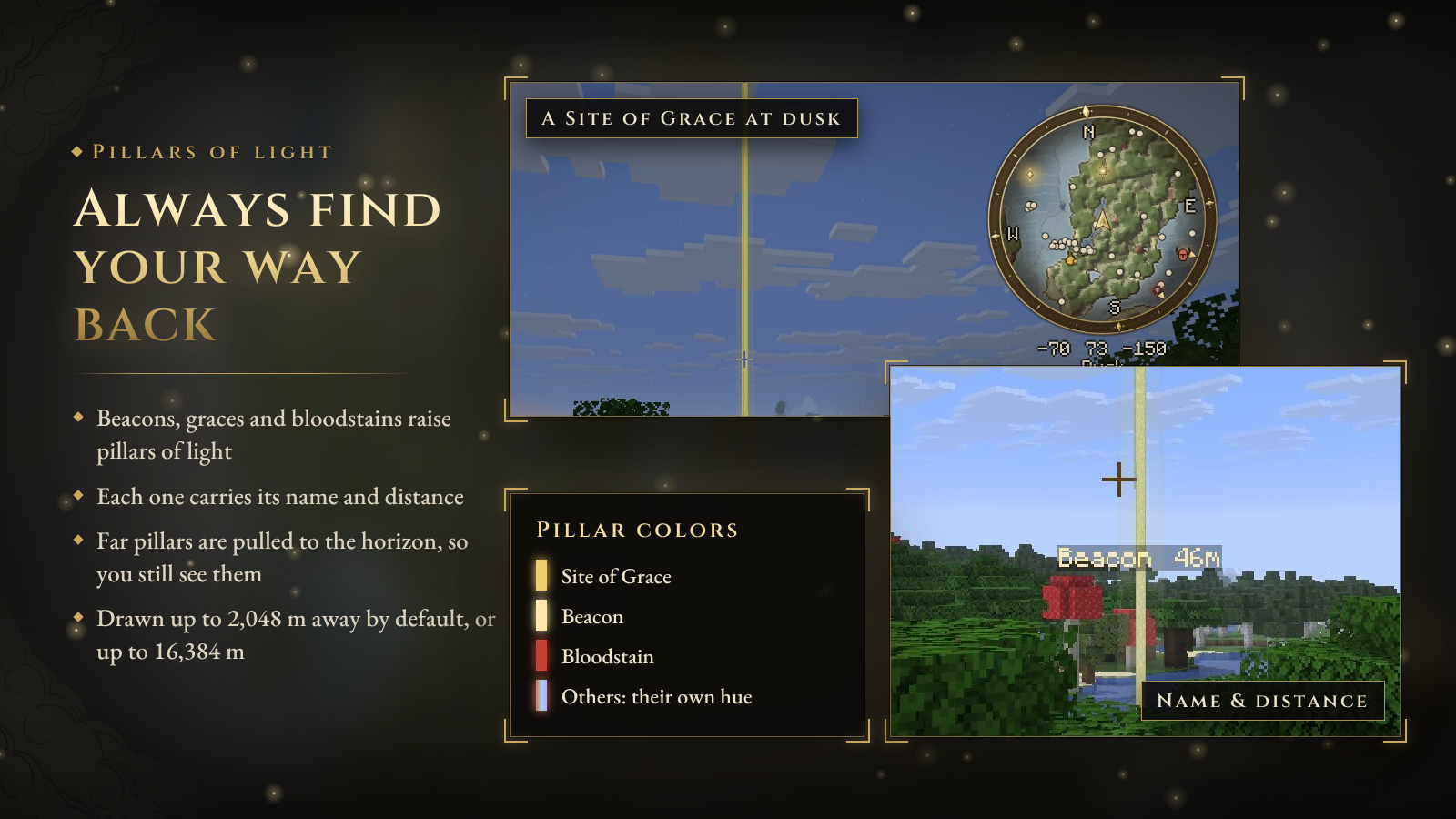
Pillars of light rise from your beacon, your Sites of Grace and your bloodstains, and from any marker you choose, with its name and distance floating beside it. Pillars beyond your render distance are pulled in to the horizon, so you can still see them. They are drawn up to 2,048 m away by default, and up to 16,384 m if you like.

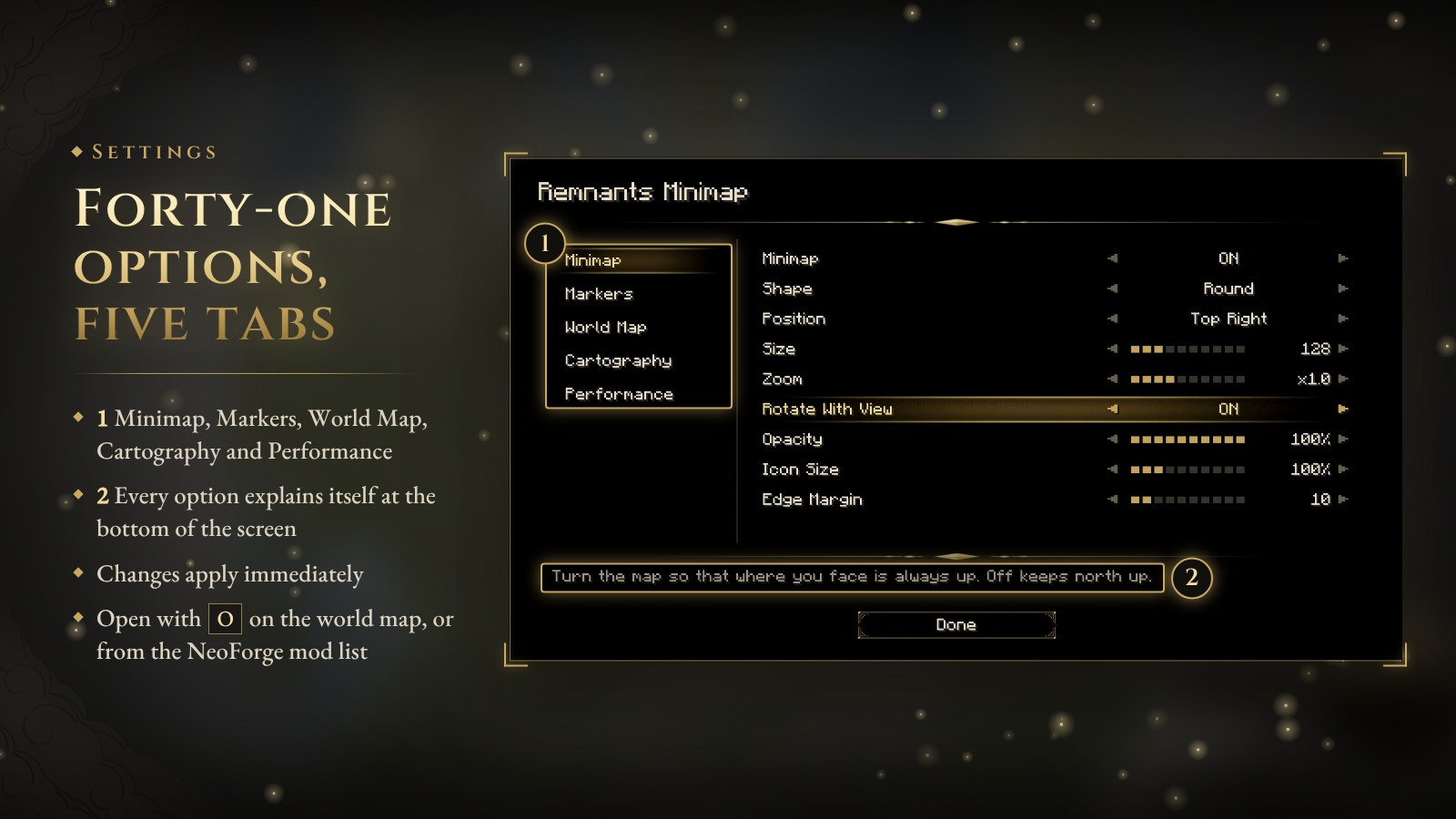
The settings screen is laid out like a soulslike options menu: tabs on the left, rows you step through, and a description of the selected option along the bottom. Every change applies immediately.
- Minimap: shape, position, size, zoom, rotation, opacity, icon size, edge margin, cardinal letters, coordinates, time of day, biome.
- Markers: markers on the minimap, pinning to the rim, pillars and their labels and distance, bloodstains, resting place, radar for players, hostile and passive creatures.
- World Map: labels, cloud border, hints, compass rose, time dial, region grid, crisp close-ups, animations.
- Cartography: palette, contour lines and interval, relief strength, engraved water, paper grain, ink outlines.
- Performance: mapping budget and regions kept in memory.
Open it with O on the world map or from the NeoForge mod list. You can also bind a key to it in Controls.
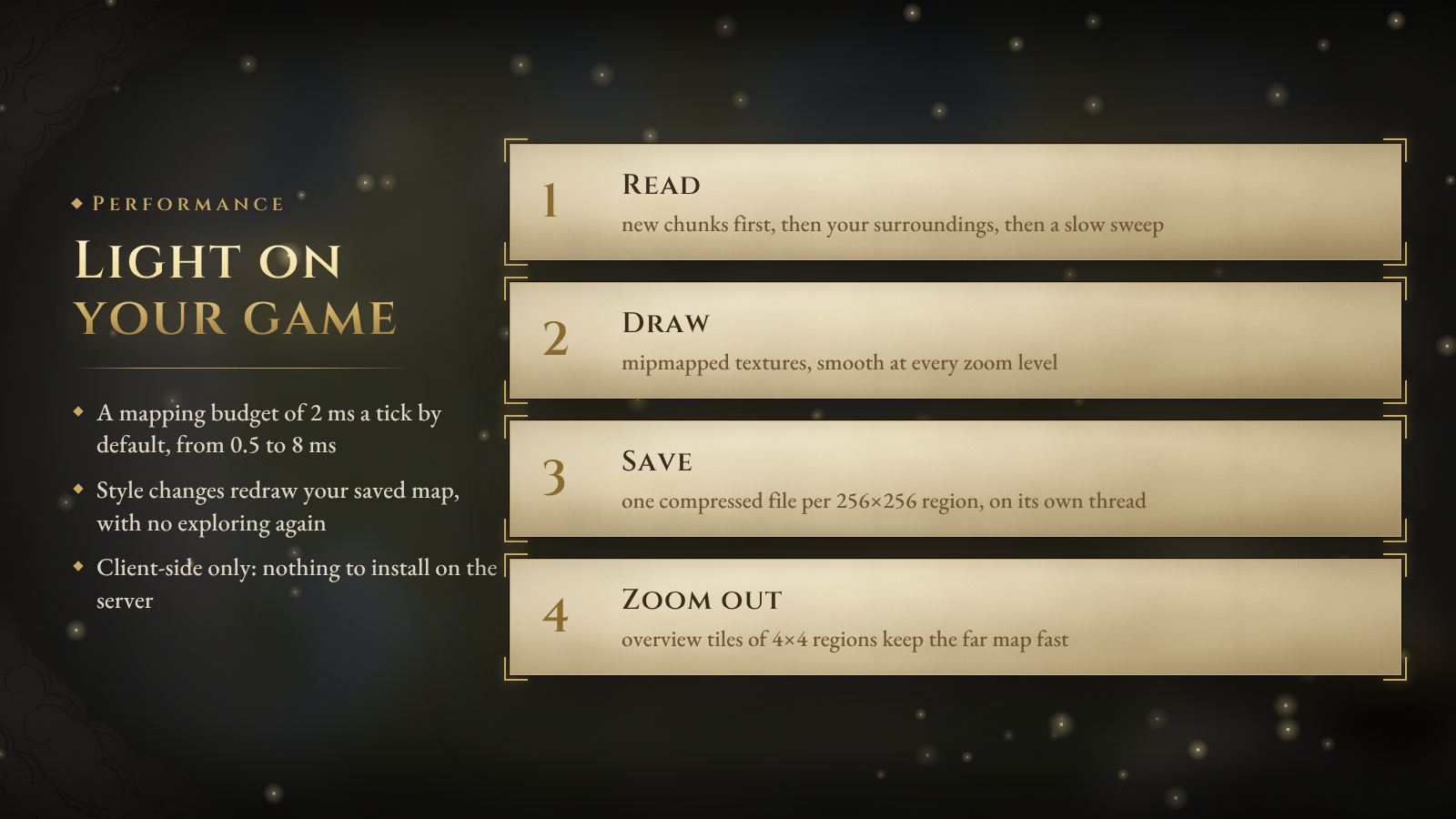
- Terrain is read within a small time budget each tick: newly loaded chunks first, then your surroundings, then a slow sweep over your render distance. The default is 2 ms, adjustable from 0.5 to 8 ms.
- Maps are drawn from mipmapped textures, so they stay smooth at every zoom level.
- Each 256×256 block region is saved as one compressed file, in the background, on its own thread.
- Change the palette or any cartography option and your saved map is redrawn. Nothing needs exploring again.
- 128 regions stay in memory by default, about 0.8 MB each.

| Key | Action |
|---|---|
| M | Open / close the world map |
| N | Show / hide the minimap |
| = / - | Minimap zoom |
| B | Place a marker where you stand |
| Left click (world map) | Place or remove the beacon, select a marker |
| Right click (world map) | Marker menu |
| G (world map) | Grace and marker list |
| Space (world map) | Return to your position |
| H (world map) | Show / hide control hints |
| O (world map) | Settings |
All keys can be rebound in Controls. Toggle Minimap Rotation and Minimap Settings are there too, unbound by default.

| Minecraft | Loaders | Also install |
|---|---|---|
| 1.20.1 | Fabric, Forge | Fabric API (Fabric) |
| 1.21.1 | Fabric, NeoForge | Fabric API (Fabric) |
| 26.1.2 · 26.2 | Fabric, NeoForge | Fabric API (Fabric) |
- Download the file whose name matches your loader and Minecraft version, for example
remnantminimaps-fabric-26.2-….jar. - Install it on your client only. Servers do not need it.
- Maps and markers are kept per singleplayer world and per server address in
remnantminimaps/in your game folder. Settings are inconfig/remnantminimaps.json. - Coming from Odyssey Map? Remnants Minimap is its full rebuild. Remove the old
odysseymapjar first. Old settings and waypoints are not carried over; the map fills in again as you explore.

Does it work on servers? Yes. Everything happens on your client, so it works on any server without the server installing anything.
Can I keep the Minecraft look? Yes. Set the palette to Classic to keep Minecraft's own map colors, or Vivid Parchment to keep more of them under the parchment look. Contours, water engraving, paper grain and ink outlines can each be switched off, and relief shading can be turned down to zero.
Is it heavy? The mod reads terrain within a time budget you set (2 ms a tick by default), saves in the background, and draws from mipmapped textures. Far zoom levels on the world map use overview tiles instead of hundreds of region textures. On a slow machine, lower the Mapping Budget or Regions in Memory under Performance.
Where are my maps saved?
In remnantminimaps/worlds/<world>/ in your game folder: one .rmr file per 256×256 block region for each dimension, plus your markers.
Where are the docs? Source and README · Changelog · Issues

Remnants Minimap is licensed under Apache-2.0. It is an independent, fan-made project and is not affiliated with or endorsed by any game or studio it takes inspiration from. All art in the mod is original.
A soulslike minimap for Minecraft
Remnants Minimap redraws your world as a hand-inked chart: parchment lands, engraved seas and ink contour lines, framed by a gilded ring. Mark your Sites of Grace, drop a beacon, and follow pillars of light back across the land.
Client-side only. It works in singleplayer and on any server, and the server needs nothing installed.
2.0 is available for Fabric, Forge and NeoForge on 1.20.1, 1.21.1, 26.1.2 and 26.2.
Most minimaps copy the block colors. Remnants Minimap draws the land the way a cartographer would.
- Parchment palette. Soft khaki plains, olive forests, pale sand and grey stone instead of saturated block colors.
- Relief and contours. Hills are shaded so they show their shape, and ink contour lines follow the height of the land. Every fourth line is inked darker.
- Engraved water. Slate-blue seas with fine wave lines, pale shallows and a second line offshore.
- Ink outlines. Coastlines, building footprints and roads are traced in ink.
- Fog of the unexplored. Land you have not seen stays hidden in fog. Everything you explore is saved per world and per dimension.
- In the Nether, and other dimensions with a ceiling, the map is drawn at your height instead of from the roof.
- Prefer Minecraft's own colors? Switch to the Vivid Parchment or Classic palette. Contours, relief, water engraving, paper grain and ink outlines each have their own setting.
- Smooth. The map rotates and scrolls with sub-pixel precision instead of jumping block by block, and zooming is animated.
- Rotate with your view or keep north up, with N, E, S and W around the rim.
- A gold arrow for you and silver arrows for other players. An optional radar shows hostile and passive mobs.
- Your coordinates, the time of day (Dawn, Early Day, Noon, Dusk…) and, optionally, the biome below the map.
- Graces, beacons, bloodstains and markers with a pillar stay pinned to the rim when they are out of view, so you always know which way to go.
- Press N to hide the minimap and = / - to zoom.
Pick a round map in a gold ring or a square chart frame, any screen corner, and a size from 64 to 320 GUI pixels. Opacity, icon size and edge margin are adjustable too. At the top right, the minimap moves down to make room for your status effect icons.
Press M to open the full map.
- Drag to pan. The map keeps gliding when you let go. WASD and the arrow keys pan too.
- Scroll to zoom toward the cursor, from single blocks out to your whole explored world. Far zoom levels switch to overview tiles, so the map stays fast.
- Left click places your beacon, which rises as a pillar of light in the world; click it again to remove it. Click any other marker and the map glides to it; double click it to edit.
- Right click opens the marker menu: add a marker, place or remove the beacon, edit, raise or lower a pillar, show or hide a marker on the minimap, remove it, or return to your position.
- Hover a marker to see its name, group, position and distance.
- A compass rose, a day-and-night dial, a scale bar, cursor coordinates and control hints, framed by swirling clouds in the corners. The compass, dial, hints and clouds can each be turned off, and a faint region grid can be turned on.
- Space returns to your position, H hides the hints and O opens the settings.
- 30 emblems: Site of Grace, Castle, Church, Ruins, Tower, Village, Cave, Catacombs, Portal, Waygate, Boss, Danger, Battle, Treasure, Mine, Forge, Farm, Merchant, Spring, Great Tree, Summit, Camp, Ship, Banner, Star, Lookout and more.
- Make each one yours: a name, one of ten hues, an exact position, and whether it shows on the minimap, carries a label and raises a pillar of light.
- Press B to place a marker where you stand.
- Press G on the world map for the Grace list: every marker in the dimension with its distance, Sites of Grace first, a search box and nine category filters (Graces, Beacons, Bloodstains, Rest & Home, Settlements, Dungeons, Threats, Resources, Landmarks). Click an entry and the map glides to it.
- A Bloodstain is left where you die (the last 3 are kept by default, up to 20), and a Resting Place marks the last bed you slept in. Both are automatic.
Pillars of light rise from your beacon, your Sites of Grace and your bloodstains, and from any marker you choose, with its name and distance floating beside it. Pillars beyond your render distance are pulled in to the horizon, so you can still see them. They are drawn up to 2,048 m away by default, and up to 16,384 m if you like.
The settings screen is laid out like a soulslike options menu: tabs on the left, rows you step through, and a description of the selected option along the bottom. Every change applies immediately.
- Minimap: shape, position, size, zoom, rotation, opacity, icon size, edge margin, cardinal letters, coordinates, time of day, biome.
- Markers: markers on the minimap, pinning to the rim, pillars and their labels and distance, bloodstains, resting place, radar for players, hostile and passive creatures.
- World Map: labels, cloud border, hints, compass rose, time dial, region grid, crisp close-ups, animations.
- Cartography: palette, contour lines and interval, relief strength, engraved water, paper grain, ink outlines.
- Performance: mapping budget and regions kept in memory.
Open it with O on the world map or from the NeoForge mod list. You can also bind a key to it in Controls.
- Terrain is read within a small time budget each tick: newly loaded chunks first, then your surroundings, then a slow sweep over your render distance. The default is 2 ms, adjustable from 0.5 to 8 ms.
- Maps are drawn from mipmapped textures, so they stay smooth at every zoom level.
- Each 256×256 block region is saved as one compressed file, in the background, on its own thread.
- Change the palette or any cartography option and your saved map is redrawn. Nothing needs exploring again.
- 128 regions stay in memory by default, about 0.8 MB each.
| Key | Action |
|---|---|
| M | Open / close the world map |
| N | Show / hide the minimap |
| = / - | Minimap zoom |
| B | Place a marker where you stand |
| Left click (world map) | Place or remove the beacon, select a marker |
| Right click (world map) | Marker menu |
| G (world map) | Grace and marker list |
| Space (world map) | Return to your position |
| H (world map) | Show / hide control hints |
| O (world map) | Settings |
All keys can be rebound in Controls. Toggle Minimap Rotation and Minimap Settings are there too, unbound by default.
| Minecraft | Loaders | Also install |
|---|---|---|
| 1.20.1 | Fabric, Forge | Fabric API (Fabric) |
| 1.21.1 | Fabric, NeoForge | Fabric API (Fabric) |
| 26.1.2 · 26.2 | Fabric, NeoForge | Fabric API (Fabric) |
- Download the file whose name matches your loader and Minecraft version, for example
remnantminimaps-fabric-26.2-….jar. - Install it on your client only. Servers do not need it.
- Maps and markers are kept per singleplayer world and per server address in
remnantminimaps/in your game folder. Settings are inconfig/remnantminimaps.json. - Coming from Odyssey Map? Remnants Minimap is its full rebuild. Remove the old
odysseymapjar first. Old settings and waypoints are not carried over; the map fills in again as you explore.
Does it work on servers? Yes. Everything happens on your client, so it works on any server without the server installing anything.
Can I keep the Minecraft look? Yes. Set the palette to Classic to keep Minecraft's own map colors, or Vivid Parchment to keep more of them under the parchment look. Contours, water engraving, paper grain and ink outlines can each be switched off, and relief shading can be turned down to zero.
Is it heavy? The mod reads terrain within a time budget you set (2 ms a tick by default), saves in the background, and draws from mipmapped textures. Far zoom levels on the world map use overview tiles instead of hundreds of region textures. On a slow machine, lower the Mapping Budget or Regions in Memory under Performance.
Where are my maps saved?
In remnantminimaps/worlds/<world>/ in your game folder: one .rmr file per 256×256 block region for each dimension, plus your markers.
Where are the docs? Source and README · Changelog · Issues
Remnants Minimap is licensed under Apache-2.0. It is an independent, fan-made project and is not affiliated with or endorsed by any game or studio it takes inspiration from. All art in the mod is original.
Screenshots
Gallery
Versions
Files
Relations
Project Relations
More like this
Similar Mods
Suggestions use data such as tags, dependencies, dependents, descriptions, titles, and more to rank how much they overlap with this mod.
- Mob Lootbags
- Runeborn | Soulslike RPG progression
- Sunken Spires
- Remnants | RPG Stats, Skills & Progression
- Remnants | The Eclipsed Realm
- Remnants - Structure Expansion
- Remnants Of A Cruel World
- Remnants
- Remnants of Hyrule
- Remnants Of The Ancient Builders
- Remnants of the Past
- Ancient Remnants: Monoliths
On ModDex
Community snapshot
By the numbers
Statistics

Get it on
Available Platforms
On ModDex
Community snapshot
By the numbers