
Community listing page, reviews here may not be monitored by the author.
Sable Photomancy


No reviews yet
Capture form. Preserve memory. Project reality.
Community voices
Reviews
No reviews yet. Be the first to review this project!
Get it on
Available Platforms
Compatibility
Supported Environments
Must be installed on both the client and the server.
About
Project Details
For authors
Embed Badge
If you're the author of this project, you can embed a live badge anywhere that supports HTML or Markdown. It updates automatically whenever ratings change.
Use HTML for any page that supports it, or Markdown for README files and Markdown-based descriptions.
Identifiers
Platform IDs
About
Description
Blueprints That Remember Everything!
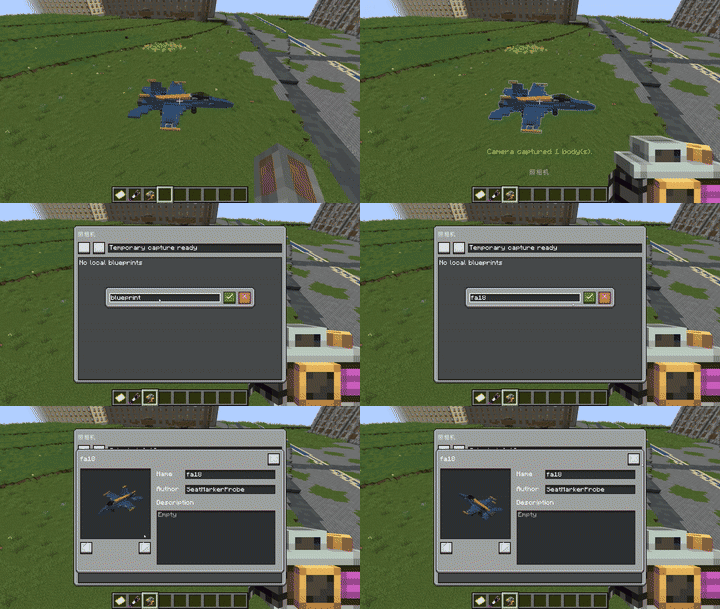
Save Your Builds
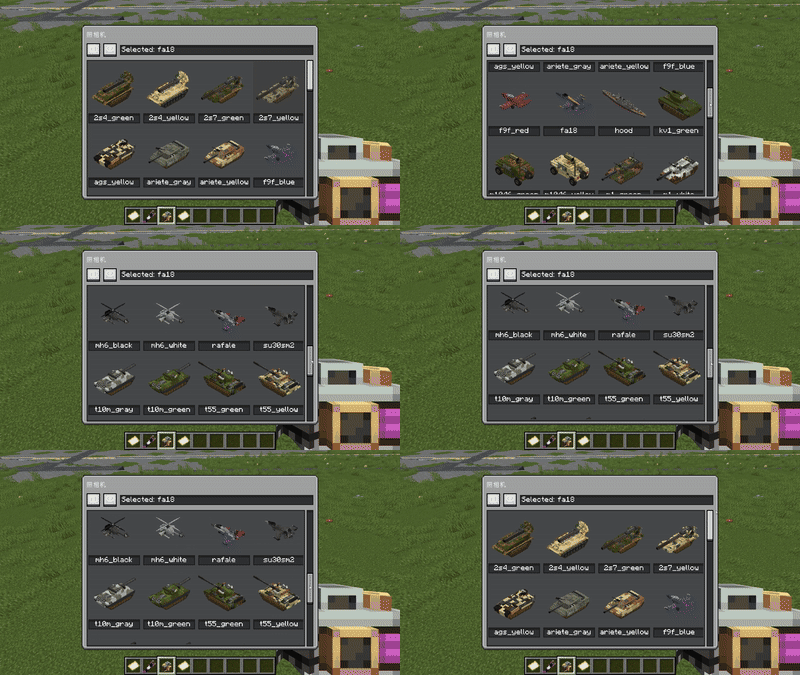
Preview Your Builds
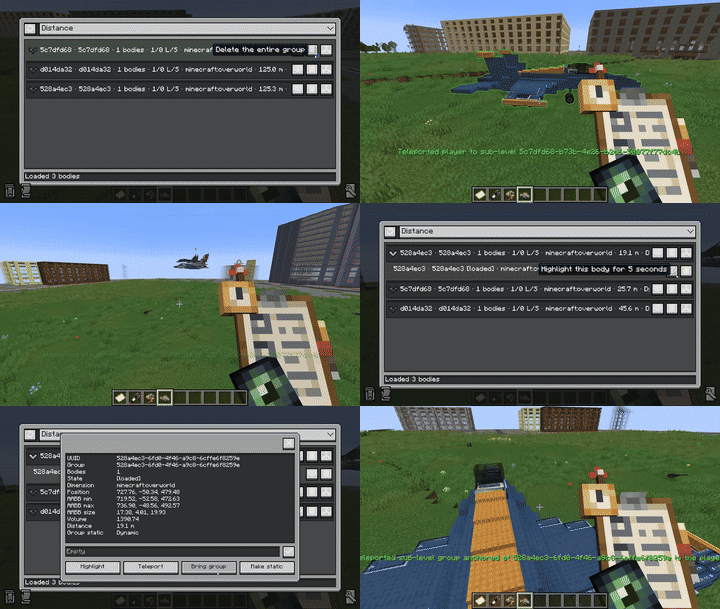
Find Your Stray Builds
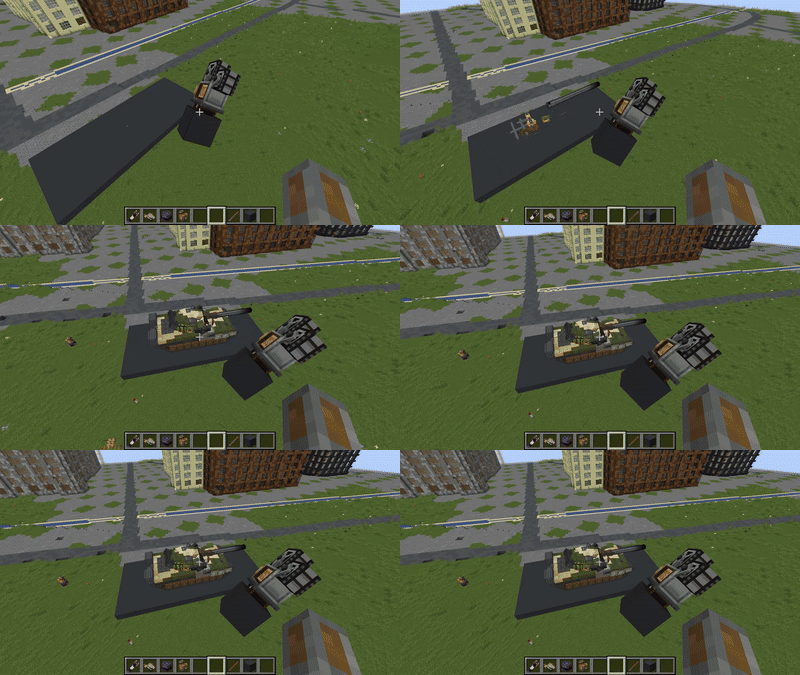
Print Your Builds At Survival
This blueprint system is built for high compatibility, not just saving blocks. It already supports saving and restoring Swivel Bearing connections, Rope Winch rope links, Drive By Wire connections, Create contraptions, and Super Glue, so complex Sable/Create builds can survive copy, export, and placement with their important runtime links intact.
It also includes a SubLevel management tool for recovering SubLevels that get lost somewhere in the world. You can locate them and teleport them back, including connected joints, making it much easier to rescue misplaced or orphaned physics structures during testing and building.
Introduction
Sable sub-levels can contain moving blocks, block entities, entities, and modded state that often stores references to positions, UUIDs, constraints, or manager-owned data. A normal copy-paste workflow is not enough for these structures because copied data must stop pointing back to the original world objects.
Sable Schematic API focuses on that remapping problem:
- Blocks and block entities can clean or rewrite saved NBT.
- Entities can be transformed, skipped, or restored with custom logic.
- Multi-block or externally managed systems can store blueprint sidecar data.
- Placement maps source sub-level UUIDs and blueprint-local block references to newly allocated placed sub-levels.
The mod also includes a simple in-game tool so blueprints can be tested without typing coordinates every time.
Features
- Save and load Sable sub-level blueprints.
- Save blocks, block entities, regular entities, and Create contraption entities.
- OP-only commands for saving and loading.
- In-game blueprint tool:
- Select an area with left click.
- Open the UI with Tab.
- Save local blueprint files under
Sable-Schematics/. - Upload and place selected local blueprints with right click.
- Developer extension points:
- Block mappers.
- Entity mappers.
- Global blueprint events and sidecar data.
- Create compatibility:
- Contraption entity anchor remapping.
- Super Glue save and restore through sidecar data.
- Simulated Project compatibility:
- Swivel-bearing and plate reconnection.
- Rope-winch / rope-connector rope strand restoration.
- Launched plunger entity skip rule.
Requirements
Required
- Minecraft
1.21.1 - NeoForge
21.1.228+ - Sable
2.0.0+ - LDLib2
2.2.17+
Optional Compatibility Targets
- Create
6.0.10+ - Simulated Project
1.1.3+
Compatibility mappers are only registered when the corresponding optional mod is loaded.
Usage
Blueprint Tool
Give yourself the tool:
/give @p sable_schematic_api:blueprint_toolBasic controls:
- Hold the tool and left click to select the start and end points.
- Shift + left click clears the current selection and selected blueprint.
- Press Tab while holding the tool to open the blueprint UI.
- Use Save to export the selected area to the client-side
Sable-Schematics/<name>.nbtfolder. - Select a local blueprint in the UI, then right click to upload it to the server and place it at the look target.
Tool-based saving and loading also require OP permission, and the player must be holding the blueprint tool.
Important Notes
- This is an experimental API mod, not a stable long-term storage format yet.
- Back up important worlds before testing blueprint save/load workflows.
- Current blueprints mainly copy Sable sub-level contents. Regular root-world blocks are not part of the same reference mapping.
- Rotation and mirroring are not exposed as stable placement features yet. Current compatibility behavior mainly assumes translation.
- Blueprint NBT format is currently v1 and does not support legacy plot payloads.
- Optional compatibility behavior depends on the runtime NBT and API structures of the targeted Create and Simulated Project versions.
- This mod is intended for controlled testing, compatibility development, and early blueprint workflow experiments.
License And Redistribution
Unless otherwise stated, this project's source code is licensed under the PolyForm Shield License 1.0.0.
You may use, distribute, include in modpacks, run on servers, or depend on this mod in non-competing contexts.
Please do not:
- Rename and republish this project as a competing replacement.
- Impersonate Sable, Sable Schematic API, or an official compatibility build.
- Remove authorship, source, license, or attribution information.
- Mislead players about the origin or status of the mod.
Third-party dependencies and release jars placed under libs/ are not covered by this project's source license. Follow their own licenses and distribution terms.
Known Issues
- Stable rotation and mirroring are not supported yet.
- Root-world blocks are not part of the sub-level reference mapping.
- The API is still a draft and may change in future versions.
Blueprints That Remember Everything!
Save Your Builds
Preview Your Builds
Find Your Stray Builds
Print Your Builds At Survival
This blueprint system is built for high compatibility, not just saving blocks. It already supports saving and restoring Swivel Bearing connections, Rope Winch rope links, Drive By Wire connections, Create contraptions, and Super Glue, so complex Sable/Create builds can survive copy, export, and placement with their important runtime links intact.
It also includes a SubLevel management tool for recovering SubLevels that get lost somewhere in the world. You can locate them and teleport them back, including connected joints, making it much easier to rescue misplaced or orphaned physics structures during testing and building.
Introduction
Sable sub-levels can contain moving blocks, block entities, entities, and modded state that often stores references to positions, UUIDs, constraints, or manager-owned data. A normal copy-paste workflow is not enough for these structures because copied data must stop pointing back to the original world objects.
Sable Schematic API focuses on that remapping problem:
- Blocks and block entities can clean or rewrite saved NBT.
- Entities can be transformed, skipped, or restored with custom logic.
- Multi-block or externally managed systems can store blueprint sidecar data.
- Placement maps source sub-level UUIDs and blueprint-local block references to newly allocated placed sub-levels.
The mod also includes a simple in-game tool so blueprints can be tested without typing coordinates every time.
Features
- Save and load Sable sub-level blueprints.
- Save blocks, block entities, regular entities, and Create contraption entities.
- OP-only commands for saving and loading.
- In-game blueprint tool:
- Select an area with left click.
- Open the UI with Tab.
- Save local blueprint files under
Sable-Schematics/. - Upload and place selected local blueprints with right click.
- Developer extension points:
- Block mappers.
- Entity mappers.
- Global blueprint events and sidecar data.
- Create compatibility:
- Contraption entity anchor remapping.
- Super Glue save and restore through sidecar data.
- Simulated Project compatibility:
- Swivel-bearing and plate reconnection.
- Rope-winch / rope-connector rope strand restoration.
- Launched plunger entity skip rule.
Requirements
Required
- Minecraft
1.21.1 - NeoForge
21.1.228+ - Sable
2.0.0+ - LDLib2
2.2.17+
Optional Compatibility Targets
- Create
6.0.10+ - Simulated Project
1.3.0+
Compatibility mappers are only registered when the corresponding optional mod is loaded.
Screenshots
Gallery
Versions
Files
Relations
Project Relations
More like this
Similar Mods
Suggestions use data such as tags, dependencies, dependents, descriptions, titles, and more to rank how much they overlap with this mod.
On ModDex
Community snapshot
By the numbers
Statistics
Want to reach Minecraft players?
We're looking for a server hosting partner to feature here and other parts of the site. Interested? Send us a message!
Get in touchGet it on
Available Platforms
On ModDex
Community snapshot
By the numbers