
Community listing page, reviews here may not be monitored by the author.
Server Optimiser V2

No reviews yet
Smart server optimization with optional TPS control. Reduce RAM usage 25%. Perfect for survival/skyblock servers. Entity optimization, chunk management, system monitoring.

Community voices
Reviews
No reviews yet. Be the first to review this project!
Get it on
Available Platforms
About
Project Details
For authors
Embed Badge
If you're the author of this project, you can embed a live badge anywhere that supports HTML or Markdown. It updates automatically whenever ratings change.
Use HTML for any page that supports it, or Markdown for README files and Markdown-based descriptions.
Identifiers
Platform IDs
Resources
External Links
About
Description
🔧 ServerOptimiser v2 - Intelligent Performance Management
Transform your server's performance with smart TPS control and comprehensive optimization.
🚀 Proven Results - Real Performance Data
Before ServerOptimiser:
- TPS: 20.00 (standard)
- CPU Usage: 8.0%
- RAM Usage: 0.49GB
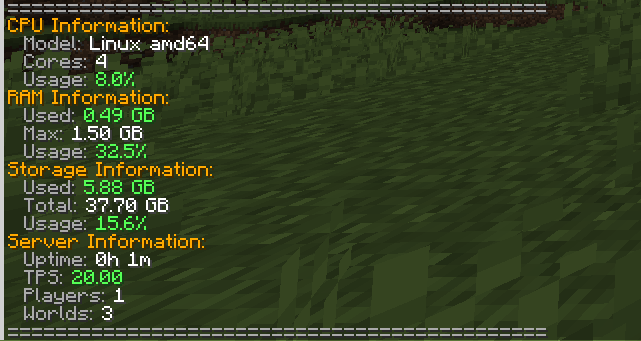
After ServerOptimiser (TPS limited to 15):
- TPS: 15.14 (controlled)
- CPU Usage: 2.5%
- RAM Usage: 0.38GB
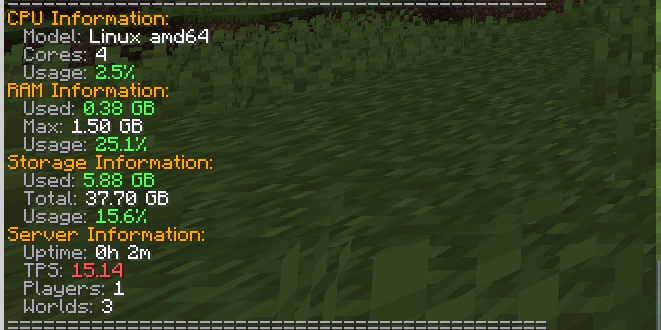
🎯 Result: 25% reduction in RAM & 50%> CPU usage with controlled TPS!
⚠️ TPS Limiting is ENTIRELY OPTIONAL
TPS limiting is only recommended for:
- Survival servers where precision timing isn't critical
- Skyblock servers focused on building and economy
- Peaceful/Non-PvP servers where combat timing doesn't matter
- Economy/RP servers where smooth performance > precise timing
NOT recommended for:
- PvP servers - Combat requires precise timing
- Minigame servers - Fast-paced games need full TPS
- Redstone-heavy servers - Complex contraptions need 20 TPS
💡 Why Lower TPS Actually Improves Performance
The Science Behind Smart TPS Limiting:
Most players can't tell the difference between 20 TPS and 15 TPS in survival gameplay, but your server definitely can! Here's why:
✅ Reduced CPU Cycles - 25% fewer game ticks means 25% less CPU processing
✅ Lower RAM Usage - Fewer entity updates and chunk processing saves memory
✅ Decreased Disk I/O - Less frequent world saves and chunk loading
✅ Improved Stability - Prevents lag spikes during high activity periods
✅ Better Resource Distribution - More CPU available for plugins and player actions
🎮 Core Features
Smart TPS Management (Optional)
- Intelligent TPS Limiting: Set target TPS (15-20) with
/ob tps 15 - Automatic Performance Scaling: Dynamically adjusts based on server load
- Manual Override: Instant reset to 20 TPS when needed
- Completely Optional: Use only if it benefits your server type
Entity Optimization
- Smart Entity Limiting: Reduces mob density in high-traffic areas
- AI Optimization: Improves mob AI performance without breaking behavior
- Automatic Cleanup: Removes lag-causing entities intelligently
Chunk Management
- Smart Unloading: Automatically unloads unused chunks
- Preloading System: Keeps frequently accessed areas ready
- Memory Optimization: Reduces RAM usage from chunk overhead
System Monitoring
- Real-time Stats:
/obstatsshows CPU, RAM, and storage usage - Lag Detection: Automatically identifies and resolves performance bottlenecks
- Performance Alerts: Notifies admins of critical performance issues
Admin Tools
- Auto-Permission Management: Streamlined permission assignment
- Comprehensive Commands: Master
/obcommand with full control - Configuration Flexibility: Extensive YAML configuration options
📊 Commands
Main Commands:
/ob- Run full server optimization/ob tps 15- Limit TPS to 15 for better performance (optional)/ob tps reset- Restore normal 20 TPS/obstats- View detailed system statistics
Specific Optimizations:
/ob entities- Optimize entities only/ob chunks- Optimize chunks only/ob lag- Run lag detection
Additional Commands:
/ob stats- Show performance statistics/ob reload- Reload configuration/ob help- Show all available commands
⚙️ Technical Details
- Platform: PaperMC 1.21.8+ (Java 21)
- Performance Impact: Minimal overhead, major benefits
- Thread Safety: Properly handles async operations
- Analytics: Optional bStats integration for usage insights
🎯 Perfect For
✅ Survival Servers - Improved performance without gameplay impact
✅ Economy Servers - Better stability for shop plugins and transactions
✅ Skyblock Servers - Smooth building and progression experience
✅ RPG Servers - Better performance with custom content
✅ Community Servers - Handle more players with same hardware
✅ Budget Hosting - Maximize performance on limited resources
🚨 Not Recommended For TPS Limiting
❌ PvP Servers - Where precise combat timing is crucial
❌ Redstone-Heavy Servers - Complex contraptions need full TPS
❌ Minigame Servers - Fast-paced games require 20 TPS
❌ Competitive Servers - Where every tick matters
📈 Installation & Setup
- Download and place in your
plugins/folder - Restart your server
- Optional: Run
/ob tps 15if you have a survival/skyblock server - Use
/obstatsto monitor your performance improvements!
Remember: TPS limiting is completely optional and should only be used on appropriate server types!
Experience the difference - your server (and your hosting bill) will thank you!
the tests of the plugin were done on the "hosting" plan on server.pro
Screenshots
Gallery
Versions
Files
Relations
Project Relations
More like this
Similar Mods
Suggestions use data such as tags, dependencies, dependents, descriptions, titles, and more to rank how much they overlap with this mod.
On ModDex
Community snapshot
By the numbers
Statistics

 (opens in a new tab)
Get it on
Available Platforms
On ModDex
Community snapshot
By the numbers
Statistics
Resources