
Community listing page, reviews here may not be monitored by the author.
Simple Screens


No reviews yet
Allows you to customize game loading screen backgrounds.

Community voices
Reviews
No reviews yet. Be the first to review this project!
Get it on
Available Platforms
Compatibility
Supported Environments
Runs entirely on the client. Works on vanilla servers.
About
Project Details
For authors
Embed Badge
If you're the author of this project, you can embed a live badge anywhere that supports HTML or Markdown. It updates automatically whenever ratings change.
Use HTML for any page that supports it, or Markdown for README files and Markdown-based descriptions.
Identifiers
Platform IDs
About
Description
This mod allows you to easily customize the background image of loading screens in the game. For example you can set a new background image for the game loading screen or world loading screens. Your custom images are loaded from resource packs and can be any resolution as long as it's a PNG. We recommend 1920x1080 or a 16:9 aspect for the best results.
How it works?
When you run the game with the mod installed a simplescreens.json configuration file will be generated in the config folder. You can edit this file to add new load screen backgrounds or keep the default. You can also define more than one background which will cause the mod to randomly pick one. The textures are loaded using Minecraft's resource pack system, so the entry simplescreens:/textures/gui/title/load_screen_background.png will load a texture from assets/simplescreens/textures/gui/title/load_screen_background.png from a resource pack. Modpacks may need an additional mod to automatically enable resource packs, we recommend Open Loader for this.
Examples
Below is an example configuration file that will have different random logos for the different types of loading screens. In this example we are loading the background images from the assets/my_pack/textures/gui/loading_screens folder in a resource pack.
{
  "game_load_screen_textures": [
    "mypack:textures/gui/loading_screens/game_one.png",
    "mypack:textures/gui/loading_screens/game_two.png",
    "mypack:textures/gui/loading_screens/game_three.png"
  ],
  "world_load_screen_textures": [
    "mypack:textures/gui/loading_screens/world_one.png",
    "mypack:textures/gui/loading_screens/world_two.png",
    "mypack:textures/gui/loading_screens/world_three.png"
  ]
}
FaQ
Q: I get purple and black squares instead of my texture? This means that the game can not find the image that you specified. This can be caused by a typo in your configuration file, or by the resource pack with your image has not been correctly loaded. This mod will not load resource packs for you! You must load them yourself or use a mod like Open Loader to load them for you automatically!
Q: How do random textures work? When more than one texture is specified the mod will pick one at random. Each entry has the same probability of being selected, however you can add duplicate entries if you want to make a specific texture more or less common. Random textures are completely optional, and the mod will work perfectly fine with just one.
Q: When I start the game I still see the red loading screen for a bit? Unfortunately this screen is displayed before mods are loaded, meaning we can not run any of our code yet. This limitation is shared by other mods that also modify the loading screen so we don't believe it is realistic to fix this issue. If anyone knows of a solution please let us know.
Credits
This mod was developed by Jaredlll08 and Darkhax for Kehaan but other projects can use it as well. The logo for this project was created by Delapouite and is licensed under CC BY 3.0.

This project is sponsored by Nodecraft. Use code Darkhax for 30% off your first month of service!
This mod allows you to easily customize the background image of loading screens in the game. For example you can set a new background image for the game loading screen or world loading screens. Your custom images are loaded from resource packs and can be any resolution as long as it's a PNG. We recommend 1920x1080 or a 16:9 aspect for the best results.
How it works?
When you run the game with the mod installed a simplescreens.json configuration file will be generated in the config folder. You can edit this file to add new load screen backgrounds or keep the default. You can also define more than one background which will cause the mod to randomly pick one. The textures are loaded using Minecraft's resource pack system, so the entry simplescreens:/textures/gui/title/load_screen_background.png will load a texture from assets/simplescreens/textures/gui/title/load_screen_background.png from a resource pack. Modpacks may need an additional mod to automatically enable resource packs, we recommend Open Loader for this.
Examples
Below is an example configuration file that will have different random logos for the different types of loading screens. In this example we are loading the background images from the assets/my_pack/textures/gui/loading_screens folder in a resource pack.
{
  "game_load_screen_textures": [
    "mypack:textures/gui/loading_screens/game_one.png",
    "mypack:textures/gui/loading_screens/game_two.png",
    "mypack:textures/gui/loading_screens/game_three.png"
  ],
  "world_load_screen_textures": [
    "mypack:textures/gui/loading_screens/world_one.png",
    "mypack:textures/gui/loading_screens/world_two.png",
    "mypack:textures/gui/loading_screens/world_three.png"
  ]
}
FaQ
Q: I get purple and black squares instead of my texture? This means that the game can not find the image that you specified. This can be caused by a typo in your configuration file, or by the resource pack with your image has not been correctly loaded. This mod will not load resource packs for you! You must load them yourself or use a mod like Open Loader to load them for you automatically!
Q: How do random textures work? When more than one texture is specified the mod will pick one at random. Each entry has the same probability of being selected, however you can add duplicate entries if you want to make a specific texture more or less common. Random textures are completely optional, and the mod will work perfectly fine with just one.
Q: When I start the game I still see the red loading screen for a bit? Unfortunately this screen is displayed before mods are loaded, meaning we can not run any of our code yet. This limitation is shared by other mods that also modify the loading screen so we don't believe it is realistic to fix this issue. If anyone knows of a solution please let us know.
Credits
This mod was developed by Jaredlll08 and Darkhax for Kehaan but other projects can use it as well. The logo for this project was created by Delapouite and is licensed under CC BY 3.0.

This project is sponsored by Nodecraft. Use code DARKHAX for 30% off your first month of service!
Screenshots
Gallery
-
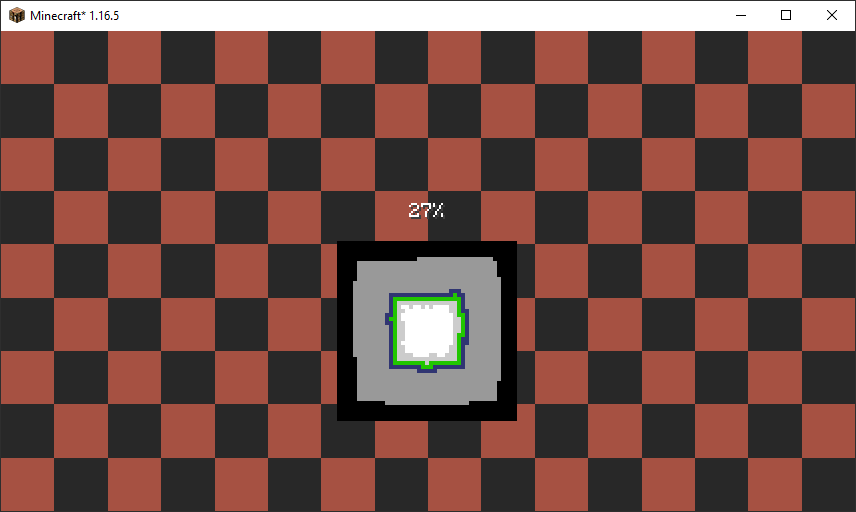 Custom World Loading Screen Easily change the background of the world loading screen with a custom background from your resource pack.
 -
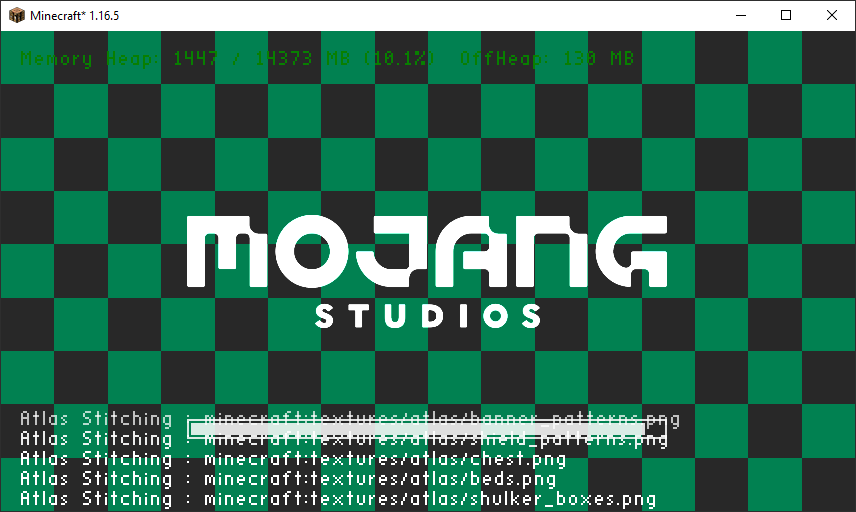 Custom Game Loading Screens Easily change the background of the game loading screen with a custom background from your resource pack.
-
 Custom Game Loading Screens Easily change the background of the game loading screen with a custom background from your resource pack.
 -
 Custom World Loading Screen Easily change the background of the world loading screen with a custom background from your resource pack.
Versions
Files
Relations
Project Relations
More like this
Similar Mods
Suggestions use data such as tags, dependencies, dependents, descriptions, titles, and more to rank how much they overlap with this mod.
On ModDex
Community snapshot
By the numbers
Statistics
 (opens in a new tab)
Get it on
Available Platforms
On ModDex
Community snapshot
By the numbers