Community listing page, reviews here may not be monitored by the author.
Sodium Profiles (Save Your Settings as Profiles)

No reviews yet
Sodium Profiles adds one-click performance presets and custom settings profiles to Sodium's video settings. Swap between max FPS and best visuals instantly — no manual tweaking needed.
Community voices
Reviews
No reviews yet. Be the first to review this project!
Get it on
Available Platforms
About
Project Details
For authors
Embed Badge
If you're the author of this project, you can embed a live badge anywhere that supports HTML or Markdown. It updates automatically whenever ratings change.
Use HTML for any page that supports it, or Markdown for README files and Markdown-based descriptions.
Identifiers
Platform IDs
Resources
External Links
About
Description
Sodium Profiles
Tired of manually adjusting dozens of Sodium settings every time you want to switch between performance and quality? Sodium Profiles adds built-in preset profiles and custom profile support directly inside Sodium's video settings menu.
━━━━━━━━━━━━━━━━━━━━━━━━━━━━━━
Features
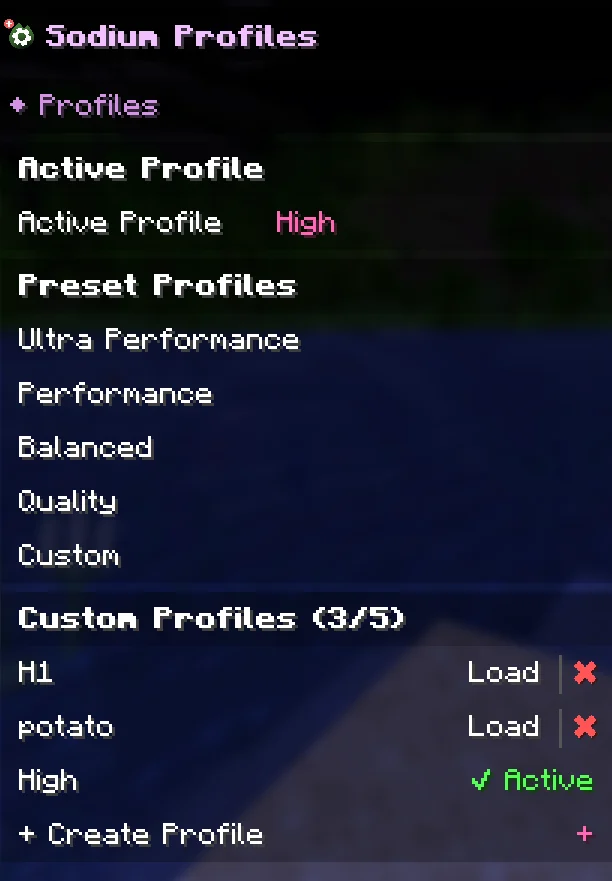
• 4 Built-in Presets — Ultra Performance, Performance, Balanced, and Quality profiles that instantly configure all Sodium settings with one click.
• Custom Profiles — Save your current settings as a named profile (up to 5 custom profiles). Load them anytime with a single click.
• Delete Profiles — Easily remove custom profiles you no longer need.
• Active Profile Indicator — Always see which profile is currently active in the settings menu.
• Custom Detection — If you manually change settings without using a profile, the mod automatically shows "Custom" as your active profile.
• Native Integration — Profiles appear directly in Sodium's settings sidebar, fully integrated with the Apply/Undo workflow. No separate config screens.
━━━━━━━━━━━━━━━━━━━━━━━━━━━━━━
How It Works
- Open Minecraft Video Settings (Sodium's settings screen).
- You'll see preset profiles (Ultra Performance, Performance, Balanced, Quality) in the sidebar.
- Click a preset or custom profile to select it — settings won't change yet.
- Press "Apply" to activate the profile — all settings update at once.
- Press "Undo" if you change your mind before applying.
- To save your own profile, click "Create Profile", give it a name, and your current settings are saved.
━━━━━━━━━━━━━━━━━━━━━━━━━━━━━━
Important
This is an unofficial community add-on. It is not made by, affiliated with, or endorsed by CaffeineMC (the developers of Sodium).
And you need to use the sodium mod in order to be able to use this mod
Screenshots
Gallery
-
 1
1
Versions
Files
Relations
Project Relations
More like this
Similar Mods
Suggestions use data such as tags, dependencies, dependents, descriptions, titles, and more to rank how much they overlap with this mod.
On ModDex
Community snapshot
By the numbers
Statistics
Want to reach Minecraft players?
We're looking for a server hosting partner to feature here and other parts of the site. Interested? Send us a message!
Get in touchGet it on
Available Platforms
On ModDex
Community snapshot
By the numbers
Statistics
Resources