Community listing page, reviews here may not be monitored by the author.
Watson


No reviews yet
Updated Watson that displays LogBlock, CoreProtect or Ledger query results in 3D.

Community voices
Reviews
No reviews yet. Be the first to review this project!
Get it on
Available Platforms
Compatibility
Supported Environments
Runs entirely on the client. Works on vanilla servers.
About
Project Details
For authors
Embed Badge
If you're the author of this project, you can embed a live badge anywhere that supports HTML or Markdown. It updates automatically whenever ratings change.
Use HTML for any page that supports it, or Markdown for README files and Markdown-based descriptions.
Identifiers
Platform IDs
About
Description
Watson Overview
Malilib is required
https://www.curseforge.com/minecraft/mc-mods/malilib
Server side support
https://www.spigotmc.org/resources/watson-display-coreprotect-logblock-logs-in-3d.82222
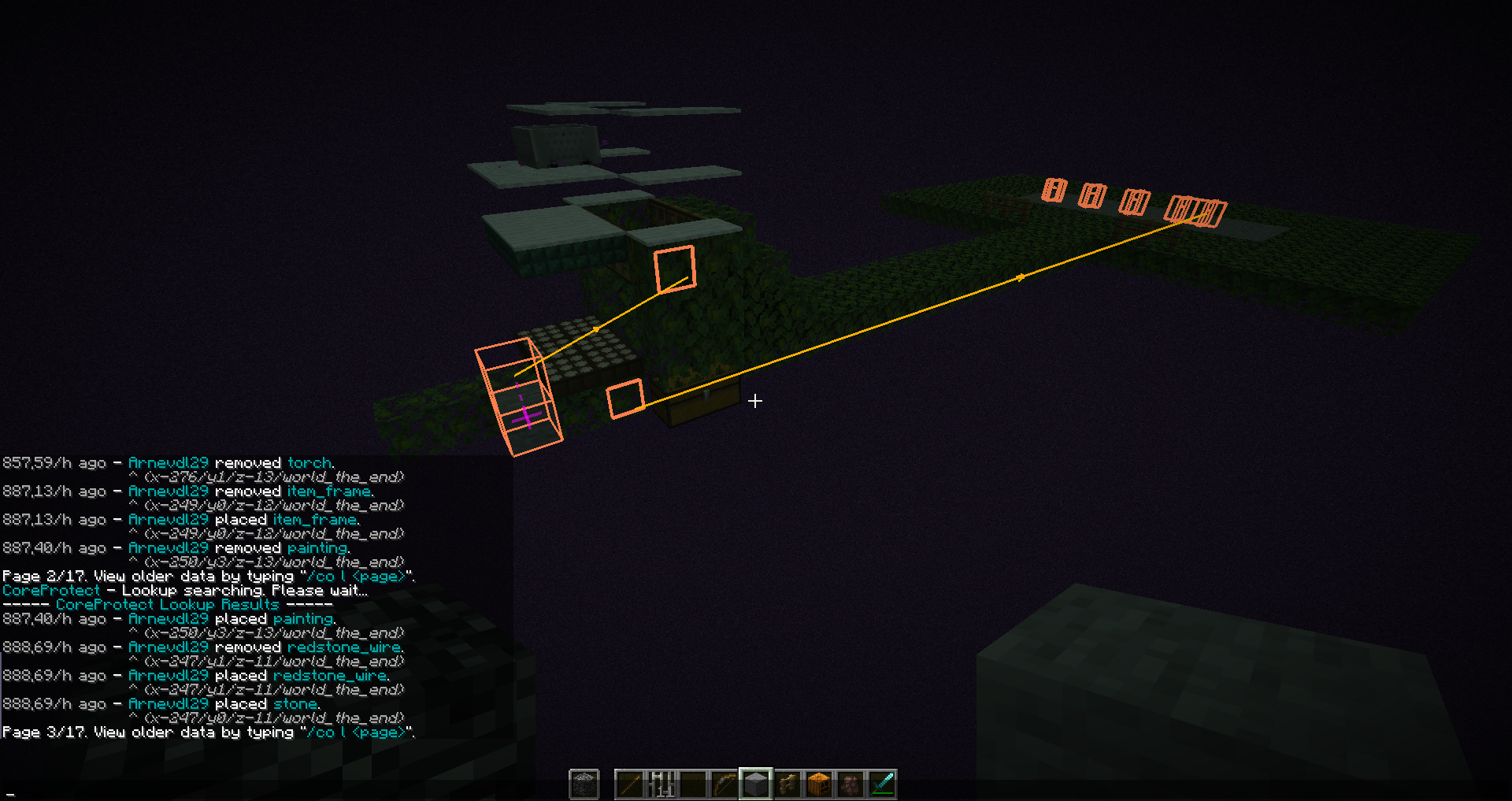
Watson is a Minecraft mod that displays LogBlock, CoreProtect or Ledger logs in 3-D. It also has some features to make moderation tasks, such as observing chat and managing screenshots, a little easier. The current features of the mod are:
- To open main menu, press L
- To open the config menu, press L + C
- It displays individual edits as wireframe 3-D boxes.
- It groups edits of ore blocks into ore deposits, numbers each deposit, shows the numbers in 3-D space and provides commands to teleport to deposits and compute a stone:diamond ratio.
- It draws vectors between edits indicating the time sequence of edits.
- It draws text annotations in 3-D space. These can act as teleport targets.
- Edits and annotations can be saved to files and loaded at a later date.
- There's a simple built-in calculator for working out stone:diamond ratios.
- It uses colour to highlight parts of chat that match regular expressions. This can be used to draw attention to banned words. It can also be used to highlight the names of people, acting as a rudimentary friends list.
- It adds player names to screenshots automatically.
- It does a
/region info regionnamefor you when you right click on a region with the wooden sword (rate limited to once every 10 seconds - the wooden sword will simply list the region name the other times). - In order to shorten coordinate displays and make them easier to read, Watson also hides the LogBlock coords lines from chat and re-echoes them in a custom, brief format, where block IDs are numeric rather than words. Re-echoed coordinates are assigned colours based on their physical proximity. This makes separate ore deposits easy to distinguish in the coordinate listing. Note that reformatting and recolouring of LogBlock query results can be controlled by the reformatqueryresults and recolourqueryresults configuration settings, respectively.
If you have questions or need help with something, the fastest way to get answers is to join Watson Discord, otherwise put them on my github incase of crashes/bugs click here
Want to support development?
If you want to support development, check out my Patreon! Supporting me via Patreon lets me spend more time modding, and allows me to put out more updates for everyone to enjoy.
Watson Overview
Server side support
https://www.spigotmc.org/resources/watson-display-coreprotect-logblock-logs-in-3d.82222
Watson is a Minecraft mod that displays LogBlock or CoreProtect or Ledger logs in 3-D. It also has some features to make moderation tasks, such as observing chat and managing screenshots, a little easier. The current features of the mod are:
- To open main menu, press L
- To open the config menu, press L + C
- It displays individual edits as wireframe 3-D boxes.
- It groups edits of ore blocks into ore deposits, numbers each deposit, shows the numbers in 3-D space and provides commands to teleport to deposits and compute a stone:diamond ratio.
- It draws vectors between edits indicating the time sequence of edits.
- It draws text annotations in 3-D space. These can act as teleport targets.
- Edits and annotations can be saved to files and loaded at a later date.
- There's a simple built-in calculator for working out stone:diamond ratios.
- It uses colour to highlight parts of chat that match regular expressions. This can be used to draw attention to banned words. It can also be used to highlight the names of people, acting as a rudimentary friends list.
- It adds player names to screenshots automatically.
- It does a
/region info regionnamefor you when you right click on a region with the wooden sword (rate limited to once every 10 seconds - the wooden sword will simply list the region name the other times). - In order to shorten coordinate displays and make them easier to read, Watson also hides the LogBlock coords lines from chat and re-echoes them in a custom, brief format, where block IDs are numeric rather than words. Re-echoed coordinates are assigned colours based on their physical proximity. This makes separate ore deposits easy to distinguish in the coordinate listing. Note that reformatting and recolouring of LogBlock query results can be controlled by the reformat_query_results and recolour_query_results configuration settings, respectively.
If you have questions or need help with something, the fastest way to get answers is to join Watson Discord, otherwise put them on my github incase of crashes/bugs click here
Want to support development?
If you want to support development, check out my Patreon! Supporting me via Patreon lets me spend more time modding, and allows me to put out more updates for everyone to enjoy.
Screenshots
Gallery
Versions
Files
Relations
Project Relations
More like this
Similar Mods
Suggestions use data such as tags, dependencies, dependents, descriptions, titles, and more to rank how much they overlap with this mod.
On ModDex
Community snapshot
By the numbers
Statistics
 (opens in a new tab)
Get it on
Available Platforms
On ModDex
Community snapshot
By the numbers