Community listing page, reviews may not be monitored by the author.
Litematica


A modern schematic mod written for Fabric (and LiteLoader on 1.12.x), with extra features for Creative mode work

Community voices
Reviews
No reviews yet. Be the first to review this project!
Get it on
Available Platforms
Compatibility
Supported Environments
Runs entirely on the client. Works on vanilla servers.
About
Project Details
For authors
Embed Badge
If you're the author of this project, you can embed a live badge anywhere that supports HTML or Markdown. It updates automatically whenever ratings change.
Use HTML for any page that supports it, or Markdown for README files and Markdown-based descriptions.
Identifiers
Platform IDs


 Rift
Rift
About
Description
Severe vulnerability in 1.21+ versions of the mod
See the announcement post here for details:
As a summary, everyone using MC 1.21+ versions of Litematica should update to the latest available mod versions immediately!!
The vulnerability does not exist in the 1.20.x and older mod versions. With the affected mod versions, connecting to potentially any server might transfer malware to your system. Single player is not at risk. But update the mod!
See this about MC 1.20.5 and later versions
TL;DR; I won't maintain the 1.20.5+ versions myself anymore, at least for now. There are ports by Sakura-Ryoko. They will be here once they are more stable, see the post for the links and details before then.
Description:
Litematica is a new schematic mod written from scratch, and it is primarily targeting light mod loaders like LiteLoader on 1.12.x, Rift on 1.13.x and Fabric on 1.14+. There is also a Forge version for 1.12.2, but not yet for 1.14.4+ (but Forge ports for 1.14.4+ are also planned, see below).
It has all the features of the old Schematica mod except for the printer (which is not planned for Litematica itself, but instead is left to extension mods), plus a bunch more.
- The main feature of a schematic mod is to display a "hologram" version of a structure, which shows you exactly how to build the structure and where to place the blocks. It also includes a (configurable) overlay to highlight missing, extra or wrongly placed blocks.
- Litematica also includes a nice Material List, including a Material List HUD, to help you collect the materials needed for the build.
- There is also a Schematic Verifier feature, including an overlay, which you can use to scan the entire schematic area and look for any mistakes. This can be extremely useful especially with technical/redstone builds, where tiny mistakes can break everything.
- There are also several Creative-mode-only helper features, such as Fill, Replace, Delete and also a Paste mode for "pasting" schematics into the world (immediate/direct in single player, using /setblock commands in multiplayer).
NOTE: Litematica also requires the MaLiLib library mod:
https://www.curseforge.com/minecraft/mc-mods/malilib
WARNING: The Easy Place mode feature may get you banned on some servers!
The Easy Place feature will always be clicking on the target position's air block, and this can easily be detected by anti-cheat systems. So this can result in at least two things: The block placement will just be rejected and you just get client-side ghost blocks, or some anti-cheat system flags that as cheating and auto-bans you from the server. So before using Easy Place, find out of it's allowed on the server!
About Forge ports for 1.14.4+
Forge versions for 1.14.4 and later are planned.
Still no ETA for the "official port", which will only be done from the still being worked on new development code. But ZacSharp already ported the current 1.16.4 Fabric version to 1.16.5 Forge. That port is available here: https://legacy.curseforge.com/minecraft/mc-mods/litematica-forge
Some more info and discussion about the Forge port/builds is here: https://github.com/maruohon/litematica/issues/234
There are also at least a couple of other 3rd party Forge ports on GitHub and at least one on Modrinth. I haven't tested those myself, so I can't say anything about how well they work.
The default hotkey to open the in-game config GUI is M + C. If you are for example on AZERTY keyboard layout instead, then the keys are different, and M + C becomes , + C instead, etc.
If you have Optifine installed, then there are some options that you most likely will need to disable in Optifine, or otherwise it will break the schematic rendering:
- If you get glitchy weird triangles, then in 1.16+ first try updating to the latest Litematica version. If that doesn't work, then set shaders to OFF (not Internal) and restart the game.
- Render Regions probably needs to be disabled to prevent weird rendering issues (the schematic (partially?) rendering in weird places)
- Fast Render might also need to be disabled if there are still some weird HUD/GUI rendering issues
Snapshot versions and latest development builds
There are sometimes newer "development" or snapshot versions of my mods available here: https://masa.dy.fi/mcmods/client_mods/
Lately I've stopped making releases for MC snapshots, as it's mostly a waste of my limited modding time and energy. Snapshot releases maye start again at some point, if I ever get the elusive but often mentioned "new code versions" of the mods actually released to the public first. I geuss time will tell.
FAQ - please read first if you have questions
- Q: The main menu and the config menu don't open with M and M + C
- A: 1.) Check that the mod is installed and working: check if you see the orange Litematica text on the F3 screen.
2.) If you are on a non-QWERTY keyboard layout, then the default hotkeys are different. For example on AZERTY the M key is , (comma) instead, so the config menu hotkey for example is , + C. I'm looking for a solution to this issue. - Q: How do I rotate a schematic (placement)?
- A: In the Placement configuration GUI. You can open it (for the currently selected Placement) with a hotkey, or you can go via the Main menu -> Schematic Placements -> Configure.
- Q: How do I only render one layer at a time
- A: You can control the rendered layers on the Render Layers tab inside the in-game config menu (via the Main menu -> Configuration Menu, or the default hotkey M + C
- Q: How do I change blocks in the schematic? Is there a /schematicaReplace command?
- A: There is no command, but there is the Schematic Rebuild mode (should be called Schematic Edit mode...). See the wiki here for more details: https://github.com/maruohon/litematica/wiki/schematic_editing
- Q: Is there a printer like in Schematica?
- A: 1.) There is no printer for survival, and it's not planned for Litematica itself. There are at least two separate extension mods to add a printer. See: https://github.com/aria1th/litematica-printer or https://github.com/aleksilassila/litematica-printer
2.) For Creative mode there is the Paste Schematic in world tool mode, which places the entire schematic at once in a single player world, or using setblock commands in multiplayer. - Q: I get an error "Failed to load schematic" when trying to load a '*.schematic' file in 1.13+.
- A: 1.) The 1.13 - 1.16 versions of Litematica can't currently load the Sponge schematic format yet. That format is used for example by World Edit in 1.13+. Although those schematics should preferably be named with the *.schem file name extension, many web sites use the *.schematic extension, which makes them hard to tell apart from the old, completely different MCEdit/Schematica format, which Litematica can already load. Full support for the Sponge format exists in the main development version in 1.12.2, and a "quick hax" temporary support for just loading that format also exists in the 1.17+ mod versions. It will also come to the other versions with the next bigger update.
2.) Currently the way to load Sponge schematics with Litematica is:
- Create a temporary (flat) world.
- Place the schematic there using World Edit (quick guide: https://old.reddit.com/r/Minecraft/comments/kt2znv/convert_schem_file_to_litematic_file/gilwla8/)
- Make a new Litematica schematic from the placed structure from that world
The mod is still under development, and some of the planned "extra" features (for example some of the "tool modes") haven't yet been implemented fully or at all.
Here is a Reddit post that explains the very basics of the mod:
https://old.reddit.com/r/Minecraft/comments/cqdmkk/anyone_can_help_me_how_do_i_make_schematics_with/exeug78/
Here are some tutorial videos for the basics of the mod. A more detailed, "official" tutorial video is planned after I finish some changes and still missing features I'm still working on for the mod.
A short, quick tutorial of the basics of the mod:
Another, a bit longer tutorial that also covers some other things like the Rebuild mode:
A couple of more tutorials:
If you have questions or need help with something, the best/fastest way to get answers is on my Discord server.

For now, this project is an "unofficial" and unsupported Forge port of the Fabric version of the Litematica mod. Use it if it works for you, but there will not be any bug fixes or new features added to these Forge versions before I get the "official" Forge ports done at some point.
NOTE: Litematica also needs the malilib library mod: https://www.curseforge.com/minecraft/mc-mods/malilib-forge
For now, see the Fabric version of the project for documentation/tutorials/possibly relevant existing comments about issues/questions.
https://www.curseforge.com/minecraft/mc-mods/litematica
Forge port plans/timeline/explanation
The "proper/official" Forge ports of my client mods will only be made from the new rewritten/refactored and cleaned up code from the main development branch, that is being worked on in the 1.12.2 LiteLoader branch of the mods. There is still a TON of work left before things are ready to be "properly" ported forward to the later MC versions. But there will likely be the some early "testing ports" for Forge 1.18.2 after the first test ports of the new code from 1.12.2 to 1.19.x Fabric appear at some point. These "test ports" will only be mentioned and linked on my Discord. The mod versions based on the new code will only get uploaded to CurseForge once they are "fully ready", which will take a looong time, especially considering my really slow progress on the mods after I got a full time IRL job.
Thus far I've still mostly been focusing on malilib rewrites, after which all the other client mods also need their own rewrites/refactoring and clean-up. And after that there is a VERY LONG todo list of planned new features and also improvements to existing features. Once all of that is maybe ready a some point, then that new code will be ported to all the later MC versions starting from 1.13.2. The ports to the later MC versions will happen first to the Fabric branches, and the Forge ports will then be made from the corresponding Fabric versions. So basically there is a vast amount of work left before the "proper" Forge ports can happen. And on top of that IRL work stuff now takes a lot of my time and energy, considerably slowing down progress on the mods from what it used to be (which wasn't fast then either)... So I have zero idea of any kind of timeline at this point.
Known issues
I have noticed that the hotkey configs in these current early Forge ports don't get applied properly when you close the config menu. You most likely need to log out of the world and back in for any hotkey changes to take effect.
Project History
These CurseForge projects were originally created by Kazuto11927, and the ownership of the projects was transferred to masa/masady on 2022-05-07, since I plan to upload the "official" Forge ports of the mods in these projects going forward, once the ports are made at some point. As to when that might happen... I still can't say, see above...
The code porting for these early/unofficial ports was made by ZacSharp on GitHub, and the current 1.16.5 mod files were built by masa, first linked via the GitHub issue comment here: https://github.com/maruohon/litematica/issues/234#issuecomment-855391378
Description
Litematica is a modern schematic mod primarily targeting light mod loaders like LiteLoader on MC 1.12.x, Rift on MC 1.13.x and Fabric on MC 1.14+.
There is also a Forge version, but currently only for MC 1.12.2. For later MC versions there are currently only third party ports such as Forgematica.
Litematica has all the main features (plus a bunch more) of the old Schematica mod, except for the printer, which is not planned for Litematica itself, but instead is left to extension mods (see: aria1th printer or the other printer).
Compatibility with shaders
Litematica's rendering doesn't currently work properly with shaders (even with Iris) in 1.21.3+. So when you need to use Litematica (schematic rendering), disable shaders.
In older MC versions the rendering works better with shaders, at least with Iris, but also depending on the shader pack. Some shader packs break the rendering pretty badly, but some used to work pretty nicely. Optifine in general is/was a lot more problematic, pretty much you can't use shaders at all with Optifine if you use Litematica. The general recommendation is to use Sodium (and Iris) instead of Optifine.
Hotkeys
The default hotkey to open the Litematica main menu is M.
Note: If you use a non-QWERTY keyboard layout, then the keys may be different, such as M becoming , on AZERTY.
Other common default hotkeys:
M + C- The direct hotkey to open the config menuM + R- Toggle ON/OFF ALL rendering from LitematicaM + G- Toggle ON/OFF just schematic rendering ("ghost blocks" - all HUDs for example will still render)M + T- Toggle ON/OFF the "tool item" (which is by default a stick) functionalityM + P- Directly open the Schematic Placements menu/listM + V- Open the Schematic Verifier menuNumpad minus- Open the placement configuration menu for the currently selected placementNumpad multiply- Open the Area Editor menuPage Up/Down- Change the selected layer in the render layers settingsM + Page Up/Down- Change the render layers modeCtrl + scroll(holding the tool) - Cycle the "tool mode" (there is also a button for this in the lower left corner of the main menu)Alt + scroll(holding the tool) - Nudge/move the selected placement or area selection box or corner (depending on the tool mode) in the direction the player is looking atCtrl + M- Toggle or cycle the "sub-mode" or main setting of some of the "tool modes", such aspasteReplaceBehaviorin Paste mode, theCornersvs.Expandbehavior in Area Selection mode, or theAreavs.Placementbehavior of the Delete mode
Warning for multiplayer
The Easy Place mode feature may get you banned on some servers!
The Easy Place feature will always be clicking on the target position's air block, and this can easily be detected by anti-cheat systems. So this can result in at least two things: The block placement will just be rejected and you just get client-side ghost blocks, or some anti-cheat system flags that as cheating and auto-bans you from the server. So before using Easy Place, find out of it's allowed on the server!
If you have Optifine...
In general I don't recommend using Optifine (with Litematica, or otherwise) due to the various rendering issues it causes. Instead I would recommend using Sodium and/or Iris if you want shaders.
If you have Optifine installed, then there are some options that you most likely will need to disable in Optifine, or otherwise it will break the schematic rendering:
- If you get glitchy weird triangles, then in 1.16+ first try updating to the latest Litematica version. If that doesn't work, then set shaders to
OFF(notInternal) and restart the game. Render Regionsprobably needs to be disabled to prevent weird rendering issues (the schematic partially rendering in weird places)Fast Rendermight also need to be disabled if there are still some weird HUD/GUI rendering issues
Documentation
There is a wiki. The wiki is still being worked on, and it will probably have a new address at some point (or rather there will be a new wiki in a new location with a lot more coverage).
Other/older documentation and explanations, some FAQ answers
Here is a Reddit post that explains the very basics of the mod:
Litematica - Easy Place support on servers
Misc explanations on Reddit or my Discord server
Schematic format conversions:
Litematica Normal selection mode with sub-regions:
- https://old.reddit.com/r/feedthebeast/comments/r9n9mi/litematicas_addselectionbox_keybind_wont_work/
- https://old.reddit.com/r/feedthebeast/comments/r9n9mi/litematicas_addselectionbox_keybind_wont_work/hnpe9yg/
Litematica - hiding an area selection:
- https://github.com/maruohon/litematica/discussions/755#discussioncomment-6772682
- https://old.reddit.com/r/fabricmc/comments/yw9r5y/litematica_1192_issues/ixr7l5h/
Litematica - can't create new selection sub-regions (in Simple mode):
Litematica - Normal/Multi-Region area selection tutorial:
Litematica - Easy Place on a server with FabricCarpet but no CarpetExtra:
- https://discord.com/channels/169369095538606080/566649314001158165/1235158483792433214
- https://discord.com/channels/169369095538606080/566649314001158165/1221223833889935420
Litematica - easy/fast selections tutorial:
Litematica - schematic formats:
- https://discord.com/channels/169369095538606080/183172448919748608/1180841121845354516
- https://discord.com/channels/169369095538606080/566649314001158165/1176569283271213098
- https://discord.com/channels/169369095538606080/566649314001158165/1097540707931127938
- https://discord.com/channels/169369095538606080/169369095538606080/1081089742944337941
- https://discord.com/channels/169369095538606080/566649314001158165/1097564948999184394
- https://github.com/maruohon/litematica/issues/812#issuecomment-1924300257
Litematica - saving and pasting with block entity data:
Litematica - Material Lists variants:
Litematica - Manual Origin issue:
Litematica - placing stairs correctly:
Litematica - performance tips with large schematics:
Litematica - large schematics, bad performance or crashes, what to do:
Litematica - how to only show one block type at a time:
Litematica not working/keys not working:
Litematica "only render one block":
Litematica - finding the schematics directory/game directory:
- https://old.reddit.com/r/litematica/comments/1co6vh4/downloading_schematics_on_different_versions_of/l3c21l9/
- https://old.reddit.com/r/litematica/comments/13es48n/how_to_import_schematics_on_mac/kb8bu5d/
Litematica - using sub-regions:
Litematica - pasting redstone on servers:
- https://discord.com/channels/169369095538606080/566649314001158165/1063578995347685446
- https://legacy.curseforge.com/minecraft/mc-mods/litematica?comment=2838
- https://discord.com/channels/169369095538606080/566649314001158165/1227276878830764183
Litematica - pasting inventory contents on servers, feat. Litemoretica:
Litematica - paste task not running + somewhat comprehensive mspt and profiling quick howto:
Litematica - schematic placement explained:
Litematica - material list:
Litematica - performance tips with large schematics:
Litematica - no schematics directory in the .minecraft directory:
Litematica "not working" (not in Controls) -> F3, malilib keys, Mod Menu:
World Edit pasting:
MacOS how to go up one directory:
Youtube tutorials
Here are some of the better Youtube tutorial videos I've come across.
Youtube tutorials
Screenshots
Gallery
-
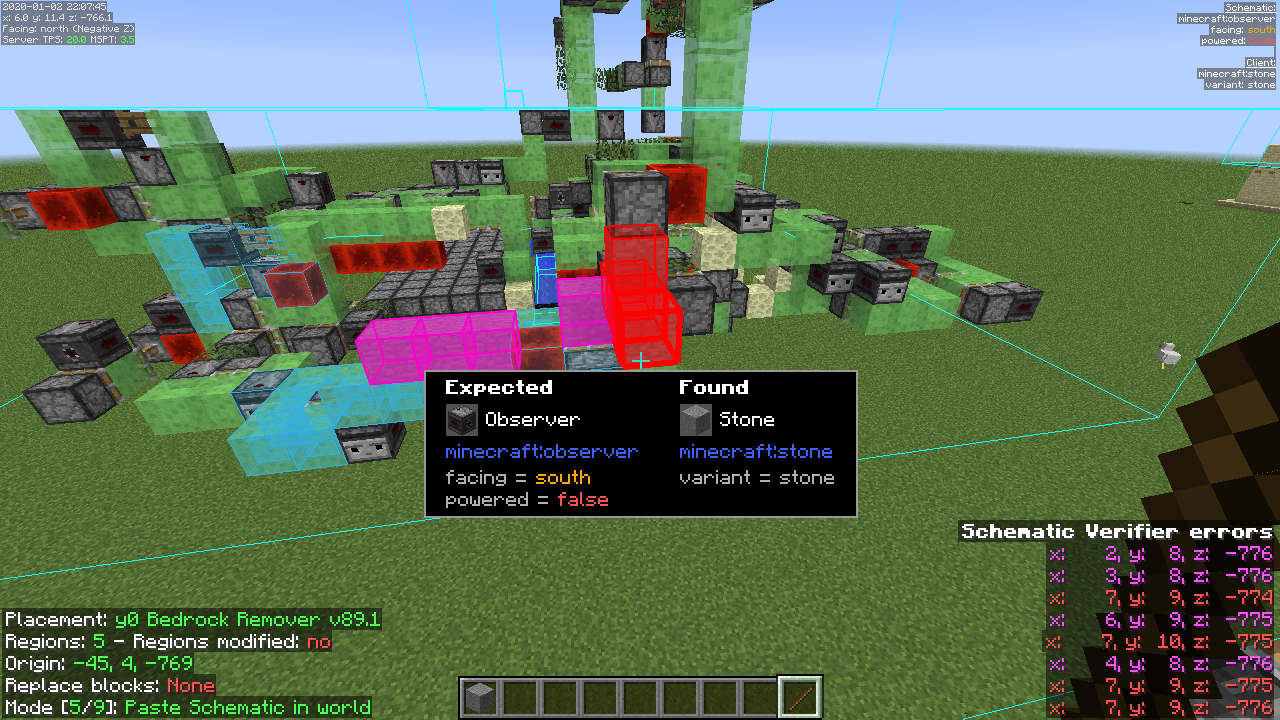 Litematica - Schematic Verifier overlay The Schematic Verifier overlay, highlighting the currently selected mismatches in-world, and showing the locations of the closest problems on the HUD
 -
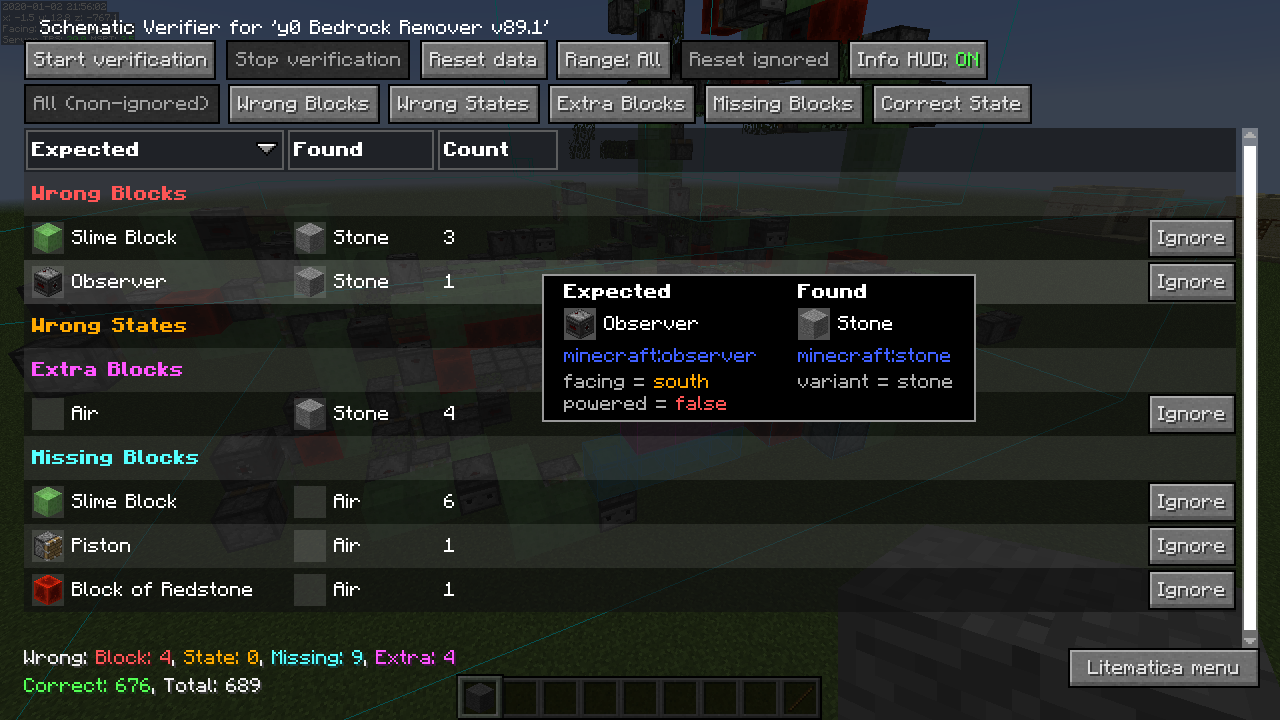 Litematica - Schematic Verifier GUI The Schematic Verifier GUI, listing all the mismatches in the world compared to what the schematic expects.
 -
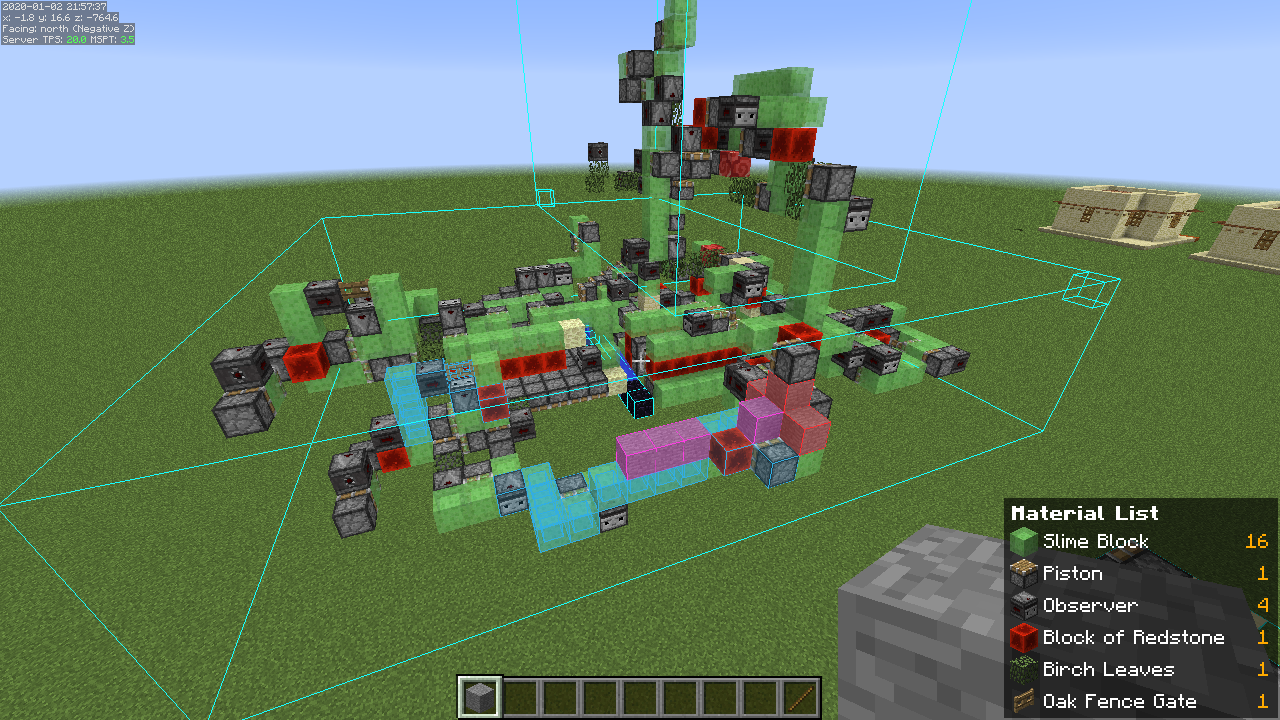 Litematica - Material List HUD The Material List HUD, showing the still missing (from the player's inventory) items, reducing the need to re-open the Material List GUI all the time
 -
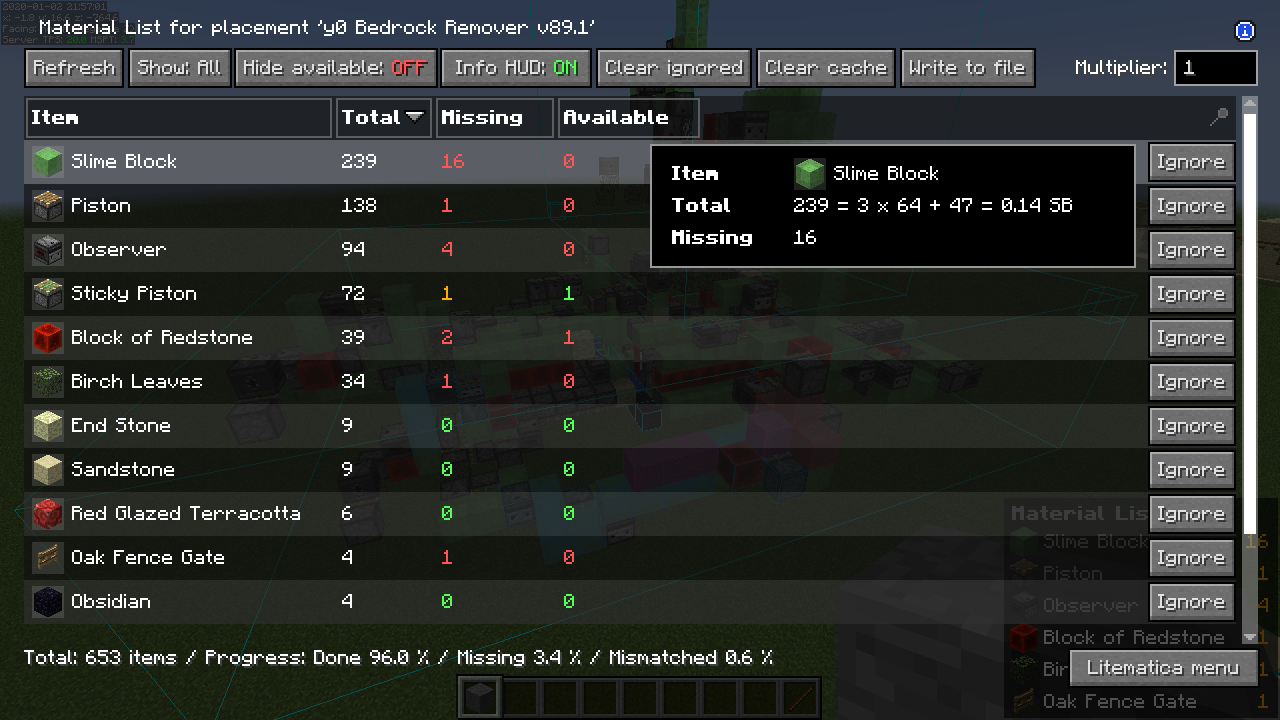 Litematica - Material List GUI The Material List GUI showing the total, still unplaced and available number of items
 -
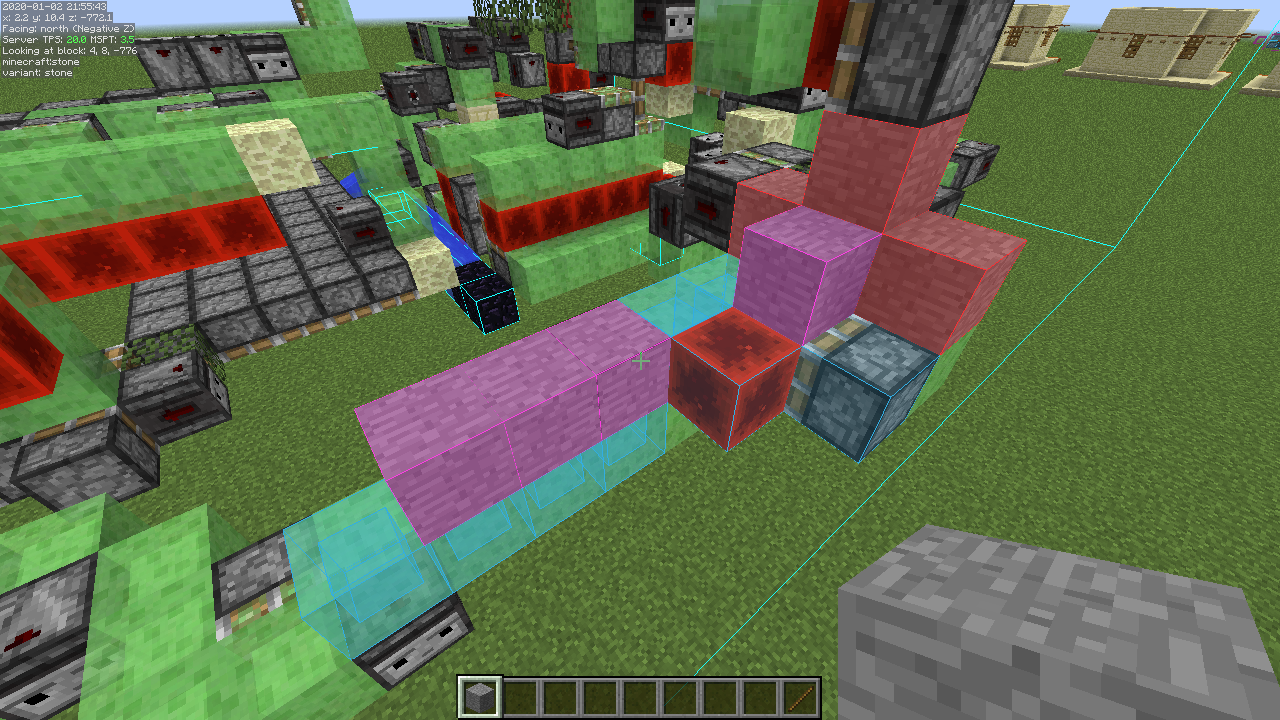 Litematica - Schematic overlay The colored schematic overlay indicating the missing, extra and wrongly placed blocks
 -
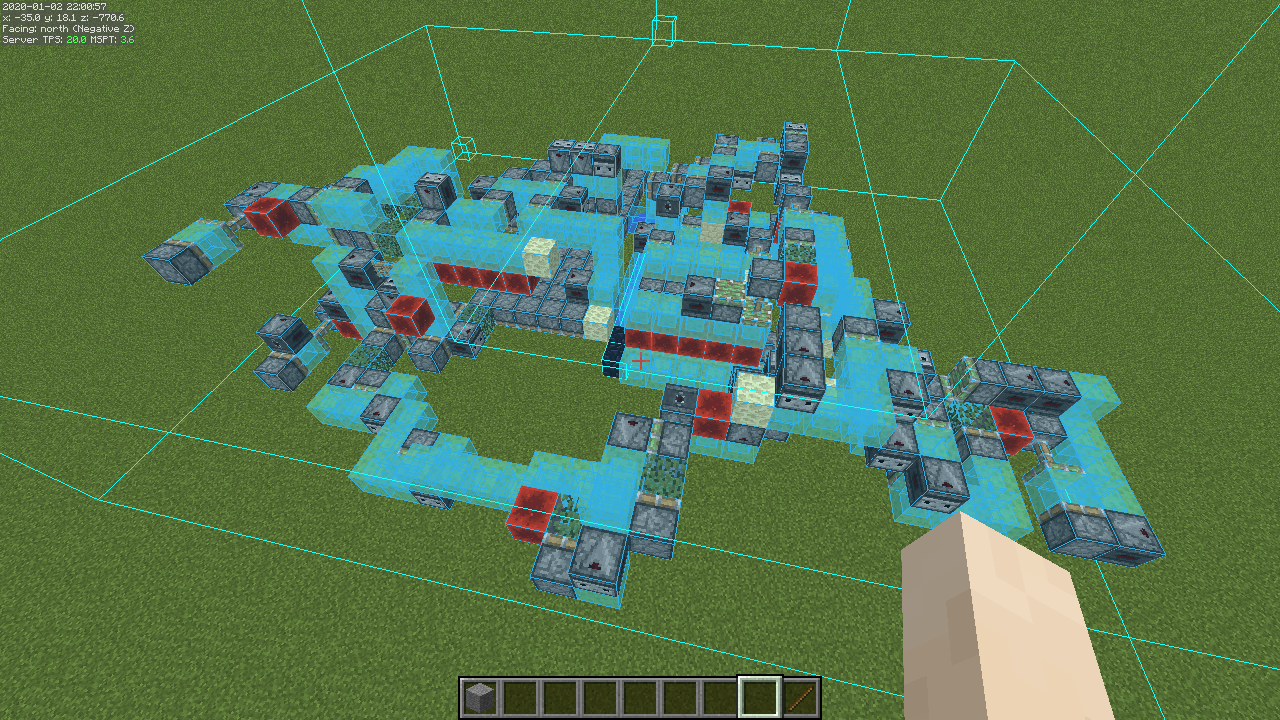 Litematica - All Below rendering mode Schematic rendering in the All Below rendering mode
 -
 Litematica - Single layer mode Schematic rendering in the Single Layer rendering mode
 -
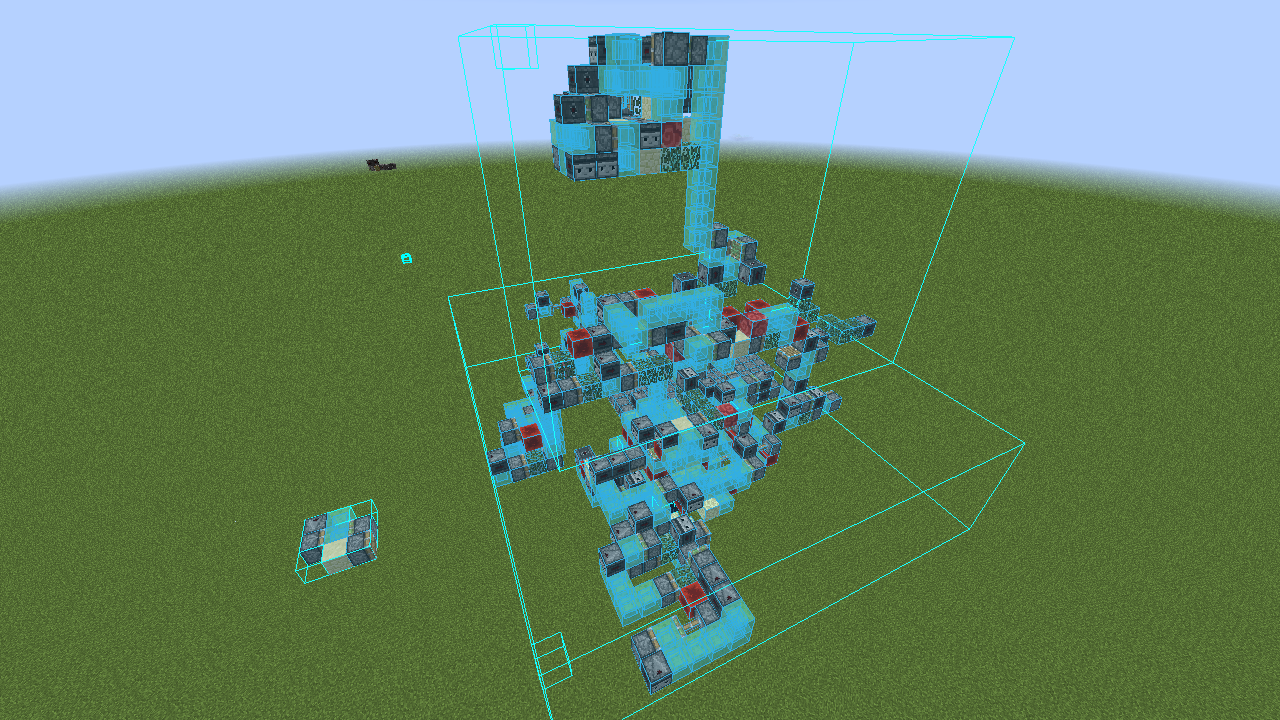 Litematica - Schematic rendering Schematic rendering
-
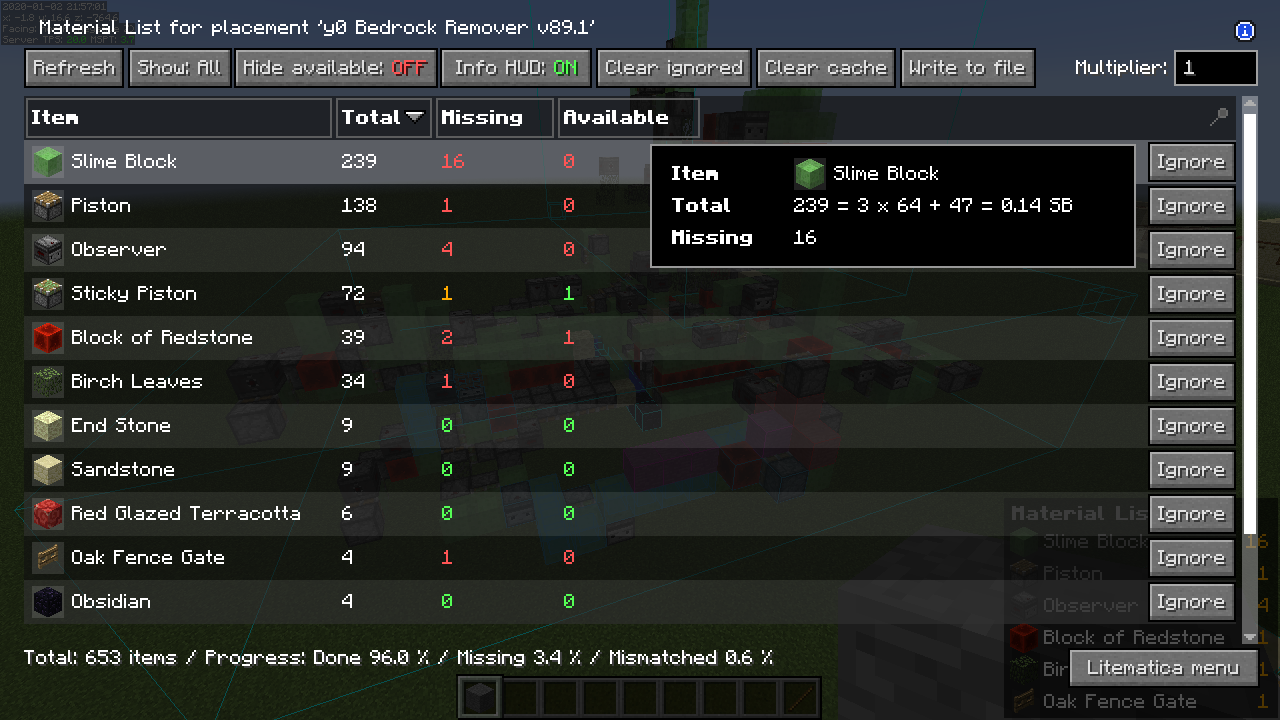 Material List Screen
 -
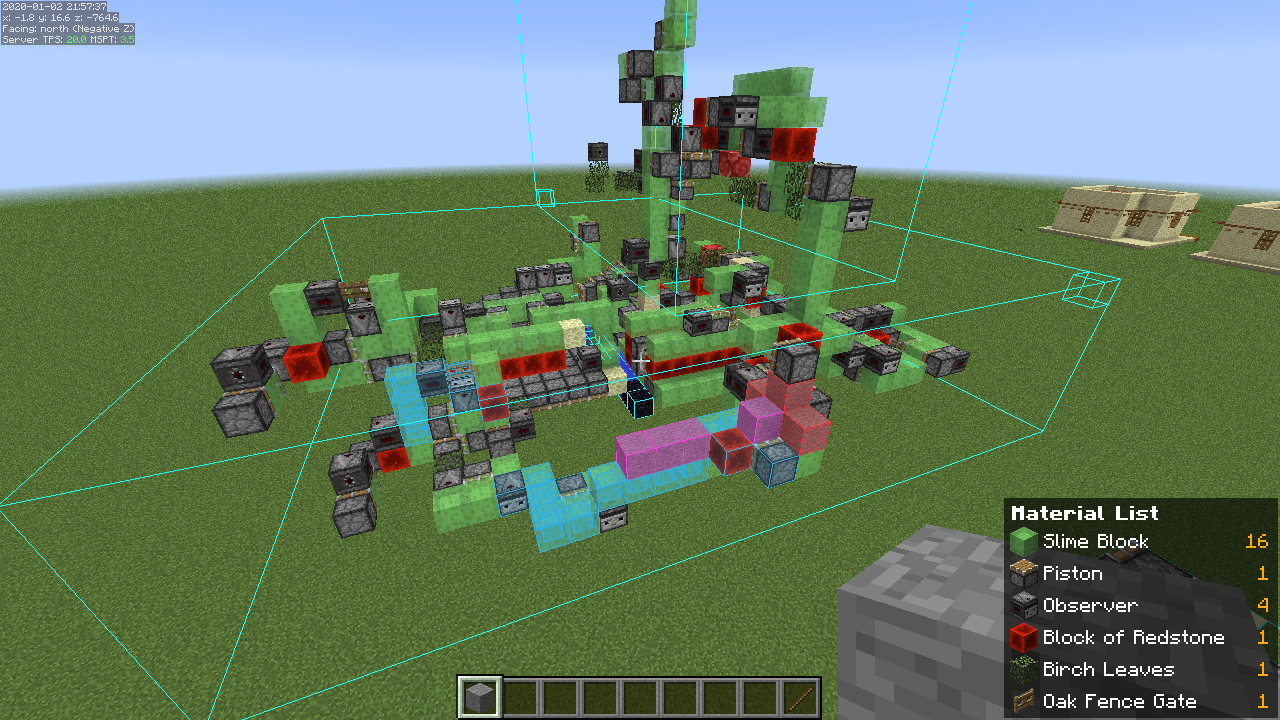 Material List HUD A "shopping list" material list HUD in the bottom right of the screen
 -
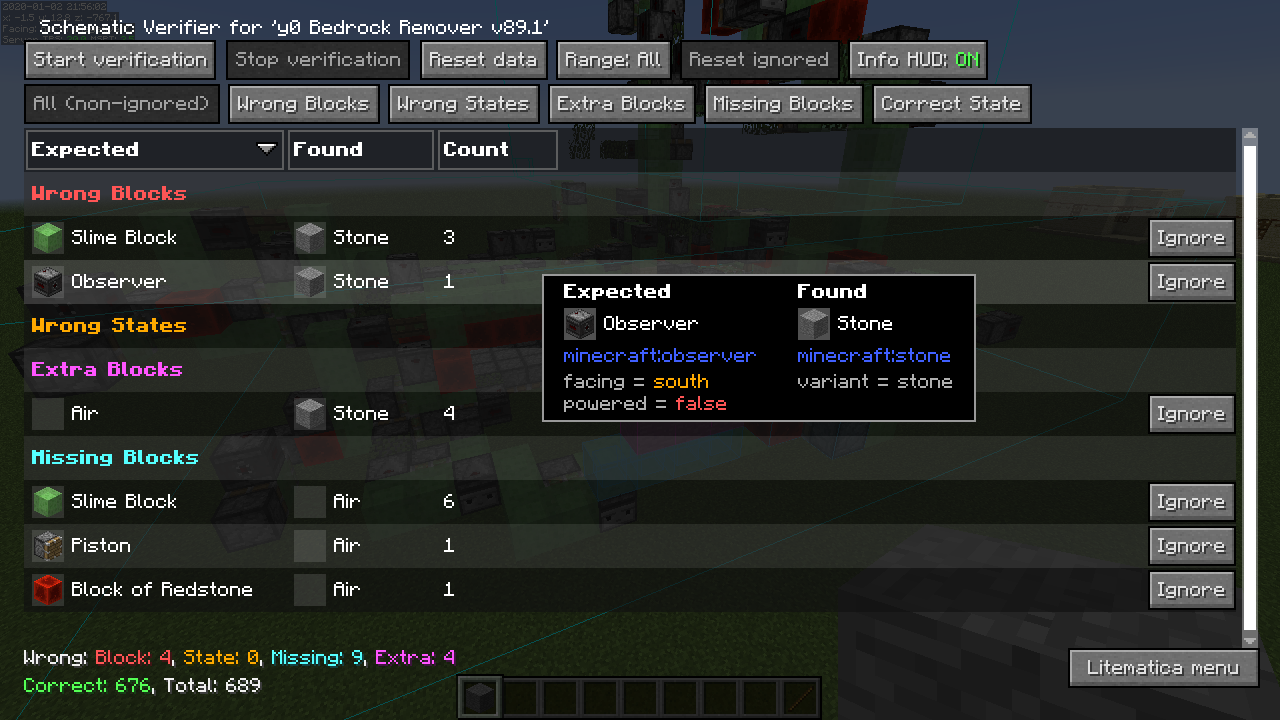 Schematic Verifier Screen
 -
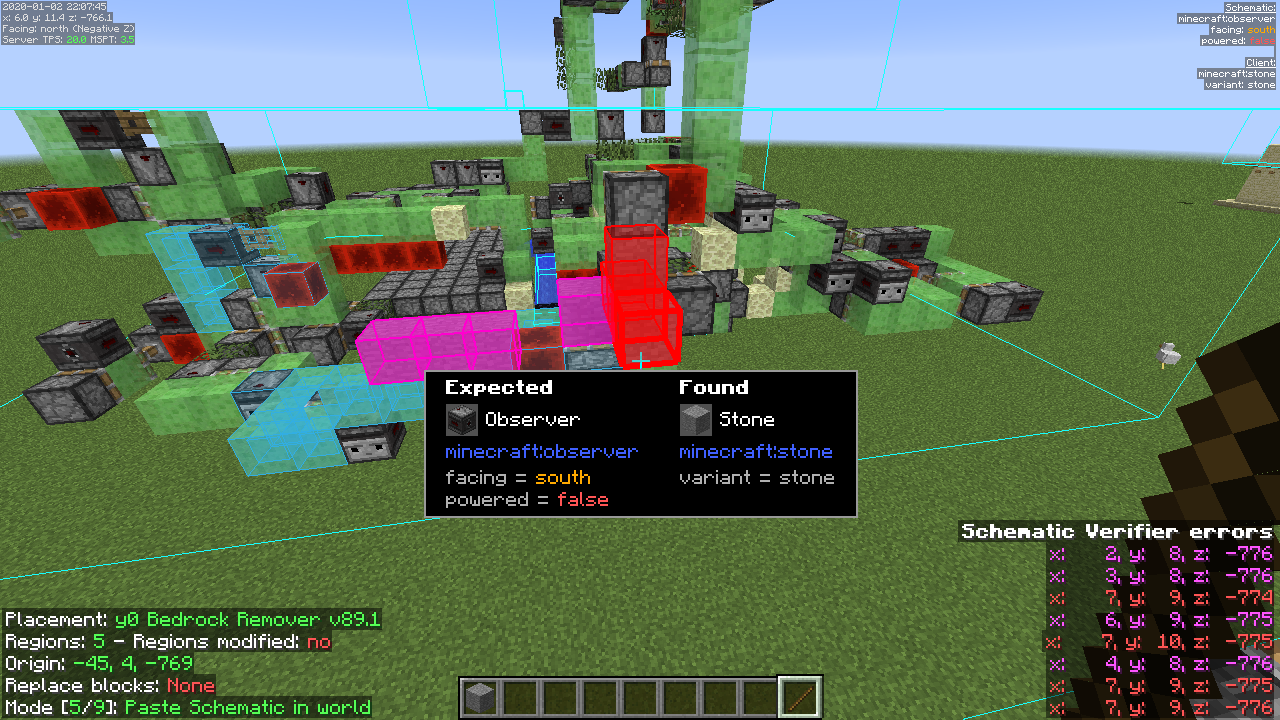 Schematic Verifier Highlights The in-world highlights of selected verifier errors, and the position info HUD
Versions
Files
Relations
Project Relations
More like this
Similar Mods
Suggestions use data such as tags, dependencies, dependents, descriptions, titles, and more to rank how much they overlap with this mod.
On ModDex
Community snapshot
By the numbers
Statistics
 (opens in a new tab)
Get it on
Available Platforms
On ModDex
Community snapshot
By the numbers