Community listing page, reviews here may not be monitored by the author.
World Handler - Command GUI

No reviews yet
Minecraft ingame GUI for commands
Community voices
Reviews
No reviews yet. Be the first to review this project!
Get it on
Available Platforms
About
Project Details
For authors
Embed Badge
If you're the author of this project, you can embed a live badge anywhere that supports HTML or Markdown. It updates automatically whenever ratings change.
Use HTML for any page that supports it, or Markdown for README files and Markdown-based descriptions.
Identifiers
Platform IDs
About
Description
World Handler - Command GUI
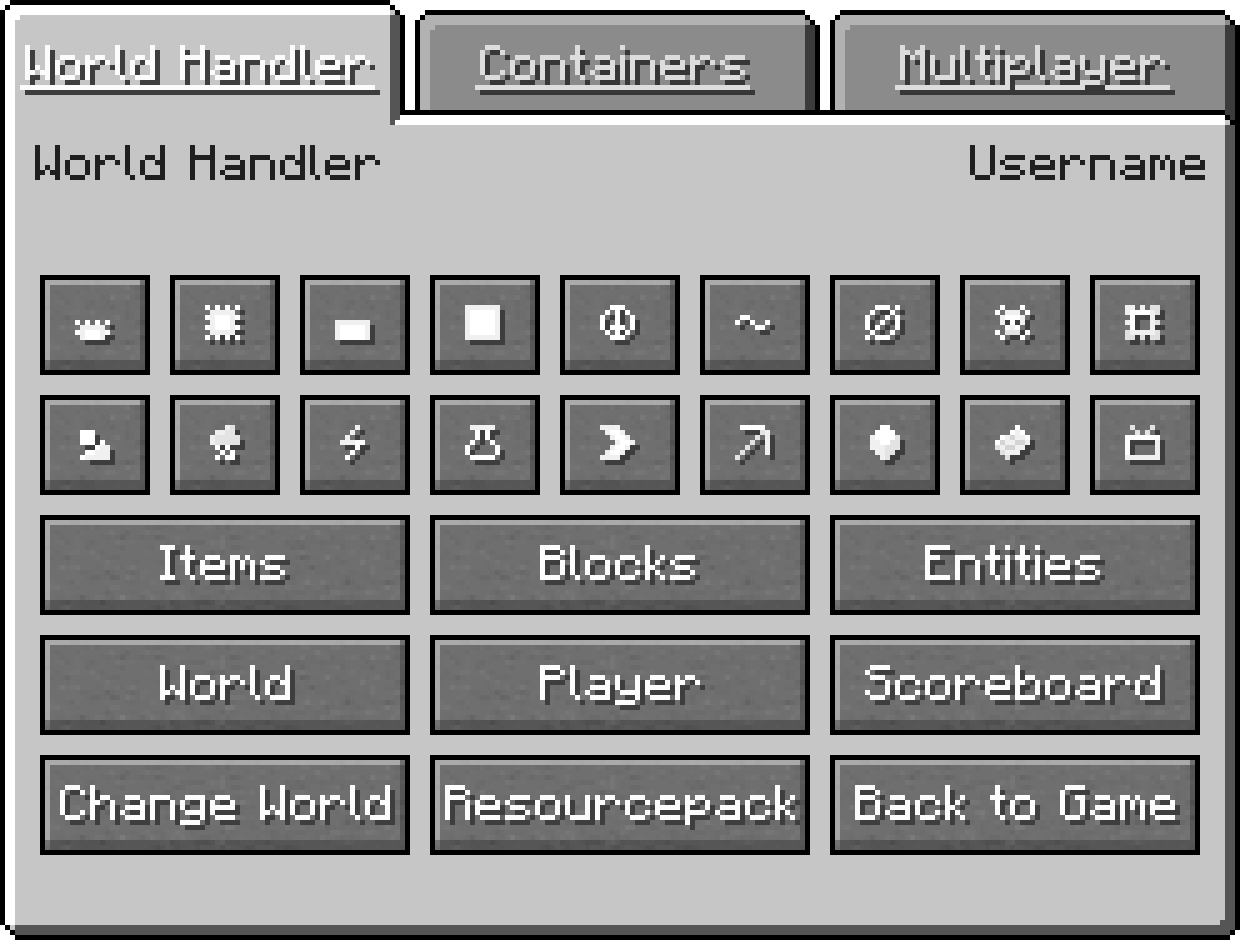
The World Handler provides a simple and easy to use graphical user interface for commands. It lets you create powerful and complex sub-commands alongside NBT-structures within seconds.
Features
- GUI for commands
- Client Commands: advancement, blockdata, clear, clone, difficulty, effect, enchant, fill, gamemode, gamerule, give, kill, recipe, scoreboard, setworldspawn, spawnpoint, summon, tag, team, time, trigger, weather, xp
- Server Commands: ban, deop, kick, op, pardon, save-all, save-off, save-on, whitelist
- World and player information
- /wh for a simplified /fill and /clone
- Expandable GUI with json files and child mods
- Client-side only
Installation
Download World Handler or build from source
Prerequisites
- 1. Make sure Minecraft Forge is installed
Installer
- 1. Run "WorldHandler-[VERSION]-UNIVERSAL.jar"
- 2. Select your Minecraft directory
- 3. Click Install
Manual
- 1. Navigate to "..\.minecraft\mods"
- 2. Copy the "WorldHandler-[VERSION]-UNIVERSAL.jar"
- 3. Follow the steps below
Launcher Settings
- 1. Select Forge as your profile
- 2. Launch Minecraft
- 3. Join a world or server
- 4. Press "V" to open the World Handler
Configuration
- ≥ 1.14.4: Manual: "..\.minecraft\config\worldhandler\worldhandler.toml"
- 1.13-1.14.4: Manual: "..\.minecraft\config\worldhandler.toml"
- 1.9-1.12: Ingame: Mods -> World Handler -> Config (Manual: "..\.minecraft\config\worldhandler.cfg")
- ≤ 1.8: Manual: "..\.minecraft\config\worldhandler\[CONFIG].cfg"
Installation with ModLoader (1.6.2)
- 1. Navigate to "..\.minecraft\mods"
- 2. Copy all files of the "World_Handler_GUI_[VERSION].zip" into the "1.6.2ML.jar"
- 3. Run Minecraft
Expansion
The World Handler GUI can also be expanded with custom tabs configured with json and javascript files or as a separate child mod written in java. A description on how to implement a custom json and javascript file can be found here and an example child mod can be found here.
FAQ
- Q: Is this client-side only ?
- A: Yes
- Q: Can you port this to fabric, liteloader, rift, etc ?
- A: No
- Q: Can i add this to my modpack ?
- A: Yes, as long as you give credit
Support
This mod will no longer be updated.
License
GNU GENERAL PUBLIC LICENSE Version 3
Screenshots
Gallery
-
World Handler GUI Main GUI
Versions
Files
Relations
Project Relations
More like this
Similar Mods
Suggestions use data such as tags, dependencies, dependents, descriptions, titles, and more to rank how much they overlap with this mod.
On ModDex
Community snapshot
By the numbers
Statistics
Want to reach Minecraft players?
We're looking for a server hosting partner to feature here and other parts of the site. Interested? Send us a message!
Get in touchGet it on
Available Platforms
On ModDex
Community snapshot
By the numbers