
Community listing page, reviews here may not be monitored by the author.
Advanced HUD TCT


No reviews yet
Advanced HUD allows you to recreate your Minecraft interface, with a customized interface and new customizations like fading options.
Community voices
Reviews
No reviews yet. Be the first to review this project!
Get it on
Available Platforms
Compatibility
Supported Environments
Must be installed on both the client and the server.
About
Project Details
For authors
Embed Badge
If you're the author of this project, you can embed a live badge anywhere that supports HTML or Markdown. It updates automatically whenever ratings change.
Use HTML for any page that supports it, or Markdown for README files and Markdown-based descriptions.
Identifiers
Platform IDs
Resources
External Links
About
Description
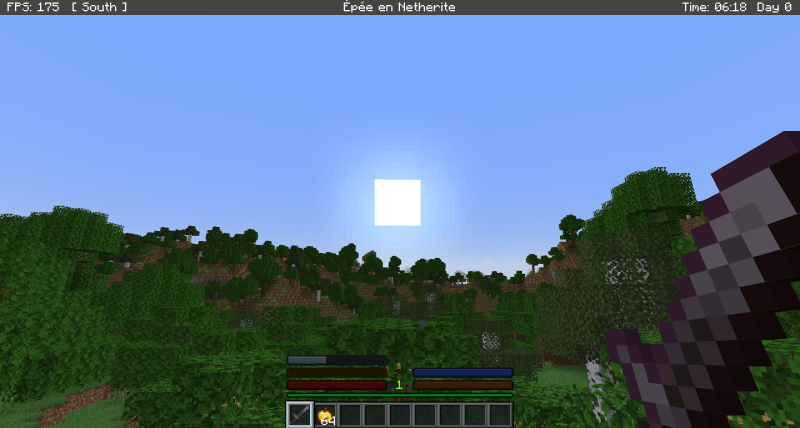
AdvancedHUD is a client-side Minecraft mod that offers full customization of the in‑game HUD. It allows players to adjust the appearance, visibility, and behavior of key HUD elements such as the health bar, hunger bar, armor, oxygen, XP, hotbar, and crosshair.
The mod needs TCT Core to function.
Main Features:
- Per‑element customization: enable or disable each HUD bar individually.
- Custom bars: replace vanilla HUD bars with clean, stylized versions.
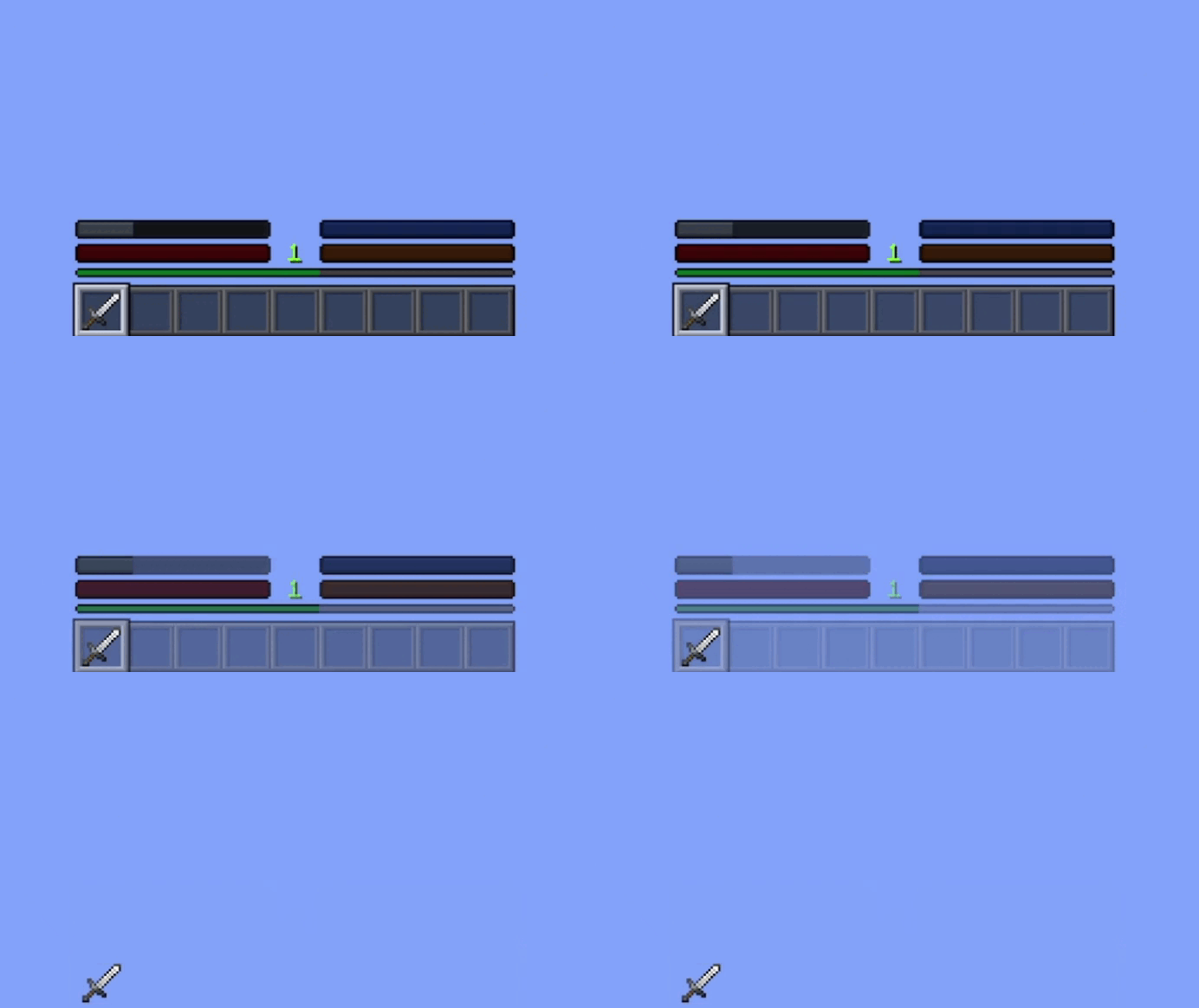
- Fade effects: configure delay and duration for HUD element fade‑out.
- Customizable crosshair: choose from multiple crosshair styles.
- Integrated configuration menu: access all settings through a dedicated interface.
- Client‑only: no server impact, fully compatible with vanilla servers.
To access the setting, click on H, Mods settings, AdvancedHUD
Provide demanding players with complete control over their HUD while preserving performance and Minecraft’s visual identity. The mod is designed to be lightweight, extensible, and faithful to the spirit of classic HUD customization mods.
Patch note :
Beta 0.1
- Added custom health bar
- Added custom hunger bar
- Added custom armor bar
- Added custom oxygen bar
- Added custom XP bar
- Added fade‑in/out effect for all custom bars
- Added custom hotbar
- Added 48 custom crosshairs
- Added settings via TCTCore for all customization options
- Added configuration file
Beta 0.2
- Bugfix: crosshair texture offset
- Bugfix: configuration file not saving in‑game settings correctly
- Bugfix: issue with XP bar rendering
- Added an info bar at the top of the screen that displays:
- world time
- world day
- FPS count
- the cardinal direction the player is facing
Beta 0.3
- Added held‑item name display inside the Info Bar (replacing the vanilla hotbar text)
- Added a “Show Item Name” toggle in the AdvancedHUD settings menu
- Added
infoBarItemNameto the configuration file - Added F8 shortcut to temporarily force all HUD bars to appear at once (fade override)
- Added a full “Reset Settings” button to restore all HUD parameters to default values
- Added appearance conditions for each bar (survival only, spectator behavior, underwater logic, etc.)
- Added color variations for bars depending on player effects (poison, wither, absorption, etc.)
- Added the yellow heart bar (absorption bar) to the custom HUD system
- Fixed hotbar transparency issues (PNG alpha now renders correctly without opaque artifacts)
- Fixed multiple fade‑in/fade‑out issues across all bars (timing, reset behavior, visibility logic)
- Fixed conflicts between the custom hotbar and the vanilla item‑name popup
- Fixed several rendering inconsistencies when switching items or slots
- Optimized HUD rendering to improve FPS (fewer draw calls, reduced redundant operations)
Beta 0.4
- Fixed a bug where the crosshair was not displayed.
- Synchronized all fade systems (health, food, armor, oxygen, hotbar, XP).
- HUD elements are now force‑rendered when the player changes gamemode or joins a world.
- Adjusted default fade delays and durations in the config file.
- Disabled the top InfoBar by default.
AdvancedHUD
is a client-side Minecraft mod that offers full customization of the in‑game HUD. It allows players to adjust the appearance, visibility, and behavior of key HUD elements such as the health bar, hunger bar, armor, oxygen, XP, hotbar, and crosshair.

The mod needs TCT Core to function.
Main Features:
Per‑element customization: enable or disable each HUD bar individually. Custom bars: replace vanilla HUD bars with clean, stylized versions. Fade effects: configure delay and duration for HUD element fade‑out. Customizable crosshair: choose from multiple crosshair styles. Integrated configuration menu: access all settings through a dedicated interface. Client‑only: no server impact, fully compatible with vanilla servers.

To access the setting, click on H, Mods settings, AdvancedHUD
Provide demanding players with complete control over their HUD while preserving performance and Minecraft’s visual identity. The mod is designed to be lightweight, extensible, and faithful to the spirit of classic HUD customization mods.
Patch note :
Beta 0.1
-
Added custom health bar
-
Added custom hunger bar
-
Added custom armor bar
-
Added custom oxygen bar
-
Added custom XP bar
-
Added fade‑in/out effect for all custom bars
-
Added custom hotbar
-
Added 48 custom crosshairs
-
Added settings via TCTCore for all customization options
-
Added configuration file Beta 0.2
-
Bugfix: crosshair texture offset
-
Bugfix: configuration file not saving in‑game settings correctly
-
Bugfix: issue with XP bar rendering
-
Added an info bar at the top of the screen that displays:
-
world time
-
world day
-
FPS count
-
the cardinal direction the player is facing
Beta 0.3
- Added held‑item name display inside the Info Bar (replacing the vanilla hotbar text)
- Added a “Show Item Name” toggle in the AdvancedHUD settings menu
- Added infoBarItemName to the configuration file
- Added F8 shortcut to temporarily force all HUD bars to appear at once (fade override)
- Added a full “Reset Settings” button to restore all HUD parameters to default values
- Added appearance conditions for each bar (survival only, spectator behavior, underwater logic, etc.)
- Added color variations for bars depending on player effects (poison, wither, absorption, etc.)
- Added the yellow heart bar (absorption bar) to the custom HUD system
- Fixed hotbar transparency issues (PNG alpha now renders correctly without opaque artifacts)
- Fixed multiple fade‑in/fade‑out issues across all bars (timing, reset behavior, visibility logic)
- Fixed conflicts between the custom hotbar and the vanilla item‑name popup
- Fixed several rendering inconsistencies when switching items or slots
- Optimized HUD rendering to improve FPS (fewer draw calls, reduced redundant operations)
Beta 0.4
- Fixed a bug where the crosshair was not displayed.
- Synchronized all fade systems (health, food, armor, oxygen, hotbar, XP).
- HUD elements are now force‑rendered when the player changes gamemode or joins a world.
- Adjusted default fade delays and durations in the config file.
- Disabled the top InfoBar by default.
Screenshots
Gallery
Versions
Files
Relations
Project Relations
More like this
Similar Mods
Suggestions use data such as tags, dependencies, dependents, descriptions, titles, and more to rank how much they overlap with this mod.
On ModDex
Community snapshot
By the numbers
Statistics
Want to reach Minecraft players?
We're looking for a server hosting partner to feature here and other parts of the site. Interested? Send us a message!
Get in touchGet it on
Available Platforms
On ModDex
Community snapshot
By the numbers
Statistics
Resources