
Community listing page, reviews here may not be monitored by the author.
Advancement Info Update Port


No reviews yet
Show more information about advancement requirements
Community voices
Reviews
No reviews yet. Be the first to review this project!
Get it on
Available Platforms
Compatibility
Supported Environments
Runs entirely on the client. Works on vanilla servers.
About
Project Details
For authors
Embed Badge
If you're the author of this project, you can embed a live badge anywhere that supports HTML or Markdown. It updates automatically whenever ratings change.
Use HTML for any page that supports it, or Markdown for README files and Markdown-based descriptions.
Identifiers
Platform IDs
About
Description


Description
This mod will enlarge the advancements info UI, so it'll use most of your screen, not just a tiny part of it, especially when your GUI scale is high.
This means more info visible at the same time, less scrolling, and a better overview.
Also, it checks out which requirements you've met and which you haven't, and displays a list of those to the right of the UI. This makes it much easier to find what you have done and what you still need to do.
For example, the "Discover every Biome" Advancement does tell you what's still missing; this mod will help you go for that last biome you haven't visited.
This works with data pack Advancements as well; in gallery there is an example from BlazeAndCave.
If the list to the right overflows, you can use your mouse scroll wheel to scroll.
Credits
Original mod on modrinth: https://modrinth.com/mod/advancementinfo
Original mod on curseforge: https://www.curseforge.com/minecraft/mc-mods/advancementinfo
Advancement Info Continued
This mod is a continuation of the abandoned Advancement Info mod, updated for Minecraft 1.21.9 and 1.21.10+.
Features
This mod enlarges the advancements UI to use most of your screen instead of just a tiny portion, especially beneficial when your GUI scale is high. This means more information visible at the same time, less scrolling, and a better overview of your progress.
The mod analyzes which advancement requirements you've completed and which remain unfinished, displaying a comprehensive list to the right of the UI. This makes it significantly easier to track what you've accomplished and what still needs to be done.
For example, the "Discover every Biome" advancement doesn't tell you which biomes are still missing—this mod will help you identify that last biome you haven't visited yet.
This works seamlessly with data pack advancements as well. Here's an example from BlazeAndCave:
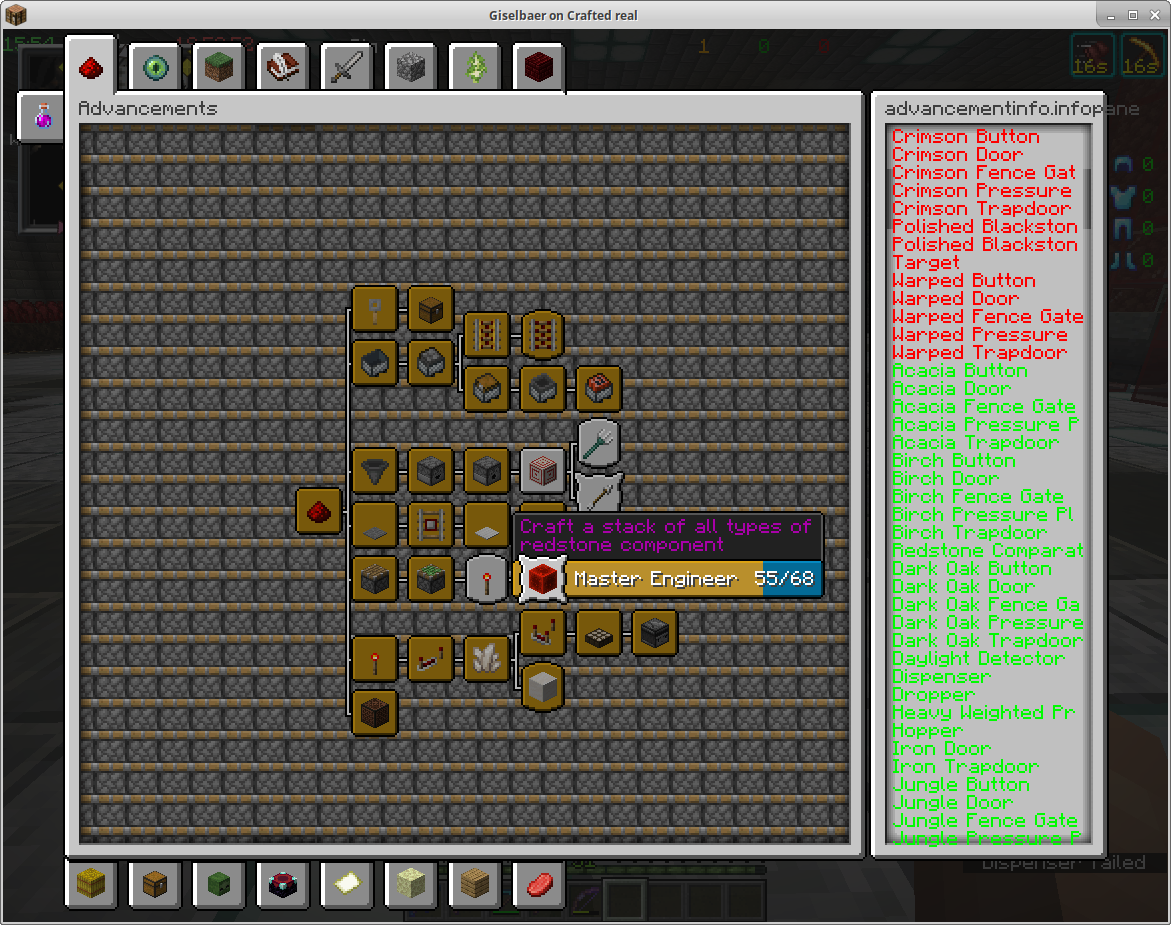
If the list on the right overflows, you can use your mouse scroll wheel to scroll through it.
Advancements and their objectives have their own internal names, which may or may not correspond to Minecraft items, blocks, or entities. The mod does its best to map those names to Minecraft objects, but in some cases—especially with data packs—that's not possible. The mod will display the internal name in those cases, hoping you can decipher what's needed better than the mod itself.
For example, the objective of "The Parrots and the Bats" is named "bred", which will show as bred in the info box.
How to Use
- Download the mod from the releases page
- Place the
.jarfile in yourmodsfolder - Launch Minecraft with Fabric
- Open the Advancements screen (default: L key)
- Hover over any advancement to see its objectives in the right panel
- Use the search bar at the top to find specific advancements
- Scroll in the right panel to see all objectives
Minecraft Version Support
This mod supports Minecraft 1.21.9 and 1.21.10+.
For older Minecraft versions, please check the original Advancement Info mod page for compatible versions.
Requirements
- Fabric Loader
- Fabric API 0.134.0+
Optional Dependencies
- Cloth Config API (for in-game configuration)
- Mod Menu (for better mod management)
To ensure optimal performance, this mod has been optimized using  .
.
Screenshots
Gallery
-
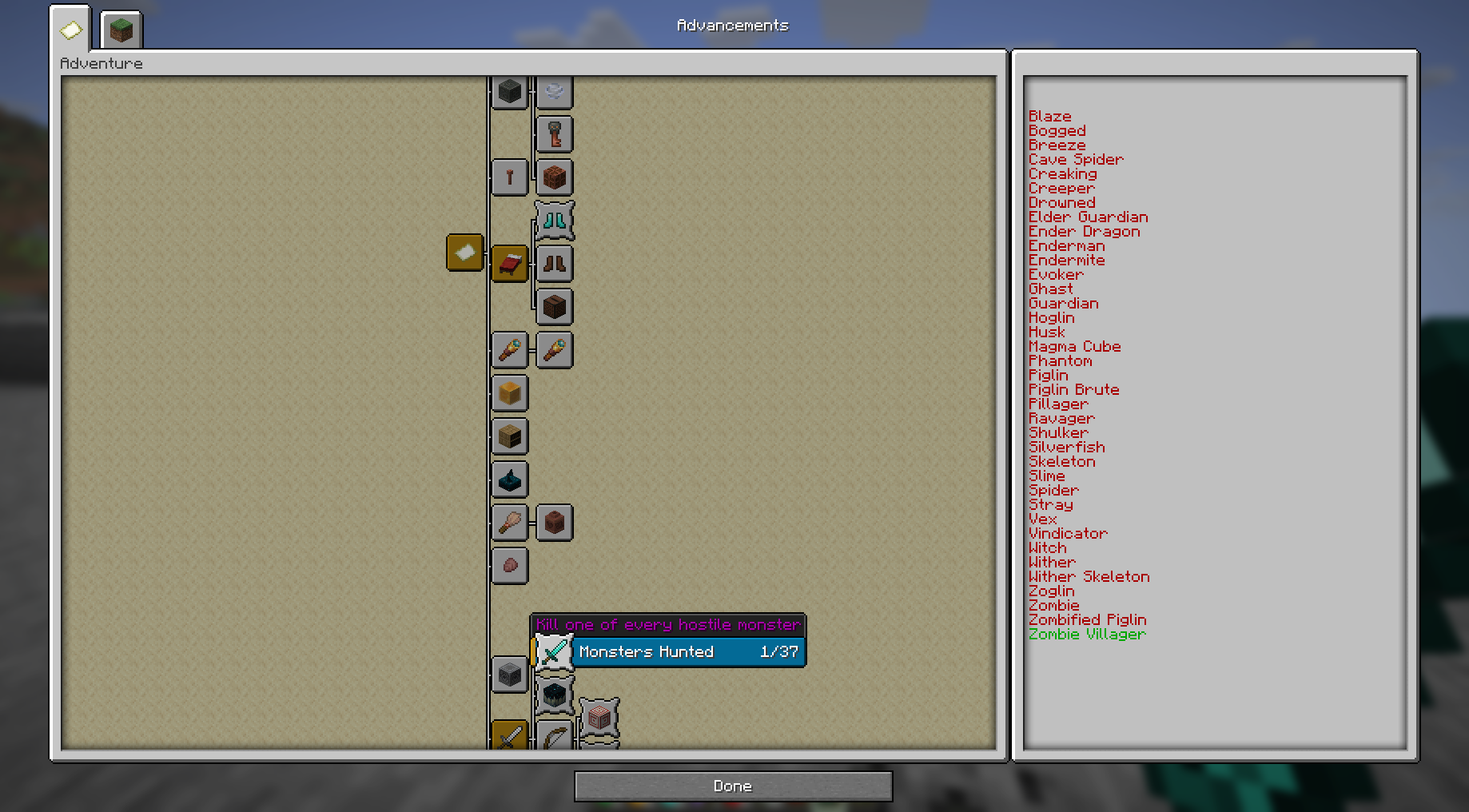 The updated Advancement Menu
Versions
Files
Relations
Project Relations
More like this
Similar Mods
Suggestions use data such as tags, dependencies, dependents, descriptions, titles, and more to rank how much they overlap with this mod.
On ModDex
Community snapshot
By the numbers
Statistics
Want to reach Minecraft players?
We're looking for a server hosting partner to feature here and other parts of the site. Interested? Send us a message!
Get in touchGet it on
Available Platforms
On ModDex
Community snapshot
By the numbers