
Camera Snapper
No reviews yet
A Fabric mod for Minecraft that lets you press a keybind to instantly snap your camera to a predefined yaw/pitch.
Fabric is a mod loader for versions 1.14+ of Minecraft, particularly popular for client side and optimization mods.
Community voices
Reviews
Click once to include, again to exclude, again to clear
No reviews yet. Be the first to review this project!
Get it on
Available Platforms
 Modrinth
Compatibility
Supported Environments
About
Project Details
For authors
Embed Badge
If you're the author of this project, you can embed a live badge anywhere that supports HTML or Markdown. It updates automatically whenever ratings change.
Use HTML for any page that supports it, or Markdown for README files and Markdown-based descriptions.
Identifiers
Platform IDs
About
Description
Camera Snapper
Instantly snap your camera to a predefined view — perfect for cinematic shots, screenshot setups, builds you want to check from the exact same angle every time, or just quickly glancing at a fixed spot without fiddling with your mouse.
Features
- Two switchable presets — save two different yaw/pitch camera directions and flip between them whenever you like.
- One-key snap — press a single key to instantly turn your camera to whichever preset is currently active.
- On-screen confirmation — switching presets briefly shows which one is now active, so you always know what you'll snap to.
- Built-in settings screen — no commands or config file editing required. Type in exact yaw/pitch values, or just look where you want and click Use Current View to capture it instantly.
- Fully rebindable controls — every key works through the standard Controls menu like any vanilla keybind.
- Persistent presets — your two presets are saved automatically and survive between sessions.
- ModMenu support — if you have ModMenu installed, Camera Snapper shows up in your mod list with a config button, no extra setup needed. It works perfectly fine without ModMenu too.
- Lightweight — client-side only, no mixins, no server requirement, no gameplay changes.
Controls
| Action | Default Key |
|---|---|
| Snap camera to active preset | V |
| Switch active preset (1 ↔ 2) | B |
| Open settings screen | N |
All keybinds can be changed in Options > Controls > Key Binds > Camera Snap.
You can also open the settings screen with the /camerasnap chat command if you'd rather not use a keybind.
How it works
- Open the settings screen (
Nby default, or/camerasnap). - Set up Preset 1 and Preset 2 — either type the yaw/pitch values directly, or look in the direction you want and click Use Current View.
- Click Save.
- In-game, press
Bto choose which preset is active (you'll see a short on-screen notice confirming the switch). - Press
Vany time to snap your view to that preset.
Notes
- This is a client-side mod — install it just on your own client, no server-side installation needed.
- Snapping your view is a genuine rotation change (not a purely visual trick), so it behaves exactly like moving your mouse to look in a direction — servers see the same rotation update they normally would.
- Config is stored in
config/camerasnap.jsonand persists across game sessions.
Screenshots
Gallery
-
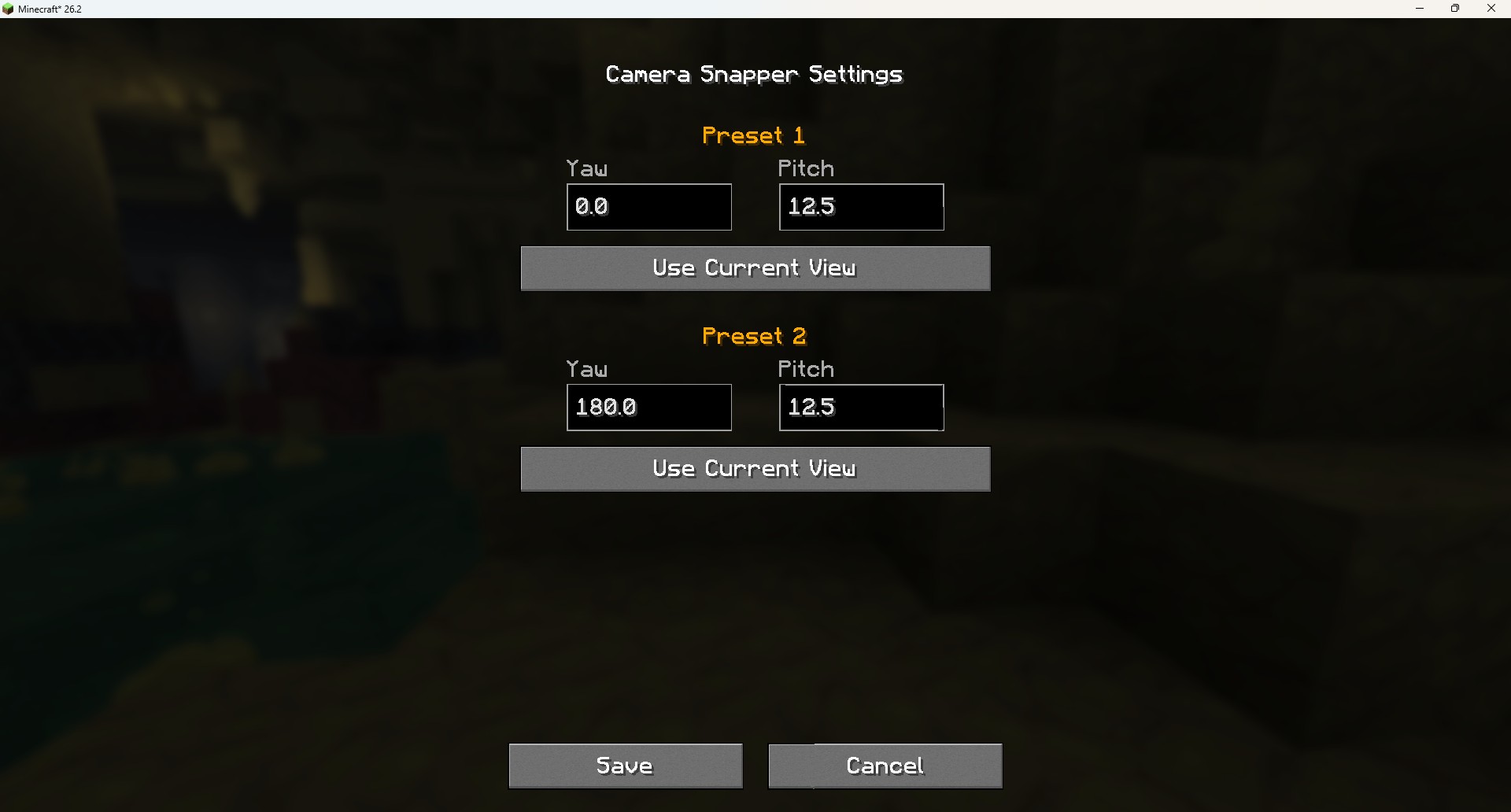 Settings Screen
Versions
Files
Relations
Project Relations
More like this
Similar Mods
Suggestions use data such as tags, dependencies, dependents, descriptions, titles, and more to rank how much they overlap with this mod.
On ModDex
Community snapshot
By the numbers
Statistics

Want to reach Minecraft players?
We're looking for a server hosting partner to feature here and other parts of the site. Interested? Send us a message!
Get in touchGet it on
Available Platforms
On ModDex
Community snapshot
By the numbers