Chat Heads
Rank 236
Rank 146 among mods

Quick rating

Community listing page, reviews here may not be monitored by the author.

Chat Heads

By dzwdzOwner
Overall rating distribution
0.5★ (no ratings)
1.0★ (no ratings)
1.5★ (no ratings)
2.0★ (no ratings)
2.5★ (no ratings)
3.0★ (no ratings)
3.5★ (no ratings)
4.0★ (no ratings)
3 ratings (100%) · 4.5★
5.0★ (no ratings)
0.5★ 5★
Gameplay
0.0
Aesthetics rating distribution
0.5★ (no reviews)
1.0★ (no reviews)
1.5★ (no reviews)
2.0★ (no reviews)
2.5★ (no reviews)
3.0★ (no reviews)
3.5★ (no reviews)
4.0★ (no reviews)
4.5★ (no reviews)
1 review (100%) · 5.0★
0.5★ 5★
Performance
0.0

See who are you chatting with!

No Theme
No Genre
Aesthetic Improvements
Social & Roleplay
Public Servers
QoL & Tweaks
Accessibility & Comfort
Client Utility
Mod Loaders
Forge
NeoForge
Fabric
Minecraft
26.2

Community voices

Reviews

List view
Grid view
Compact view
Sort by
Date
Rating
Helpful
Unhelpful
Edited
Sort ascending
Show per page
10
25
50
Delete this review?

This removes your review from the project. You can write a new review after.

Review submitted for moderation

Your review has been sent to moderators, who will check that it meets our guidelines before it appears publicly.

4.5
Auseawesome

Reputation ranks

Explorer 0 pts
Contributor 100 pts
Guide 500 pts
Veteran 1,500 pts
Luminary 4,000 pts

Ranks only ever go up; points can drop but your rank stays.

About reputation ranks
Total 50 hrs MC 26.1, 1.2… MC 26.1, 1.21, 1.20, 1.18
The version(s) the reviewer played
Aesthetics
5.0

This mod is just nice, it isn't essential, I don't find myself missing it, but it is just nice. This mod can be really useful on servers to help differentiate who is speaking at a glance however.

This is a small mod that I see no reason not to use if you're playing multiplayer. Everyone should try it.

2
0
Posted July 7, 2026 at 7:07:27 AM UTC
4.5
Auseawesome

Reputation ranks

Explorer 0 pts
Contributor 100 pts
Guide 500 pts
Veteran 1,500 pts
Luminary 4,000 pts

Ranks only ever go up; points can drop but your rank stays.

About reputation ranks
Total 50 hrs MC 26.1, 1.2… MC 26.1, 1.21, 1.20, 1.18
The version(s) the reviewer played
Aesthetics
5.0

This mod is just nice, it isn't essential, I don't find myself missing it, but it is just nice. This mod can be really useful on servers to help differentiate who is speaking at a glance however.

This is a small mod that I see no reason not to use if you're playing multiplayer. Everyone should try it.

2
0
Posted July 7, 2026 at 7:07:27 AM UTC
4.5
Auseawesome

Reputation ranks

Explorer 0 pts
Contributor 100 pts
Guide 500 pts
Veteran 1,500 pts
Luminary 4,000 pts

Ranks only ever go up; points can drop but your rank stays.

About reputation ranks
Posted July 7, 2026 at 7:07:27 AM UTC
Total 50 hrs MC 26.1, 1.2… MC 26.1, 1.21, 1.20, 1.18
The version(s) the reviewer played
2
0

Get it on

Available Platforms

Compatibility

Supported Environments

Where It Runs
Client Only

Runs entirely on the client. Works on vanilla servers.

About

Project Details

Type
Mod
License
Mozilla Public License 2.0
Latest Version
[Fabric 1.20.1] 0.15.7

For authors

Embed Badge

If you're the author of this project, you can embed a live badge anywhere that supports HTML or Markdown. It updates automatically whenever ratings change.

Custom banner text
ModDex rating badge preview

Use HTML for any page that supports it, or Markdown for README files and Markdown-based descriptions.

Identifiers

Platform IDs

CurseForge ID
Modrinth ID

Resources

External Links

Source Issues Wiki Discord

About

Description

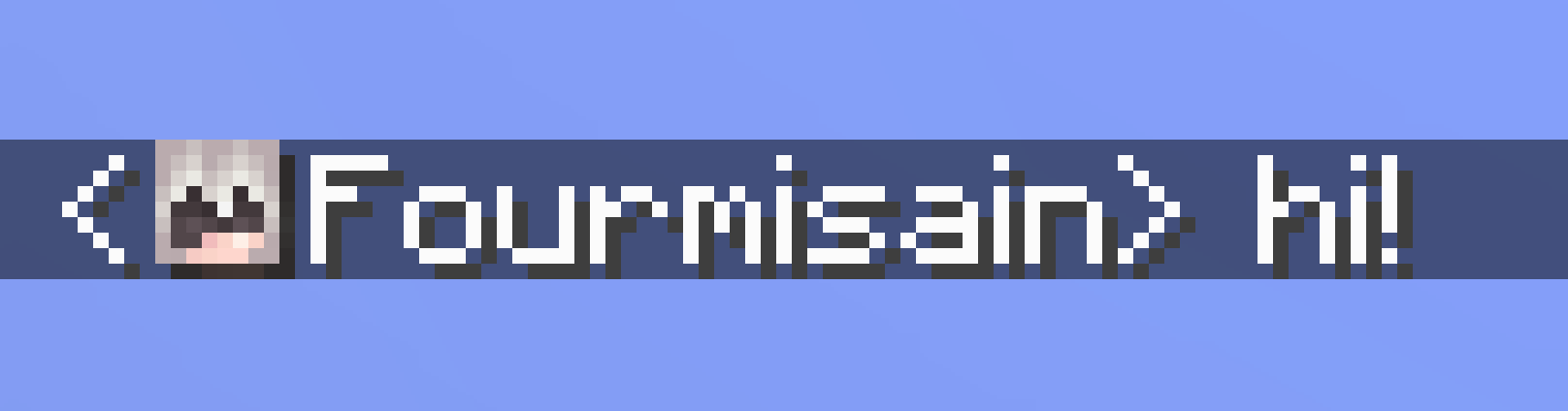
This client-side mod adds player heads next to chat messages, as seen on the screenshot above.

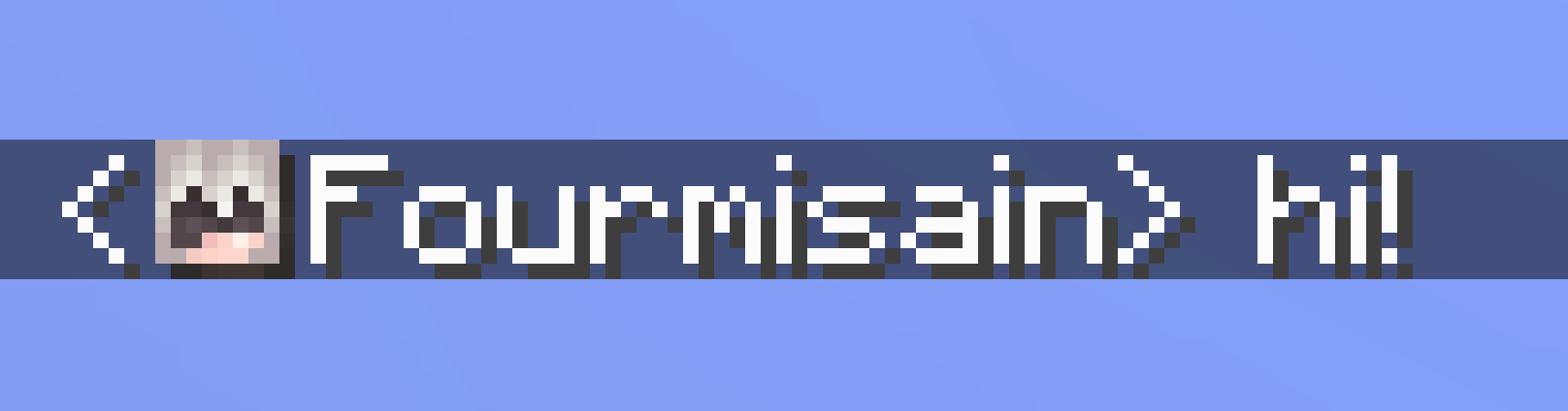
It makes telling various people in chat apart a bit easier, and it looks hella nice.

Based on a request from Hugman on the Fabric Discord.

Cloth Config (and Mod Menu for Fabric) is needed to access the settings, but the mod works without it, using the default settings.

Note: The default settings might not work on some servers. In this case try using "Heuristic only" sender detection. Note that this might put wrong chat heads on some messages.

Note: Incompatible with newer versions of OptiFine (~1.20.1), use Sodium and co instead.

fd0ce2a3eeff2bfb68e0cac9bcd5f116202e2427.png
This clientside mod adds player heads next to chat messages, as seen on the screenshot above. It makes telling various people in chat apart a bit easier, and it looks hella nice.

Based on a request from Hugman on the Fabric Discord.

Cloth Config (and Mod Menu for Fabric) is needed to access the settings, but the mod works without it, using the default settings.

Note: The default settings might not work on some servers. In this case try using the "Heuristic only" sender detection mode. Note that this might put wrong chat heads on some messages.

Note: Incompatible with newer versions of OptiFine (~1.20.1), use Sodium and co instead.

Screenshots

Gallery

  • 3Dness
    3Dness Larger hat layer means less flat heads
  • Shadow
    Shadow Optionally render a drop shadow
  • Before Name
    Before Name new in 0.13
  • Before Line, no offset
    Before Line, no offset
  • Before Line, default (with offset)
    Before Line, default (with offset)
  • Before Line
    Before Line
  • 3Dness
    3Dness Larger hat layer means less flat heads
  • Before Line
    Before Line
  • Before Name
    Before Name New in 0.13
  • Before Line, default (with offset)
    Before Line, default (with offset)
  • Before Line, no offset
    Before Line, no offset (Cloth Config required)
  • Shadow
    Shadow Optionally render a drop shadow

Versions

Files

Relations

Project Relations

More like this

Similar Mods

Suggestions use data such as tags, dependencies, dependents, descriptions, titles, and more to rank how much they overlap with this mod.

On ModDex

Community snapshot

3
Ratings
0
Followers
5
In stacks

By the numbers

Statistics

156.9m
Total Downloads
CurseForge
109.8m
Modrinth
47.1m
Last Updated
CurseForge
Created
CurseForge
Modrinth
Last synced
When ModDex last fetched this project from CurseForge or Modrinth. Every project is re-checked on a schedule, and any project that ships a new file is synced automatically within hours of the release.
New file updates sync automatically
How syncing works