
Community listing page, reviews may not be monitored by the author.


Community voices
Reviews
No reviews yet. Be the first to review this project!
Get it on
Available Platforms
Compatibility
Supported Environments
Runs entirely on the client. Works on vanilla servers.
About
Project Details
For authors
Embed Badge
If you're the author of this project, you can embed a live badge anywhere that supports HTML or Markdown. It updates automatically whenever ratings change.
Use HTML for any page that supports it, or Markdown for README files and Markdown-based descriptions.
Identifiers
Platform IDs
Resources
External Links
About
Description
DIPrinter Mod Features
DIPrinter is a Fabric client-side mod for Minecraft that provides two automated building modes ("Dik" and "Beta"), along with aura‑based auto‑building, helper block management, preview rendering, and extensive configuration options.
🧱 Building Modes
Dik Mode
-
Builds a structure resembling a “Dik”:
-
Starts with a helper block (the base).
-
Adds two side blocks (“wings”) to the left and right.
-
Extends forward for a configurable length (default 3 blocks, max 4, min 2).
-
Triggered by right‑clicking on a block while holding a block item.
-
Can be enabled/disabled via hotkey.
-
Beta Mode
-
Builds a different multi‑block pattern:
-
A central column of building blocks (2 high).
-
Two side arms at the middle level.
-
Two side arms at the top level.
-
A top cap.
-
Triggered similarly with a right‑click.
-
Also togglable via hotkey.
-
✨ Aura (Auto‑Building)
-
Dik Aura and Beta Aura automatically scan the area around the player (configurable radius, 3–7 blocks).
-
When a valid placement spot is found, the corresponding structure is built automatically without manual clicking.
-
Scans once every 500 ms to avoid performance issues.
-
If both auras are enabled, you can choose which one takes priority.
🔧 Helper Blocks & Breaking Assistance
-
Some positions in the structures are marked as helper blocks (temporary).
-
After placing all building blocks, the helper blocks are automatically broken.
-
Softest‑block selection – the mod can automatically choose the easiest‑to‑break block from your inventory for helper blocks.
-
Best‑tool selection – when breaking helpers, the mod automatically switches to the most effective tool for that block.
-
Breaking is done with simulated player interactions (left‑click continues).
🎮 Configuration & Controls
-
GUI – press D + C (default) to open the full configuration screen, organised into three tabs:
-
Construction – enable/disable Dik/Beta modes and auras.
-
Misc – placement delay, player rotation, Dik length, aura radius, helper block preferences, etc.
-
Render – structure preview and aura preview toggles.
-
All hotkeys can be rebound through the in‑game controls menu (malilib integration).
-
👁️ Preview Rendering
-
Structure Preview – when aiming at a block and ready to build, a translucent overlay shows exactly where each block will be placed (building blocks and helpers).
-
Aura Preview – while an aura is active, the next structure to be built is shown transparently around the player until it is placed or cancelled.
🧠 Other Features
- Player Rotation – automatically rotates the player to face each placement position (can be disabled).
🛠️ Requirements
-
Fabric Loader
-
Fabric API
-
malilib (required for config GUI and keybindings)
📄 AI Generated Contents
This mod is totally generated by DeepSeek V4-Pro. (Including this document)
Screenshots
Gallery
-
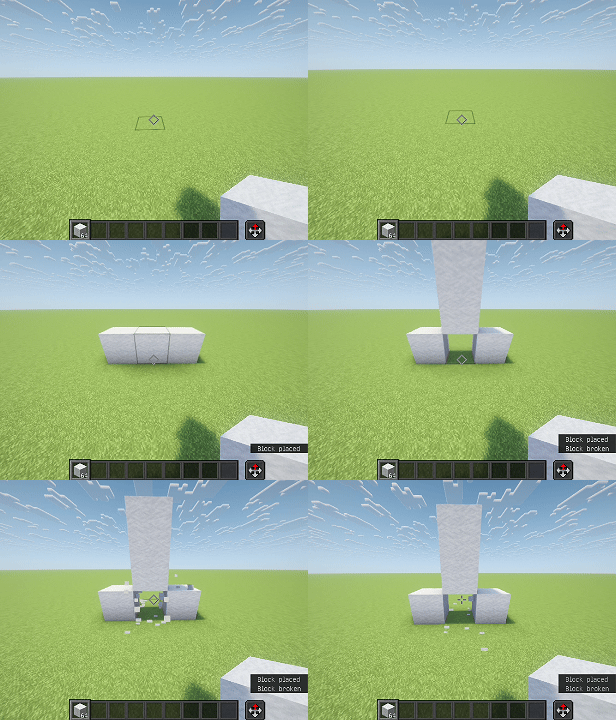 Building a Dik
Versions
Files
Relations
Project Relations
More like this
Similar Mods
Suggestions use data such as tags, dependencies, dependents, descriptions, titles, and more to rank how much they overlap with this mod.
On ModDex
Community snapshot
By the numbers
Statistics

 (opens in a new tab)
Get it on
Available Platforms
On ModDex
Community snapshot
By the numbers
Statistics
Resources