
Community listing page, reviews may not be monitored by the author.
HitColor X


No reviews yet
[26.2 SUPPORT IS HERE!] Fully Custom Hit Color - Toggle Armor, Body & Trim Tint - Custom Opacity - Hex Support - Presets, lightweight client-side Fabric mod for Minecraft 1.21.11 that lets you fully customize the hurt flash color when entities are hit.

Community voices
Reviews
No reviews yet. Be the first to review this project!
Get it on
Available Platforms
Compatibility
Supported Environments
Runs entirely on the client. Works on vanilla servers.
About
Project Details
For authors
Embed Badge
If you're the author of this project, you can embed a live badge anywhere that supports HTML or Markdown. It updates automatically whenever ratings change.
Use HTML for any page that supports it, or Markdown for README files and Markdown-based descriptions.
Identifiers
Platform IDs
About
Description
◼️ HitColor X ◼️ 
Fully customize the hurt flash color on entities INCLUDING their ARMOR.
Built for PvP players who want clear, personalized visual feedback during combat.
Features
◼️ Custom Hit Color
Set any color you want using:
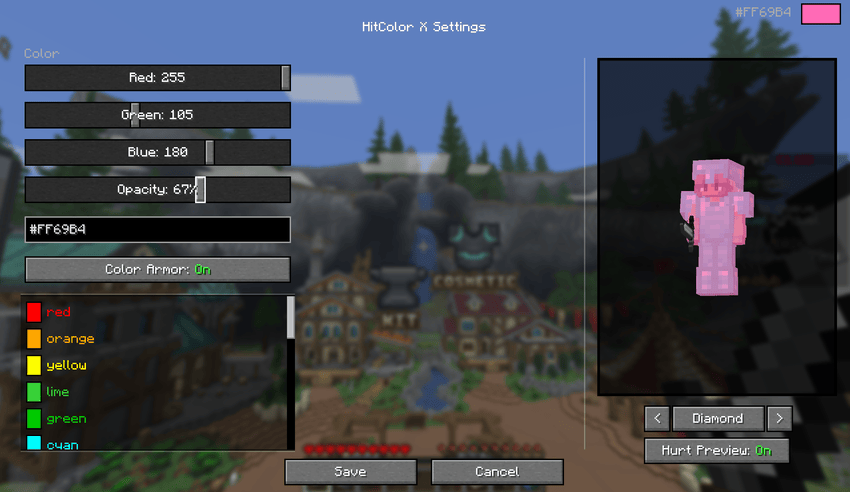
- RGB sliders: precise control over red, green, and blue channels
- Hex Code Input: Paste any hex color directly
- Preset colors: Red, Orange, Yellow, Green, Cyan, Blue, Purple, Pink, Magenta, White, Black
◼️ Armor Tinting
Toggle armor color too. When an entity is hit, their armor flashes the same color as their body. Supports all armor types.
◼️ Opacity Control
Adjust the intensity of the hit flash from 0% (no hit color) to 100% (fully solid). Find the perfect balance.
◼️ In-Game Settings Screen
Open the settings screen from Mod Menu to configure everything visually:
- Live player preview with your actual skin (You have to be in a world/server for this feature to function)
- Cycle through armor sets (Current, None, Leather, Gold, Chainmail, Iron, Copper, Diamond, Netherite) with enchantment glint
- Toggle hurt preview on/off to compare with and without the effect
- All changes update in real time

◼️ In-Game Commands
No ModMenu? No problem. Configure everything via chat commands:
| Command | Description |
|---|---|
/hitcolorx rgb <r> <g> <b> |
Set color by RGB values |
/hitcolorx hex <#RRGGBB> |
Set color by hex code |
/hitcolorx color <preset> |
Use a preset color |
/hitcolorx opacity <0-100> |
Adjust opacity |
/hitcolorx armor <on/off> |
Toggle armor recoloring |
/hitcolorx reset |
Reset to vanilla defaults |
/hitcolorx status |
Show current settings |
◼️ Available Preset Colors
| Color | Name | Color | Name | Color | Name |
|---|---|---|---|---|---|
| 🔴 | red |
🟠 | orange |
🟡 | yellow |
| 🟢 | lime |
🟩 | green |
🩵 | cyan |
| 🔵 | lightblue |
💙 | blue |
🌑 | navy |
| 🟣 | purple |
🫐 | darkpurple |
💗 | hotpink |
| 🌸 | pink |
💜 | magenta |
🪻 | lavender |
| ❤️ | crimson |
🩸 | darkred |
🪸 | coral |
| 🏅 | gold |
🩴 | teal |
🩵 | turquoise |
| 🌿 | lightgreen |
🌲 | darkgreen |
🔷 | darkblue |
| 🩶 | silver | ⬜ | white | ⬛ | black |
◼️ Dependencies
- Required: Fabric API
- Optional: Mod Menu (for the config screen)
- Minecraft 1.21.11
- Fabric Loader 0.18.4+
- Client-side only
HitColor X


recolor the hurt flash on entities, armor included ♡
made so anyone can read their hits more easily


want another version, a new feature, or help? come say hi (˶ᵔ ᵕ ᵔ˶)


✦ Features
♡ Color wheel: drag to pick a color, tune it with brightness and opacity sliders, type a hex code, or choose one of 27 presets.
♡ Chroma mode: the flash cycles through the rainbow, and you set the speed.
♡ Per-part toggles: body, armor, trims, held items and capes flash independently, so you can tint only the armor if you like.
♡ Live preview: see the effect on your own skin, switch between armor sets from Leather to Netherite, preview trims, and toggle the hurt effect to compare. Changes apply instantly.
♡ Scrolling screen: it fits at any GUI scale.

✦ Commands
No Mod Menu? No problem, everything works in chat:
| Command | Description |
|---|---|
/hitcolorx rgb <r> <g> <b> |
Set color by RGB values |
/hitcolorx hex <#RRGGBB> |
Set color by hex code |
/hitcolorx color <preset> |
Use a preset color |
/hitcolorx opacity <0-100> |
Adjust opacity |
/hitcolorx chroma <on/off> |
Toggle chroma mode |
/hitcolorx chroma speed <1-100> |
Set the chroma speed |
/hitcolorx armor <on/off> |
Toggle armor recoloring |
/hitcolorx trims <on/off> |
Toggle armor trim recoloring |
/hitcolorx body <on/off> |
Toggle body recoloring |
/hitcolorx items <on/off> |
Toggle held item recoloring |
/hitcolorx cape <on/off> |
Toggle cape recoloring |
/hitcolorx reset |
Reset to vanilla defaults |
/hitcolorx status |
Show current settings |
✦ Preset Colors
 red |
 crimson |
 darkred |
 coral |
 orange |
 gold |
 yellow |
 lime |
 green |
 lightgreen |
 darkgreen |
 teal |
 turquoise |
 cyan |
 lightblue |
 blue |
 darkblue |
 navy |
 lavender |
 purple |
 darkpurple |
 magenta |
 hotpink |
 pink |
 silver |
 white |
 black |
✦ Dependencies
- Required: Fabric API
- Optional: Mod Menu, for the settings screen. You can also use commands to configure the mod ^^
thanks for playing ♡
Screenshots
Gallery
-
 Banner Custom Hit Color × Armor Tint × Hex Support × 27 Presets × Opacity Control × Live Preview
-
 Color preview :) Color preview is also available through the commands!!
-
 Mod Settings (Mod Menu required for this menu) You need Mod Menu to be able to access the mod settings, however you can also use the /hitcolorx commands
-
 Advanced Page More options to color items, capes and armor trims along with a trim previewer
-
 Banner Custom Hit Color × Armor Tint × Hex Support × 27 Presets × Opacity Control × Live Preview
-
 Mod Settings (Mod Menu required for this menu) You need Mod Menu to be able to access the mod settings, however you can also use the /hitcolorx commands
-
 Advanced Page More options to color items, capes and armor trims along with a trim previewer
-
 Color preview :) Color preview is also available through the commands!!
Versions
Files
Relations
Project Relations
More like this
Similar Mods
Suggestions use data such as tags, dependencies, dependents, descriptions, titles, and more to rank how much they overlap with this mod.
On ModDex
Community snapshot
By the numbers
Statistics

Get it on
Available Platforms
On ModDex
Community snapshot
By the numbers