Community listing page, reviews here may not be monitored by the author.
HopperPlus


No reviews yet
Hopper Plus adds multiple tiers of hoppers with unique abilities to Minecraft! From filtering items to teleporting them across distances, these upgraded hoppers will revolutionise your automation setups.

Community voices
Reviews
No reviews yet. Be the first to review this project!
Get it on
Available Platforms
Compatibility
Supported Environments
Must be installed on both the client and the server.
About
Project Details
For authors
Embed Badge
If you're the author of this project, you can embed a live badge anywhere that supports HTML or Markdown. It updates automatically whenever ratings change.
Use HTML for any page that supports it, or Markdown for README files and Markdown-based descriptions.
Identifiers
Platform IDs
Resources
External Links
About
Description
Hopper Plus
Hopper Plus adds multiple tiers of hoppers with unique abilities to Minecraft! From filtering items to teleporting them across distances, these upgraded hoppers will revolutionize your automation setups.
Available for: NeoForge and Fabric

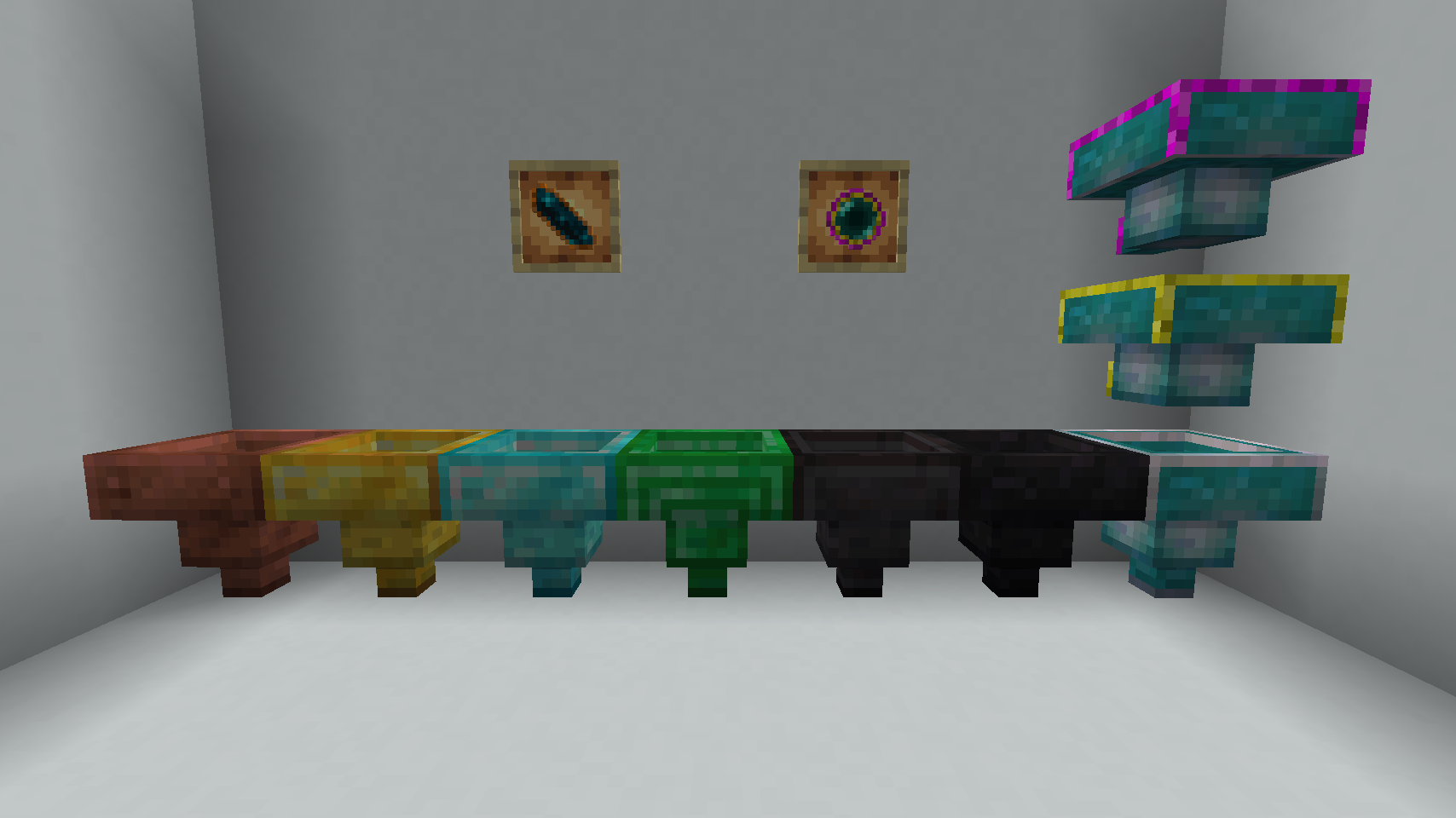
Warp Hopper Showcase
Multi-Link System

The Fabric and NeoForge versions support advanced multi-linking capabilities for Warp Hoppers!
How It Works
Warp Hoppers in modded versions can create complex item transportation networks with multiple connections:
- Multiple Links: A single Warp Hopper can send items to multiple destinations and receive from multiple sources simultaneously
- Flexible Networks: Build hub-and-spoke systems, daisy chains, or complex routing networks
- One-Way Links: Each link is directional - items flow from sender to receiver
- Easy Management: Use the Warp Linker tool to create and manage all your connections
Key Features
- Multiple Outgoing Links: Send items from one hopper to many destinations
- Multiple Incoming Links: Receive items from multiple sources into one hopper
- Network Flexibility: Create any network topology you need for your automation
- Persistent Storage: Links are saved and persist across server restarts
Example Network
Here's a practical example of a multi-hop network:
        [Hopper A]
           │
           │ (Link 1)
           ▼
        [Hopper B] ──(Link 2)──► [Hopper C]
           │
           │ (Link 3)
           ▼
        [Hopper D]
What's happening:
- Hopper A → Sends to B (Link 1)
- Hopper B → Receives from A (Link 1), sends to C (Link 2) and D (Link 3)
- Hopper C → Receives from B (Link 2)
- Hopper D → Receives from B (Link 3)
This allows you to create sophisticated item routing systems for your modded automation needs!
Features
Tiered Hoppers
| Hopper | Special Ability |
|---|---|
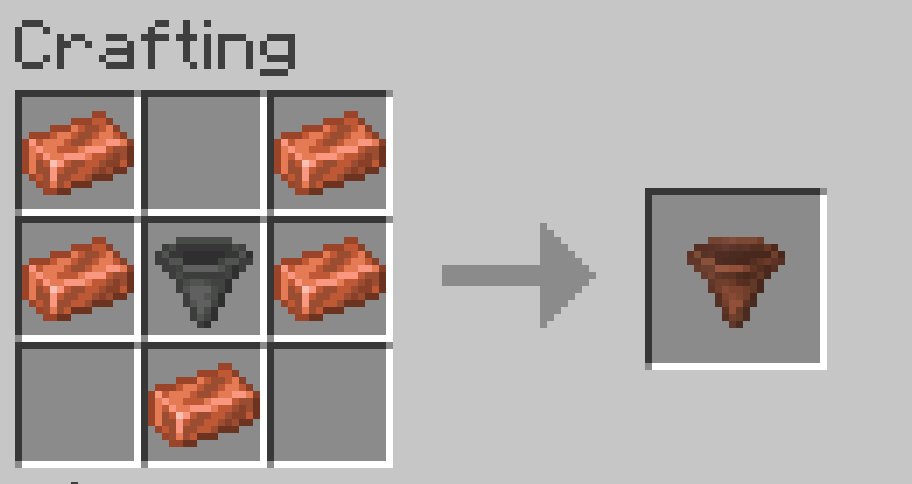
| Copper Hopper | Item filtering - only picks up items you configure |
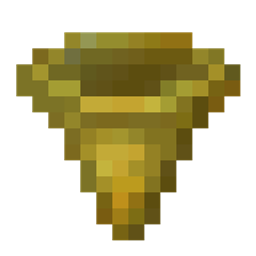
| Golden Hopper | 2x transfer speed (4 ticks instead of 8) |
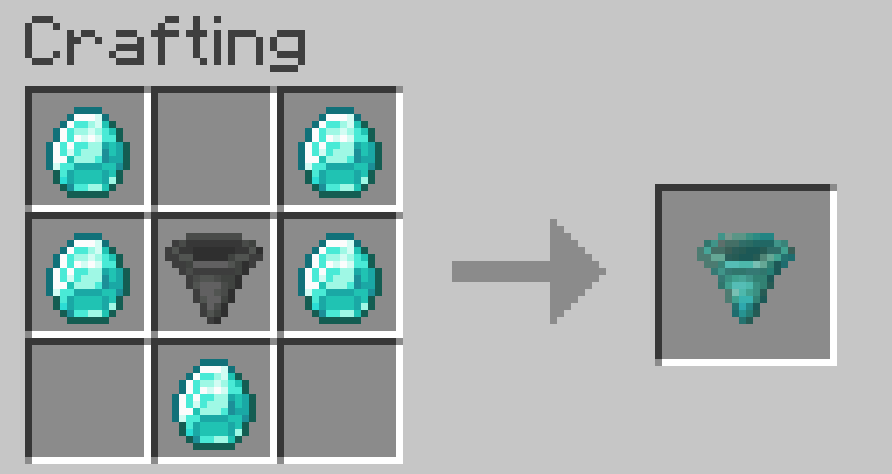
| Diamond Hopper | Extended pickup range (2 blocks) |
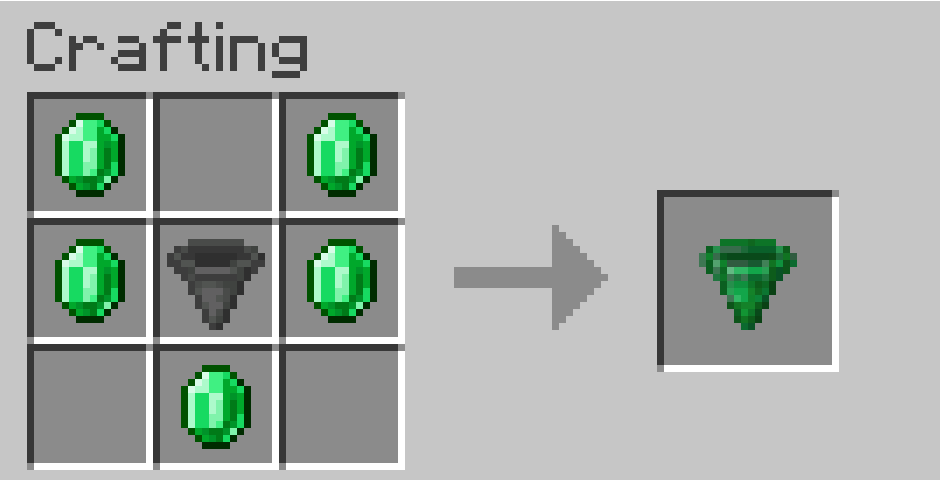
| Emerald Hopper | Large pickup range (3 blocks) |
| Netherite Hopper | Ultimate hopper - fast transfer, long range, fire resistant |
| Void Hopper | Destroys all items - perfect for trash disposal |
| Warp Hopper | Teleports items to a linked Warp Hopper |
Tools
Warp Linker
Used to link two Warp Hoppers together for item teleportation.
How to use:
- Right-click the first Warp Hopper (becomes the Sender)
- Right-click the second Warp Hopper (becomes the Receiver)
- Items placed in the Sender will teleport to the Receiver
- Shift+right-click a Warp Hopper to clear its link
Note: Links are one-way! The Sender and Receiver have different textures so you can tell them apart.
Advanced Features:
- Multiple Links: Warp Hoppers can have multiple outgoing and incoming links simultaneously
- Network Flexibility: Create complex routing networks for your automation needs
- Persistent Storage: Links are saved and persist across server restarts
Hopper Configurator
Used to configure the item filter on Copper Hoppers.
How to use:
- Right-click a Copper Hopper with the Hopper Configurator
- Place items in the 5 filter slots (only 1 of each item needed)
- Close the GUI - the filter is now active
- The hopper will only pick up items matching the filter
Tip: If no filter is set, the Copper Hopper picks up all items like a normal hopper.
Crafting Recipes
Hopper Configurator

Warp Linker

Copper Hopper

Golden Hopper

Diamond Hopper

Emerald Hopper

Netherite Hopper


Warp Hopper

Compatibility
- Minecraft: 1.21.1
- Mod Loaders:
- Fabric (Mod)
- NeoForge (Mod)
- Dependencies:
- Architectury API (Fabric/NeoForge)
- Fabric API (Fabric only)
Made with love for the Minecraft modding community!
Hopper Plus
Hopper Plus adds multiple tiers of hoppers with unique abilities to Minecraft! From filtering items to teleporting them across distances, these upgraded hoppers will revolutionize your automation setups.
Available for: Paper, NeoForge, and Fabric
Warp Hopper Showcase
Multi-Link System (Fabric/NeoForge Versions)
The Fabric and NeoForge versions also support advanced multi-linking capabilities for Warp Hoppers!
How It Works
Warp Hoppers in modded versions can create complex item transportation networks with multiple connections:
- Multiple Links: A single Warp Hopper can send items to multiple destinations and receive from multiple sources simultaneously
- Flexible Networks: Build hub-and-spoke systems, daisy chains, or complex routing networks
- One-Way Links: Each link is directional - items flow from sender to receiver
- Easy Management: Use the Warp Linker tool to create and manage all your connections
Key Features
- Multiple Outgoing Links: Send items from one hopper to many destinations
- Multiple Incoming Links: Receive items from multiple sources into one hopper
- Network Flexibility: Create any network topology you need for your automation
- Persistent Storage: Links are saved and persist across server restarts
Example Network
Here's a practical example of a multi-hop network in modded versions:
        [Hopper A]
           │
           │ (Link 1)
           ▼
        [Hopper B] ──(Link 2)──► [Hopper C]
           │
           │ (Link 3)
           ▼
        [Hopper D]
What's happening:
- Hopper A → Sends to B (Link 1)
- Hopper B → Receives from A (Link 1), sends to C (Link 2) and D (Link 3)
- Hopper C → Receives from B (Link 2)
- Hopper D → Receives from B (Link 3)
This allows you to create sophisticated item routing systems for your modded automation needs!
Features
Tiered Hoppers
| Hopper | Special Ability |
|---|---|
| Copper Hopper | Item filtering - only picks up items you configure |
| Golden Hopper | 2x transfer speed (4 ticks instead of 8) |
| Diamond Hopper | Extended pickup range (2 blocks) |
| Emerald Hopper | Large pickup range (3 blocks) |
| Netherite Hopper | Ultimate hopper - fast transfer, long range, fire resistant |
| Void Hopper | Destroys all items - perfect for trash disposal |
| Warp Hopper | Teleports items to a linked Warp Hopper |
Tools
Warp Linker
Used to link two Warp Hoppers together for item teleportation.
How to use:
- Right-click the first Warp Hopper (becomes the Sender)
- Right-click the second Warp Hopper (becomes the Receiver)
- Items placed in the Sender will teleport to the Receiver
- Shift+right-click a Warp Hopper to clear its link
Note: Links are one-way! The Sender and Receiver have different textures so you can tell them apart.
Advanced Features:
- Multiple Links: Warp Hoppers can have multiple outgoing and incoming links simultaneously (all versions)
- Visual Indicators (Paper): Color-coded floating indicators show link relationships - matching colors mean connected hoppers
- Smart Display (Paper): Hoppers show
[SENDER]or[RECEIVER]tags with colored squares (■) for each link - Efficient Storage (Paper): Uses SQLite database for fast, reliable data storage
Hopper Configurator
Used to configure the item filter on Copper Hoppers.
How to use:
- Right-click a Copper Hopper with the Hopper Configurator
- Place items in the 5 filter slots (only 1 of each item needed)
- Close the GUI - the filter is now active
- The hopper will only pick up items matching the filter
Tip: If no filter is set, the Copper Hopper picks up all items like a normal hopper.
Crafting Recipes
Hopper Configurator
Warp Linker
Copper Hopper
Golden Hopper
Diamond Hopper
Emerald Hopper
Netherite Hopper
Warp Hopper
Commands (Paper Version)
The Paper version includes powerful admin commands for managing hoppers:
/hopperplus give <type> [amount]
Gives you custom hopper items or tools.
Types:
copper_hopper,golden_hopper,diamond_hopper,emerald_hopper,netherite_hopper,void_hopper,warp_hopperwarp_linker,hopper_configurator
Example:
/hopperplus give warp_hopper 4
/hopperplus give warp_linker 1
/hopperplus stats
Shows statistics about all custom hoppers on the server.
Displays:
- Total number of custom hoppers
- Count of each hopper type
/hopperplus reload
Reloads plugin config and hopper data from the database, then refreshes floating hopper displays.
Permission: hopperplus.admin
Configuration (Paper)
Edit plugins/HopperPlus/config.yml to control visual effects:
visual-effects:
  # Hide floating link-status text on warp hoppers (icon above hopper is kept)
  warp-hopper-name-tags: true
Set warp-hopper-name-tags to false if link labels show through your builds. Run /hopperplus reload after changing this value.
/hopperplus debug
Debug command to check item metadata (useful for troubleshooting).
Permission: hopperplus.admin
Visual Link System (Paper Version)

Warp Hoppers feature an advanced visual system to help you manage complex networks with ease!
How It Works
Each Warp Hopper displays its link status with color-coded squares (■) in its floating name tag:
| Display Type | Example | Meaning |
|---|---|---|
| Sender | ■■■ → Warp Hopper [3] |
Sends items to 3 different hoppers (green text) |
| Receiver | ■■ ← Warp Hopper [2] |
Receives items from 2 different hoppers (yellow text) |
| Dual Role | ■■■ → [3] | ■■ ← [2] |
Both sends and receives items simultaneously |
Key Features
- Unique Colors: Each link pair gets its own color - matching colors mean connected hoppers
- Multiple Links: A single hopper can send to multiple destinations and receive from multiple sources
- Real-Time Updates: Visual indicators update instantly when links are created or removed
- Easy Identification: Instantly see which hoppers are connected just by looking at the colors
Example Network
Here's a practical example of a multi-hop network:
        [Hopper A]
           │
           │ (Red Link)
           ▼
        [Hopper B] ──(Blue Link)──► [Hopper C]
           │
           │ (Green Link)
           ▼
        [Hopper D]
What's happening:
- Hopper A → Sends to B (red link)
- Hopper B → Receives from A (red), sends to C (blue) and D (green)
- Hopper C → Receives from B (blue link)
- Hopper D → Receives from B (green link)
All connections are clearly visible with matching colored squares above each hopper!
Hiding Name Tags
If floating link labels show through walls or floors, you can hide them while keeping the small icon above each warp hopper:
- Open
plugins/HopperPlus/config.yml - Set
visual-effects.warp-hopper-name-tagstofalse - Run
/hopperplus reload
Visual Link Labels (Fabric / NeoForge)
Linked warp hoppers show floating OUT→ and ←IN text above the block. To hide these labels (block textures and linker debug lines are kept):
| Loader | Config file | Setting |
|---|---|---|
| NeoForge | config/hopperplus-client.toml |
showWarpHopperLabels = false |
| Fabric | config/hopperplus-client.json |
"showWarpHopperLabels": false |
Connection lines still appear when holding a Warp Linker or sneaking.
Paper Version Features
The Paper version includes several enhancements over the mod versions:
Performance
- SQLite Database: Fast, efficient storage instead of YAML files
- Immediate Saves: Changes are saved instantly to the database
- Optimized Queries: Indexed database queries for lightning-fast lookups
Visual Enhancements
- Floating Indicators: Each custom hopper has a floating display showing its type
- Color-Coded Links: Warp Hopper links are color-coded for easy identification
- Multi-Link Support: Hoppers can have multiple sender and receiver links simultaneously
- Real-Time Updates: Visual indicators update instantly when links change
Commands & Administration
- Admin Commands: Full command suite for server management
- Statistics: Track hopper usage across your server
- Debug Tools: Built-in debugging for troubleshooting
Compatibility
- Minecraft: 1.21.1, 26.1.x, 26.2
- Mod Loaders:
- Paper (Server Plugin) — 1.21.1 (26.x when Paper API is available)
- Fabric (Mod)
- NeoForge (Mod)
- Dependencies:
- Architectury API (Fabric/NeoForge)
- Fabric API (Fabric only)
- SQLite JDBC (Paper - included)
JAR filenames include the Minecraft version, e.g. hopperplus-fabric-1.0.3+1.21.1.jar.
Made with love for the Minecraft modding community!
Screenshots
Gallery


Versions
Files
Relations
Project Relations
More like this
Similar Mods
Suggestions use data such as tags, dependencies, dependents, descriptions, titles, and more to rank how much they overlap with this mod.
On ModDex
Community snapshot
By the numbers
Statistics
 (opens in a new tab)
Get it on
Available Platforms
On ModDex
Community snapshot
By the numbers
Statistics
Resources