Community listing page, reviews here may not be monitored by the author.
KeybindsGalore (HVB007)

No reviews yet
Resolves Minecraft keybind conflicts: when two actions share a key, choose the one you meant.
Community voices
Reviews
No reviews yet. Be the first to review this project!
Get it on
Available Platforms
Compatibility
Supported Environments
Runs entirely on the client. Works on vanilla servers.
About
Project Details
For authors
Embed Badge
If you're the author of this project, you can embed a live badge anywhere that supports HTML or Markdown. It updates automatically whenever ratings change.
Use HTML for any page that supports it, or Markdown for README files and Markdown-based descriptions.
Identifiers
Platform IDs
Resources
External Links
About
Description
KeybindsGalore
Opens a selection menu when multiple actions are bound to the same key, so you choose which action actually runs.
Minecraft's default behaviour is to pick one binding and silently ignore the rest. Usually you
find out by walking into a wall because a mod stole Space. KeybindsGalore intercepts the
conflict instead of guessing.
Available for both Fabric and NeoForge.
Features
Conflict selection - Press a contested key and a menu opens listing every action bound to it. Point at the one you meant, and the others are released for that press.
Pie menu and list menu - The pie is the default. A plain list menu is also available if you prefer something conventional, switchable in the config.
GPU-rendered pie - Wedges are drawn through Minecraft's deferred GUI render pipeline using
a custom RingRenderer, so the pie composites correctly with the rest of the interface. No
external rendering library is bundled or needed.
Priority system - For keys you never want to be asked about. Set Space to always jump and
it jumps, even when something else is bound to it.
K-key priority capture - Press K, press the key you want to lock down, pick the action. No
file editing.
Live conflict detection - Conflicts are re-scanned on startup, on joining a world, when you close the vanilla Controls screen, when you save your config, and when priorities change.
Category filters - Exclude entire categories from detection if you never want to be asked about them.
Mouse support - Works with conflicting mouse button bindings, not just keyboard.
In-game configuration - A full settings screen through Cloth Config, with sliders, colour fields with alpha, and tooltips on every entry.
Public API - A small versioned API lets other mods register their actions so their bindings take part in conflict detection.
What's New in 1.8.0
Now available on NeoForge as well as Fabric. The 26.2 NeoForge build is the same mod on the NeoForge loader: same menus, same priority system, same config screen. It needs no Fabric Loader, no Fabric API, and no ModMenu.
Minecraft 26.3 support on Fabric. The 26.3 build ports the mod to 26.3, where the client
moved from GLFW to SDL3 and rendering moved to the newer RenderPipeline API.
The config screen works on 26.2. The previous 26.2 build shipped with a known issue where the config screen failed, because the Cloth Config version available at the time referenced a Minecraft class that no longer exists. That is resolved.
Beyond that, this release rebuilds how conflicts are detected and how the pie is drawn:
- Sector gradation - each wedge shades from a lighter inner edge to its outer colour, with an intensity slider. Free to draw, since the renderer already accepted separate inner and outer colours.
- Open animation - a short eased animation when the pie appears, with a duration slider. Set it to 0 for an instant menu. Labels appear once it finishes.
- Pie geometry actually works - scale, margin, and cancel-zone size are now wired up. They were exposed in the config screen but silently ignored.
- Selected sector expansion now applies when you hover a wedge.
- Darken strength slider for the pie background.
- Label text shadow follows its setting instead of being permanently on.
- Fixed label placement - labels are positioned radially and clamped to the screen. Previously a label on a bottom wedge was pushed upward into the pie.
- Fixed pie smoothness - lowering the vertex count now degrades the whole pie evenly instead of only making the cancel circle faceted.
- Reliable K-key capture - a direct edge-triggered path runs alongside the previous poll-based one, so the first press is no longer sometimes swallowed.
- A separate list menu settings tab - the list menu's colours and opacity were in the pie tab, where they had no effect and looked broken.
- Typed configuration - config is read and written through a validated snapshot with atomic file replacement, instead of reflection over static fields.
- Retired options are cleaned up automatically - nine settings that were unread, redundant, or left over from 1.21.x are stripped from your config file on load, with the replacement noted in the file. Upgrading no longer produces error messages about unknown keys.
Requirements
Pick the row that matches your loader.
Fabric
- Minecraft 26.2 or 26.3
- Fabric Loader >= 0.19.3
- Fabric API >= 0.152.1+26.2
- Cloth Config >= 26.2.155
- ModMenu (optional, only for the settings screen)
NeoForge
- Minecraft 26.2
- NeoForge >= 26.2.0.88
- Cloth Config >= 26.2.155
Java 25 or newer on both. Client-side only: not for dedicated servers.
Configuration
The in-game settings screen is the recommended way to configure the mod, and it edits the same
config/keybindsgalore.properties file you can edit by hand, so you can use either. On Fabric
the screen appears in ModMenu; on NeoForge it appears in the mod list.
Four tabs:
- General - debug logging, pulse duration, attack workaround, background dimming.
- Behaviour - pie or list menu, conflict warnings, category filters, priority actions.
- Visual (Pie Menu) - geometry, colours, gradient, animation, labels.
- Visual (List Menu) - list colours and opacity. These affect the list menu only.
Colours are entered as ARGB hex values such as C0606060. The Cloth Config release this mod
uses provides a hex field rather than an RGB slider widget.
Setting a priority by hand looks like this:
PRIORITY_KEYBINDS=[key.jump:key.keyboard.space]
PRIORITY_CATEGORIES=[Movement]
An action priority always beats a category priority.
Known limitations
- The pie menu is mouse-only. There is no keyboard navigation yet, which is the largest accessibility gap.
- Long action names on neighbouring wedges can overlap. Labels are clamped so they are never cut off by the screen edge, but they cannot reflow.
- The pie menu does not pause the game, intentionally, so you can see the world behind it.
- Colour inputs are hex text fields, not pickers.
- Bindings changed by another mod at runtime are not detected. Only the listed triggers cause a rescan.
History and Credits
- Original project and original author: Cael
- KeybindsGalore Plus: AV306
- 1.20.x, 1.21.x, and 26.x updates and re-writes: HVB007
- Contributors listed in the mod metadata and the GitHub repository
AI Declaration
Portions of this mod's code were written with the assistance of AI tools. All AI-generated code has been reviewed, tested, and verified for functionality by the developer.
Links
Screenshots
Gallery
-
 Conflict Resolution Menu Two actions share one key, so the pie menu opens. Hover a wedge to highlight it, and the selected sector expands outward.
 -
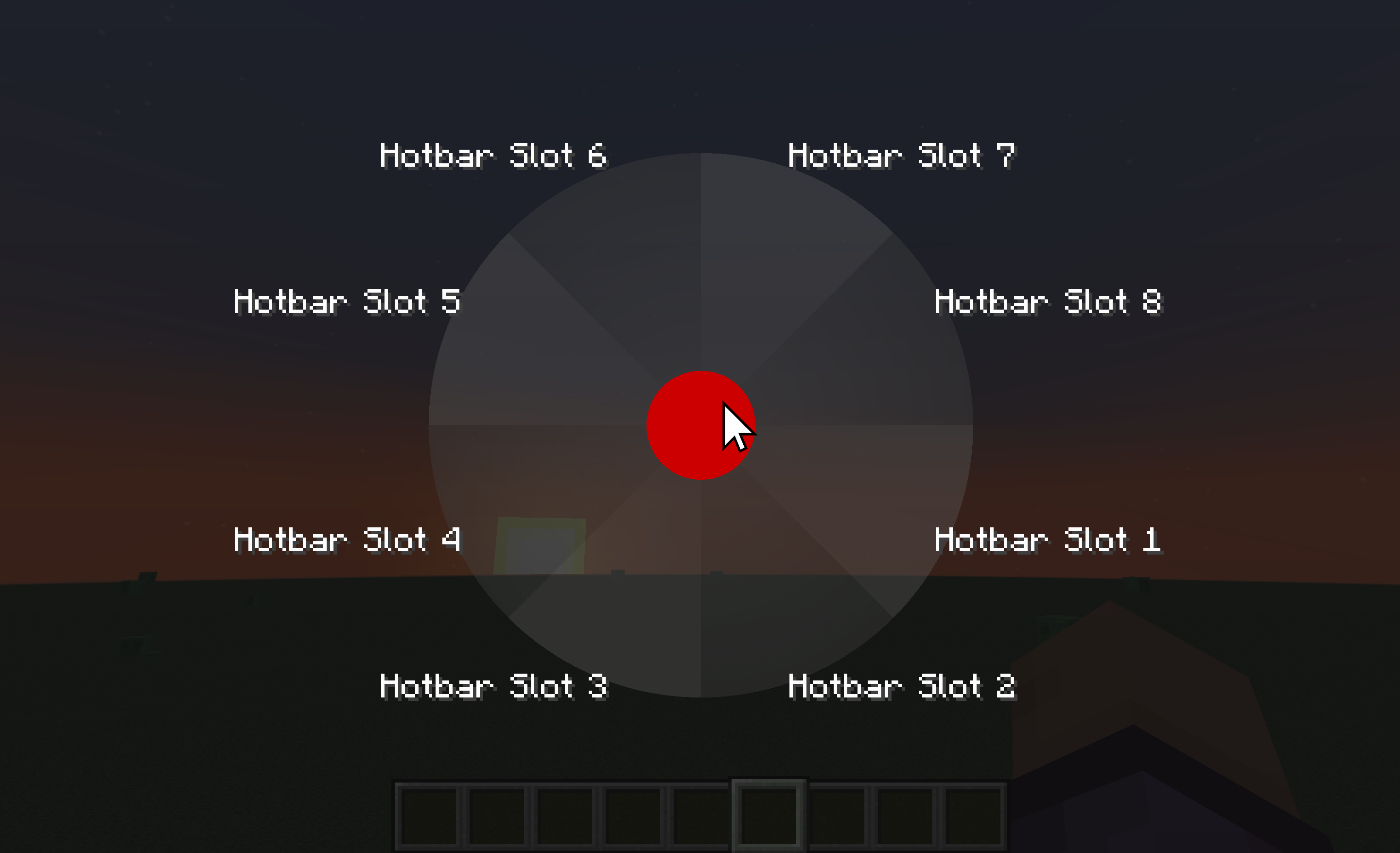 Cancel Keypress (<1.21.1) When letting go off the key while cursor is in the middle red area, it will not press any key.(for accidental keypresses)
 -
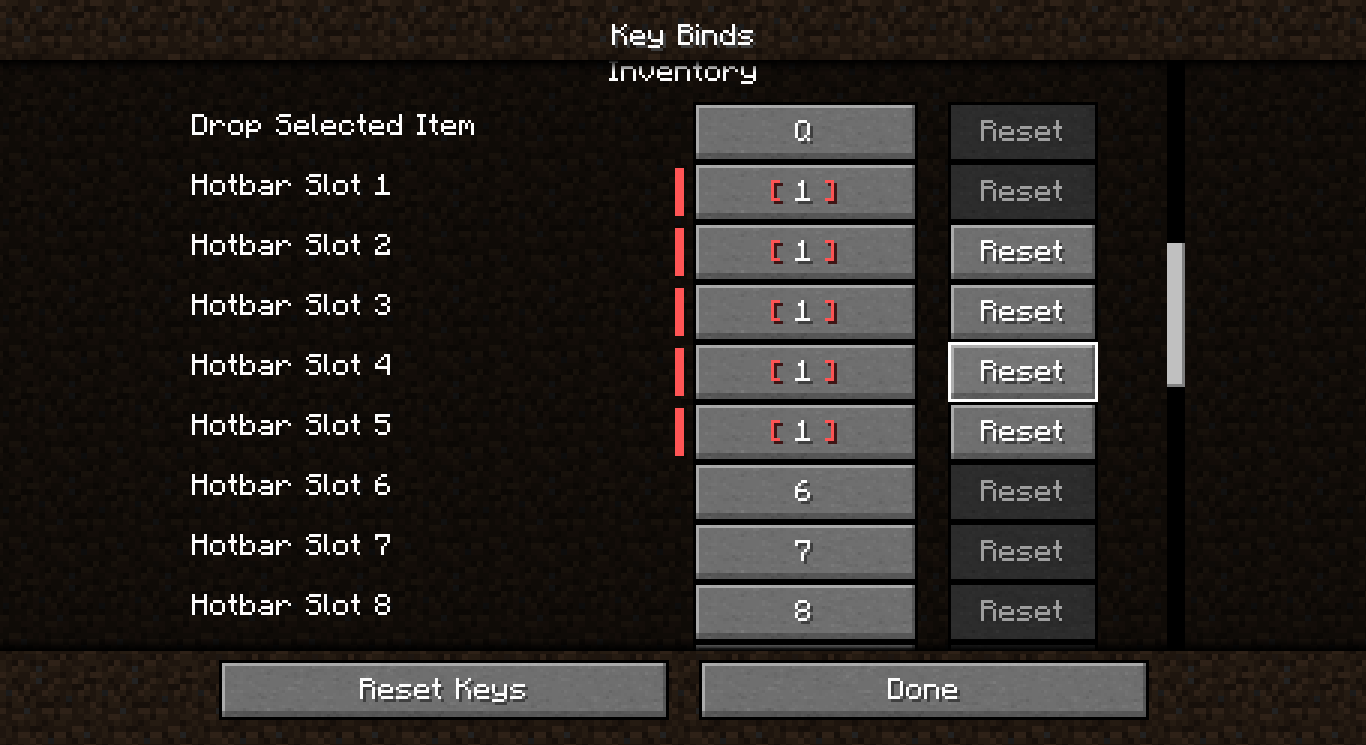 Conflicted Keys You can bind multiple actions to the same key in the key binds settings
 -
 Visual Settings (Pie Menu) Every pie option in one place: geometry sliders, per-sector colours, gradient intensity, animation duration, and label shadow.
 -
 Behaviour Settings Switch between pie and list menus, filter whole categories out of conflict detection, and manage your priority actions.
 -
 Priority Capture (K) Press K, press the key you want to lock down, then pick the action that always wins. No file editing needed.
Versions
Files
Relations
Project Relations
More like this
Similar Mods
Suggestions use data such as tags, dependencies, dependents, descriptions, titles, and more to rank how much they overlap with this mod.
On ModDex
Community snapshot
By the numbers
Statistics

Want to reach Minecraft players?
We're looking for a server hosting partner to feature here and other parts of the site. Interested? Send us a message!
Get in touchGet it on
Available Platforms
On ModDex
Community snapshot
By the numbers
Statistics
Resources