
Community listing page, reviews here may not be monitored by the author.
LuckPermsGUIPlus

No reviews yet
Tired of typing 2kms long commands ? Try this powerful in-game editor !

Community voices
Reviews
No reviews yet. Be the first to review this project!
Get it on
Available Platforms
About
Project Details
For authors
Embed Badge
If you're the author of this project, you can embed a live badge anywhere that supports HTML or Markdown. It updates automatically whenever ratings change.
Use HTML for any page that supports it, or Markdown for README files and Markdown-based descriptions.
Identifiers
Platform IDs
Resources
External Links
About
Description
LuckPermsGUIPlus
A comprehensive Minecraft plugin that provides an intuitive graphical user interface for managing LuckPerms permissions through in-game menus.
🛠️ Crafting...
This plugin is not fully finished ! Please contact me if you encounter any bugs.
⏳ Coming Soon
[Premium] [90% done] AI Assistant for LuckPerms — Automatically reviews and improves your permission setup !
[Free] [Done] Enhanced Logging System — Gain full visibility and control !
[Free] [80% done] Permission presets (Per-plugin) - Select installed plugins, group type and you're done !
…and more powerful tools are coming soon...
Features
🎯 Core Functionality
- Group Management: Create, edit, delete, duplicate, and rename permission groups
- Permission Management: Add, remove, toggle, and modify permissions with context restrictions
- Player Management: View and manage individual player permissions
- Advanced Search: Search permissions across all groups or within specific groups
- Context Support: Add world, server, or custom context restrictions to permissions
- Temporary Permissions: Set permissions with expiration times
🎨 User Interface
- Intuitive GUI: Clean, organized menus with clear navigation
- Visual Indicators: Color-coded permissions (enabled/disabled/temporary/inherited)
- Pagination: Handle large numbers of groups and permissions efficiently
- AnvilGUI Integration: Smooth text input for names, permissions, and contexts
- Responsive Design: Proper button placement and menu flow
🔧 Technical Features
- Real-time Caching: Efficient permission data caching with automatic refresh
- Context Management: Track which permissions belong to which groups
- Logging: Comprehensive action logging for audit trails
- Configuration: Highly customizable GUI elements and messages
- Performance: Optimized for large permission databases
Installation
- Ensure you have LuckPerms installed on your server
- Download the latest LuckPermsGUIPlus.jar from the releases
- Place the jar file in your server's
plugins/directory - Restart your server or use a plugin manager to load the plugin
Configuration
The plugin creates a config.yml file on first startup with customizable options:
Configuration
# LuckPermsGUIPlus Configuration

# GUI Settings
gui:
  title:
    main: "LuckPerms Groups"
    group: "Permissions of %group%"
    permission: "Edit Permission"
    search: "Search Results"
    players: "Players"
    player_permissions: "Permissions of %player%"
  items:
    # Main Menu Items
    group: "BOOK"
    create_group: "EMERALD_BLOCK"
    players: "PLAYER_HEAD"
    search: "COMPASS"
    close: "BARRIER"

    # Navigation Items
    previous_page: "ARROW"
    next_page: "ARROW"
    back: "BARRIER"

    # Group Menu Items
    add_permission: "EMERALD"
    search_permissions: "COMPASS"

    # Permission Status Items
    enabled: "GREEN_WOOL"
    disabled: "RED_WOOL"
    temporary: "CLOCK"
    inherited: "ENCHANTED_BOOK"

    # Permission Action Items
    toggle_permission: "LEVER"
    edit_permission: "WRITABLE_BOOK"

    # Permission Edit Menu Items
    status_enabled: "GREEN_WOOL"
    status_disabled: "RED_WOOL"
    make_temporary_button: "CLOCK"
    add_context_button: "GRASS_BLOCK"
    delete_button: "BARRIER"

    # Group Options Menu Items
    duplicate_group: "COPY"
    delete_group: "TNT"
    rename_group: "NAME_TAG"
    edit_prefix: "GOLDEN_APPLE"
    edit_suffix: "GOLDEN_CARROT"
    edit_display_name: "PAPER"
    edit_icon: "ITEM_FRAME"

    # Search Menu Items
    search_groups: "BOOK"
    search_players: "PLAYER_HEAD"
    search_all: "SPYGLASS"

    # Player Menu Items
    player_info: "PLAYER_HEAD"
    player_permissions: "WRITABLE_BOOK"

    # Context Menu Items
    add_context: "GRASS_BLOCK"
    remove_context: "DIRT"
    context_world: "GRASS_BLOCK"
    context_server: "COMMAND_BLOCK"
  lore:
    group_permissions: "Permissions: %count%"
    permission_status: "Status: %status%"
    permission_context: "Context: %context%"
    permission_expiry: "Expiry: %expiry%"
    inherited_from: "Inherited from %group%"

# Messages
messages:
  no_permission: "You do not have permission to use this command."
  group_created: "Group '%group%' created successfully."
  group_deleted: "Group '%group%' deleted successfully."
  permission_added: "Permission '%permission%' added to group '%group%'."
  permission_removed: "Permission '%permission%' removed from group '%group%'."
  permission_toggled: "Permission '%permission%' toggled in group '%group%'."
  search_no_results: "No permissions found matching '%query%'."
  invalid_group: "Group '%group%' does not exist."
  invalid_permission: "Invalid permission format."

# Cache Settings
cache:
  refresh_interval: 30 # seconds

# Logging
logging:
  enabled: true
  file: "history.log"

# Theme (light/dark)
theme: "dark"
Usage
Opening the GUI
- Use the command
/luckpermsguior/lpgui - Players need the
luckpermsgui.openpermission
Navigation
- Main Menu: Lists all permission groups
- Group Menu: Shows permissions for a specific group
- Permission Menu: Edit individual permission settings
- Player Menu: Manage player-specific permissions
- Search: Find permissions across groups
Group Operations
- Left-click: Open group permission menu
- Right-click: Access group options (duplicate, delete, rename, etc.)
- Create Group: Add new permission groups
- Search: Find specific permissions within groups
Permission Operations
- Left-click: Toggle permission on/off
- Right-click: Open detailed permission menu
- Add Permission: Grant new permissions to groups
- Edit Details: Modify contexts, expiry times, etc.
Commands
| Command | Description | Permission |
|---|---|---|
/luckperms |
Open the main GUI | luckpermsgui.open |
Permissions
| Permission | Description | Default |
|---|---|---|
luckpermsgui.open |
Access to the main GUI | op |
API
LuckPermsGUIPlus provides a simple API for integration with other plugins:
API example
import fr.arockenbauer.luckpermsgui.LuckPermsGUIPlus;
import fr.arockenbauer.luckpermsgui.gui.MainMenu;

// Get the plugin instance
LuckPermsGUIPlus plugin = LuckPermsGUIPlus.getInstance();

// Open GUI for a player
new MainMenu(player).open();
Dependencies
- LuckPerms 5.0+
- AnvilGUI (included)
- Bukkit/Spigot/Paper 1.20+ (Older versions not tested, may work but unsupported)
Support
- Issues: Email me at [email protected] or DM me via Discord (@lechat_v2)
License
This project is licensed under a custom License.
Changelog
Version 1.0.0
- Initial release
- Complete GUI system for LuckPerms management
- AnvilGUI integration for text input
- Context and temporary permission support
- Player permission management
- Advanced search functionality
- Comprehensive logging and caching
Credits
- Developer: Axel Rockenbauer
- AnvilGUI: WesJD
- LuckPerms: Luck
NOTE :
This plugin is NOT created or maintened by the original Luckperms author ! Please DO NOT report any issue regarding this plugin to Luck ! Contact me instead.
Screenshots
Gallery
-
 Main GUI The GUI when we run /lpgui (each item is a group)
 -
 Group editor
 -
 Group name editor
 -
 Group permission node browser Shows every permission a group has
 -
 Node description
 -
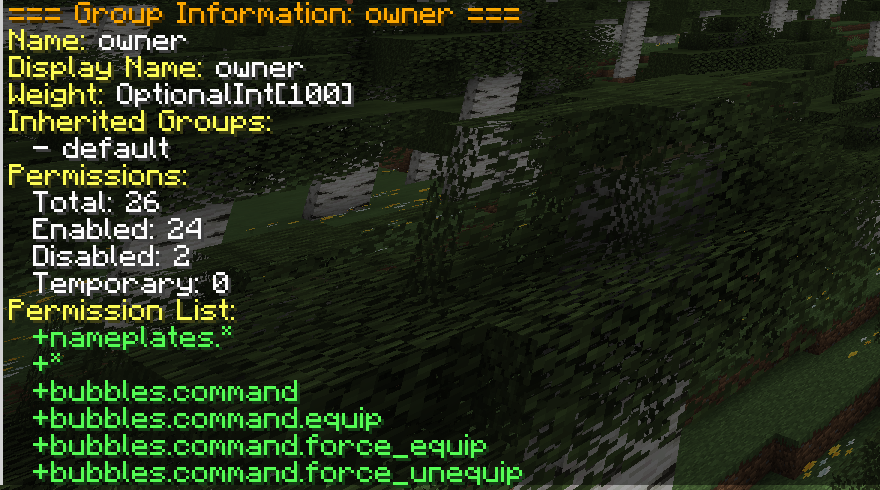 Get Group Info button
 -
 Edit custom icon Change a group icon to make the GUI more readable
 -
 The main GUI after custom icon change
Versions
Files
Relations
Project Relations
More like this
Similar Mods
Suggestions use data such as tags, dependencies, dependents, descriptions, titles, and more to rank how much they overlap with this mod.
On ModDex
Community snapshot
By the numbers
Statistics

 (opens in a new tab)
Get it on
Available Platforms
On ModDex
Community snapshot
By the numbers
Statistics
Resources