
Community listing page, reviews here may not be monitored by the author.
PointControl


No reviews yet
capture points with minimalism design
Community voices
Reviews
No reviews yet. Be the first to review this project!
Get it on
Available Platforms
Compatibility
Supported Environments
Must be installed on both the client and the server.
About
Project Details
For authors
Embed Badge
If you're the author of this project, you can embed a live badge anywhere that supports HTML or Markdown. It updates automatically whenever ratings change.
Use HTML for any page that supports it, or Markdown for README files and Markdown-based descriptions.
Identifiers
Platform IDs
About
Description
PointControl
A lightweight Forge mod that adds capture points to Minecraft.
Players can fight for control of areas, and teams can capture and hold points to gain dominance.
Perfect for:
- PvP servers
- mini-games
- faction battles
- territory control systems
- adventure maps
Points can be created anywhere and will automatically track nearby players and determine which team controls the area.
Features
- Create capture points anywhere in the world
- Automatic team dominance detection
- Configurable capture duration
- Customizable capture animations
- Client HUD showing point status
- Persistent points saved with the world
- Event API for other mods
How It Works
A Point is a area in the world.
Players inside the area contribute to their team's dominance.
If one team has more players inside the area than others:
- The point starts assimilating
- Progress increases until capture duration is reached
- The team becomes the owner of the point
If another team enters the area:
- capture progress can decrease
- the point can become contested
- the point can be lost
Commands
All commands require operator.
Create a Point
Creates a new capture point at the player's position.
/point create <id> <radius>
Example:
/point create alpha 10
Creates a point with:
- id:
alpha - radius:
10blocks
Remove a Point
Deletes an existing point.
/point remove <id>
Example:
/point remove alpha
List Points
Displays all existing points.
/point list
Example output:
Points: alpha, bravo, charlie
Change Capture Duration
Sets how long it takes to capture a point.
/point assimilation duration <id> <ticks>
Example:
/point assimilation duration alpha 60
Default value:
30 ticks
Higher values make capturing slower.
Change Capture Animation
Sets the animation used in the HUD.
/point assimilation animation <id> <animation>
Available animations:
up
down
in
out
Example:
/point assimilation animation alpha out
Configuration
Config file:
config/pointcontrol.json
Example configuration:
{
  "enableDeassimilationWhenNoPlayers": true,
  "deassimilationPeriod": 6
}
enableDeassimilationWhenNoPlayers
If enabled, capture progress will slowly decrease when no players are present.
deassimilationPeriod
Controls how quickly capture progress decays.
Lower values = faster decay.
HUD
When points exist, players will see a capture HUD on the screen.
The HUD displays:
- point identifier
- capture progress
- controlling team color
- capture animation
Team Support
The mod uses Minecraft scoreboard teams.
Example:
/team add red
/team add blue
Players must belong to teams for capture logic to work.
Developer API
PointControl provides simple events for mod integration.
Events
PointCaptureEvent
PointCapturedTickEvent
PointLostEvent
Example usage:
EventManager.POINT_CAPTURE.add(event -> {
    Point point = event.getPoint();
    Team team = event.getTeam();
});
PointControl
A lightweight Forge mod that adds capture points to Minecraft.
Players can fight for control of areas, and teams can capture and hold points to gain dominance.
Perfect for:
- PvP servers
- mini-games
- faction battles
- territory control systems
- adventure maps
Points can be created anywhere and will automatically track nearby players and determine which team controls the area.
Features
- Create capture points anywhere in the world
- Automatic team dominance detection
- Configurable capture duration
- Customizable capture animations
- Client HUD showing point status
- Persistent points saved with the world
- Event API for other mods
How It Works
A Point is a area in the world.
Players inside the area contribute to their team's dominance.
If one team has more players inside the area than others:
- The point starts assimilating
- Progress increases until capture duration is reached
- The team becomes the owner of the point
If another team enters the area:
- capture progress can decrease
- the point can become contested
- the point can be lost
Commands
All commands require operator.
Create a Point
Creates a new capture point at the player's position.
/point create <id> <radius>
Example:
/point create alpha 10
Creates a point with:
- id:
alpha - radius:
10blocks
Remove a Point
Deletes an existing point.
/point remove <id>
Example:
/point remove alpha
List Points
Displays all existing points.
/point list
Example output:
Points: alpha, bravo, charlie
Change Capture Duration
Sets how long it takes to capture a point.
/point assimilation duration <id> <ticks>
Example:
/point assimilation duration alpha 60
Default value:
30 ticks
Higher values make capturing slower.
Change Capture Animation
Sets the animation used in the HUD.
/point assimilation animation <id> <animation>
Available animations:
up
down
in
out
Example:
/point assimilation animation alpha out
Configuration
Config file:
config/pointcontrol.json
Example configuration:
{
  "enableDeassimilationWhenNoPlayers": true,
  "deassimilationPeriod": 6
}
enableDeassimilationWhenNoPlayers
If enabled, capture progress will slowly decrease when no players are present.
deassimilationPeriod
Controls how quickly capture progress decays.
Lower values = faster decay.
HUD
When points exist, players will see a capture HUD on the screen.
The HUD displays:
- point identifier
- capture progress
- controlling team color
- capture animation
Team Support
The mod uses Minecraft scoreboard teams.
Example:
/team add red
/team add blue
Players must belong to teams for capture logic to work.
Developer API
PointControl provides simple events for mod integration.
Events
PointCaptureEvent
PointCapturedTickEvent
PointLostEvent
Example usage:
EventManager.POINT_CAPTURE.add(event -> {
    Point point = event.getPoint();
    Team team = event.getTeam();
});
Screenshots
Gallery
-
 2026-03-07-201928_hyprshot.png 2026-03-07-201928_hyprshot.png
 -
 2026-03-07-201435_hyprshot.png 2026-03-07-201435_hyprshot.png
-
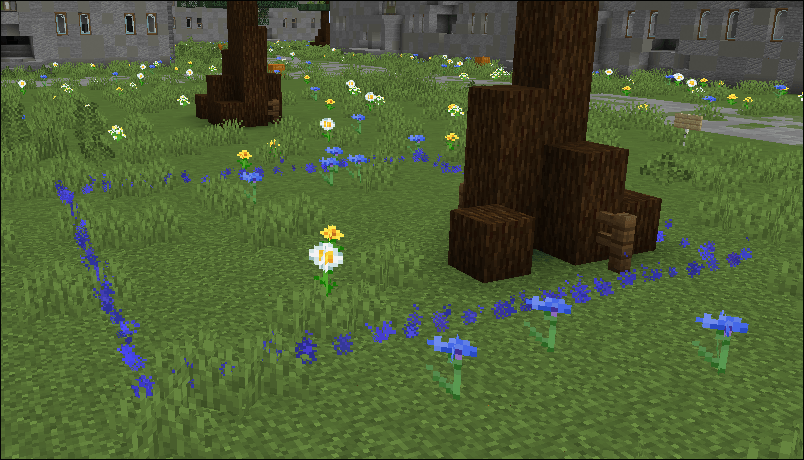
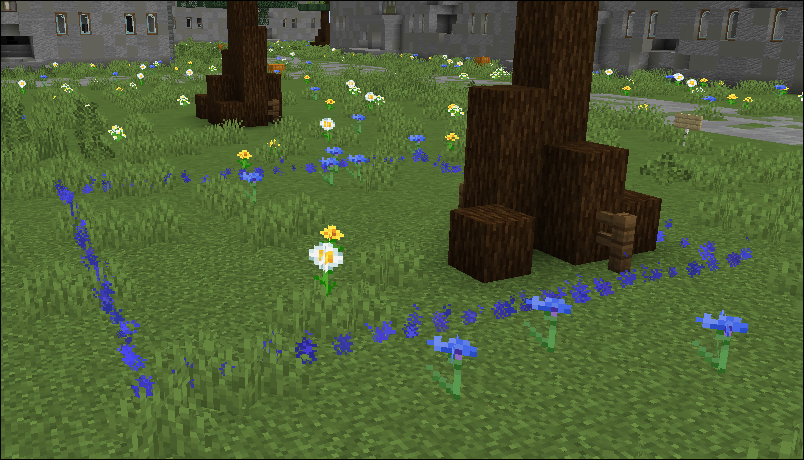 Capture zone Zone with beautiful particle border for capture point
 -
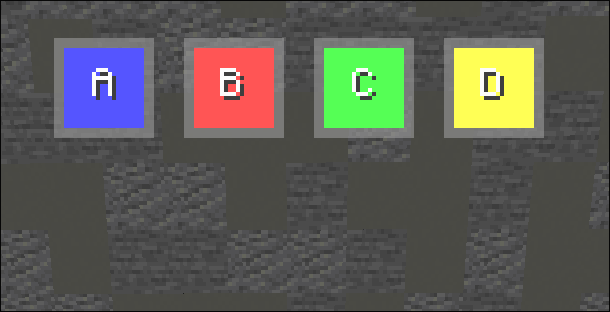 HUD point indicators hud for monitoring progress of assimilation or de-assimilation points
Versions
Files
Relations
Project Relations
More like this
Similar Mods
Suggestions use data such as tags, dependencies, dependents, descriptions, titles, and more to rank how much they overlap with this mod.
On ModDex
Community snapshot
By the numbers
Statistics
Want to reach Minecraft players?
We're looking for a server hosting partner to feature here and other parts of the site. Interested? Send us a message!
Get in touchGet it on
Available Platforms
On ModDex
Community snapshot
By the numbers