Community listing page, reviews here may not be monitored by the author.
DMZ Ragnarok Tournaments Module

No reviews yet
Automated single-elimination PvP tournament manager for DragonMine Z. Run recurring brackets from in-game menus, no datapacks. WorldEdit arenas, schedules, rulesets, structured rewards, transferable champion titles, and sign-up NPCs, styled to match DMZ.
Community voices
Reviews
No reviews yet. Be the first to review this project!
Get it on
Available Platforms
 CurseForge
Modrinth
CurseForge
Modrinth
Compatibility
Supported Environments
Must be installed on both the client and the server.
About
Project Details
For authors
Embed Badge
If you're the author of this project, you can embed a live badge anywhere that supports HTML or Markdown. It updates automatically whenever ratings change.
Use HTML for any page that supports it, or Markdown for README files and Markdown-based descriptions.
Identifiers
Platform IDs
Resources
External Links
About
Description
DMZ Ragnarok Tournaments
Automated fighting tournaments for DMZ Ragnarok.
This is an optional module for DMZ Ragnarok. It requires the DMZ Ragnarok core (and DragonMine Z under it), and it will not load on its own.
Set an arena, open sign-ups, and let the mod run the whole bracket.
Tournaments
- Every tournament format: 1v1, team formats and free-for-all.
- A fully automated bracket. It seeds entrants, teleports fighters in, freezes them for the countdown, calls the match, handles ring-outs and disconnects, advances the winner and places spectators where they can see it.
- Tournament characters, for fighting under a separate build.
New in 1.5.0
- A crash inside a tournament character no longer resets your real character. Your main progress is safe.
Install
DMZ Ragnarok ships two ways from one build. Pick one, never both.
- All-in-one jar:
dmz_ragnarok-1.5.0.jarfrom the DMZ Ragnarok core page already contains this module. If you use it, do not add this jar. - Modular set: the DMZ Ragnarok core jar plus this Tournaments jar (and any other modules you want).
Rules:
- Never install the all-in-one jar together with this module jar. Forge reports a duplicate mod and refuses to start.
- This jar needs the core jar. It will not load alone.
- Existing worlds load unchanged. No migration.
- Removing this module from a world that used its content is refused at startup: the server stops and names the jar to put back, rather than deleting its blocks and entities. To drop it anyway and accept the loss, start with
-Ddmzr.allowContentRemoval=true.
Everything here works in singleplayer, on LAN and on any server.
Requirements
| Dependency | Required |
|---|---|
| DMZ Ragnarok core | Yes |
| DragonMine Z 2.1.1b or newer (tested on 2.1.3) | Yes |
| Minecraft 1.20.1, Forge 47.4.20+, Java 17 | Yes |
| WorldEdit | Optional, for selecting arena bounds |
Required on both the client and the server.
Support
The official Discord is where support, updates and bug reports happen: discord.gg/K7vFwWkKrF
Licence: GNU GPL v3.0, the same licence DragonMine Z uses. You may modify and share it under the GPL, with credit to DMZ Ragnarok and Ragnarok Studios LLC. All original code and assets are the property of Ragnarok Studios LLC. Source code: github.com/Shurui54/DMZ-Ragnarok.

🏆 Shurui's DMZ Tournaments 🏆
Automated PvP tournaments for DragonMine Z
Run recurring 1v1, 2v2, 3v3 and free-for-all tournaments on your server, arenas, schedules, rewards and sign-up NPCs, all from in-game menus.
No datapacks. No JSON wrangling. No restarts.
⚠️ This is a public beta. It's stable enough to run real events, but expect rough edges, please report anything you find on Discord.
🟢 Official Community & Support Server
This mod's official, endorsed Discord is the best place for support, updates, sneak peeks, and sharing your creations:
👉 discord.gg/HaXBGEPXyE
Come say hi. Bug reports, feature requests, and help are all welcome.
Shurui's DMZ Tournaments is an add-on for DragonMine Z that turns your server into a fighting circuit. Define as many tournaments as you like, each with its own format (1v1, 2v2, 3v3, or a Tournament-of-Power free-for-all), arena, schedule, rules and prizes, then let the mod handle sign-ups, team-building, match teleports, healing between rounds, and crowning the champion, automatically, on a timer, styled to match DMZ's own UI.
✨ Features
🗓️ Fully Automated Tournaments
Set it and forget it. Each tournament can run on a daily, weekly, or monthly schedule with configurable sign-up windows, or you can kick one off by hand. The mod builds the bracket, teleports fighters into the arena, sends the losers to the stands, heals combatants between rounds, and announces every step in chat with a custom sound.
🥊 Four Formats
Pick a format per tournament in the editor:
- 1v1: classic single-elimination duels.
- 2v2 & 3v3 teams: single-elimination brackets fought between teams. A team is only out when all its members are down, teammates can't hurt each other, and every member of the winning (and runner-up) team is rewarded.
- Tournament of Power (FFA): everyone fights in one arena at once; the last fighter standing wins and the second-to-last takes runner-up.
The team formats and FFA are gated behind Shurui's Key only on a dedicated server: in singleplayer and LAN every format (and the Stat Gems) is fully available.
🤝 Team Sign-up, Your Way
For 2v2 and 3v3, players build teams however they like: a captain creates a named team and friends join it from the sign-up menu (or /sdt team create/join/leave). Any leftover solo sign-ups are randomly paired to fill the remaining slots, so nobody is left out, or turn random fill off to require pre-made teams only.
🧱 Multiple Named Tournaments
Run as many concurrent tournaments as you want, a weekly ranked cup, a casual daily brawl, a monthly championship, each an independent definition with its own bounds, rules, and rewards. Manage them all from a list menu: create, edit, open, delete.
🗺️ Flexible Arena Setup
Define each tournament's arena, waiting room, and spectator stands by making a WorldEdit selection and clicking a button in the editor, or by typing two corner coordinates, no WorldEdit required. Regions are treated as full-height columns: only the ground footprint matters, so a fighter flying or being launched upward is never counted as a ring-out.
🧍 Sign-up NPC Browser
Turn any registered entity into a tournament host. Right-click it to open a browser that lists every tournament under collapsible group dropdowns, pick one to sign up, build or join a team, teleport to the waiting room, or check status. Filter an NPC to a single group (e.g. a "Ranked" host and a "Casual" host), or let one NPC show them all. NPCs carry their setup through world saves and show a floating, word-wrapped name above their head.
⚔️ Match & Ruleset Control
Fights use DMZ's own combat with tournament-safe guardrails: friendly-fist is toggled on during matches, fighters are fully healed between rounds, and out-of-bounds PvP is blocked. A configurable ring-out rule decides whether leaving the arena eliminates a fighter. Toggle an items-allowed rule, when off, each contestant's inventory, offhand and Curios are safely stashed for the duration and restored on elimination, victory, or cancel (even across logout and crashes).
🎁 Structured Rewards
Build a prize table per tournament from selectable reward tokens: run a command, give an item, teleport, grant a DMZ skill level, award a title, or send a message, each with searchable item/skill/title dropdowns. Hand out different rewards to the champion, runner-up, and participants.
👑 Transferable Titles
Award a title as a prize, a colored prefix that shows above the winner's head and in chat via a scoreboard team. Titles have a single holder each and transfer to the next champion automatically, giving your server a real, visible reigning champ.
🛠️ Getting Started
- Open the tournament list with
/sdt editand create a new tournament. - On the General tab, pick a Format (1v1 / 2v2 / 3v3 / FFA) and, optionally, a Group to organise it under in the NPC browser.
- Set the arena, waiting room, and stands in the Bounds tab, either Set via WorldEdit from your selection, or type two corner coordinates. A thin floor-level region is enough.
- Set the schedule, rules (including ring-out and, for teams, random fill), messages, and rewards in the tabbed editor and hit Save.
- Spawn a host NPC with
/sdt npc spawn, players right-click it to open the browser and sign up. Optionally filter it with/sdt npc setgroup <group|all>. - Let it run on schedule, or start one now with
/sdt start "Tournament Name".
Player commands: /sdt list, join, leave, tpwait, status, and team create/join/leave for 2v2 and 3v3. Admin commands (edit, open, start, cancel, npc, title) are permission-gated and server-validated, so they're safe to hand to trusted staff. /tournament works as an alias for /sdt.
📦 Requirements
| Dependency | Version | Required? |
|---|---|---|
| Minecraft | 1.20.1 (Forge) | ✅ Yes |
| DragonMine Z | 2.1 or newer | ✅ Yes |
| WorldEdit | 7.2 or newer | ⚪ Optional (bounds can also be set by coordinates) |
🧪 Beta Notes
Known limitation: an in-progress tournament lives in memory, so restarting the server mid-run abandons the current bracket or free-for-all (stashed inventories are still safely restored). Everything else, definitions, schedules, titles, persists across restarts. Bug reports and feedback are hugely helpful, please share them on Discord.
💬 Join the Community
Support, updates, and everything else happen on the official Discord, the endorsed home for this mod:
🔗 discord.gg/HaXBGEPXyE
☕ Support Solo Development
Shurui's DMZ Tournaments is built and maintained by one developer. It's completely free and always will be, but these tools take a lot of time and effort to build and keep updated. If you'd like to help fund continued development, you can chip in below, entirely optional and genuinely appreciated.
💛 Patreon · 💙 PayPal
No pressure at all, using and sharing the mod already helps a ton.
Dependencies
Required
Optional
Screenshots
Gallery
-
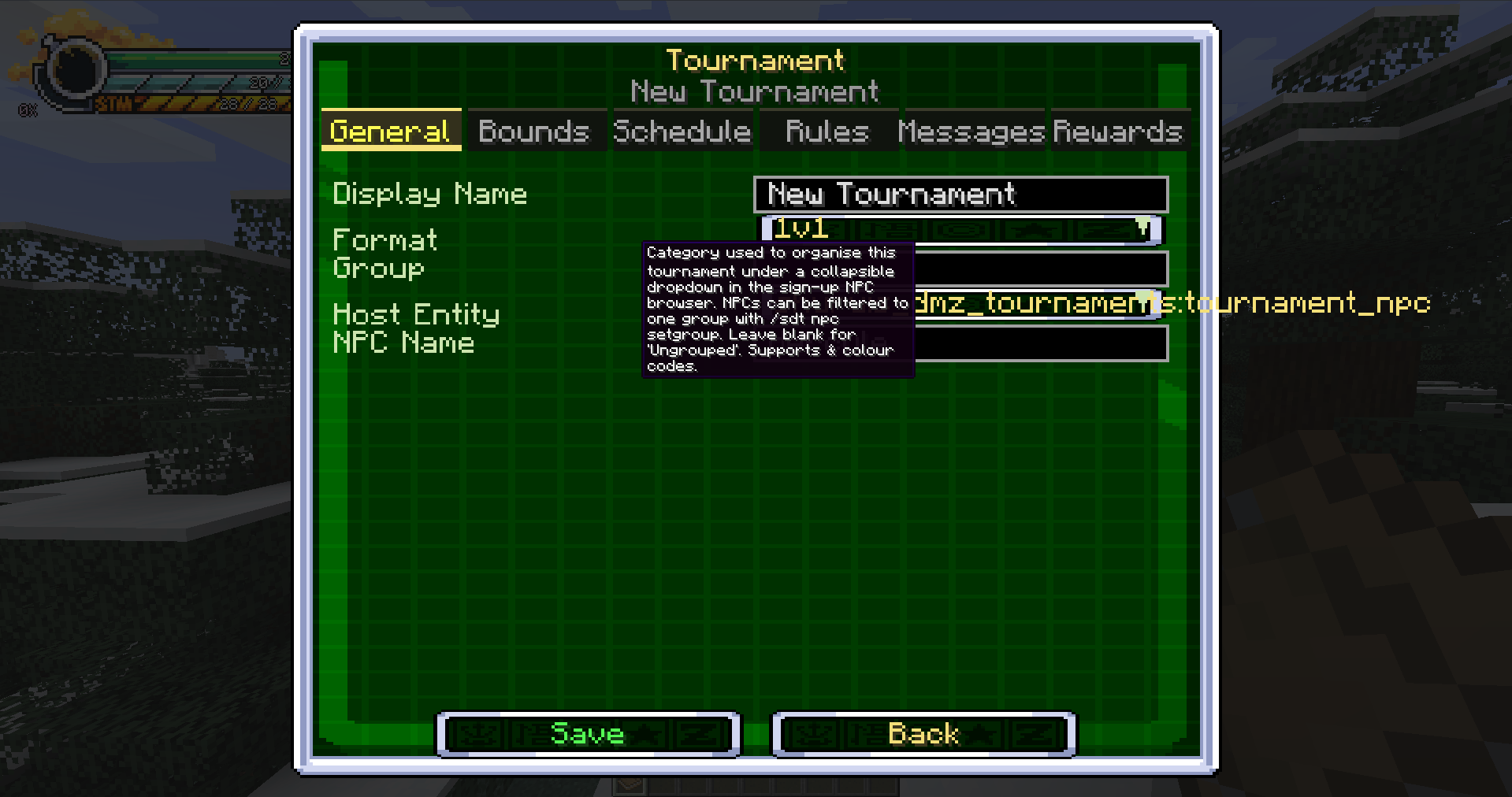 Tournament configuration editor Creating a tournament in game. The format selector covers 1v1, 2v2, 3v3 and Tournament of Power, and the remaining tabs cover arena bounds, schedule, rules, announcement messages and the prize tables.
Versions
Files
Relations
Project Relations
More like this
Similar Mods
Suggestions use data such as tags, dependencies, dependents, descriptions, titles, and more to rank how much they overlap with this mod.
- DMZ Ragnarok Raids Module
- DragonMine Z: Auto Trainer
- DragonMine Z: Layers+
- DMZ Ragnarok Core
- Dragon Mine Z: FTB Chunks Protection
- DMZ Ragnarok Dungeons Module
- DMZ Ragnarok Space Module
- DMZ Outfits+
- DMZ - REWORK UPDATE - Villager/Rework Expansion
- DMZ REALISTIC TWEAKS AND FEATURES
- DMZ Weapon Blocking
- DMZ: Sairen's RPG World
On ModDex
Community snapshot
By the numbers
Statistics
Want to reach Minecraft players?
We're looking for a server hosting partner to feature here and other parts of the site. Interested? Send us a message!
Get in touchGet it on
Available Platforms
CurseForge
Modrinth
On ModDex
Community snapshot
By the numbers
Statistics
Resources