
Community listing page, reviews here may not be monitored by the author.
ScalingMobs


No reviews yet
Adjusts the stats of bosses and mobs, multiplied by the number of players on the server.

Community voices
Reviews
No reviews yet. Be the first to review this project!
Get it on
Available Platforms
Compatibility
Supported Environments
Required on the server. Installing it on the client adds functionality.
About
Project Details
For authors
Embed Badge
If you're the author of this project, you can embed a live badge anywhere that supports HTML or Markdown. It updates automatically whenever ratings change.
Use HTML for any page that supports it, or Markdown for README files and Markdown-based descriptions.
Identifiers
Platform IDs
About
Description
📈 Scaling Mobs
This mod allows you to apply changes to bosses as well as regular mobs, depending on how many players are nearby. You can apply these changes to bosses, regular mobs, mod-specific mobs, and more.
✨ Features
- Dynamic Scaling – Boss health, damage, and armor increase with more nearby players
- Configurable Boss List – Define which mobs should be treated as bosses
- Math-Based Scaling – Scales using √(nearbyPlayers) for balanced difficulty progression
📥 Dependencies
- Cloth Config API – Required for GUI configuration (client-side only)
📊 How Scaling Works
Changes to mobs/bosses only take effect if they were spawned within a 100-block radius of the required number of players
When a boss spawns or when players approach an existing boss:
Health = Base Health × √(Nearby Players)
Damage = Base Damage × √(Nearby Players)
Armor =
- If base armor > 0: Base Armor × √(Nearby Players)
- If base armor = 0: 5 + √(Nearby Players)
| Players | Scaling Multiplier |
|---|---|
| 1 | 1× |
| 4 | 2× |
| 9 | 3× |
| 16 | 4× |
| 25 | 5× |
📈 Scaling Mobs
This mod allows you to apply changes to bosses as well as regular mobs, depending on how many players are nearby. You can apply these changes to bosses, regular mobs, mod-specific mobs, and more.
✨ Features
- Dynamic Scaling – Boss health, damage, and armor increase with more nearby players
- Configurable Boss List – Define which mobs should be treated as bosses
- Math-Based Scaling – Scales using √(nearbyPlayers) for balanced difficulty progression
📥 Dependencies
- Cloth Config API – Required for GUI configuration (client-side only)
🎮 Supported Bosses (Default)
The mod comes with pre-configured bosses from popular mods:
| Mod | Bosses |
|---|---|
| Vanilla | Warden, Ender Dragon, Wither, Elder Guardian |
| Minecells | Concierge, Conjunctivius |
| Twilight Forest | Naga, Lich, Alpha Yeti, Ur-Ghast, Hydra, Minoshroom, Snow Queen |
| Alex's Mobs | Void Worm |
| Alex's Caves | Luxtructosaurus |
| Aquamirae | Captain Cornelia |
| Cataclysm | Maledictus, Ignis, Leviathan, Netherite Monstrosity, Harbinger, Ender Guardian, Ancient Remnant |
| Mowzie's Mobs | Ferrous Wroughtnaut, Frostmaw, Sculptor, Umvuthi |
| Iron's Spells & Spellbooks | Dead King |
📊 How Scaling Works
Changes to mobs/bosses only take effect if they were spawned within a 100-block radius of the required number of players
When a boss spawns or when players approach an existing boss:
Health = Base Health × √(Nearby Players)
Damage = Base Damage × √(Nearby Players)
Armor =
- If base armor > 0: Base Armor × √(Nearby Players)
- If base armor = 0: 5 + √(Nearby Players)
| Players | Scaling Multiplier |
|---|---|
| 1 | 1× |
| 4 | 2× |
| 9 | 3× |
| 16 | 4× |
| 25 | 5× |
Screenshots
Gallery
-
 Adding a new mob. To add a new mob or boss, click on an empty space at the very bottom of the list. Alternatively, use the server configuration file located in the config/scalingmobs directory.
 -
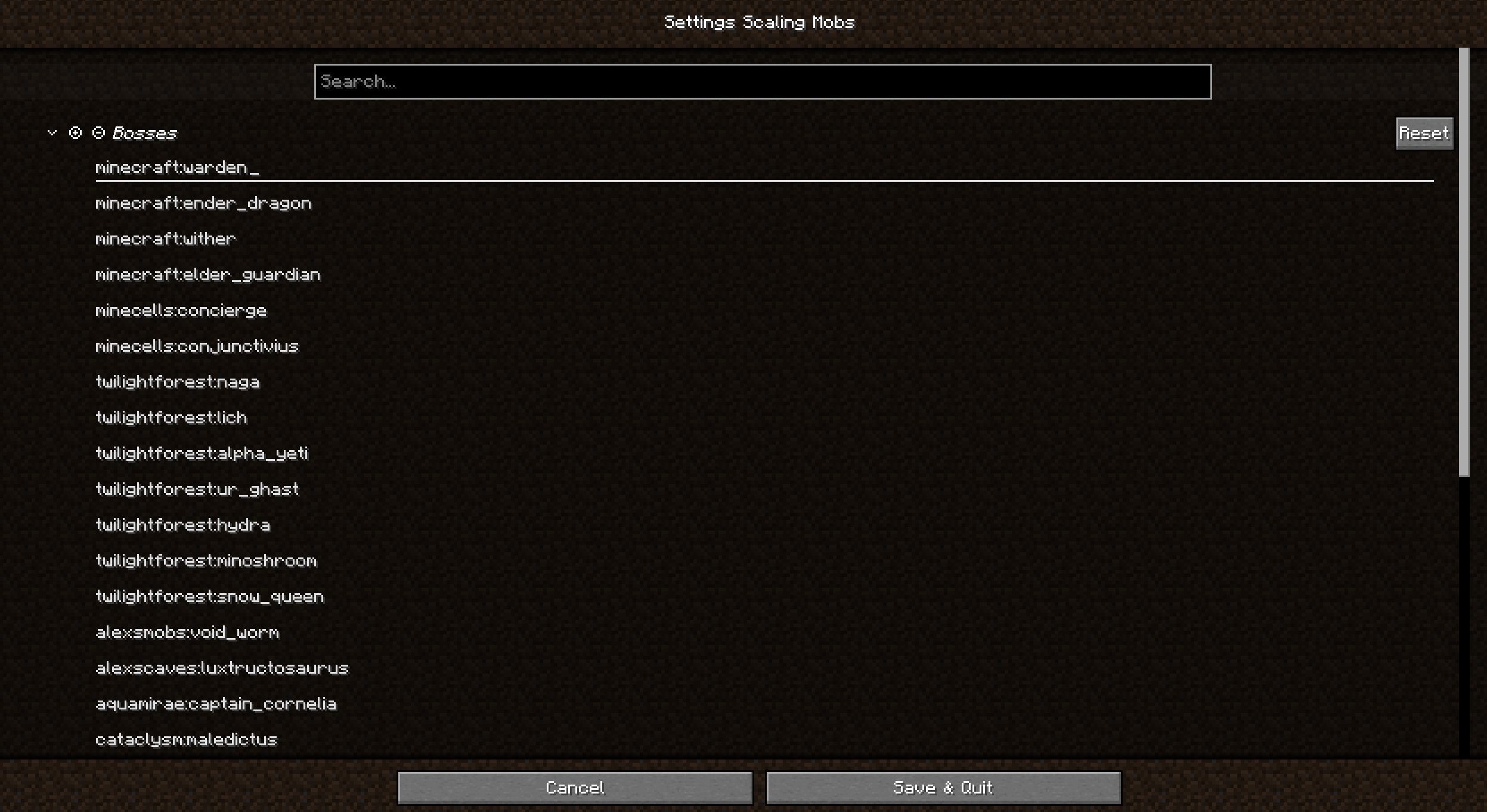 List You can add and remove mobs from this list.
-
 Adding a new mob. To add a new mob or boss, click on an empty space at the very bottom of the list. Alternatively, use the server configuration file located in the config/scalingmobs directory.
 -
 List You can add and remove mobs from this list.
Versions
Files
Relations
Project Relations
More like this
Similar Mods
Suggestions use data such as tags, dependencies, dependents, descriptions, titles, and more to rank how much they overlap with this mod.
On ModDex
Community snapshot
By the numbers
Statistics
 (opens in a new tab)
Get it on
Available Platforms
On ModDex
Community snapshot
By the numbers