Community listing page, reviews here may not be monitored by the author.
ShootScreen


No reviews yet
Make your game screen look like a screenshot.
Community voices
Reviews
No reviews yet. Be the first to review this project!
Get it on
Available Platforms
Compatibility
Supported Environments
Runs entirely on the client. Works on vanilla servers.
About
Project Details
For authors
Embed Badge
If you're the author of this project, you can embed a live badge anywhere that supports HTML or Markdown. It updates automatically whenever ratings change.
Use HTML for any page that supports it, or Markdown for README files and Markdown-based descriptions.
Identifiers
Platform IDs
About
Description
Shoot Screen
Make your game screen look like a screenshot.
Press 'Z' to toggle of screenshot like rendering.
Supprt custom background image and many other params.
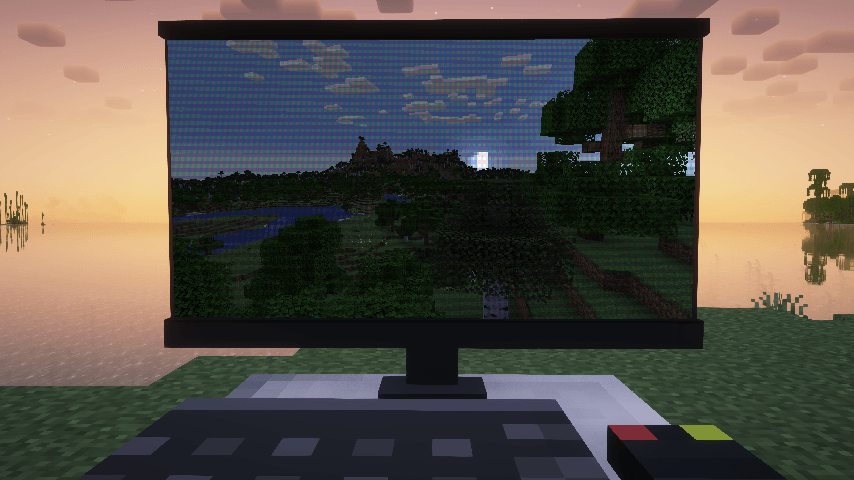
Custom Background
Put following files in a resource pack.
├───assets
│   └───<namespace>
│       └───custom_background
│           └─── <image_name>.json //background config
│       └───texutres
│           └───custom_background
│               └─── <image_name>.png
If there is more than one background, will apply a random one.
//A background config example.
{
  "name": "example_background", //the image name.
    "screenRect": {                //define the sreen corners in background.
        "leftDown": [            //Percentage[0-1] form left down corner of iamge.
          0.106,
          0.249
        ],
        "leftUp": [
          0.0879,
          0.876
        ],
        "rightDown": [
          0.952,
          0.256
        ],
        "rightUp": [
          0.951,
          0.92
        ]
  },
  "moireStrength": 0.6,    //Strength of Moiré pattern.Range[0,1]. 0 means no Moiré pattern.
  "lightColor": [        //Following are the light parameters
    1.0,
    1.0,
    1.0
  ],
  "lightPos": [
    1.7,
    1.0,
    2.0
  ],
    "viewPos": [
    0.6,
    0.5,
    1.0
  ]
  "ambientStrength": 0.2,
  "specularStrength": 5,
  "shininess": 16,
}
About light parameters: this mod use Phong Lighting Model to simulate highlighting effects. The screen mapped to a rect from (0,0,0) to(1,1,0)and towards(0,0,1).
If you just want to disable highlighing effects , set specular strength to 0.
Shoot Screen
Make your game screen look like a screenshot.
Press 'Z' to toggle of screenshot like rendering.
Supprt custom background image and many other params.
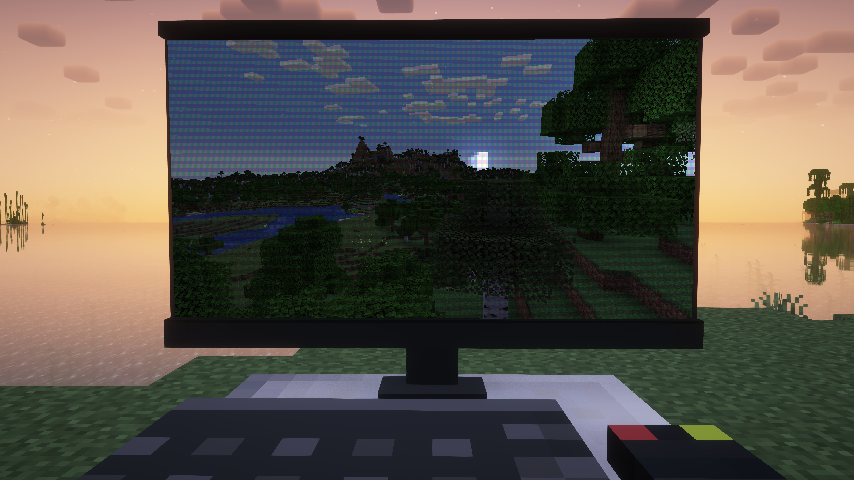
Custom Background
Put following files in a resource pack.
├───assets
│   └───<namespace>
│       └───custom_background
│           └─── <image_name>.json //background config
│       └───texutres
│           └───custom_background
│               └─── <image_name>.png
If there is more than one background, will apply a random one.
//A background config example.
{
  "name": "example_background", //the image name.
    "screenRect": {				//define the sreen corners in background.
        "leftDown": [			//Percentage[0-1] form left down corner of iamge.
          0.106,
          0.249
        ],
        "leftUp": [
          0.0879,
          0.876
        ],
        "rightDown": [
          0.952,
          0.256
        ],
        "rightUp": [
          0.951,
          0.92
        ]
  },
  "moireStrength": 0.6,	//Strength of Moiré pattern.Range[0,1]. 0 means no Moiré pattern.
  "lightColor": [		//Following are the light parameters
    1.0,
    1.0,
    1.0
  ],
  "lightPos": [
    1.7,
    1.0,
    2.0
  ],
    "viewPos": [
    0.6,
    0.5,
    1.0
  ]
  "ambientStrength": 0.2,
  "specularStrength": 5,
  "shininess": 16,
}
About light parameters: this mod use Phong Lighting Model to simulate highlighting effects. The screen mapped to a rect from (0,0,0) to(1,1,0)and towards(0,0,1).
If you just want to disable highlighing effects , set specular strength to 0.
Screenshots
Gallery
-
demo.png demo.png
-
demo
Versions
Files
Relations
Project Relations
More like this
Similar Mods
Suggestions use data such as tags, dependencies, dependents, descriptions, titles, and more to rank how much they overlap with this mod.
On ModDex
Community snapshot
By the numbers
Statistics
Want to reach Minecraft players?
We're looking for a server hosting partner to feature here and other parts of the site. Interested? Send us a message!
Get in touchGet it on
Available Platforms
On ModDex
Community snapshot
By the numbers