
Community listing page, reviews may not be monitored by the author.
ShopShelves


No reviews yet
New advanced way of admin shops and playershops. ShopShelves and PlayerShelves

Community voices
Reviews
No reviews yet. Be the first to review this project!
Get it on
Available Platforms
Compatibility
Supported Environments
Install on the client or the server; either alone gives full functionality.
About
Project Details
For authors
Embed Badge
If you're the author of this project, you can embed a live badge anywhere that supports HTML or Markdown. It updates automatically whenever ratings change.
Use HTML for any page that supports it, or Markdown for README files and Markdown-based descriptions.
Identifiers
Platform IDs
Resources
External Links
About
Description
ShopShelves - Admin Shops & Player-Owned Shops
Using Bukkit, Spigot, Paper, or Purpur?
To get the most accurate list of features and general information for server plugins, please visit the Spigot site:
👉 View the Plugin version on the SpigotMC page
Recommended Client-Side Companion
Looking to enhance the shopping visual experience?
👉 WIITS - Client-side Shopping Mod

ShopShelves transforms the Shelf Block into flexible, server-friendly shops! This powerful server-side Fabric mod allows administrators to create permanent, fixed-price shops and gives players the ability to set up their own chest-linked "Player Shelves" with custom prices, all powered by a configurable in-game economy.
📷 Pictures Explained
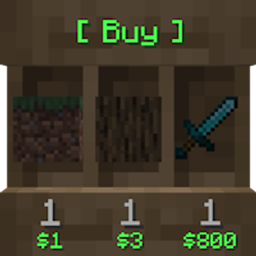
The following pictures depict the in-game shelf blocks in order:
- Buy Shop | Sell Shop | Buy & Sell Shop | Custom Label | Player Shop
- Statistics Book → Shows total money earned / lost per slot item.
- Custom Price GUI → Shift right-click a shelf to set custom prices per slot.
- Customer-Friendly Viewer GUI → Inspect full item details (potions, enchantments, NBT data, etc.).


📦 Required Dependencies

Required Mod: EcoBal Economy API
✨ Features
Robust Shop Types
- Admin Shops (Buy / Sell / Dual): Admins can create persistent shops using the Shelf Block for buying, selling, or dual trade. Admin shops are immune to world allowlists and cannot be broken through the front-facing item slots.
- Player Shops (PlayerShelves): Players can create their own shops by Sneaking + Placing a Shelf Block against a chest, barrel, or copper chest.
- Automatically links to the container (including double chests) for stock management.
- Supports custom prices set per slot via the in-game Price GUI (shift right-click the shelf).
- Configurable single-type mode: lock a player shop to one item across all three slots with a shared price, or allow each slot to hold different items.
- Configurable creation limits via permission nodes.
- Breaking the linked container automatically safely resets the shelf back to a plain vanilla shelf without leftover floating displays.
Custom Shop Labels
- Set a custom floating label on any shelf via the Price GUI.
- Supports legacy color codes (
&c,&l, etc.), hex colors (&#RRGGBB), and newline markers (\nor&n). - Surrounding whitespace around newlines is stripped cleanly.
- Length limit (
label_max_lengthinconfig.yml, default 64) measures visible characters only. - Fully configurable bracket formatting in
messages.yml(toggle per-line or full-block brackets). - Right-click the label icon in the Price GUI to clear the label instantly.
Dynamic Item Pricing
- Global Pricing (
pricing.yml): Set default buy/sell values for items—including potions, enchanted books, goat horns, and player heads. - Custom Price Stamps: Use
/shops priceto stamp held items with custom pricing rules to configure shelves on the fly. - Flexible Quantity Ratios: Set prices by quantity (e.g., $10 for 64 blocks); unit values are calculated automatically.
- In-GUI Price Editing: Shift right-click any shelf to edit pricing via increment buttons or exact chat input.
- Instant Price Reset: Reset slot pricing to default values directly inside the GUI.
Statistics Book
- Track cumulative profits and losses per slot for both Admin Shops and Player Shelves.
- All profit/loss metrics persist across server reboots.
Display Aesthetics & Tech
- Dynamic Floating Text: Rendered using vanilla Text Display Entities that sync live with stock and price updates.
- Scale & Distance Tuning: Fully configurable render distances and text scaling multipliers (1–10).
- Two Display Modes:
TRIPLEPRICE(individual price per slot) andSINGLEPRICE(merged price display). - Localization: Supports standard Minecraft locale files (
en_us,de_de,fr_fr, etc.) fetched on boot.
Server Protection & Management
- Break Protection: Shelf item slots (8×16 px hitboxes) ignore normal hit interactions; breaking requires targeting the border bands.
- Container Security: Linked storage cannot be opened or broken by unauthorized players.
- Explosion Proofing: Shelves and linked inventories resist TNT, creeper, and wither damage.
- Auto-Migration: Automatically updates configuration files with newly introduced keys without overwriting existing settings.
- Live Reloading: Refresh configurations on the fly via
/shops reload.
💻 Commands
| Command | Permission | Description |
|---|---|---|
/shops or /shopshelves |
shopshelves.command |
Displays help menu with interactive commands |
/shops admin |
shopshelves.admin |
Toggles Admin Mode to bypass restrictions |
/shops reload |
shopshelves.reload |
Reloads all configuration and pricing files |
/shops update |
shopshelves.update |
Forces a global re-render of text displays |
/shops mode [mode] |
shopshelves.mode |
Sets message target (CHAT/ACTIONBAR) or price style |
/shops itemprice |
shopshelves.itemprice |
Inspects global price settings for held item |
/shops itemprice <price> <type> <amount> |
shopshelves.itemprice |
Sets global price for held item |
/shops price <price> <type> <amount> |
shopshelves.price |
Creates a temporary custom price stamp on held item |
🔑 Permissions
shopshelves.command— Access to/shopshelp command (Default: Everyone)shopshelves.admin— Access to/shops adminmode (OP Level 2)shopshelves.reload— Access to/shops reload(OP Level 2)shopshelves.update— Access to/shops update(OP Level 4)shopshelves.mode— Access to/shops mode(OP Level 4)shopshelves.itemprice— Manage global item pricing (OP Level 2)shopshelves.price— Create custom item price stamps (OP Level 2)shopshelves.playershelf— Permission to create PlayerShelves (Default: Everyone)shopshelves.playershelves.unlimited— Unlimited PlayerShelf creation (OP Level 4)shopshelves.playershelves.<number>— Sets custom shelf limit (e.g.shopshelves.playershelves.10)shopshelves.setlabel— Set custom floating shop labels (OP Level 2)shopshelves.setlabel.color— Use color/hex formatting in labels (OP Level 4)
🛠️ Developer API
For mod developers, ShopShelves exposes internal shop shelf methods via the ShopshelvesApi class:
package me.andy.shopshelves.api;

import me.andy.shopshelves.logic.ShopHelper;
import me.andy.shopshelves.util.ShopShelf;
import net.minecraft.block.entity.BlockEntity;
import net.minecraft.block.entity.ShelfBlockEntity;
import org.jetbrains.annotations.Nullable;

import java.util.Optional;
import java.util.UUID;

public final class ShopshelvesApi {

    private static final ShopshelvesApi INSTANCE = new ShopshelvesApi();

    private ShopshelvesApi() {}

    public static ShopshelvesApi getInstance() {
        return INSTANCE;
    }

    // Checks if a given BlockEntity is an active ShopShelf.
    public boolean isShopShelf(@Nullable BlockEntity blockEntity) {
        if (!(blockEntity instanceof ShelfBlockEntity) || !(blockEntity instanceof ShopShelf shopShelf)) {
            return false;
        }
        return shopShelf.getShopMode() != ShopHelper.ShopMode.NONE;
    }

    // Gets the current shop mode for a BlockEntity.
    public Optional<ShopHelper.ShopMode> getShopMode(@Nullable BlockEntity blockEntity) {
        if (blockEntity instanceof ShopShelf shopShelf && isShopShelf(blockEntity)) {
            return Optional.of(shopShelf.getShopMode());
        }
        return Optional.empty();
    }

    // Gets the UUID of the shop owner.
    public Optional<UUID> getShopOwner(@Nullable BlockEntity blockEntity) {
        if (blockEntity instanceof ShopShelf shopShelf && isShopShelf(blockEntity)) {
            return shopShelf.getOwner();
        }
        return Optional.empty();
    }
}
💬 Support & Contact Policy
Primary Support (Discord)
All questions, bug reports, and suggestions should go through our Official Discord Server so other community members can find existing solutions.
Urgent PM Policy
Direct private messages are reserved for critical production emergencies:
- Allowed Reason: Severe server crashes or critical item exploits directly caused by the mod.
- Requirement: Must be the server owner/administrator.
- Hours: 10:00 AM – 10:00 PM CET (Brussels Time).
📜 Modpack Policy
- ✅ You are welcome to include ShopShelves in public or private modpacks.
- ❌ Direct redistribution or re-hosting behind a paywall is prohibited.
ShopShelves - Admin Shops & Player-Owned Shops
Using Bukkit, Spigot, Paper or Purpur? The plugin version can be found on the SpigotMC page.
ShopShelves turns the Shelf Block into interactive, server-friendly display shops! Admins create permanent fixed-price shops, and players set up their own chest-linked Player Shelves with custom prices, all powered by the EcoBal economy. Prices, stock and shop status are shown live with lag-friendly Text Displays.
Want item-for-item trades too? Check out TradeShelves, built on the same interaction and protection system and fully compatible with ShopShelves. Then make shopping even better with the WIITS client side mod!

Pictures explained:
The following pictures depict the in-game shelf blocks in order:
Buy Shop | Sell Shop | Buy & Sell Shop | Custom Label | Player Shop
Statistics Book → Shows the total money earned / lost per item slot.
Custom Price GUI → Shift right-click your shelf to set custom prices per slot.
Customer-friendly viewer GUI to inspect the full item (potions, enchantments, etc.)
📧 Contact Me & Support Information
💬 Primary Support Channel (Preferred)
All general questions, feature requests, and non-urgent bug reports should be posted in the appropriate channels on our Discord Server. We actively monitor the server and will respond as soon as possible. This ensures that the whole community can benefit from the discussion and solutions.
🆘 Urgent Private Messaging (PM) Policy
While we prefer all issues to be handled via the Discord server first, you are welcome to PM me directly under specific urgent circumstances:
- Allowed Reason: Your server is crashing or experiencing critical, game-breaking errors directly related to one of my mods/plugins.
- Requirement: You must be the owner of the server.
- Time Zone: I am operating in the (CET/CEST) Time Zone.
- PM Hours: Please only send private messages between 10:00 AM and 10:00 PM (Brussels Time).
I will endeavor to answer your PM as soon as I can to be helpful and see what I can do to resolve your urgent issue. However, please understand that immediate responses are not guaranteed, and private messaging is a professional courtesy, not an entitlement. Thank you for your understanding and cooperation!
Required Mod: EcoBal Economy API
✨ Features & Highlights
Native Shop Block
- Uses the Shelf Block as the shop itself: no signs, no armor stands, just a clean, immersive look.
Dual Shop Modes
- Admin Shops (Buy / Sell / Dual): Permanent shops with infinite stock for buying, selling, or both. Admin shops are never restricted by the world allowlist.
- Player Shops (Player Shelves): Players create their own shop by sneaking + placing a Shelf Block against a chest, barrel or copper chest.
- Automatically links to the container, including double chests, for stock management.
- Custom prices per slot via the in-game Price GUI.
- Optional single-type mode (
limit_playershelf_to_single_type): one item type across all three slots with a shared price, or a different item and price per slot. - Shows Out of Order when the linked container is missing.
- When the linked container is broken, the shelf resets to a plain vanilla shelf, with no leftover floating text or stale data.
Price GUI
- Owners shift + right-click their shelf to open a full price management GUI: use +/− buttons to adjust buy/sell prices per slot, or type an exact value (and amount) in chat. No commands required.
- Reset any slot back to the global config prices with one click.
Custom Shop Labels
- Set a personalized floating label from the Price GUI with the name tag button: left-click to type it in chat, right-click to remove it.
- Supports color codes (
&c,&l, …), hex colors (&#RRGGBB) and a second line (\nor&n). Color support can be granted per permission. label_max_lengthcounts only visible characters. Brackets and colors are configurable separately for admin and player shops, with abrackets_per_linetoggle.
Shop Viewer & Statistics
- Customers shift + click the top edge of a shelf to open a read-only viewer with the full items (potions, enchantments, etc.).
- The Statistics Book shows the total money earned and lost per slot. It is stored on the shelf, so it survives restarts.
Flexible Pricing System
- Global Prices: Set default prices for any item in
pricing.ymlor with/shops itemprice, including potions, enchanted books, goat horns, player heads and more. - Custom Price Stamps: Use
/shops priceto stamp a one-off price onto a held item, then put it on a shelf. - Per-Slot Control: Each slot can have its own buy price, sell price and stack amount (e.g. $10 for 64 dirt).
Lag-Friendly Text Displays
- Prices, stock and status are shown with Minecraft's Text Display Entities: no packet hacks, no legacy holograms. They only rebuild when something actually changes and re-sync to clients less often.
- Configurable Scaling: Size the header, amount and price displays independently (1–10).
- View Range: Separate render distances for shop headers and price tags.
- Two Price Display Modes:
TRIPLEPRICE(a price per slot) orSINGLEPRICE(one merged price). - Item Language: Localize item names with any Minecraft locale (
en_us,de_de,fr_fr, …).
Protection & Security
- Linked containers can only be opened or broken by their owner or an admin.
- Shop shelves and their linked containers are immune to explosions and the wither, and hoppers can't take items out of or put items into active shops.
- The front-face item slots can't be broken by accident: owners and admins break a shelf by hitting its top or bottom edge.
Shop Management
- Player Shop Limits: Cap player shelves per player with permissions (e.g.
shopshelves.playershelves.5) or grant unlimited. - World Allowlist: Restrict player shops to specific worlds with
allowed_worlds. Admins can grant per-world or blanket bypass permissions. - Admin Mode:
/shops adminlets operators bypass all protections and set up shops. - Chop Stick:
/shops chopstickgives a stick that refreshes a shop display (right-click) or cycles an admin shop's mode (sneak + right-click). - Config Auto-Migration: New
config.ymlandmessages.ymlkeys are added automatically on updates.
Made to work with TradeShelves
Install TradeShelves next to ShopShelves and they detect each other on startup and work together:
- One shelf, two hands: Player shops made with the main hand become ShopShelves shops and player shops made with the off-hand become trade shelves (swap it with
TradeShelves_offhand). Admin shops keep using each mod's own admin mode. - Money and trades on one chest: An owner can put a ShopShelves shop and a trade shelf on the same chest. Other players can't use a chest that is already linked to someone else's shop.
- One reload:
/shops reloador/trades reloadreloads both mods, ShopShelves first. - Shared permissions and limits: Optionally let TradeShelves use the ShopShelves permission nodes and player shop limit (see Compatible Settings below).
- ShopShelves always takes priority, and both mods leave each other's shelves alone.
⚙️ Setup & Usage
1. Admin Shop Setup
- Place a Shelf Block.
- Enter Admin Mode: run
/shops admin. - Set Mode: while sneaking, right-click the middle of the shelf to cycle NONE → BUY → SELL → DUAL.
- Set Item & Price: hold an item (with a global price configured, or with a Price Stamp) and right-click a slot to fill it.
- Price GUI: sneak + right-click the top or bottom edge of the shelf.
2. Player Shop Setup
- Place a Chest, Barrel or Copper Chest.
- Link Shelf: while sneaking, place a Shelf Block against the container. The shelf is linked automatically. With TradeShelves installed, use your main hand (or the off-hand if the server swapped it).
- Set Price: shift + right-click your shelf to open the Price GUI.
- Stock Your Shop: add items to the linked container. The display updates automatically.
3. Customer Interactions
- Right-click slot: buy one stack.
- Left-click slot: sell one stack.
- Sneak + click (admin shops): buy or sell a full stack at once.
- Shift + click top edge: open the read-only shop viewer.
Commands
/shops,/shopshelves: Opens the help menu with clickable commands./shops admin [player]: Toggles admin setup mode for yourself or another player./shops reload: Reloadsconfig.yml,pricing.ymlandmessages.ymland refreshes displays. Also reloads TradeShelves when installed./shops update: Forces a full refresh of all shop text displays./shops mode [mode]: Views or sets the message delivery mode (CHAT|ACTIONBAR|BOTH) or price display mode (SINGLEPRICE|TRIPLEPRICE)./shops itemprice [price] [buy|sell|both] [amount]: Views or sets the global price for the held item./shops price <price> [buy|sell|both] [amount]: Stamps a custom one-off price onto the held item. Only one stamped item is allowed in your inventory at a time./shops chopstick: Gives you the Chop Stick.
Permissions
Click to view all permission nodes and their descriptions
shopshelves.command: Access to/shopsand the help page. (Default: all players)shopshelves.admin: Usage of/shops admin. (OP Level 2)shopshelves.reload: Usage of/shops reload. (OP Level 2)shopshelves.update: Usage of/shops update. (OP Level 2)shopshelves.mode: Usage of/shops mode. (OP Level 2)shopshelves.itemprice: Usage of/shops itempriceto manage global pricing. (OP Level 2)shopshelves.price: Usage of/shops priceto create price stamps. (Default: all players)shopshelves.chopstick: Receiving and using the Chop Stick. (OP Level 2)shopshelves.playershelf: Allows a player to create player shelves. (Default: all players)shopshelves.playershelves.<number>: Sets the maximum number of player shelves (e.g.shopshelves.playershelves.10). (OP Level 2)shopshelves.playershelves.unlimited: Grants unlimited player shelves. (OP Level 4)shopshelves.playershelf.worlds: Bypasses the world allowlist for all worlds. (OP Level 4)shopshelves.playershelf.<world>: Bypasses the world allowlist for a specific world. (OP Level 4)shopshelves.setlabel: Allows setting a custom shop label via the Price GUI. (OP Level 2)shopshelves.setlabel.color: Allows color/formatting codes in custom shop labels. (OP Level 4)
Works with LuckPerms through the Fabric Permissions API. Without a permissions mod, the OP levels above are used.
Compatible Settings
These settings in the ShopShelves config.yml only do something when TradeShelves is installed too. ShopShelves takes priority, so it owns them.
# ─── Compatible settings (only used when TradeShelves is installed) ───
# true:  ShopShelves player shops use the main hand, TradeShelves player shops use the off-hand.
# false: the other way around.
TradeShelves_offhand: true
# true: TradeShelves uses the ShopShelves permission nodes (tradeshelves.X = shopshelves.X).
TradeShelves_permissions: false
# true: TradeShelves uses the default player shop limit from this config.
TradeShelves_ownlimit: false
Shared permissions: With TradeShelves_permissions: true, every tradeshelves.X node is checked as shopshelves.X (for example shopshelves.playershelf, shopshelves.playershelves.5), and tradeshelves.arrow becomes shopshelves.mode.
🛠️ Developer API: ShopshelvesApi
For mod developers, ShopShelves exposes shop shelf functions via me.andy.shopshelves.api.ShopshelvesApi.
ShopshelvesApi api = ShopshelvesApi.getInstance();

// Check if a block entity is an active shop of any kind
boolean isShop = api.isShopShelf(blockEntity);

// Shop mode: BUY, SELL, DUAL or PLAYERSHELF
Optional<ShopHelper.ShopMode> mode = api.getShopMode(blockEntity);

// Owner UUID of a player-owned shelf
Optional<UUID> owner = api.getShopOwner(blockEntity);
Making your shelf mod compatible
ShopShelves and TradeShelves leave a shelf alone when another mod has claimed it. On Fabric every shelf mod mixes its own interface into ShelfBlockEntity, so add one of these methods to your mixin interface:
boolean isShelfClaimed(): returntruewhile the shelf is yours. The simplest option.getShopMode(): return an enum or String, any value exceptNONE.
public interface MyShelf {
    // ShopShelves / TradeShelves ignore every shelf where this returns true
    default boolean isShelfClaimed() {
        return isMyShelfActive();
    }

    boolean isMyShelfActive();
}
Return false (or NONE) when your shelf turns back into a normal shelf, and our mods will treat it as a plain shelf again.
Requirements
- Minecraft: 26.3
- Loader: Fabric Loader + Fabric API (server-side only, no client install needed)
- Required: EcoBal (economy)
- Optional: LuckPerms + Fabric Permissions API for permission nodes
- Optional: TradeShelves: item-for-item trades next to your shops, with the compatible settings above
Modpack Policy
- You ARE PERMITTED to include ShopShelves in any modpack.
- Credit is appreciated but not strictly required.
- Please do not modify the mod's JAR file directly.
- The modpack itself, or access to this mod within the modpack, must not be sold.
Screenshots
Gallery
Versions
Files
Relations
Project Relations
More like this
Similar Mods
Suggestions use data such as tags, dependencies, dependents, descriptions, titles, and more to rank how much they overlap with this mod.
On ModDex
Community snapshot
By the numbers
Statistics

Get it on
Available Platforms
On ModDex
Community snapshot
By the numbers
Statistics
Resources