
Mod

Skin Layers 3D
Rank 88
Rank 46 among mods

Quick rating

Skin Layers 3D

Overall rating distribution
0.5★ (no ratings)
1.0★ (no ratings)
1.5★ (no ratings)
2.0★ (no ratings)
2.5★ (no ratings)
1 rating (17%) · 3.0★
1 rating (17%) · 3.5★
4.0★ (no ratings)
2 ratings (33%) · 4.5★
2 ratings (33%) · 5.0★
0.5★ 5★
Gameplay
0.0
Aesthetics rating distribution
0.5★ (no reviews)
1.0★ (no reviews)
1.5★ (no reviews)
2.0★ (no reviews)
2.5★ (no reviews)
3.0★ (no reviews)
3.5★ (no reviews)
4.0★ (no reviews)
4.5★ (no reviews)
2 reviews (100%) · 5.0★
0.5★ 5★
Performance rating distribution
0.5★ (no reviews)
1.0★ (no reviews)
1.5★ (no reviews)
2.0★ (no reviews)
2.5★ (no reviews)
3.0★ (no reviews)
3.5★ (no reviews)
4.0★ (no reviews)
1 review (50%) · 4.5★
1 review (50%) · 5.0★
0.5★ 5★

Render the player skin layer in 3d!

No Theme
Aesthetic Improvements
Client Utility
Development: Active/WIP
Mod Loaders
Forge
NeoForge
Fabric
Quilt
Minecraft
26.2

Community voices

Reviews

Versions
Loading versions…
Match includes

Click once to include, again to exclude, again to clear

Rating Any
Any 0.5 1.0 1.5 2.0 2.5 3.0 3.5 4.0 4.5 5.0
Min
Max
Play Status
Reviews
Time Played
hrs+
Verified developers only
Has developer response
List view
Grid view
Compact view
Sort by
Date
Rating
Helpful
Unhelpful
Edited
Sort ascending
Delete this review?

This removes your review from the project. You can write a new review after.

Review submitted for moderation

Your review has been sent to moderators, who will check that it meets our guidelines before it appears publicly.

4.5
smeagle-0

Reputation ranks

Explorer 0 pts
Contributor 100 pts
Guide 500 pts
Veteran 1,500 pts
Luminary 4,000 pts

Ranks only ever go up; points can drop but your rank stays.

About reputation ranks
Posted: June 22, 2026 at 2:42:09 PM UTC
100 hrs
Total hours played at time of review
MC 1.21, 1.1… MC 1.21, 1.19, 1.12
The version(s) the reviewer played
Aesthetics
5.0
Performance
4.5

Basically perfect mod that does what it says on the tin and makes players skins look 3d. Only ever had some slight issues with some very specific skins. I usually throw this in whatever pack im making and it always turns out fine.
1
0
4.5
smeagle-0

Reputation ranks

Explorer 0 pts
Contributor 100 pts
Guide 500 pts
Veteran 1,500 pts
Luminary 4,000 pts

Ranks only ever go up; points can drop but your rank stays.

About reputation ranks
Posted: June 22, 2026 at 2:42:09 PM UTC
100 hrs
Total hours played at time of review
MC 1.21, 1.1… MC 1.21, 1.19, 1.12
The version(s) the reviewer played
Aesthetics
5.0
Performance
4.5

Basically perfect mod that does what it says on the tin and makes players skins look 3d. Only ever had some slight issues with some very specific skins. I usually throw this in whatever pack im making and it always turns out fine.

1
0
4.5
smeagle-0

Reputation ranks

Explorer 0 pts
Contributor 100 pts
Guide 500 pts
Veteran 1,500 pts
Luminary 4,000 pts

Ranks only ever go up; points can drop but your rank stays.

About reputation ranks
Posted: June 22, 2026 at 2:42:09 PM UTC
100 hrs
Total hours played at time of review
MC 1.21, 1.1… MC 1.21, 1.19, 1.12
The version(s) the reviewer played
1
0
5.0
misstify

Reputation ranks

Explorer 0 pts
Contributor 100 pts
Guide 500 pts
Veteran 1,500 pts
Luminary 4,000 pts

Ranks only ever go up; points can drop but your rank stays.

About reputation ranks
Posted: May 29, 2026 at 2:35:33 PM UTC
100 hrs
Total hours played at time of review
MC 1.21, 1.2… MC 1.21, 1.20, 1.16
The version(s) the reviewer played
Aesthetics
5.0
Performance
5.0

Skin Layers 3D kind of says it on the tin - it renders your skin in 3D. It's a nice and simple client-sided aesthetic mod, and I've never encountered any performance issues or memorable bugs since I've started using it. It has clear compat guidelines, has been actively in dev for years and just makes for a nice vibe when playing with friends. 10/10, would 3D again.

2
0
Last edited: May 29, 2026 at 2:38:50 PM UTC
5.0
misstify

Reputation ranks

Explorer 0 pts
Contributor 100 pts
Guide 500 pts
Veteran 1,500 pts
Luminary 4,000 pts

Ranks only ever go up; points can drop but your rank stays.

About reputation ranks
Posted: May 29, 2026 at 2:35:33 PM UTC
100 hrs
Total hours played at time of review
MC 1.21, 1.2… MC 1.21, 1.20, 1.16
The version(s) the reviewer played
Aesthetics
5.0
Performance
5.0

Skin Layers 3D kind of says it on the tin - it renders your skin in 3D. It's a nice and simple client-sided aesthetic mod, and I've never encountered any performance issues or memorable bugs since I've started using it. It has clear compat guidelines, has been actively in dev for years and just makes for a nice vibe when playing with friends. 10/10, would 3D again.

2
0
Last edited: May 29, 2026 at 2:38:50 PM UTC
5.0
misstify

Reputation ranks

Explorer 0 pts
Contributor 100 pts
Guide 500 pts
Veteran 1,500 pts
Luminary 4,000 pts

Ranks only ever go up; points can drop but your rank stays.

About reputation ranks
Posted: May 29, 2026 at 2:35:33 PM UTC
100 hrs
Total hours played at time of review
MC 1.21, 1.2… MC 1.21, 1.20, 1.16
The version(s) the reviewer played
2
0

Get it on

Available Platforms

Compatibility

Supported Environments

Dev Environment
Client Required
Server Unsupported

About

Project Details

Type
Mod
License
tr7zw Protective License
Latest Version
1.11.2-26.1.2 - NeoForge
Authors
CurseForge
Modrinth

For authors

Embed Badge

If you're the author of this project, you can embed a live badge anywhere that supports HTML or Markdown. It updates automatically whenever ratings change.

Custom banner text
ModDex rating badge preview

Use HTML for any page that supports it, or Markdown for README files and Markdown-based descriptions.

Identifiers

Platform IDs

CurseForge ID
Modrinth ID

Resources

External Links

About

Description

alt text

Discord GitHub GitHub GitHub Ko-fi


Divider

About

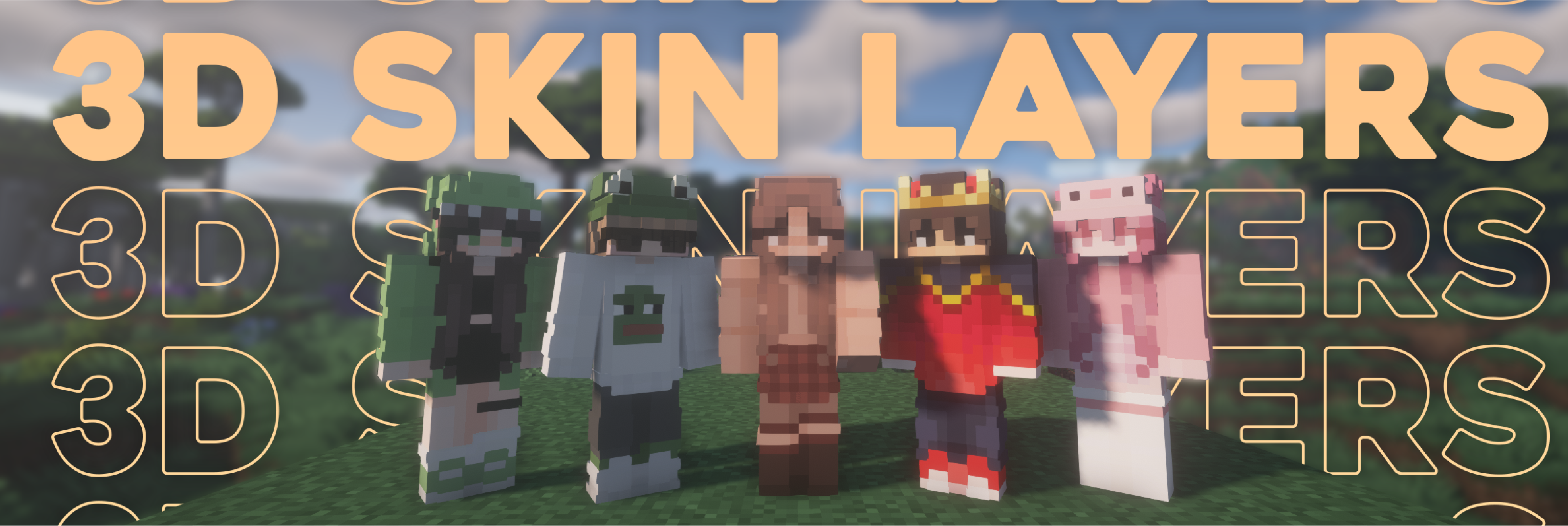
Replaces the normally flat second layer of player skins with a fully 3D-modeled version.
The mod automatically switches back to vanilla-style 2D rendering when players are more than 12 blocks away, helping maintain high framerates. It also supports transparent elements - perfect for glasses, visors, or other cosmetic details!

Since this mod is purely visual and entirely client-side, it doesn't need to be installed on servers and works seamlessly in any environment.


Divider


Features

Give your player skin the depth it deserves—with style and performance in mind.

3D Extruded Skin Layer

  • Replaces the flat second skin layer with a full 3D model
  • Adds visual depth to cosmetic details like jackets, sleeves, or hats
  • Fully supports transparency for glasses, visors, etc.
  • Also applies to player head items

Performance-Aware Rendering

  • Automatically switches to vanilla 2D rendering beyond 12 blocks
  • Maintains FPS even in multiplayer or crowded areas
  • Fully client-side and requires no server installation


Essential

Need a 24/7 Server? Check this out! Shockbyte


Divider


Compatibility & Dependancys

Minecraft Loader Status Version Note
1.16.5+ Fabric/Forge*/NeoForge ✅ Supported Latest
*1.16.5 Forge ⚠️ Unsupported Outdated Unsupported, until it gets support for JarInJar mods
1.12.2/1.8.9 Forge ❌ Not supported Outdated Might get new updates at some point
Mod Status Note
Essential ✅ Supported
Shoulder Surfing Reloaded ✅ Supported
Player Animator ✅ Supported This means mods that use it like Better Combat and Emotecraft
CustomSkinLoader ⚠️ Partial support Requires this helper mod
Lunar Client ❌ Not supported Will never get support!


Divider


Screenshots / Media

Stage View


Divider


Known Issues

  • Because the outer layer is slightly larger than the player model, some skins may not align perfectly in 3D.
  • ZigZag patterns around corners will join up. This down to the math of making it 3d, but it can be somewhat prevented by placing slightly transparent pixels into the holes.
  • With shaders, some body part layer sides have weird shadows. I am trying to get this resolved.


Divider


FAQ

Does this need to be installed on the server?

No. This is a fully client-side mod and does not need to be installed on the server.

Does this work with HD Skins?

No. Since the pixels wouldn't have the correct shape, this is not possible.

The layers stick through the modded armor

Some modded armor is closer to the body than vanilla. Turn down the 3d size in the mod settings till it fits.

The layers are flying offset to the body

You are probably using a ETF/EMF resourcepack. Make sure you update it, fitting to the Minecraft version.

Help the layers are gone! / The mod doesn't work!

A few things to check before asking for help:

  • Check under Options > Skin Customization that you didn't accidentally disable your skin layers.
  • Check in the mod settings, that the features are turned on.
  • Does the mod show up in the modlist at all?
  • The skin should be loaded via Mojang, other skin loaders might not be supported.
  • Make sure your skin actually has things on the second layer. The mod can't magically invent layers.

I'm having issues with my cracked version of Minecraft

Please buy the game, illegal copies of the game are not supported.


Divider


Credits & license

👤 Thanks to the awesome translators and contributors on Github! Link

📄 License: tr7zw Protective License
Feel free to use this mod in your Modrinth/Curseforge hosted modpacks without asking for permission. Do not redistribute the jar files anywhere else!

alt text

Discord GitHub GitHub GitHub Ko-fi


Divider

About

Replaces the normally flat second layer of player skins with a fully 3D-modeled version.
The mod automatically switches back to vanilla-style 2D rendering when players are more than 12 blocks away, helping maintain high framerates. It also supports transparent elements - perfect for glasses, visors, or other cosmetic details!

Since this mod is purely visual and entirely client-side, it doesn't need to be installed on servers and works seamlessly in any environment.


Divider


Features

Give your player skin the depth it deserves—with style and performance in mind.

3D Extruded Skin Layer

  • Replaces the flat second skin layer with a full 3D model
  • Adds visual depth to cosmetic details like jackets, sleeves, or hats
  • Fully supports transparency for glasses, visors, etc.
  • Also applies to player head items

Performance-Aware Rendering

  • Automatically switches to vanilla 2D rendering beyond 12 blocks
  • Maintains FPS even in multiplayer or crowded areas
  • Fully client-side and requires no server installation

Essential


Divider


Compatibility & Dependancys

Minecraft Loader Status Version Note
1.16.5+ Fabric/Forge*/NeoForge ✅ Supported Latest
*1.16.5 Forge ⚠️ Unsupported Outdated Unsupported, until it gets support for JarInJar mods
1.12.2/1.8.9 Forge ❌ Not supported Outdated Might get new updates at some point
Mod Status Note
Essential ✅ Supported
Shoulder Surfing Reloaded ✅ Supported
Player Animator ✅ Supported This means mods that use it like Better Combat and Emotecraft
CustomSkinLoader ⚠️ Partial support Requires this helper mod
Lunar Client ❌ Not supported Will never get support!


Divider


Screenshots / Media

Stage View


Divider


Known Issues

  • Because the outer layer is slightly larger than the player model, some skins may not align perfectly in 3D.
  • ZigZag patterns around corners will join up. This down to the math of making it 3d, but it can be somewhat prevented by placing slightly transparent pixels into the holes.
  • With shaders, some body part layer sides have weird shadows. I am trying to get this resolved.


Divider


FAQ

Does this need to be installed on the server?

No. This is a fully client-side mod and does not need to be installed on the server.

Does this work with HD Skins?

No. Since the pixels wouldn't have the correct shape, this is not possible.

The layers stick through the modded armor

Some modded armor is closer to the body than vanilla. Turn down the 3d size in the mod settings till it fits.

The layers are flying offset to the body

You are probably using a ETF/EMF resourcepack. Make sure you update it, fitting to the Minecraft version.

Help the layers are gone! / The mod doesn't work!

A few things to check before asking for help:

  • Check under Options > Skin Customization that you didn't accidentally disable your skin layers.
  • Check in the mod settings, that the features are turned on.
  • Does the mod show up in the modlist at all?
  • The skin should be loaded via Mojang, other skin loaders might not be supported.
  • Make sure your skin actually has things on the second layer. The mod can't magically invent layers.

I'm having issues with my cracked version of Minecraft

Please buy the game, illegal copies of the game are not supported.


Divider


Credits & license

👤 Thanks to the awesome translators and contributors on Github! Link

📄 License: tr7zw Protective License
Feel free to use this mod in your Modrinth/Curseforge hosted modpacks without asking for permission. Do not redistribute the jar files anywhere else!

Screenshots

Gallery

  • Header image
    Header image

Versions

Files

Relations

Project Relations

More like this

Similar Mods

Suggestions use data such as tags, dependencies, dependents, descriptions, titles, and more to rank how much they overlap with this mod.

On ModDex

Community snapshot

6
Ratings
0
Followers
5
In stacks

By the numbers

Statistics

169.6m
Total Downloads
CurseForge
105.9m
Modrinth
63.6m
Last Updated
CurseForge
Created
CurseForge
Modrinth
Last synced
When ModDex last fetched and imported data for this project from CurseForge or Modrinth. High-traffic and active projects are checked more often.
Next pipeline sync