
Community listing page, reviews here may not be monitored by the author.
SVWaypoint


No reviews yet
Create HUD waypoints for players (static, follow and temp), toggle visibility, and guide them to event locations easily.
Community voices
Reviews
No reviews yet. Be the first to review this project!
Get it on
Available Platforms
Compatibility
Supported Environments
Must be installed on both the client and the server.
About
Project Details
For authors
Embed Badge
If you're the author of this project, you can embed a live badge anywhere that supports HTML or Markdown. It updates automatically whenever ratings change.
Use HTML for any page that supports it, or Markdown for README files and Markdown-based descriptions.
Identifiers
Platform IDs
Resources
External Links
About
Description
SVWaypoint is a lightweight utility/event mod that lets you send waypoints to specific players and show them on their HUD, without sharing coordinates in chat.
This is especially useful for events, minigames, roleplay servers, or staff-controlled experiences where players need to know “go here”, “protect this player”, or “attack this target”.
Main features:
• /waypoint create <targets> <x> <y> <z> <name> – sends a static waypoint to the selected players.
• /waypoint follow <targets> <entity> <name> – creates a waypoint that follows a player or entity (good for VIPs, bosses, runners, etc.).
• /waypoint temp – creates a temporary waypoint where the staff is looking (raycast), only visible to that player, and auto-expires.
• /waypoint list – shows the waypoints that belong to you.
• /waypoint visible <name> <enable|disable> – hide/show a waypoint from the HUD without deleting it.
• /waypoint clear <name|all> – delete a single waypoint or all your waypoints.
Why use it?
• Cleaner events: no more spamming coordinates.
• Per-player waypoints: each player can have their own markers.
• HUD-friendly: made to be visible but not annoying.
• Works great for content creators and organized events.
Developed by SV Studio & Santiivlog.
> 💬 Discord (SV Studio)
> 📘 **SVWaypoint Wiki: pronto
SVWaypoint
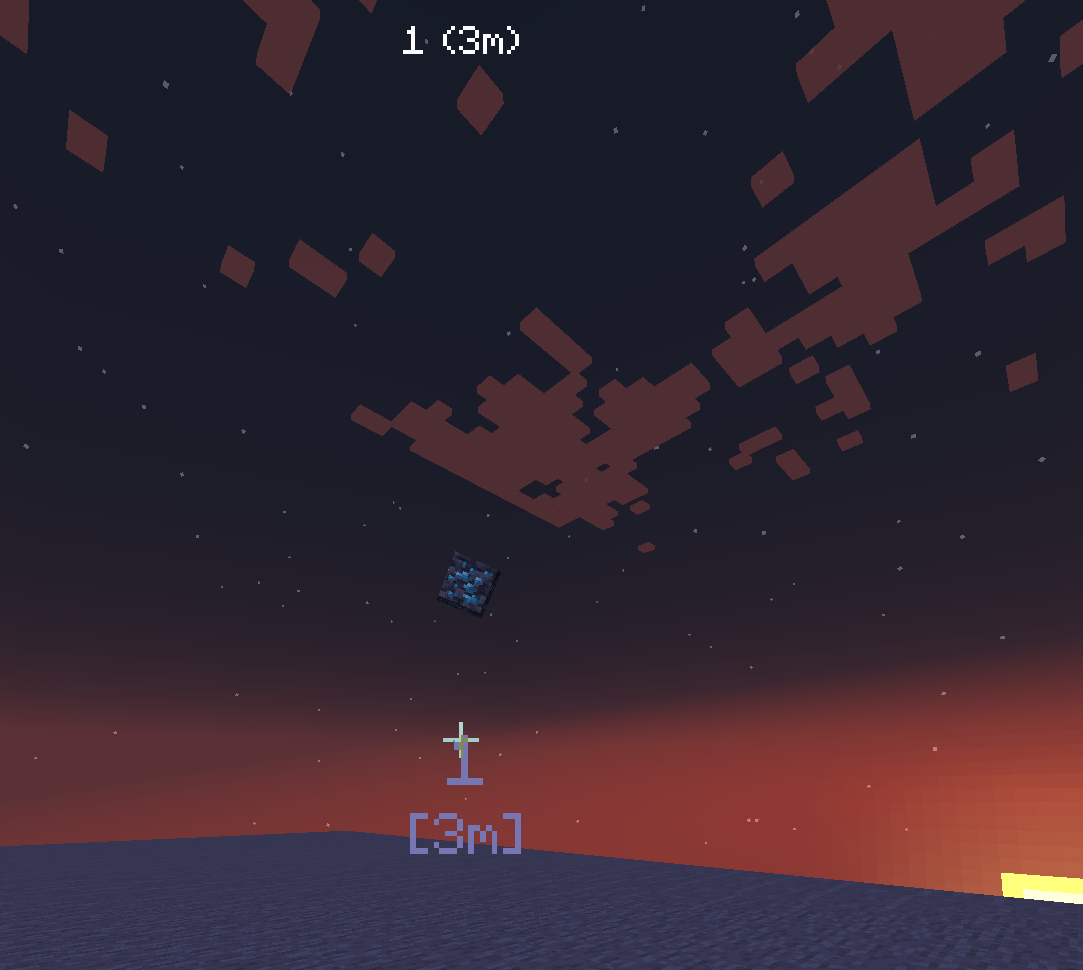
SVWaypoint is a clean and modern waypoint mod that lets players and servers create persistent 3D waypoints rendered directly in the world.
Unlike older waypoint systems, SVWaypoint does not use Armor Stands. Instead, it uses a custom lightweight waypoint entity designed for better performance, cleaner rendering, and better multiplayer support.
It is perfect for event servers, minigames, survival servers, roleplay servers, stream projects, and custom resource-pack experiences.
Features
- Custom lightweight waypoint entity.
- No Armor Stands.
- Persistent waypoints saved with world data.
- Multiplayer-ready server-side waypoint system.
- Clean 3D in-world rendering.
- Optional distance display.
- Optional unicode icon.
- Optional Minecraft item icon.
- Supports vanilla and modded items.
- Supports custom unicode fonts from resource packs.
- Public and private waypoints.
- Per-player waypoint ownership.
- Configurable text scale, icon scale, color, visibility, render distance, and item rotation.
- Closest-waypoint HUD.
- Keybind for quick temporary waypoints.
- Keybind for toggling the waypoint HUD.
Rendering System
Each waypoint can display:
- A main name.
- Distance below the name.
- A unicode symbol.
- A real Minecraft item as an icon.
- A custom font using a
ResourceLocation. - Optional rotating item icons.
- Optional through-walls rendering.
Example:
/svwaypoint create home Home
/svwaypoint edit home unicode \uE000
/svwaypoint edit home item minecraft:diamond
/svwaypoint edit home color #55FFAA
If an item icon is set, the unicode icon is cleared automatically. This keeps the waypoint clean and prevents both icons from rendering at the same time.
Commands
Create a waypoint at your current position
/svwaypoint create <id> <name>
Creates a persistent waypoint at the player's current position.
Example:
/svwaypoint create home Home
Create a waypoint at exact coordinates
/svwaypoint pos <id> <x> <y> <z> <name>
Creates a persistent waypoint at a specific position.
Example:
/svwaypoint pos spawn 0 80 0 Spawn
Remove a waypoint
/svwaypoint remove <id>
Deletes a waypoint completely.
Example:
/svwaypoint remove home
List waypoints
/svwaypoint list
Shows the waypoints visible to you.
View waypoint info
/svwaypoint info <id>
Shows waypoint data such as name, position, item, unicode icon, color, font, visibility, and render options.
Teleport to a waypoint
/svwaypoint tp <id>
Teleports you to the selected waypoint if you have permission.
Example:
/svwaypoint tp home
Edit a waypoint
/svwaypoint edit <id> <field> <value>
Available fields:
name
unicode
item
color
visible
distance
public
font
scale
unicode_scale
render_distance
background
through_walls
rotate_item
Examples:
/svwaypoint edit home name Base
/svwaypoint edit home unicode \uE000
/svwaypoint edit home item minecraft:nether_star
/svwaypoint edit home color #FFAA00
/svwaypoint edit home visible true
/svwaypoint edit home distance true
/svwaypoint edit home public false
/svwaypoint edit home font minecraft:default
/svwaypoint edit home scale 1.2
/svwaypoint edit home unicode_scale 1.5
/svwaypoint edit home render_distance 256
/svwaypoint edit home background true
/svwaypoint edit home through_walls false
/svwaypoint edit home rotate_item true
Temporary waypoint
/svwaypoint temp
Creates a temporary waypoint where the player is looking.
Reload waypoint data
/svwaypoint reload
Reloads and refreshes waypoint data and runtime waypoint entities.
Debug
/svwaypoint debug
Shows saved waypoint count, active runtime entity count, and useful debug information.
Keybinds
Default keybinds:
- X — Toggle closest-waypoint HUD.
- Z — Create a temporary raycast waypoint.
Keybinds can be changed from the Minecraft Controls menu.
Server Config
The server config is generated at:
config/svwaypoint-server.toml
Configurable options include:
- Temporary waypoint duration.
- Default render distance.
- Default text scale.
- Default icon scale.
- Default waypoint color.
- Default waypoint font.
- Show distance by default.
- Through-walls rendering.
- Text background.
- Item icon animation.
- Maximum waypoint limit.
- Command permissions.
- Teleport permissions.
- Debug mode.
Resource Pack Unicode Support
SVWaypoint supports custom unicode characters from resource packs.
Example:
/svwaypoint edit home unicode \uE000
/svwaypoint edit home font svwaypoint:waypoint_icons
This allows servers to use custom icons, symbols, and textures through Minecraft font providers.
If a custom font is missing or unavailable, the renderer safely falls back to:
minecraft:default
Item Icon Support
SVWaypoint can render real Minecraft items as waypoint icons.
Examples:
/svwaypoint edit home item minecraft:diamond
/svwaypoint edit home item minecraft:compass
/svwaypoint edit home item minecraft:nether_star
Modded items are also supported as long as the item exists on both the server and the client.
Example:
/svwaypoint edit boss item some_mod:custom_sword
Screenshots
Gallery
Versions
Files
Relations
Project Relations
More like this
Similar Mods
Suggestions use data such as tags, dependencies, dependents, descriptions, titles, and more to rank how much they overlap with this mod.
On ModDex
Community snapshot
By the numbers
Statistics
Want to reach Minecraft players?
We're looking for a server hosting partner to feature here and other parts of the site. Interested? Send us a message!
Get in touchGet it on
Available Platforms
On ModDex
Community snapshot
By the numbers
Statistics
Resources